# 2 questions: Moving multiple blocks in editor and micro:bit simulator keyboard control
**URL:** https://forum.makecode.com/t/2-questions-moving-multiple-blocks-in-editor-and-micro-bit-simulator-keyboard-control/31389
**Category:** micro:bit
**Created:** [October 28, 2024, 9:17pm UTC](https://forum.makecode.com/t/2-questions-moving-multiple-blocks-in-editor-and-micro-bit-simulator-keyboard-control/31389 "2024-10-28T21:17:24Z")
**Posts on this page:** 17
**Page:** 1
### Author:  [@Vegz78](https://forum.makecode.com/u/Vegz78)
#### Post date: [October 28, 2024, 9:17pm UTC](https://forum.makecode.com/t/2-questions-moving-multiple-blocks-in-editor-and-micro-bit-simulator-keyboard-control/31389/1 "2024-10-28T21:17:24Z")
Sorry for the 2 noob questions, which may be answered before, but I am unable to locate:
1. _Is it possible in the editors somehow to select and move multiple blocks of code around, like a marquee tool or holding down a key while selecting several blocks or something, for moving around on the canvas?_
This need emerges especially when switching back to block based code from text based, and everything has been tossed around seemingly at random… 😉
2. _Are there any ways to activate keyboard controls for the micro:bit simulator?_.
I have tried most keys on the keyboard, so I am assuming the answer might be no, but this could be useful e.g. for simulating functionality like holding button A while pressing button B and vice versa and etcetera.
---
### Author:  [@richard](https://forum.makecode.com/u/richard)
#### Post date: [October 28, 2024, 9:18pm UTC](https://forum.makecode.com/t/2-questions-moving-multiple-blocks-in-editor-and-micro-bit-simulator-keyboard-control/31389/2 "2024-10-28T21:18:03Z")
unfortunately the answer for both is not today
---
### Author:  [@emory55](https://forum.makecode.com/u/emory55)
#### Post date: [October 28, 2024, 11:03pm UTC](https://forum.makecode.com/t/2-questions-moving-multiple-blocks-in-editor-and-micro-bit-simulator-keyboard-control/31389/3 "2024-10-28T23:03:47Z")
Hi
The standard BBC microbit library allows for python based as console input() functions.
Will ms microbit make code cloud based coding support this same feature in the future? (Or does it already?)
---
### Author:  [@richard](https://forum.makecode.com/u/richard)
#### Post date: [October 28, 2024, 11:04pm UTC](https://forum.makecode.com/t/2-questions-moving-multiple-blocks-in-editor-and-micro-bit-simulator-keyboard-control/31389/4 "2024-10-28T23:04:33Z")
@emory55 not sure what you’re referring to there. can you give me some example code in python that you want to recreate in makecode maybe?
---
### Author:  [@Vegz78](https://forum.makecode.com/u/Vegz78)
#### Post date: [October 29, 2024, 2:43pm UTC](https://forum.makecode.com/t/2-questions-moving-multiple-blocks-in-editor-and-micro-bit-simulator-keyboard-control/31389/5 "2024-10-29T14:43:57Z")
Your question triggered a flash of memory from a long time ago, @emory55.
Might you mean something like this?:
>
>
> Feedback from Mr. Coxall -
> The requirement that I have is to be able to have "…free flow" input of numbers and letters like I have in MakeCode Arcade but in MakeCode for Micro:Bit.
> I know I can do it with the console in the Python IDE, but I want to do it with a Micro:Bit using a block language.
> Using the Python IDE for the Micro:Bit I can make a program like:
> \ >
> And then use the console to interact with it like:
> \
>
> And then use the console to interact with it like:
> \ >
> Similarly, when I use MakeCode Arcade, I can write a program like:
> \
>
> Similarly, when I use MakeCode Arcade, I can write a program like:
> \ >
> The Console window for MakeCode micro:bit doesn't allow user input:
> !\[MicrobitConsole\](https://user-images.githubusercontent.com/22108954/106076520-8cfa4300-60c4-11eb-933c-a63966f8b788.png)
(A very good idea for a useful functionality IMO, and some (presumably) related mentions other places, too:
[https://forum.makecode.com/t/microbit-extension-that-adds-to-the-simulator-and-debugger/19465/5](https://forum.makecode.com/t/microbit-extension-that-adds-to-the-simulator-and-debugger/19465/5)
[https://github.com/microsoft/pxt-microbit/issues/5110](https://github.com/microsoft/pxt-microbit/issues/5110))
Maybe there are some synergies for the micro:bit and the sought after “input() from console” with the anticipated [keyboard input of text](https://forum.makecode.com/t/keyboard-mouse-input-extension/5988/28), too?
---
>
> The Console window for MakeCode micro:bit doesn't allow user input:
> !\[MicrobitConsole\](https://user-images.githubusercontent.com/22108954/106076520-8cfa4300-60c4-11eb-933c-a63966f8b788.png)
(A very good idea for a useful functionality IMO, and some (presumably) related mentions other places, too:
[https://forum.makecode.com/t/microbit-extension-that-adds-to-the-simulator-and-debugger/19465/5](https://forum.makecode.com/t/microbit-extension-that-adds-to-the-simulator-and-debugger/19465/5)
[https://github.com/microsoft/pxt-microbit/issues/5110](https://github.com/microsoft/pxt-microbit/issues/5110))
Maybe there are some synergies for the micro:bit and the sought after “input() from console” with the anticipated [keyboard input of text](https://forum.makecode.com/t/keyboard-mouse-input-extension/5988/28), too?
---
### Author:  [@emory55](https://forum.makecode.com/u/emory55)
#### Post date: [October 29, 2024, 2:47pm UTC](https://forum.makecode.com/t/2-questions-moving-multiple-blocks-in-editor-and-micro-bit-simulator-keyboard-control/31389/6 "2024-10-29T14:47:30Z")
Sure, this python code runs on the simulator at:
[https://python.microbit.org/v/3](https://python.microbit.org/v/3)
The code, in particular, involves the Python function input(), which is standard i/o.
As far as I know, the MS Microbit can’t do the following code:
guess = int (**input(“_Enter your number :_”)**)
It can, however, handle the **print()** functions.
```python
#Example source code file for the python.microbit.org/v/3 simulator:
# This code works on https://python.microbit.org/v/3
# Imports go at the top of the file
from microbit import *
from random import *
import music
# Code in a 'while True:' loop repeats forever
while True:
# randint gets a random whole number inclusively
# between the two values given
guessMyNumber = randint(1,100)
print("")
print("You have 9 chances to guess my number between 1 and 100: ")
guessCount = 9
while (guessCount > 0):
# print to the console how many guesses left
print ("Guess # ", guessCount)
try:
guess = int (input("Enter your number :"))
except:
print ("Invalid number. Try again.")
continue
if (guess == guessMyNumber):
print("You win!")
display.show(Image.HAPPY)
music.play(music.BA_DING)
break;
else:
#lower the guess count by 1
guessCount = guessCount - 1
#STUDENT TASK - tell the player if the target number is
# higher or lower.
# In addition, display an up arrow or down arrow
# on the microbit. (Image.ARROW_N means north, Image.ARROW_S means south)
if (guess > guessMyNumber):
display.show(Image.ARROW_S)
print ("My number is smaller.")
else:
display.show(Image.ARROW_N)
print ("My number is bigger.")
if (guessCount == 0):
print("You lose! No more guesses!")
#STUDENT TASK 2, print to the console what the correct number was.
#HINT: look at how we print the number of guesses
print ("The number was: ", guessMyNumber)
display.show(Image.SAD)
music.play(music.WAWAWAWAA)
display.show(guessMyNumber,wait=True)
display.clear()
```
---
### Author:  [@emory55](https://forum.makecode.com/u/emory55)
#### Post date: [October 29, 2024, 2:47pm UTC](https://forum.makecode.com/t/2-questions-moving-multiple-blocks-in-editor-and-micro-bit-simulator-keyboard-control/31389/7 "2024-10-29T14:47:40Z")
Apparently. all whitespace gets removed in this forum. Here is png snapshot:

---
### Author:  [@richard](https://forum.makecode.com/u/richard)
#### Post date: [October 29, 2024, 4:51pm UTC](https://forum.makecode.com/t/2-questions-moving-multiple-blocks-in-editor-and-micro-bit-simulator-keyboard-control/31389/8 "2024-10-29T16:51:11Z")
@emory55 if you wrap your code with three back ticks like this:
````auto
```
# code goes here
```
````
then whitespace will be preserved! i’ll edit your first post and fix it.
how does the `input` function work on the micro:bit? does it accept input from the connected computer? surely the python code hasn’t implemented any way to enter text on the micro:bit itself…
---
### Author:  [@Vegz78](https://forum.makecode.com/u/Vegz78)
#### Post date: [October 29, 2024, 5:33pm UTC](https://forum.makecode.com/t/2-questions-moving-multiple-blocks-in-editor-and-micro-bit-simulator-keyboard-control/31389/9 "2024-10-29T17:33:01Z")
> [@richard](#):
>
> how does the `input` function work on the micro:bit?
The official micro:bit Python _simulator_ accepts `input()` via keyboard from the serial console screen…:
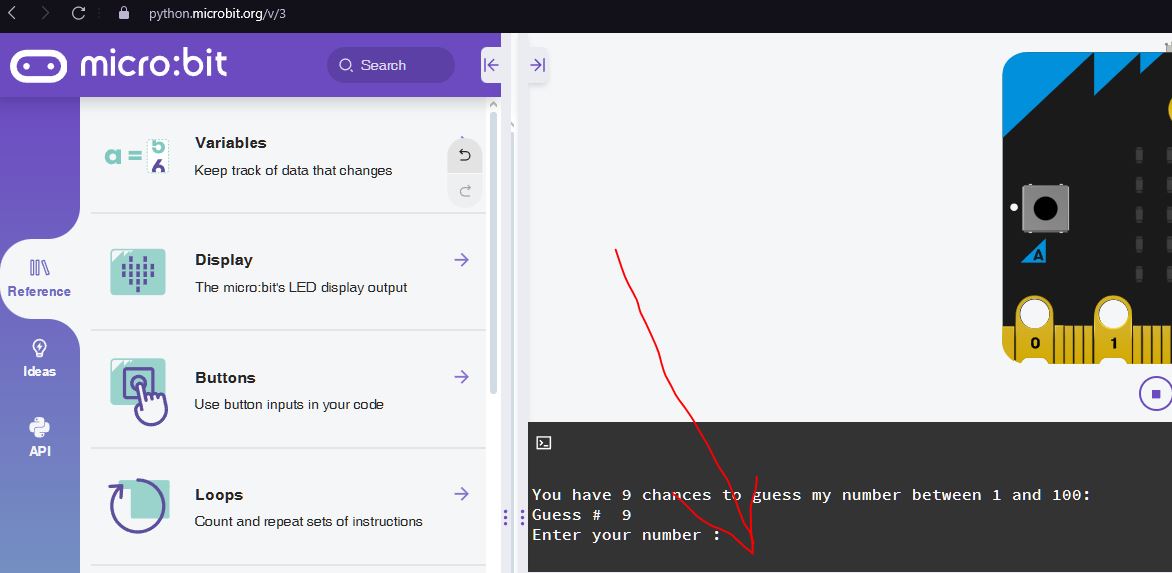
Not sure if the _physical_ micro:bit responds the same way for received characters over real serial some way.
But the `input()` in the _simulator_ console would have some utility, like in @emory55’s program snippet here, debugging etc… (in all editors, not just micro:bit) 😉
See also: [GitHub etc.](https://forum.makecode.com/t/2-questions-moving-multiple-blocks-in-editor-and-micro-bit-simulator-keyboard-control/31389/5)
---
### Author:  [@Vegz78](https://forum.makecode.com/u/Vegz78)
#### Post date: [October 29, 2024, 5:33pm UTC](https://forum.makecode.com/t/2-questions-moving-multiple-blocks-in-editor-and-micro-bit-simulator-keyboard-control/31389/10 "2024-10-29T17:33:19Z")
UPDATE: The _physical_ micro:bit also receives keyboard characters and has 2-way interaction in the “physical” serial console (there are 2 “serial consoles” - one for the simulator and one for the connected micro:bit) in the IDE / Simulator over both Bluetooth and WebUSB:

---
### Author:  [@Vegz78](https://forum.makecode.com/u/Vegz78)
#### Post date: [October 29, 2024, 5:33pm UTC](https://forum.makecode.com/t/2-questions-moving-multiple-blocks-in-editor-and-micro-bit-simulator-keyboard-control/31389/11 "2024-10-29T17:33:37Z")
> [@Vegz78](#):
>
> emerges especially when switching back to block based code from text based
Seems like one of the main causes for the need for moving multiple code blocks has been addressed already:
>
>
> \*\*Describe the bug\*\*
>
> Arising from support ticket https://support.microbit.org…/helpdesk/tickets/82439 (private)
>
> After creating a project with blocks neatly aligned, the blocks move in an apparently unpredictable way when the project is reloaded.
>
> The movement seems to vary - does it depend on which block was moved last?
>
> The moving blocks move across more on each reload.
>
> I don't know if functions are essential - but the example in the ticket has functions.
>
> \*\*To Reproduce\*\*
> Steps to reproduce the behavior:
> 1. Go to https://makecode.microbit.org/\_hLc2Ve1zYbEz
> 2. Position blocks as below
> 3. Visit Home and reload the project
> 4. See error
>
> \*\*Expected behavior\*\*
> Blocks don't change position.
>
> \*\*Screenshots\*\*
> Before reload
> !\[image\](https://github.com/user-attachments/assets/00125804-9062-4b4e-befd-a7f84ebd5653)
>
> After reload
> !\[image\](https://github.com/user-attachments/assets/e0277a59-87e4-4111-ac77-0a3d595d9517)
>
> \*\*micro:bit version (please complete the following information):\*\*
> not hardware related
>
> \*\*Desktop (please complete the following information):\*\*
> - OS: \[e.g. iOS\] Windows 10
> - Browser \[e.g. chrome, safari\] Chrome
> - Version \[e.g. 22\] 128
---
### Author:  [@richard](https://forum.makecode.com/u/richard)
#### Post date: [October 29, 2024, 5:36pm UTC](https://forum.makecode.com/t/2-questions-moving-multiple-blocks-in-editor-and-micro-bit-simulator-keyboard-control/31389/12 "2024-10-29T17:36:01Z")
ah, i see! we don’t currently have any plans for doing something like a serial console to the device but it’s an interesting idea. you should file a feature request here:
> **[microsoft/pxt-microbit](https://github.com/microsoft/pxt-microbit/issues)**
>
> A Blocks / JavaScript code editor for the micro:bit built on Microsoft MakeCode - microsoft/pxt-microbit
---
### Author:  [@Vegz78](https://forum.makecode.com/u/Vegz78)
#### Post date: [October 29, 2024, 6:05pm UTC](https://forum.makecode.com/t/2-questions-moving-multiple-blocks-in-editor-and-micro-bit-simulator-keyboard-control/31389/13 "2024-10-29T18:05:48Z")
Already filed some years ago (by your boss? - @jacqueline.russell) and brutally closed as “won’t fix”…:
>
>
> Feedback from Mr. Coxall -
> The requirement that I have is to be able to have "…free flow" input of numbers and letters like I have in MakeCode Arcade but in MakeCode for Micro:Bit.
> I know I can do it with the console in the Python IDE, but I want to do it with a Micro:Bit using a block language.
> Using the Python IDE for the Micro:Bit I can make a program like:
> \
>
> And then use the console to interact with it like:
> \
>
> Similarly, when I use MakeCode Arcade, I can write a program like:
> \
>
> The Console window for MakeCode micro:bit doesn't allow user input:
> !\[MicrobitConsole\](https://user-images.githubusercontent.com/22108954/106076520-8cfa4300-60c4-11eb-933c-a63966f8b788.png)
😉
---
### Author:  [@Vegz78](https://forum.makecode.com/u/Vegz78)
#### Post date: [October 29, 2024, 7:21pm UTC](https://forum.makecode.com/t/2-questions-moving-multiple-blocks-in-editor-and-micro-bit-simulator-keyboard-control/31389/14 "2024-10-29T19:21:15Z")
…and @eanders made some attempts at a simulator extension for keyboard and mouse, but they were probably more akin to your already produced _browser_ extension and keyboard entry for “ask for string” etc. in Arcade.
> [@Keyboard/mouse input extension](https://forum.makecode.com/t/keyboard-mouse-input-extension/5988):
>
> Hi all! In a different thread ([A camera extension?](https://forum.makecode.com/t/a-camera-extension/5950)) there was some interest in a simulator extension to support keyboard and mouse input. I’d like to take a stab at this, or at least get it started for others to take further. But first a bit about simulator extensions. They’re a little bit different than regular extensions. A traditional extension has one main part: some JavaScript that defines new blocks for you to use in your code. Call this the “block script”. A simulator extension has a blo…
So a common theme among some people seems to be a wish for more input possibilities overall (and others have also made comparisons to the official python simulator’s / IDE’s serial consoles earlier) and maybe 2-way console interaction.
But how big the demand is, or if there are any technical synergies between the wishes and different editors, I don’t know. But since the `input()` function or some ways to get data into a program is a pretty common (educational) theme\*, maybe enough to reopen the already filed request above?
\*Many curriculums contain loading tables into arrays / data structures, which is a challenge, at least in Arcade, but you had that already very early on in e.g. the “Date Science Editor” MakeCode Lab etc.
---
### Author:  [@bsiever](https://forum.makecode.com/u/bsiever)
#### Post date: [October 30, 2024, 4:41pm UTC](https://forum.makecode.com/t/2-questions-moving-multiple-blocks-in-editor-and-micro-bit-simulator-keyboard-control/31389/15 "2024-10-30T16:41:01Z")
@emory55 Makecode doesn’t have a prompt to send information to the micro:bit, but it does support `serial` commands that can send and receive text. Here’s a simple project that can send and receive text: [https://makecode.microbit.org/S88739-49984-72060-76350](https://makecode.microbit.org/S88739-49984-72060-76350)
There’s a webusb library that you could use to create your own “console” web page: [https://github.com/bsiever/microbit-webusb](https://github.com/bsiever/microbit-webusb) . The demo webpage ([here](https://bsiever.github.io/microbit-webusb/)) will print any text the micro:bit sends and has a button to send the word “Test” to the micro:bit. [Note: The demo webpage can only be used if the MakeCode tab is closed or has disconnected from the micro:bit.]. It would be possible to update that example page to have a text field and behave like the Console in the Python editor.
---
### Author:  [@Vegz78](https://forum.makecode.com/u/Vegz78)
#### Post date: [October 30, 2024, 4:45pm UTC](https://forum.makecode.com/t/2-questions-moving-multiple-blocks-in-editor-and-micro-bit-simulator-keyboard-control/31389/16 "2024-10-30T16:45:54Z")
> [@Vegz78](#):
>
> 1. _…select and move multiple blocks of code around… on the canvas?_
Seems like @jacqueline.russell already filed this with a suggested solution with a Blockly plugin recently:
>
>
> Apparently, the MIT App Inventor team have already made a Blockly plugin for thi…s!
> https://www.npmjs.com/package/@mit-app-inventor/blockly-plugin-workspace-multiselect
> [@Vegz78](#):
>
> 1. _…keyboard controls for the micro:bit simulator?_.
This was filed very early on, but closed as “won’t fix” just recently:
>
>
> \*\*Is your feature request related to a problem? Please describe.\*\*
>
> From suppo…rt:
>
> \> I've been facing an issue with the UI experience of the simulator while doing my recent project. I have to tilt the board to each of the four directions and press the A button. The moment I drag the pointer to up or down or right directions, I cannot press the 'A button' since it's present on the left of the board. I can do this nearly on a real Microbit board. Is there a way to do it or is that a bug with UI?
>
>
> \*\*Describe the solution you'd like\*\*
>
> Would it be possible to add keyboard shortcuts for the buttons e.g. listen for 'a' and 'b' and trigger the buttons when pressed
>
> \*\*Describe alternatives you've considered\*\*
>
> Tabbing through the elements and pressing spacebar/enter to select - it worked for me but was either not clear enough for the user, or isn't supported by all browsers
---
### Author:  [@emory55](https://forum.makecode.com/u/emory55)
#### Post date: [October 30, 2024, 7:50pm UTC](https://forum.makecode.com/t/2-questions-moving-multiple-blocks-in-editor-and-micro-bit-simulator-keyboard-control/31389/17 "2024-10-30T19:50:30Z")
Thanks for the possible work arounds.
I’m teaching Python using Microbit
The official simulator doesn’t have cloud saving like MS Makecode version but it does support the standard input() function which we use for teaching basic IO functionality in Python.
Some the custom workarounds might still work and I appreciate the responses.