# A micro:bit watch with an actual RTC; WIP, DS3231 extension
**URL:** https://forum.makecode.com/t/a-micro-bit-watch-with-an-actual-rtc-wip-ds3231-extension/1433
**Category:** micro:bit
**Created:** [March 17, 2020, 8:05am UTC](https://forum.makecode.com/t/a-micro-bit-watch-with-an-actual-rtc-wip-ds3231-extension/1433 "2020-03-17T08:05:42Z")
**Posts on this page:** 12
**Page:** 1
### Author:  [@gbraad](https://forum.makecode.com/u/gbraad)
#### Post date: [March 17, 2020, 8:05am UTC](https://forum.makecode.com/t/a-micro-bit-watch-with-an-actual-rtc-wip-ds3231-extension/1433/1 "2020-03-17T08:05:42Z")
It is a work in progress, but I am working on a Micro:bit Watch. It will be reading the time from a I2C RTC timer IC and show it is a custom way on the display (non-scrolling text). Allowing for setting the time, either remotely using serial or bluetooth or when on startup holding the A+B button maybe.
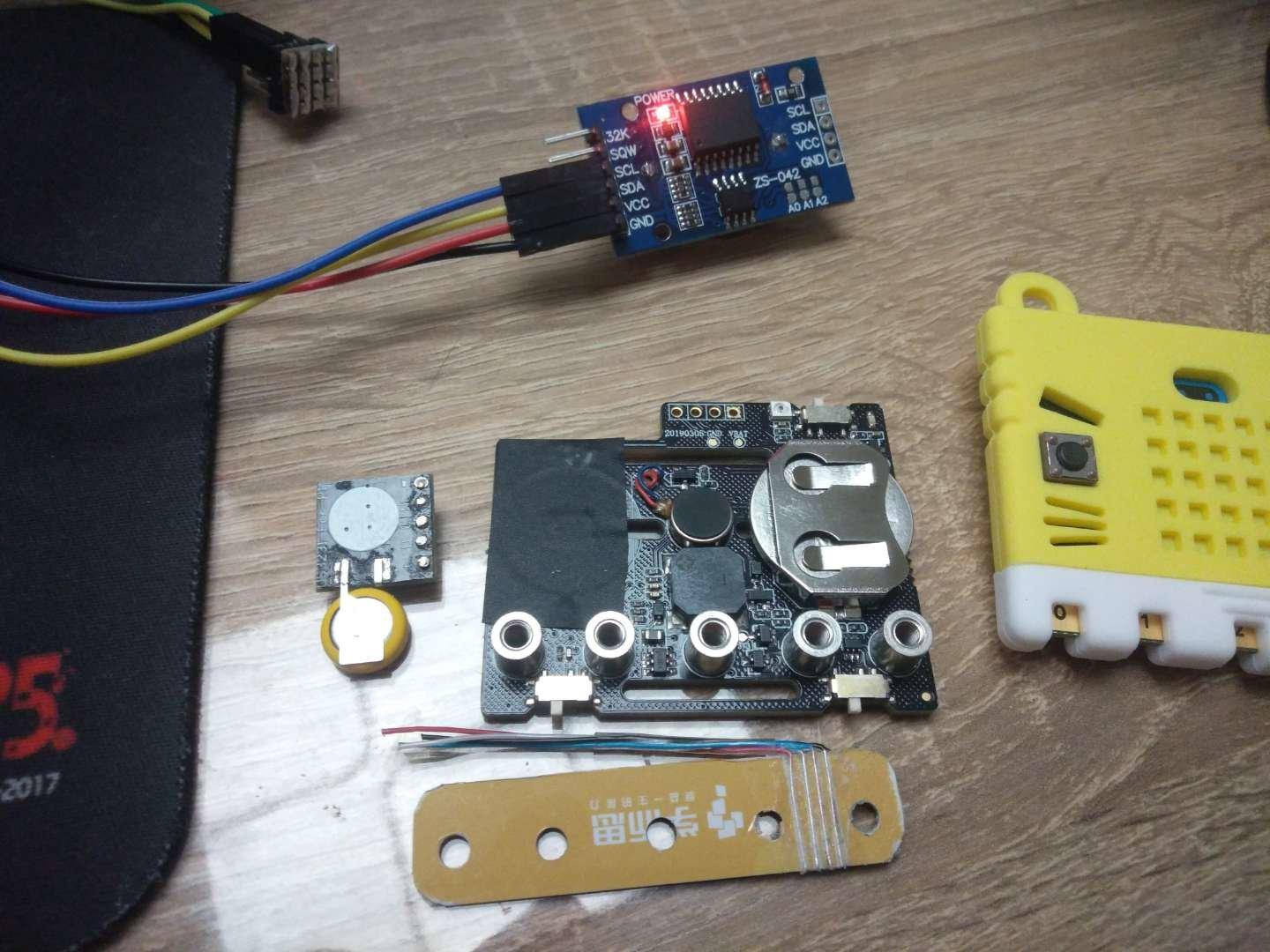
But to get the time I needed an extension for the DS3231 and so far I only found something for micropython and mbed, so I started my own and had a quick test: [https://github.com/gbraad/pxt-rtc-ds3231](https://github.com/gbraad/pxt-rtc-ds3231) and it works.
keep an eye out for a full release soon.
Note: pins on the backside aren’t connected. Still needed to add this to the documentation. Started this as a gift for the holiday but due to the situation here in China I was unable to source everything, especially motivation!
---
### Author:  [@gbraad](https://forum.makecode.com/u/gbraad)
#### Post date: [March 18, 2020, 3:49am UTC](https://forum.makecode.com/t/a-micro-bit-watch-with-an-actual-rtc-wip-ds3231-extension/1433/2 "2020-03-18T03:49:41Z")
Example project:
> **[Clock](https://makecode.microbit.org/45548-17097-69536-53684)**
>
> Made with ❤️ in Microsoft MakeCode for micro:bit.
Shows time (HH:mm) when A is pressed, and with seconds (HH:mm:ss, ss, ss) when B is pressed.
---
### Author:  [@gbraad](https://forum.makecode.com/u/gbraad)
#### Post date: [March 18, 2020, 5:38am UTC](https://forum.makecode.com/t/a-micro-bit-watch-with-an-actual-rtc-wip-ds3231-extension/1433/3 "2020-03-18T05:38:26Z")
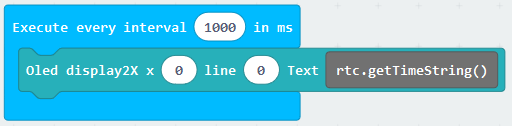
`OnInterval`, `drawText` with `rtc.getTimeString`

Using a nanobit with an oled display and the ds3231 module
> **[clock-interval](https://makecode.microbit.org/84264-09913-71875-03979)**
>
> Made with ❤️ in Microsoft MakeCode for micro:bit.
---
### Author:  [@keble6](https://forum.makecode.com/u/keble6)
#### Post date: [September 9, 2020, 8:29pm UTC](https://forum.makecode.com/t/a-micro-bit-watch-with-an-actual-rtc-wip-ds3231-extension/1433/4 "2020-09-09T20:29:11Z")
Great to find this! I am starting on a microbit add-on RTC using the DS3231 (I wrote up a how-to for a DS1307 board a while ago).
Before attempting to write an extension, I thought of writing _get\_time_ and _set\_time_ functions using only Makecode blocks. The _get\_time_ works fine, but I can’t get the _set\_time_ to work!
Maybe the i2c extension is limiting me, in that I don’t see how to write the 12c word address followed by a data byte. Any ideas?
Are you close to publishing your extension?
---
### Author:  [@bsiever](https://forum.makecode.com/u/bsiever)
#### Post date: [September 13, 2020, 1:20pm UTC](https://forum.makecode.com/t/a-micro-bit-watch-with-an-actual-rtc-wip-ds3231-extension/1433/5 "2020-09-13T13:20:49Z")
Cool! Thanks for sharing! I’m looking forward to seeing the final product (whoops…didn’t notice this was an older thread. The below was mainly a follow-up to gbraad’s work)
For what it’s worth, I wrote a reasonable reliable time extension that doesn’t need an RTC. I wrote it largely for summer camp activities where kids make micro:bit smart watches.
If anyone wants to give it a try, you can search in the extensions for “microbit-pxt-timeanddate”. Or visit the docs here: [https://makecode.microbit.org/pkg/bsiever/microbit-pxt-timeanddate](https://makecode.microbit.org/pkg/bsiever/microbit-pxt-timeanddate) . It’s got blocks that support a variety of different time/date formats and features, like callbacks to support alarm functionality. The docs also describe and show examples of three different ways to set the time.
The one bug that’s been reported: If someone uses the `start melody ... repeating infinite` in the `forever` it stops updating time. (I haven’t had a chance to look into the cause, but I suspect the `forever` loop is blocking a behind-the-scenes `forever` loop that ensures the clock is periodically updated)
Of course there are the two huge advantages of the external RTC: battery backup and it’s dedicated to updating the time (so lacks the potential freeze problem I described).
Bill
---
### Author:  [@keble6](https://forum.makecode.com/u/keble6)
#### Post date: [September 13, 2020, 1:35pm UTC](https://forum.makecode.com/t/a-micro-bit-watch-with-an-actual-rtc-wip-ds3231-extension/1433/6 "2020-09-13T13:35:57Z")
Thanks Bill, I saw that extension.
By the way (separate topic) I adapted your WebUSB terminal to add a timestamp - but it has recently stopped working, and so has your webUSB terminal. Something must have changed. Any ideas?
---
### Author:  [@bsiever](https://forum.makecode.com/u/bsiever)
#### Post date: [September 13, 2020, 4:28pm UTC](https://forum.makecode.com/t/a-micro-bit-watch-with-an-actual-rtc-wip-ds3231-extension/1433/7 "2020-09-13T16:28:28Z")
I’m glad someone is getting some use out of that (or was anyway).
I just did a quick test:
- Used makecode to create a project that streams out x:N (where N an accelerometer value)
- Use the live version of microbit-webusb (directly from the GitHub site)
Data streamed in as expected. Much of the process I use is pulled directly from Makecode (I figured it wouldn’t change much because it’d break a lot of backward compatibility)
Are you seeing any error message in the JavaScript console?
I was using a recent version of Chrome — what browser are you using?
---
### Author:  [@keble6](https://forum.makecode.com/u/keble6)
#### Post date: [September 15, 2020, 8:31am UTC](https://forum.makecode.com/t/a-micro-bit-watch-with-an-actual-rtc-wip-ds3231-extension/1433/8 "2020-09-15T08:31:46Z")
Hi - I have just tried my webUSB terminal (based on yours) - and it works! Maybe it was finger trouble or a Chrome version. My current Chrome is 84.0.4147.136 (Official Build) (64-bit)
My (very early) repo for the DS3231 is here: [https://github.com/keble6/pxt-DS3231](https://github.com/keble6/pxt-DS3231)
Extensions are all new to me, so I am still working my way through the documentation!
The DS3231 has a rather odd oscillator control bit - it allows you to stop the clock when the chip switches to battery mode. I’m not sure that’s useful to anyone! But I have included it. I haven’t done alarms yet. Maybe later. My tests look good.
---
### Author:  [@gbraad](https://forum.makecode.com/u/gbraad)
#### Post date: [September 15, 2020, 9:08am UTC](https://forum.makecode.com/t/a-micro-bit-watch-with-an-actual-rtc-wip-ds3231-extension/1433/9 "2020-09-15T09:08:40Z")
My code lives here: [https://github.com/gbraad/pxt-rtc-ds3231](https://github.com/gbraad/pxt-rtc-ds3231)
I forgot to publish it here? ah nope, it WAS published in the first message and got 10 clicks
Never got around to finish the watch as I got drawn into R/C car projects with the v2x2 protocol and nRF24 compatibility. Anyway, just thought of the watch a day ago and will finish it soon.
---
### Author:  [@keble6](https://forum.makecode.com/u/keble6)
#### Post date: [September 15, 2020, 9:10am UTC](https://forum.makecode.com/t/a-micro-bit-watch-with-an-actual-rtc-wip-ds3231-extension/1433/10 "2020-09-15T09:10:58Z")
Thanks!
---
### Author:  [@gbraad](https://forum.makecode.com/u/gbraad)
#### Post date: [September 15, 2020, 9:13am UTC](https://forum.makecode.com/t/a-micro-bit-watch-with-an-actual-rtc-wip-ds3231-extension/1433/11 "2020-09-15T09:13:45Z")
I never bothered about the other functionality, like day, month and year or even the alarm, but did extract the BCD code into another extension. [http://github.com/gbraad/pxt-bcd](http://github.com/gbraad/pxt-bcd) as several other extensions I made needed this.
---
### Author:  [@NorryTesi](https://forum.makecode.com/u/NorryTesi)
#### Post date: [December 25, 2020, 5:33pm UTC](https://forum.makecode.com/t/a-micro-bit-watch-with-an-actual-rtc-wip-ds3231-extension/1433/12 "2020-12-25T17:33:07Z")
Hi… I am utilizing the DS3231 model record from the RTCLib now.
I have really taken a stab at running this sketch six distinct ways while isolating the DS3231. The “default” where the time depends on when the sketch is aggregated, just as uncommenting the line where you can set the time (which is the thing that I use in my venture). Neither works. Additionally, I attempt to run each with and without the battery. At long last with power not from the Uno, nut a different inventory. Again no distinction in yield on the chronic screen.
It is odd as this ran on my seat for a while as a feature of my clock venture. Used to allow it to run a day or two just to ensure the entire task was all the while turned out great.
Not certain on the off chance that it is important, but rather the clock I made has three LED catches to change highlights: one each for Hour, Minutes and Color. The shading one actually turns out great, the moment and hour ones no longer addition the clock.