# Android app/Discord
**URL:** https://forum.makecode.com/t/android-app-discord/7696
**Category:** micro:bit
**Created:** [April 29, 2021, 4:52am UTC](https://forum.makecode.com/t/android-app-discord/7696 "2021-04-29T04:52:17Z")
**Posts on this page:** 20
**Page:** 1
### Author:  [@jane](https://forum.makecode.com/u/jane)
#### Post date: [April 29, 2021, 4:52am UTC](https://forum.makecode.com/t/android-app-discord/7696/1 "2021-04-29T04:52:17Z")
Hi everyone, I would like to ask if there is any good free app for android to controll a dfrobot with microbit(so no bitty controller).
I am pretty new to this microbit world, by any chance exists a discord server where people are sharing their experience?
Thank to everyone
---
### Author:  [@alex812](https://forum.makecode.com/u/alex812)
#### Post date: [April 29, 2021, 4:06pm UTC](https://forum.makecode.com/t/android-app-discord/7696/2 "2021-04-29T16:06:43Z")
There is a free MicroBit Plugin for the free DroidScript program. But I haven’t tried it.
---
### Author:  [@frank\_schmidt](https://forum.makecode.com/u/frank_schmidt)
#### Post date: [April 29, 2021, 4:07pm UTC](https://forum.makecode.com/t/android-app-discord/7696/3 "2021-04-29T16:07:05Z")
@jane , I have DF Robot 2 wheel bots and various android apps for Microbit (example : Yahboom) so I will look into your question. I am on Discord but I have seen no activity there for over a year. I will respond here and you can look at our YouTube Channel: MakeCode and Hardware, there may be a video posted there which answers your question, leave a comment on any vid and I should get a notification.
---
### Author:  [@girlwhocode](https://forum.makecode.com/u/girlwhocode)
#### Post date: [April 29, 2021, 4:23pm UTC](https://forum.makecode.com/t/android-app-discord/7696/4 "2021-04-29T16:23:46Z")
i don’t know i only know that microsoft makecode have a twitch but i might check for micro bit discord servers
---
### Author:  [@frank\_schmidt](https://forum.makecode.com/u/frank_schmidt)
#### Post date: [April 30, 2021, 4:33pm UTC](https://forum.makecode.com/t/android-app-discord/7696/5 "2021-04-30T16:33:50Z")
[ ](https://www.youtube.com/watch?v=AWwo6mI2zMY)
It looks like it is possible, to control a DF Robot Micro Maqueen with an android app. I have both so will try and report back.
---
### Author:  [@frank\_schmidt](https://forum.makecode.com/u/frank_schmidt)
#### Post date: [April 30, 2021, 8:53pm UTC](https://forum.makecode.com/t/android-app-discord/7696/6 "2021-04-30T20:53:04Z")
Can anyone help @jane with this? I would like to know also, if this BLE app will work with MakeCode and Microbit and a DF Robot; as seen in the above video. I think it is in Korean , according to Google Translate. When I download a .hex file I am told it will not open due to not being a recognized file: [https://bluexmas.tistory.com/993](https://bluexmas.tistory.com/993)
thanks
---
### Author:  [@bsiever](https://forum.makecode.com/u/bsiever)
#### Post date: [May 3, 2021, 4:00pm UTC](https://forum.makecode.com/t/android-app-discord/7696/7 "2021-05-03T16:00:46Z")
@jane The Micro:bit Slack channel is moderately active: [https://tech.microbit.org/community/#join-us-on-the-microbit-community-slack-channel](https://tech.microbit.org/community/#join-us-on-the-microbit-community-slack-channel)
---
### Author:  [@bsiever](https://forum.makecode.com/u/bsiever)
#### Post date: [May 3, 2021, 4:26pm UTC](https://forum.makecode.com/t/android-app-discord/7696/8 "2021-05-03T16:26:43Z")
An updated project: [https://makecode.microbit.org/\_ff0bpvVUyiWi](https://makecode.microbit.org/_ff0bpvVUyiWi)
This removes the unneeded extensions, includes the “Modes”, fixes the rotation icons, and sends data back to the App.
---
### Author:  [@bsiever](https://forum.makecode.com/u/bsiever)
#### Post date: [May 3, 2021, 4:27pm UTC](https://forum.makecode.com/t/android-app-discord/7696/9 "2021-05-03T16:27:08Z")
@frank_schmidt @jane
The Yahboom Mbit app could be used with almost any MakeCode robot (or other project). (**By the way, I think Yahboom’s [Tiny:bit](https://category.yahboom.net/collections/mb-robotics/products/tinybit) is a good kit for the cost and they have lots of other promising products. Please consider some support to [Yahboom](https://category.yahboom.net/) rather than just using their app**)
Resources that are needed
- App:
- [Android App](https://play.google.com/store/apps/details?id=com.yahboom.mbit&hl=en_US&gl=US) (I’ve only tested the iOS app)
- [iOS App](https://apps.apple.com/cn/app/mbit/id1450346082?l=zh&ls=1)
- Yahboom’s Code (I give an example below)
- [Hex File for Micro:bit V1](http://www.yahboom.net/xiazai/Tiny_bit/Download/microbit-Bluetooth-Control_20190523.hex)
- [Hex file for Micro:bit V2](http://www.yahboom.net/xiazai/Tiny_bit/Download/Tinybit-Bluetooth-Control-V2.hex)
- Misc: Yahboom Tiny:bit references: [http://www.yahboom.net/study/Tiny:bit](http://www.yahboom.net/study/Tiny:bit) . (Links to all the above and more, including the “distance” reading, which sends data back to the app)
As for using the app:
- You can use MakeCode’s import process to import the hex file. You can then edit it to remove references to Yahboom’s Tiny:bit blocks (the `Car` blocks) and replace them with the blocks for your bot.
- Here’s an example that works with just a micro:bit (no robot). It displays the controller values on the LEDs. It supports directions and music. I removed the “mode selection” and “light color” to simplify it): [https://makecode.microbit.org/\_9ixPthV1LHT2](https://makecode.microbit.org/_9ixPthV1LHT2)
This sort of trick is possible with a lot of Micro:bit apps…they can be used “off-label” with a little review of how they work.
I hope that helps,
Bill
---
### Author:  [@frank\_schmidt](https://forum.makecode.com/u/frank_schmidt)
#### Post date: [May 4, 2021, 3:16pm UTC](https://forum.makecode.com/t/android-app-discord/7696/10 "2021-05-04T15:16:25Z")
I’m still working on this @jane . I don’t think you have said which specific DF Robot you mean to try to control with an “app”…If by app you mean Bluetooth then let’s narrow that down to BLE, I have cell phones which I think are not BLE but just “Bluetooth”. I only have DF Robot Micro Maqueen. I do not have a DF Robot bluetooth app for it either in iOS nor in Android. I do have Mbit app for Yahboom as mentioned by @bsiever and it does work, sometimes, with Yahboom products (we have many) but they must have the Microbit plugged into a Yahboom powered expansion board (Superbit ) or bot car which can convert code from Microbit into appropriate action-output, I suppose. So, when @bsiever 's bluetooth code below is downloaded to my Microbit V1.5 and this Microbit is plugged into Micro Maqueen bot car, if it is synced with one particular iPhone of mine which has the Mbit app installed, they do pair and signals sent from phone to Microbit instructing display on the LED matrix do correspond to the code; HOWEVER, the bot car does not work as expected so now it is a matter of translating the Yahboom code into DF Robot commands; is this possible with DF Robot extension, and if so the will it work with Android ? Don’t get your hopes up. Maybe. I’ll report back if I have anything of value.
---
### Author:  [@bsiever](https://forum.makecode.com/u/bsiever)
#### Post date: [May 4, 2021, 5:43pm UTC](https://forum.makecode.com/t/android-app-discord/7696/11 "2021-05-04T17:43:32Z")
@jane @frank_schmidt
I’m not sure, but I think the DFRobot Maqueen extension in conjunction with other things, like bluetooth extension, exceeds the micro:bit’s available memory.
Here is a “full” remote control Maqueen program using the MBit app: [https://makecode.microbit.org/\_4T184AbUyREV](https://makecode.microbit.org/_4T184AbUyREV)
- It _only_ works with the v2 micro:bit.
- Adding almost any more code to it exceeds the memory limit.
- The basic directions work, the speed is
controlled via music notes 1-8. Speed is shown as “temperature” value.
- I disabled pairing, so you shouldn’t need to do bluetooth pairing with your micro:bit
- As with my last post, I’ve only tested on iOS
---
### Author:  [@frank\_schmidt](https://forum.makecode.com/u/frank_schmidt)
#### Post date: [May 5, 2021, 12:21am UTC](https://forum.makecode.com/t/android-app-discord/7696/12 "2021-05-05T00:21:17Z")
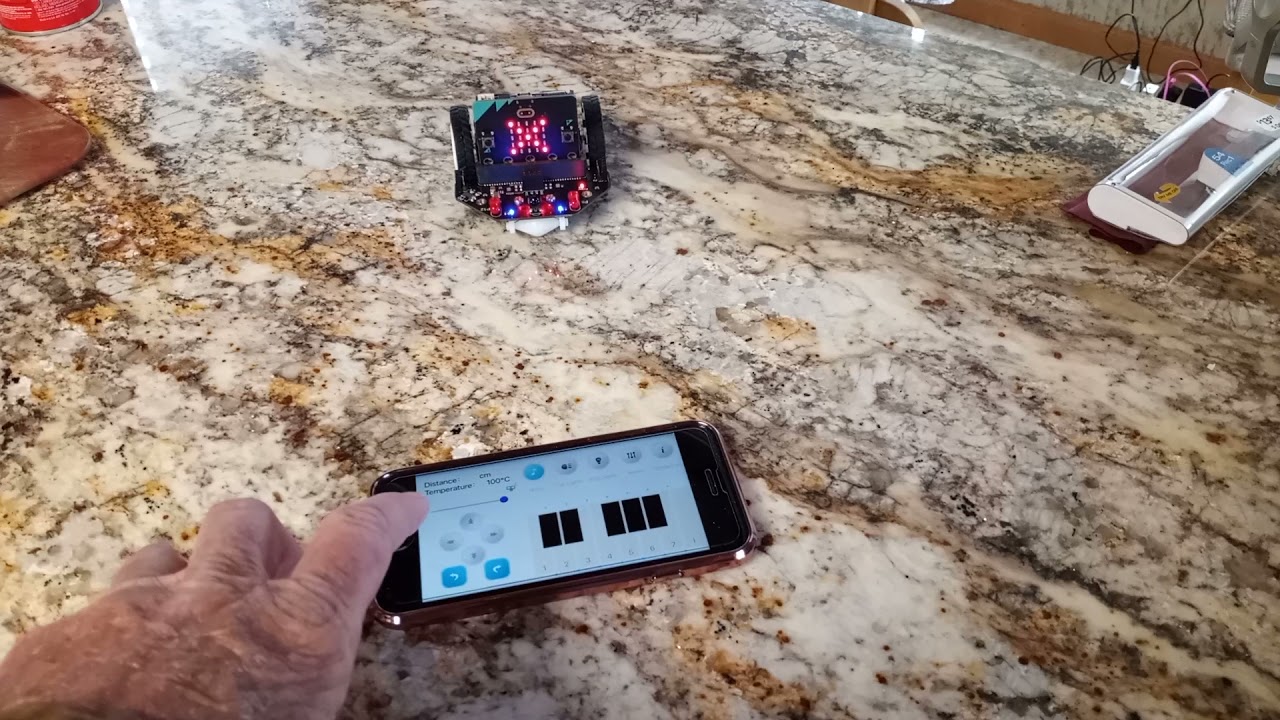
This video shows Bill’s code working beautifully ! Thank you again, Bill. Now I will try it with Android, I have found that past MakeCode programs from Yahboom often are mated to the mobile device and to V1.5 or V2 of Microbit so this may take a little work to get the app to work with Android. Will try.
[ ](https://www.youtube.com/watch?v=4Ryb2cqApYQ)
---
### Author:  [@bsiever](https://forum.makecode.com/u/bsiever)
#### Post date: [May 5, 2021, 3:37am UTC](https://forum.makecode.com/t/android-app-discord/7696/13 "2021-05-05T03:37:33Z")
@jane & @frank_schmidt If you _really_ want to have fun, here’s the deluxe version: [https://makecode.microbit.org/\_d98WqjJp3hKL](https://makecode.microbit.org/_d98WqjJp3hKL)
It has it all (almost):
- Works on the v1 micro:bit
- Reports distance
- Sets speed (in the “Car Lights” menu. Each key is a specific speed)
- Challenge to the reader: Change them to be increase/decrease speed keys. Maybe +/- 10, +/- 20, etc.
- Reports speed (as the temperature value: 0-255)
- The piano keys play music
- Turns on/off front LED lights (in the “RGB Lights” menu…It controls the front LED lights, not the back RGB lights, which can’t be used with Bluetooth enabled.)
- Room for additional remote features (in the “Mode” menu. Just displays icons now)
I was able to get more in by editing the Maqueen library and removing things I didn’t need (IR remote, Servo, line detection). If you ever want a smaller Maqueen library, here’s the “Minimal Maqueen”: [https://github.com/bsiever/pxt-maqueen](https://github.com/bsiever/pxt-maqueen) (Paste this in as the extension name when you go to search for extensions)
Bill
---
### Author:  [@frank\_schmidt](https://forum.makecode.com/u/frank_schmidt)
#### Post date: [May 5, 2021, 3:39am UTC](https://forum.makecode.com/t/android-app-discord/7696/14 "2021-05-05T03:39:18Z")
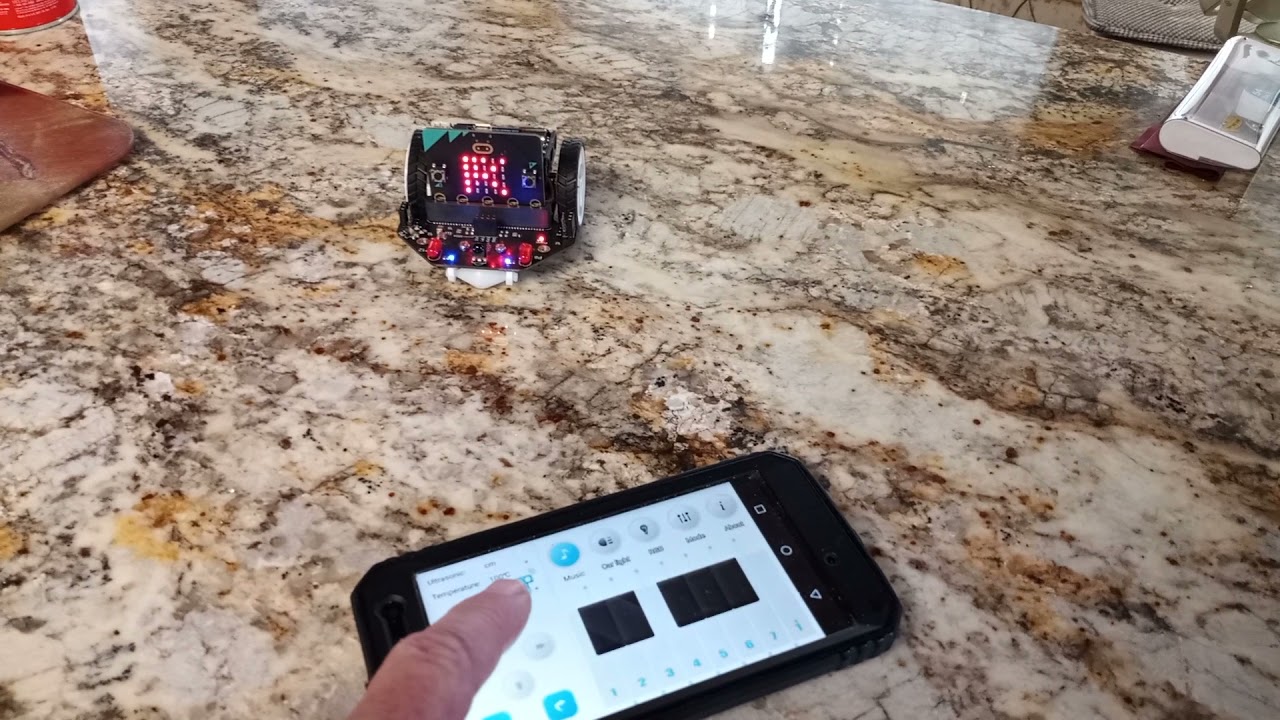
Bill, you’re a genius ! Here is the video with Android and DF Robot . MBit bluetooth app. V 2.0 Microbit. @bsiever . It’s an oldie Motorola Android cell phone. The code above in your posting works ; sometimes when trying to download it I get the message that the code will not compile. But it does eventually compile and download. @jane , please watch the video and try the code with android mobile device if you have Micro:Maqueen, otherwise try it with your DF Robot and see it that works. But remember, I tried it with V1.5 Micorbit (the one that does not have the notches in the edge connector) and that does NOT work; just like Bill said.
[ ](https://www.youtube.com/watch?v=v53MJIwOGxE)
---
### Author:  [@frank\_schmidt](https://forum.makecode.com/u/frank_schmidt)
#### Post date: [May 5, 2021, 3:14pm UTC](https://forum.makecode.com/t/android-app-discord/7696/15 "2021-05-05T15:14:11Z")
I will try all this , Bill, @bsiever , thank you so much for your work ! We have many more V1 Microbits than V2.0; and all you are doing goes to show our students what can be done with MS MakeCode.
Now to our real challenge: you may have seen my request for a Bluetooth app for the SD Wireless chip by Kittenbot for their Meowbit MakeCode Arcade. I suspect there is such an app, maybe in Chinese because I found it but it is not available in my country ,USA. My cell phone recognizes the BLE chip when they are both powered on. The chip does work with ‘radio’ to Microbit or another chip into Meowbit. It would be an Arcade app. Have you any ideas ? I have a request in to Dolphin Zhang and Bette Davis in China Yahboom via FaceBook because Yahboom sells Meowbit now; but no answer from either of those tech support/sales people. Our Youtube channel; MakeCode and Hardware shows many videos of the use of an Arcade console to drive and control robotic vehicles and will show it’s use with Yahboom Spiderbit now that we have it assembled but that will be via “radio” as we don’t have BLE as yet.
---
### Author:  [@frank\_schmidt](https://forum.makecode.com/u/frank_schmidt)
#### Post date: [May 5, 2021, 5:34pm UTC](https://forum.makecode.com/t/android-app-discord/7696/16 "2021-05-05T17:34:08Z")
So far this works with variable success depending on which cell phone that I use. Some better than others. Your above link, Bill, @bsiever , [https://makecode.microbit.org/\_d98WqjJp3hKL](https://makecode.microbit.org/_d98WqjJp3hKL)
I have it working with both V1 and V2.0 and on iPhone and Android, sometimes. This is on the DF Robot MicroMaqueen with Mbit app. I hope we can alter the code in the .hex file because I tried to do that with your first example and only had limited changes before compiler started crying and would not download. I am looking at your work Bill at the university in St Louis if you are still there, following your links from github under your name. Thanks for all you’ve done !
---
### Author:  [@bsiever](https://forum.makecode.com/u/bsiever)
#### Post date: [May 6, 2021, 5:19pm UTC](https://forum.makecode.com/t/android-app-discord/7696/17 "2021-05-06T17:19:15Z")
Hi @frank_schmidt : I hope it helps. I thought an example with v1 would be a little more useful. It looks like you’re on the micro:bit Slack. I’ve sent you a few follow-up questions there.
Bill
---
### Author:  [@frank\_schmidt](https://forum.makecode.com/u/frank_schmidt)
#### Post date: [May 6, 2021, 9:17pm UTC](https://forum.makecode.com/t/android-app-discord/7696/18 "2021-05-06T21:17:37Z")
i will look for that Slack, Bill.
---
### Author:  [@frank\_schmidt](https://forum.makecode.com/u/frank_schmidt)
#### Post date: [May 10, 2021, 4:09pm UTC](https://forum.makecode.com/t/android-app-discord/7696/19 "2021-05-10T16:09:43Z")
Another person asks this question and I have no answer, do you ? Please and Thankyou:
I am in the process of getting a companies custom board up and running with MakeCode, however I am having trouble with a few things.
When creating a custom board and submitting the SVG file into the Board Designer, config.ts is developed for us to edit with pin names and hardware numbers (ex. export const PIN\_RCC1 = **DAL.PA07** ). What are the pin hardware numbers? Is there an easy way of figuring these out for custom boards?
---
### Author:  [@bsiever](https://forum.makecode.com/u/bsiever)
#### Post date: [May 12, 2021, 5:02pm UTC](https://forum.makecode.com/t/android-app-discord/7696/20 "2021-05-12T17:02:48Z")
I haven’t done this sort of thing, but it looks like this guide is helpful: [https://www.hackster.io/wallarug/makecode-creating-custom-boards-92d933](https://www.hackster.io/wallarug/makecode-creating-custom-boards-92d933).
I think the `config.ts` is a map of the symbolic pin names from the simulator to the actual hardware pin names.
I’m using an example from [https://github.com/microsoft/pxt-maker/blob/master/libs/adafruit-trinket-m](https://github.com/microsoft/pxt-maker/blob/master/libs/adafruit-trinket-m). Here’s an example of how I _think_ it fits together…There are several symbols that are used and the are in multiple files.
1. `D0`, `A2`, and `SDA` are all symbols that are used when programming (`D0` is digital in/out 0. `A2` is Analog in 2, etc.). Often a pin can do multiple functions — in this case a single pin does all three of these things, but is usually only used for one at a time. If I’m doing digital work, I’ll think of it as `D0`. If I’m doing analog work, I’d think of it as `A2`.
2. In some places it’s important to be aware that this one thing serves all three purposes, so the name `A2_D0_SDA` is used too.
3. The actual pin on the hardware isn’t named with any of these. It was selected by the people who made the processor (who didn’t know how the processor would be used and didn’t use names like `D0`). The hardware uses a name like `PA08`.
The project’s pxt.json indicates it uses the `samd` processor, so that’s where the `DAL` part will come from. The dal.d.ts for the [`core---samd`](https://github.com/microsoft/pxt-maker/blob/master/libs/core---samd/dal.d.ts) defines `PA08 = 8`.
So, the story:
1. Someone decided to make a board. They selected a `samd` processor and figured out which pins would be used for which functions (this is also related to what the particular processor can do). They may have identified that they’ll use “Pin 8” of “Port A” as a `SDA`, `A2`, and `D0`.
2. The `samd` module already existed and had a variety of names defined to make it easy for basic hardware code to work with Port A Pin 8 via `PA08`, but it doesn’t know that it’ll be used as `D0` on this specific board.
3. The board designer created a schematic and then a picture of what the board will look like for the simulator. That picture, boardhd.svg, includes a “label” on the place where the pin will connect (it’s invisible data in the .svg file). The person who made the picture picked a really descriptive name that explains all the pin can do: `A2_D0_SDA`. That’s a bit clunky for programmers who only think about one use at a time, like `D0`.
4. The boardhd.svg was uploaded to the [board designer](https://maker.makecode.com/board-designer), which creates initial versions of config.ts and board.json.
1. board.json and boardhd.svg are all about the simulator. board.json does two things: 1) It indicates the x,y coordinates for where `A2_D0_SDA` is in the SVG (so wires in the simulator will go to the right place in the drawing) and 2) Gives simpler, additional names for `A2_D0_SDA`, like `D0`, ‘A2’, and `SDA`. (Ex: `"D0": "A2_D0_SDA",`).
2. config.ts is about the actual hardware. It explains how the names like `D0` correspond to a real pin on the processor. There wasn’t enough detail to fill in hardware details in config.ts, so it’ll initially have incomplete parts, like `export const PIN_D0 = DAL.?;`. The `?` needs to be filled in with the name of the actual hardware pin, so it’d need to be changed to: `export const PIN_D0 = DAL.PA08;` (Again, this is based on the initial choices when the board was designed…The designer decided to use Port A’s Pin 8 for the concept of `D0` on their board)
A lot of that’s speculation…If anyone has any confirmation or correction it’d be appreciated.
[Next page](https://forum.makecode.com/t/android-app-discord/7696.md?page=2)