# C++ Compilation
**URL:** https://forum.makecode.com/t/c-compilation/853
**Category:** Maker
**Created:** [December 5, 2019, 2:46pm UTC](https://forum.makecode.com/t/c-compilation/853 "2019-12-05T14:46:31Z")
**Posts on this page:** 14
**Page:** 1
### Author:  [@luqmaanb](https://forum.makecode.com/u/luqmaanb)
#### Post date: [December 5, 2019, 2:46pm UTC](https://forum.makecode.com/t/c-compilation/853/1 "2019-12-05T14:46:31Z")
I want to develop makecode extensions based on C++. I have many c++ libraries for arduino and would simply like to port it over with minor changes. I used github and the web browser to develop a simple extension, imported the extension via github url so I can edit the extension in the makecode editor. When I edit the C++ or h hile, any time i make a change it compiles immediately. It takes up to 2 minutes to compile and I can’t stop it. How can prevent this? Using the local builder still compiles the C++ every time I change the code in the browser. Its impossible to develop like this.
The C++ compiler doesn’t provide error messages as well. It will just say there’s an error at ‘base’ and nothing else.
Any help would be appreciated
---
### Author:  [@peli](https://forum.makecode.com/u/peli)
#### Post date: [December 5, 2019, 3:57pm UTC](https://forum.makecode.com/t/c-compilation/853/2 "2019-12-05T15:57:32Z")
Which editor are you specifically trying to use? To speed up c++ you will have to install our CLI and build from it using
```
pxt build —local
```
---
### Author:  [@luqmaanb](https://forum.makecode.com/u/luqmaanb)
#### Post date: [December 6, 2019, 8:37am UTC](https://forum.makecode.com/t/c-compilation/853/3 "2019-12-06T08:37:45Z")
I’m using the web browser ([https://maker.makecode.com/#editor](https://maker.makecode.com/#editor)). I have installed it locally but its not helpful. If I simply comment out a line of code it will begin to compile on its own immediately. Serving the editor locally results in the same situation. If there is an error in the c code, it doesn’t provide the source of the error (see below).

---
### Author:  [@peli](https://forum.makecode.com/u/peli)
#### Post date: [December 6, 2019, 9:03pm UTC](https://forum.makecode.com/t/c-compilation/853/4 "2019-12-06T21:03:12Z")
Modifying C++ in the web browser will generate a request to our cloud compilation service – which will take minute(s) to complete. Instead, you will need to use the PXT command line.
- download the program to .uf2
- extract it to disk
```auto
pxt extract myprogram.uf2
```
- build locally
```auto
pxt build --local
```
---
### Author:  [@luqmaanb](https://forum.makecode.com/u/luqmaanb)
#### Post date: [December 11, 2019, 10:47am UTC](https://forum.makecode.com/t/c-compilation/853/5 "2019-12-11T10:47:41Z")
Following [https://github.com/microsoft/pxt-maker/blob/master/README.md](https://github.com/microsoft/pxt-maker/blob/master/README.md), I I’m unable to complete step 8. I get the error ‘Could not remove /node\_modules/pxt-core’
---
### Author:  [@peli](https://forum.makecode.com/u/peli)
#### Post date: [December 11, 2019, 4:56pm UTC](https://forum.makecode.com/t/c-compilation/853/6 "2019-12-11T16:56:20Z")
Oh right… you need to delete `node_modules/pxt-core` and `node_modules/pxt-common-packages`.
---
### Author:  [@KalbeAbbas](https://forum.makecode.com/u/KalbeAbbas)
#### Post date: [January 15, 2020, 9:07am UTC](https://forum.makecode.com/t/c-compilation/853/7 "2020-01-15T09:07:32Z")
Hi. I tried building using above instructions, and got this error while building. Any idea please:
Building of code, using typescript extensions builds fine. Am I missing any toolchain? Thanks

---
### Author:  [@peli](https://forum.makecode.com/u/peli)
#### Post date: [January 15, 2020, 4:07pm UTC](https://forum.makecode.com/t/c-compilation/853/8 "2020-01-15T16:07:19Z")
You’ll need to install docker to run the c++ tool chain.
---
### Author:  [@KalbeAbbas](https://forum.makecode.com/u/KalbeAbbas)
#### Post date: [January 15, 2020, 4:39pm UTC](https://forum.makecode.com/t/c-compilation/853/9 "2020-01-15T16:39:07Z")
Thanks. I installed and I am now getting the error “docker: Error response from daemon: invalid mode: /src.”. Looks like path is not correctly set?

---
### Author:  [@peli](https://forum.makecode.com/u/peli)
#### Post date: [January 15, 2020, 5:11pm UTC](https://forum.makecode.com/t/c-compilation/853/10 "2020-01-15T17:11:54Z")
Does docker have access to your drive? Otherwise use “—cloud” to use the cloud compiler (much smaller)
---
### Author:  [@richard](https://forum.makecode.com/u/richard)
#### Post date: [January 15, 2020, 10:06pm UTC](https://forum.makecode.com/t/c-compilation/853/11 "2020-01-15T22:06:45Z")
In Windows you need to give permissions to Docker to access the host machine. I think it’s the “shared drives” setting described on this page: [https://docs.docker.com/docker-for-windows/](https://docs.docker.com/docker-for-windows/)
---
### Author:  [@KalbeAbbas](https://forum.makecode.com/u/KalbeAbbas)
#### Post date: [January 16, 2020, 9:41am UTC](https://forum.makecode.com/t/c-compilation/853/12 "2020-01-16T09:41:44Z")
@peli Yes, the --cloud compiler compiles and is much smaller. But when I make any small changes in .cpp files, it causes error:
**edited**
It starts with this, yeah seems that build is failed:
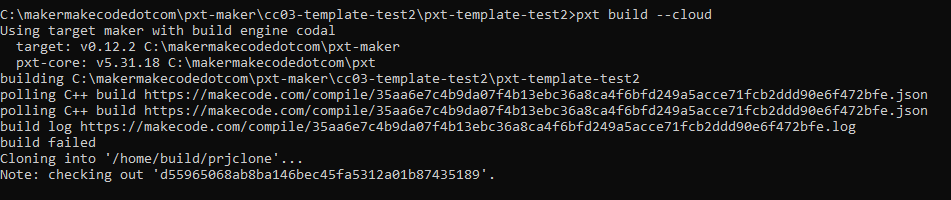
The complete log is very long. Can’t paste here
---
### Author:  [@peli](https://forum.makecode.com/u/peli)
#### Post date: [January 16, 2020, 3:08pm UTC](https://forum.makecode.com/t/c-compilation/853/13 "2020-01-16T15:08:54Z")
This means that the build Failed. The log above should have more details.
---
### Author:  [@mmoskal](https://forum.makecode.com/u/mmoskal)
#### Post date: [January 16, 2020, 3:50pm UTC](https://forum.makecode.com/t/c-compilation/853/14 "2020-01-16T15:50:37Z")
If you are editing the C++ code yourself you should not be using the —cloud option. Try to set up docker - see Richard’s instructions above.