# Can you run makecode arcade on a raspberry pi pico (rp2040)
**URL:** https://forum.makecode.com/t/can-you-run-makecode-arcade-on-a-raspberry-pi-pico-rp2040/18305
**Category:** Arcade
**Tags:** make
**Created:** [March 6, 2023, 5:47pm UTC](https://forum.makecode.com/t/can-you-run-makecode-arcade-on-a-raspberry-pi-pico-rp2040/18305 "2023-03-06T17:47:36Z")
**Posts on this page:** 11
**Page:** 1
### Author:  [@technonux](https://forum.makecode.com/u/technonux)
#### Post date: [March 6, 2023, 5:47pm UTC](https://forum.makecode.com/t/can-you-run-makecode-arcade-on-a-raspberry-pi-pico-rp2040/18305/1 "2023-03-06T17:47:36Z")
the device will probably run makecode arcade very well, but is it officially supported?
---
### Author:  [@Vegz78](https://forum.makecode.com/u/Vegz78)
#### Post date: [March 7, 2023, 7:13pm UTC](https://forum.makecode.com/t/can-you-run-makecode-arcade-on-a-raspberry-pi-pico-rp2040/18305/2 "2023-03-07T19:13:09Z")
Not officially, as far as I know, unfortunately.
> [@Support Makecode Arcade on Raspberry Pi Pico (RP2040)](https://forum.makecode.com/t/support-makecode-arcade-on-raspberry-pi-pico-rp2040/16115/2):
>
> Stumbled upon this video not long ago, which shows MakeCode Arcade running on a Pico: [[MakeCode Arcade and Pi PICO] ](https://www.youtube.com/watch?v=lNt1WC0PGd4) If this is real and doable, what a fun challenge for the @makecode team and this community! What an enormous opportunity and NO chip shortage to go with the RP2040, either, I’ve heard!
When will the official support arrive, @MakeCode and @raspberrypifoundation?
(BFFs ❤❤❤)
---
### Author:  [@technonux](https://forum.makecode.com/u/technonux)
#### Post date: [March 8, 2023, 9:42pm UTC](https://forum.makecode.com/t/can-you-run-makecode-arcade-on-a-raspberry-pi-pico-rp2040/18305/3 "2023-03-08T21:42:13Z")
yea i hope so too
---
### Author:  [@Vegz78](https://forum.makecode.com/u/Vegz78)
#### Post date: [March 14, 2023, 4:21pm UTC](https://forum.makecode.com/t/can-you-run-makecode-arcade-on-a-raspberry-pi-pico-rp2040/18305/4 "2023-03-14T16:21:41Z")
Then, again, @technonux, I stumbled upon a new hardware, RP2040 when downloading files from MakeCode Arcade today:

Since this was the regular production version and not beta, it is definitely _official_. But how it is _supported_ and works is unknown to me and I can not find any documentation.
Maybe it is connected to this post somehow, where they discuss with the @MakeCode team some new hardware based on the RP2040 for MakeCode Arcade?:
> [@New Board with RP2040 - Adding pins, multi-processor, and other questions](https://forum.makecode.com/t/new-board-with-rp2040-adding-pins-multi-processor-and-other-questions/15609):
>
> HI All, I’m hoping to get through to some folks who know a lot more than me. I am working on a project for a big client (not to mention the name). We have a new board with an RP2040 chip (Cortex-M0+) and so far, with some help from the core team, I’ve gotten it kind of working. But to do some operations using GPIO I had to jump through hoops: Use the Edge Connector extension for Micro:bit to expose “pins” blocks in Arcade (even though this board is clearly NOT a micro:bit) Add some manual t…
---
### Author:  [@jwunderl](https://forum.makecode.com/u/jwunderl)
#### Post date: [March 14, 2023, 4:39pm UTC](https://forum.makecode.com/t/can-you-run-makecode-arcade-on-a-raspberry-pi-pico-rp2040/18305/5 "2023-03-14T16:39:04Z")
As you saw there is support for raspberry pi zero, but it is limited to the specific version that is now hard to find [https://arcade.makecode.com/hardware/raspberry-pi/setup](https://arcade.makecode.com/hardware/raspberry-pi/setup) (if I recall correctly it is just on the original `Raspberry Pi Zero` model, so not the Zero 2 or Zero W). I don’t have experience running on the newer versions though, unfortunately ☹. Anything that can run a version of linux might try [https://arcade.makecode.com/kiosk](https://arcade.makecode.com/kiosk) to see if that’s runnable, though it might be… tough on these smaller devices.
---
### Author:  [@technonux](https://forum.makecode.com/u/technonux)
#### Post date: [March 14, 2023, 4:55pm UTC](https://forum.makecode.com/t/can-you-run-makecode-arcade-on-a-raspberry-pi-pico-rp2040/18305/6 "2023-03-14T16:55:06Z")
thanks, sadly while the raspberry pi pico can run unix it cannot run linux, also i think a web browser would be too demanding for it
---
### Author:  [@xjordanx](https://forum.makecode.com/u/xjordanx)
#### Post date: [March 14, 2023, 8:11pm UTC](https://forum.makecode.com/t/can-you-run-makecode-arcade-on-a-raspberry-pi-pico-rp2040/18305/7 "2023-03-14T20:11:11Z")
I did get this working. I had a lot of help from Michal (MakeCode team). I will make a video showing how I did it and publish later this week.
Meanwhile yes it’s in the online build. I had to use the pin configuration tool and UF2 generator to get my PICO pinout (and later, RP2040 custom board pinout) working. There are still a few things that I have not gotten to work and it might be that those items aren’t sully supported yet in the underlying CODAL operating system for RP2040.
I really hope that CODAL and MakeCode can be updated to support the multiple cores in the RP2040. That would be a “game changer” (pun intended).
For now, here’s proof:
[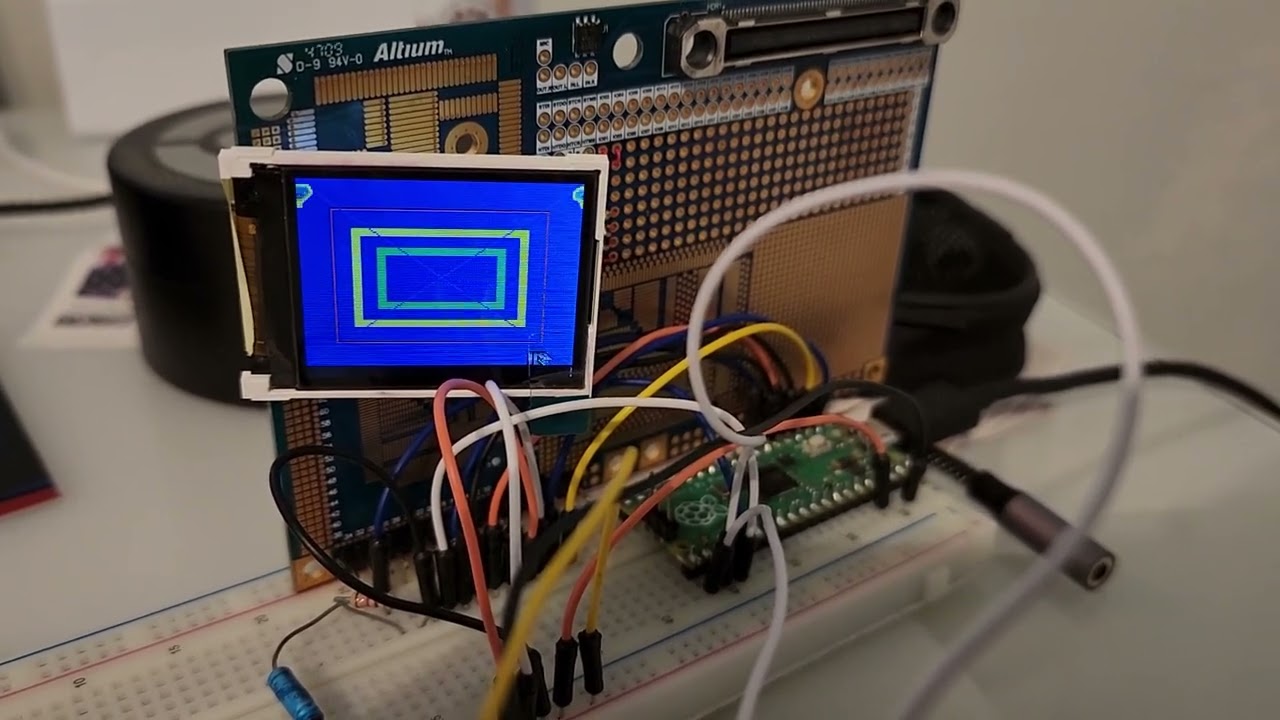 ](https://www.youtube.com/watch?v=lNt1WC0PGd4)
[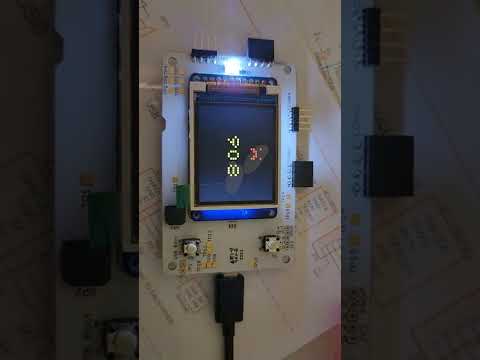 ](https://www.youtube.com/watch?v=Mxo7MWUhXSs)
The second was a custom board designed for Autodesk’s “University” user conference in 2022. I did the application for the badge using MakeCode Arcade. That’s the inspiration that lead me down this rabbit hole! But it was as frustrating as heck working with a chip that wasn’t officially supported when I began, and yet with their help I got it working and found the project inspiring in the end (after 50+ hours of trying many things and reading through all the docs and source code to finally piece together how it’s supposed to work).
---
### Author:  [@Vegz78](https://forum.makecode.com/u/Vegz78)
#### Post date: [March 15, 2023, 6:26pm UTC](https://forum.makecode.com/t/can-you-run-makecode-arcade-on-a-raspberry-pi-pico-rp2040/18305/8 "2023-03-15T18:26:41Z")
A really great project and work, @xjordanx!!! (-and support, @mmoskal!!!)
Thanks for sharing! -And helping bridging the gap between two awesome maker communities around MakeCode and the Raspberry!
I have been waiting some time now for your follow-up video announced on YouTube, and now I am really looking forward to it! -Christmas is really early this year, maybe already next week, it seems…
Multiple cores or not, this is indeed really a MakeCode Arcade “game changer”! 😉
PS @technonux: So far you have to enable _Experimental hardware_ in the MakeCode Settings - About - Experiments menu to see the RP2040/Pico on the hardware download pages. I forgot to mention that earlier.
---
### Author:  [@dolphin22](https://forum.makecode.com/u/dolphin22)
#### Post date: [April 6, 2023, 4:26pm UTC](https://forum.makecode.com/t/can-you-run-makecode-arcade-on-a-raspberry-pi-pico-rp2040/18305/9 "2023-04-06T16:26:10Z")
Would you be able to share your .uf2 for raspberry pico? Thanks!
---
### Author:  [@Vegz78](https://forum.makecode.com/u/Vegz78)
#### Post date: [September 27, 2023, 4:36pm UTC](https://forum.makecode.com/t/can-you-run-makecode-arcade-on-a-raspberry-pi-pico-rp2040/18305/10 "2023-09-27T16:36:00Z")
> [@xjordanx](#):
>
> I did get this working. I had a lot of help from Michal (MakeCode team). I will make a video showing how I did it and publish later this week.
Any updates on your exciting project here, @xjordanx?
---
### Author:  [@Vegz78](https://forum.makecode.com/u/Vegz78)
#### Post date: [October 3, 2023, 4:55pm UTC](https://forum.makecode.com/t/can-you-run-makecode-arcade-on-a-raspberry-pi-pico-rp2040/18305/11 "2023-10-03T16:55:36Z")
Another great such project here, by @AqeeAqee!
> [@DIY Arcade Console with Rp2040 Pico](https://forum.makecode.com/t/diy-arcade-console-with-rp2040-pico/22969):
>
> Hi all: Recently, I saw some questions about how to running Arcade game on Pico, especially @Vegz78 . (BTW thanks for your great efforts on running Arcade game on RPi, it’s really valuable for me) Here is what I got after playing Pico with Arcade for a few days. Hope this helped. Good news: work with both Pico & PicoW works well with screen(ST7735 160x128) & btn & speaker bootloader in rom, very very safe UF2 format supported by bootloader naturally !!! Not require compile bootloader anymor…