Currently, you can only have one design for the card’s back. You can change the card back image by using the “set card (back) frame image” block. There are other restrictions placed on card containers: decks are meant to be a stack of face down cards, and piles are meant to be a stack of face up cards. You can flip the top card up/down, but trying to change the facing of the other cards in the stack wouldn’t do anything and might even result in an error. When you move cards from one container to another, you can change the facing of the card at that moment.
By the way, since I thought for quite a bit to come up with the design for a standard UNO deck, I ended up building the full game. You can see a card back change in the CreateUNODesign function.
8 Likes
How do you pick a card up with the cursor that will move with the cursor?
1 Like
the card is a sprite so you could put in a game update to move the cards x and y to the cursor sprite
It is a little clunky right now, but you can see it being done in the solitaire example. Create a card container and move the cards that need to follow the cursor into that container, then create a “on game update” handler and use the “set container position” block (at the very bottom, under the Customizations category) to set the container’s position to cursor x and y (use the sprite property block and put the special “cursor” sprite variable to extract its properties).
It’s a common enough use case that I’ll probably end up creating a special block for managing this, but for now at least it can be done in some way.
2 Likes
Ok, thanks. Sorry to bug you, but what are the “cursor container” and “cursor card” blocks for?
The “cursor card” block is a variable that represents the card the cursor is currently pointing at (using the card extension’s built in cursor navigation). It is usually easier to use the “on button press of card in container” event handler, but occasionally you might want direct access to the cursor card and that block is the way to do it.
Card Containers are data objects for organizing Cards. Think of all the places where cards would go to - the initial deck where all cards come from, each player’s hand, fields where cards can play into, and discard piles after cards are resolved.
Each card container internally contains an array of cards and some inherent properties about how the cards within the container are organized on screen:
- Decks stack all of the cards in its array face down. It’s usually where all the cards are at the start of a game.
- Spreads put all the cards in a line, usually face up to represent an active player hand.
- Grids put the cards into a two dimensional grid. Unlike spreads, grids have a fixed row and column size and you can scroll if there are more cards than what the grid can fit.
- Finally, Piles are like the opposite of Decks - it is another way to stack cards, but they are all face up instead.
2 Likes
Thanks, but what does the “cursor container” do? The “cursor card” is the card the cursor is pointing to, but what about the “cursor container”? Is it the same as “cursor card” but the container it is pointing to; for example, the draw deck as a whole instead of the top card.
Also, how do you check if a card is a specific suit?
Sorry for flooding you with questions, but you have been a great help to my coding,
Regards, QWERTYUIOP569
You are correct - the cursor container refers to the card container of the card that the cursor is currently pointing at.
The default card deck has these attributes:
- Rank, a number between 0 (joker) and 13 (11-13 are JQK).
- Suit, a string that is either “spades”, “diamonds”, “clubs”, or “hearts” (those exact words)
- SuitColor, a number that is either 2 (red) or 15 (black).
You can use the “card Suit Attribute text” block to extract that information.
1 Like
yes it is the entire deck of cards uh in the rank attributes part click rank and there is a dropdown
1 Like
I’m working on a blackjack game using you extension. So far I need to make the dealer choose between Hit and Stand, without doing the best move every time. I’m skipping double down for now.
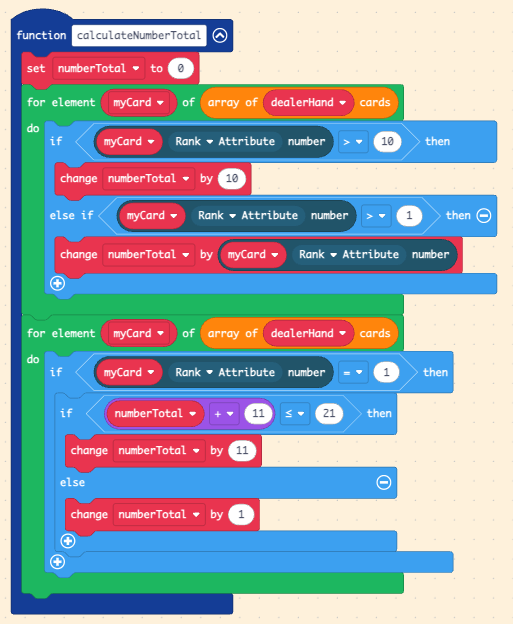
The dealer’s rules are fixed in blackjack: If their number is 16 or less, they must hit, otherwise they must stand. They can’t really “think” in the way that other players on the table can. The hard part is actually calculating a hand’s number - it will be tricky since J,Q, and K count as 10 and A can be 1 or 11.
I’ll spoiler the answers in case you want to figure it out on your own. For calculating a hand’s number:
assuming dealerHand is the card spread container for the dealer’s cards, and numberTotal is the number you can use to determine other things at the end of the calculation:
Two loops are necessary, because you want to calculate the “hard” numbers (numbers that can’t be changed) first before calculating the “soft” A to give them the best chance of using their bigger number, 11.
4 Likes
I figured people are eventually going to ask about it, so I might as well get ahead of the game. Here is a starter kit to demake Balatro:
Press B to swap between sorting by rank/suit. It is a bit more hacked together than some of my other examples, some implementations are incorrect (sort by suit doesn’t sort the rank correctly within the suit), some features are missing (can’t move cards or see remaining cards in deck), and obviously everything in the original game outside of the white deck small blind are missing.
5 Likes
I just realized that my Blackjack number total code calculates incorrect results in some situations (QAA would count as 22, which is incorrect). To correct the mistake: Always add the hard part of the numbers in the first loop, then add the soft part of the numbers in the second loop if it is safe to do so.
1 Like
Thanks for that code, I made a much longer function which is too long to show all of it:
2 Likes
Here is the final blackjack, with Hit, Stand and Dealer playing:
I hope you like it!
@QWERTYUIOP569 
2 Likes
LET’S GO GAMBLING!
aw dangit… aw dangit… aw dangit… aw dangit… aw dangit… aw dangit… aw dangit… aw dangit… aw dangit… aw dangit… aw dangit… aw dangit… aw dangit… aw dangit… aw dangit… aw dangit… aw dangit… aw dangit… aw dangit… aw dangit… aw dangit… aw dangit…
6 Likes
FYI, it is impossible to win before you grind it tons.