# Copying a .uf2 file onto the CPLAYBOOT drive just kills the drive
**URL:** https://forum.makecode.com/t/copying-a-uf2-file-onto-the-cplayboot-drive-just-kills-the-drive/11911
**Category:** Adafruit Circuit Playground Express
**Created:** [January 27, 2022, 5:40pm UTC](https://forum.makecode.com/t/copying-a-uf2-file-onto-the-cplayboot-drive-just-kills-the-drive/11911 "2022-01-27T17:40:19Z")
**Posts on this page:** 9
**Page:** 1
### Author:  [@daveccampbell](https://forum.makecode.com/u/daveccampbell)
#### Post date: [January 27, 2022, 5:40pm UTC](https://forum.makecode.com/t/copying-a-uf2-file-onto-the-cplayboot-drive-just-kills-the-drive/11911/1 "2022-01-27T17:40:19Z")
i’m fairly new to makecode and CPE, but had lots of luck messing with CircuitPython and MuEditor.
now turning my attention to makecode, i get the same result on 2 different computers:
copying the .uf2 file that downloads from makecode onto the CPLAYBOOT drive does one thing - disconnects the CPLAYBOOT drive from the system entirely. game over.
CPE in bootloader mode - check.
files on the drive look right (txt file shows most recent version, etc.)
copy the file that run perfectly in the simulator onto CPLAYBOOT…lights out, drive disconnect.
i even checked that makecode could pair with the drive - it did - no difference.
appreciate any guidance.
---
### Author:  [@UnsignedArduino](https://forum.makecode.com/u/UnsignedArduino)
#### Post date: [January 27, 2022, 5:59pm UTC](https://forum.makecode.com/t/copying-a-uf2-file-onto-the-cplayboot-drive-just-kills-the-drive/11911/2 "2022-01-27T17:59:34Z")
Once a UF2 file is finished copying to the drive, it should disappear and the device should reset, starting the program you just “flashed.”
---
### Author:  [@daveccampbell](https://forum.makecode.com/u/daveccampbell)
#### Post date: [January 28, 2022, 5:05pm UTC](https://forum.makecode.com/t/copying-a-uf2-file-onto-the-cplayboot-drive-just-kills-the-drive/11911/3 "2022-01-28T17:05:36Z")
thanks for your response.
so, here’s what does happen, not sure about what should happen, kind of why i am asking.
1 \>\> CPE reset, now in bootloader mode. (all neo-LEDS green, on is green, D13 is pulsing red).
> > assuming this is normal state.
> > device shows as CPLAYBOOT in Explorer, has 3 files on it (CURRENT.UF2, INDEX.HTM, INFO\_UF2.TXT, dated 12/12/2018).
2 \>\> using Explorer, drag a .uf2 file from a folder onto the CPLAYBOOT drive
file is: circuitplayground-Siren.uf2
exactly the file downloaded from MakeCode after testing in simulator
3 \>\> let go of drag file
4 \>\> all lights on CPE go off except green power LED
> > PC sound indicating USB drive removed
> > CPLAYBOOT no longer in Explorer
> > green power light on CPE, no other lights
and here i sit dumbfounded.
5 \>\> reset CPE manually - looks like beginning state (just the 3 2018 files, etc.)
so, i can’t tell if ‘file is finished copying to drive’.
all i know is, after 4 \>\>, lights out. literally.
it appears when it begins to write the file, USB badness begins - but just my observation.
i am on a Dell Optiplex.
this EXACT behavior is seen on a new Lenovo notebook.
this CPE appears fine, it works great with CircuitPython - copy files to it all day long.
thanks for any help - i really want to use MakeCode and help my grandson learn this stuff.
---
### Author:  [@UnsignedArduino](https://forum.makecode.com/u/UnsignedArduino)
#### Post date: [January 28, 2022, 6:12pm UTC](https://forum.makecode.com/t/copying-a-uf2-file-onto-the-cplayboot-drive-just-kills-the-drive/11911/4 "2022-01-28T18:12:54Z")
This sounds normal - this happens to me a lot when games get too big in MakeCode Arcade and once it finishes flashing it never starts the program. Can you try a simple program that just flashes the neopixels maybe??? That should be small enough to work.
---
### Author:  [@daveccampbell](https://forum.makecode.com/u/daveccampbell)
#### Post date: [January 28, 2022, 11:05pm UTC](https://forum.makecode.com/t/copying-a-uf2-file-onto-the-cplayboot-drive-just-kills-the-drive/11911/5 "2022-01-28T23:05:13Z")
thanks - it wasn’t the size but more along the lines of: “the program worked in the simulator, but fails on the CPE”.
the tutorial uses an “On Shake” input, which, for the life of me, did not want to live inside a forever loop, so i assumed it didn’t need one.
simulator runs it just fine - shake, things happen. shake again. things happen.
downloading that program to the CPE - lights out.
i did as you suggest - make a simple program that just turns the LEDs on one color, then another, in a forever loop. worked exactly as advertised.
i’m a fairly sharp fellow, and was tripped by something in that tutorial that relates to looping. i assume there is some real reference that explains how those blocks must be constructed so that the program actually runs on a real CPE?
in my opinion the Siren tutorial is either incomplete, misleading, or simply broken.
it starts out with a forever loop in the UI, yet never says what to do with it.
i have been unable to make that program, as shown in the tutorial work.
please enlighten me - this was a SUPER frustrating virgin MakeCode experience.
---
### Author:  [@richard](https://forum.makecode.com/u/richard)
#### Post date: [January 28, 2022, 11:09pm UTC](https://forum.makecode.com/t/copying-a-uf2-file-onto-the-cplayboot-drive-just-kills-the-drive/11911/6 "2022-01-28T23:09:07Z")
Sorry, that sounds frustrating! To answer your questions:
All programs in the Adafruit editor begin with the forever block on the workspace, but you don’t necessarily need to use it. The siren tutorial doesn’t use this block at all; instead all of the code lives within the on-shake block:
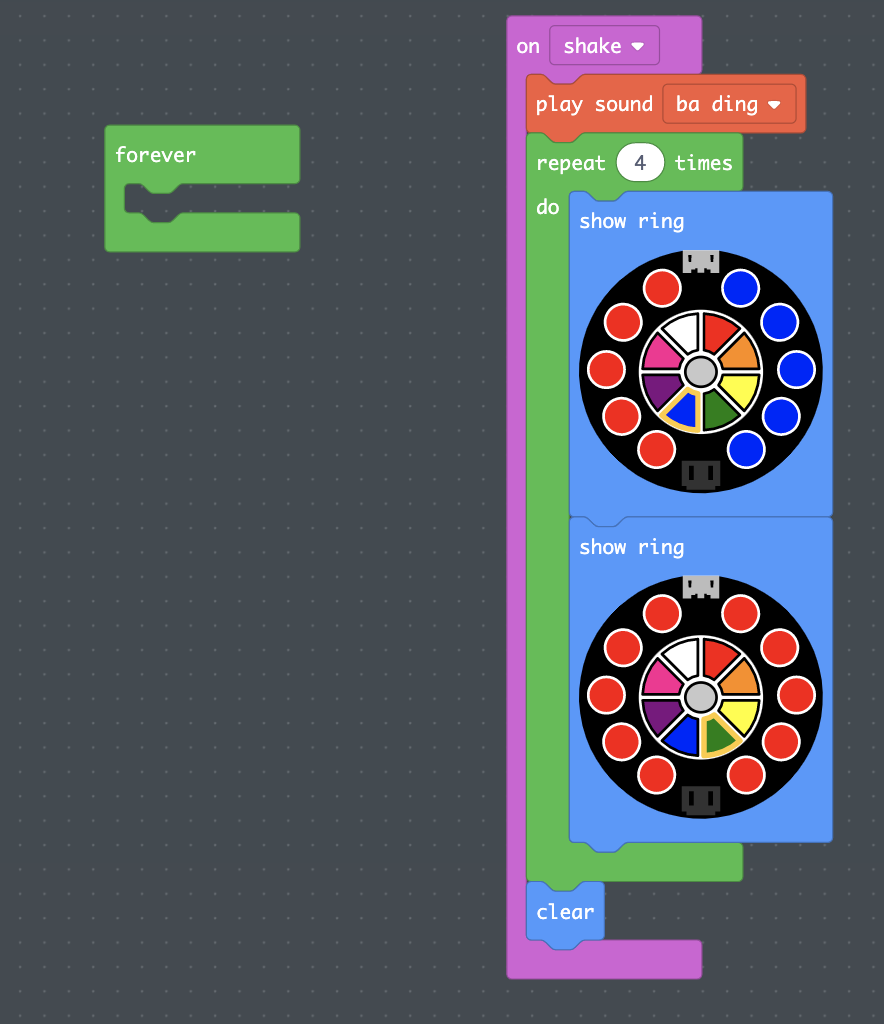
All events (like on shake) are top-level blocks in MakeCode. They don’t need to be nested inside any other blocks
---
### Author:  [@daveccampbell](https://forum.makecode.com/u/daveccampbell)
#### Post date: [January 31, 2022, 6:02pm UTC](https://forum.makecode.com/t/copying-a-uf2-file-onto-the-cplayboot-drive-just-kills-the-drive/11911/7 "2022-01-31T18:02:01Z")
thank you - i was unaware of the various ‘top-level’ blocks, and that multiple of those can exist in the same project / program.
it might be a good idea to suggest at the top of the tutorial to review a page such as this:
> **[Inputs](https://makecode.adafruit.com/courses/maker/general/coding/inputs)**
>
> An “input” is a way that a computer takes in information from the outside world. An “output” is how a computer displays information to the outside world. So, an input on the Circuit Playground Express might be pressing button A, and the output might...
in order to get a high level perspective on that.
as it was, i think i followed the instructions in the tutorial precisely and the result was not a valid program.
---
### Author:  [@trobinson](https://forum.makecode.com/u/trobinson)
#### Post date: [September 25, 2023, 5:18pm UTC](https://forum.makecode.com/t/copying-a-uf2-file-onto-the-cplayboot-drive-just-kills-the-drive/11911/8 "2023-09-25T17:18:58Z")
Was there ever a fix given for this problem? I’m experiencing the exact same issue.
---
### Author:  [@lindburly2](https://forum.makecode.com/u/lindburly2)
#### Post date: [April 5, 2024, 1:47am UTC](https://forum.makecode.com/t/copying-a-uf2-file-onto-the-cplayboot-drive-just-kills-the-drive/11911/9 "2024-04-05T01:47:18Z")
So did I. Works in the emulator, but the on Shake example just hangs when trying to copy it to CPLAYBOOT.