# Disable browser shortcuts / keybinds
**URL:** https://forum.makecode.com/t/disable-browser-shortcuts-keybinds/39493
**Category:** Help
**Tags:** extension
**Created:** [September 26, 2025, 12:11am UTC](https://forum.makecode.com/t/disable-browser-shortcuts-keybinds/39493 "2025-09-26T00:11:56Z")
**Posts on this page:** 8
**Page:** 1
### Author:  [@Ayoub](https://forum.makecode.com/u/Ayoub)
#### Post date: [September 26, 2025, 12:11am UTC](https://forum.makecode.com/t/disable-browser-shortcuts-keybinds/39493/1 "2025-09-26T00:11:56Z")
Hello!
I am making a typing game by using the “browser-events” extension. However, there is an issue with the “P” key. Pressing it prompts the editor to download / save the game and opens the explorer window. Is there a way to disable that?
Thank you.
---
### Author:  [@AlexK](https://forum.makecode.com/u/AlexK)
#### Post date: [September 26, 2025, 2:44am UTC](https://forum.makecode.com/t/disable-browser-shortcuts-keybinds/39493/2 "2025-09-26T02:44:32Z")
> [@Backspace key resets arcade machine when used](https://forum.makecode.com/t/backspace-key-resets-arcade-machine-when-used/38632/2):
>
> You’ll need to disable the system keys (or at least disable the Menu system key). I don’t think there’s a block version of this yet, but here is the code in JavaScript: keymap.setSystemKeys(0, 0, 0, 0)
---
### Author:  [@a012](https://forum.makecode.com/u/a012)
#### Post date: [September 26, 2025, 4:47pm UTC](https://forum.makecode.com/t/disable-browser-shortcuts-keybinds/39493/3 "2025-09-26T16:47:09Z")
If you want, I can make it easier for them to disable keys and shortcuts/keybinds by making an extension out of it if you would like me to make one repository out of it. I do know how to make extensions and I think I can make an extension for keymaps for any user to use it. Let me know if I should make a extension so the user can see it on the block editor easier without just using the JavaScript editor.
---
### Author:  [@Ayoub](https://forum.makecode.com/u/Ayoub)
#### Post date: [September 27, 2025, 6:56pm UTC](https://forum.makecode.com/t/disable-browser-shortcuts-keybinds/39493/4 "2025-09-27T18:56:33Z")
Thank you! It works, and honestly, the swap to JavaScript isn’t too bad especially that I don’t have a lot of code yet,
---
### Author:  [@Ayoub](https://forum.makecode.com/u/Ayoub)
#### Post date: [September 27, 2025, 6:56pm UTC](https://forum.makecode.com/t/disable-browser-shortcuts-keybinds/39493/5 "2025-09-27T18:56:57Z")
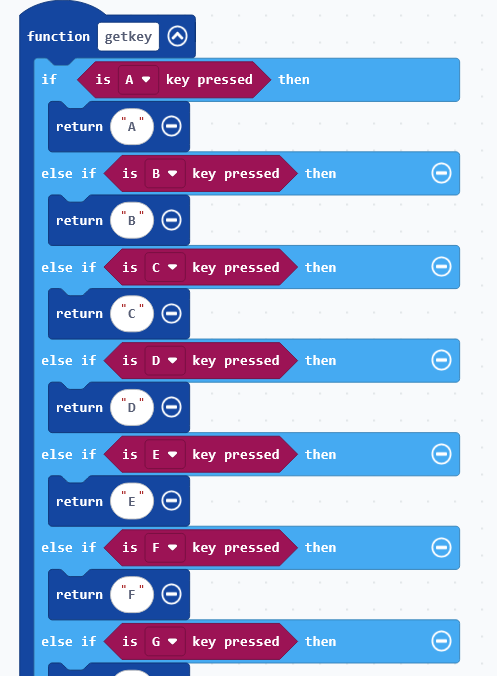
I appreciate the offer! If you have the time and really don’t mind it, I think that would be a great thing to do as it would help me and others in a similar situation. While we’re on the subject of making extensions, is there a way to get the keyboard input key return instead of having to check for every single key press?
In other words, a block that says “return key press” that returns a string with the name of the key that was pressed instead of having to do it manually like this:
---
### Author:  [@a012](https://forum.makecode.com/u/a012)
#### Post date: [September 27, 2025, 6:59pm UTC](https://forum.makecode.com/t/disable-browser-shortcuts-keybinds/39493/6 "2025-09-27T18:59:54Z")
I made the extension now for you here is the extension link you need to import to paste it in the Search or enter project URL for the extensions link
developertryingtocodelikeotherofthem/arcade-keymaps-disabling-shortcuts
paste that there then import that extension then after you will see it say keymap and you can now see the block you are looking for. I hope this helps.
---
### Author:  [@Ayoub](https://forum.makecode.com/u/Ayoub)
#### Post date: [September 29, 2025, 4:57pm UTC](https://forum.makecode.com/t/disable-browser-shortcuts-keybinds/39493/7 "2025-09-29T16:57:13Z")
Thank you!!
---
### Author:  [@a012](https://forum.makecode.com/u/a012)
#### Post date: [September 29, 2025, 9:49pm UTC](https://forum.makecode.com/t/disable-browser-shortcuts-keybinds/39493/8 "2025-09-29T21:49:32Z")
No problem, and thank you too.