# \[Extension\] Arcade Easing - Move your sprite from A to B in style!
**URL:** https://forum.makecode.com/t/extension-arcade-easing-move-your-sprite-from-a-to-b-in-style/39077
**Category:** Show & Tell
**Tags:** extension
**Created:** [September 5, 2025, 4:08pm UTC](https://forum.makecode.com/t/extension-arcade-easing-move-your-sprite-from-a-to-b-in-style/39077 "2025-09-05T16:08:02Z")
**Posts on this page:** 20
**Page:** 1
### Author:  [@ChimbroDaPro](https://forum.makecode.com/u/ChimbroDaPro)
#### Post date: [September 5, 2025, 4:08pm UTC](https://forum.makecode.com/t/extension-arcade-easing-move-your-sprite-from-a-to-b-in-style/39077/1 "2025-09-05T16:08:02Z")
[
https://github.com/ChimbroDaPro/arcade-easing](https://github.com/ChimbroDaPro/arcade-easing)
Hey yall, so I’ve found myself getting really frustrated with the limited movement options for MakeCode, like, pretty much EVERYTHING is linear, and it makes things like character dashing, objects falling, and UI movement have a lot to be desired. I found it to be very limiting especially when you want certain movements to be really expressive or fancy.
But all of that has changed now, with the all new Easing Extension, my first proper extension! I made sure it’s super easy to use, and, who knows, maybe it’ll become something like Timers or Settings that people won’t be able to live without 😅 . I guess time will tell. But let me give you a breakdown of what this extension has to offer:
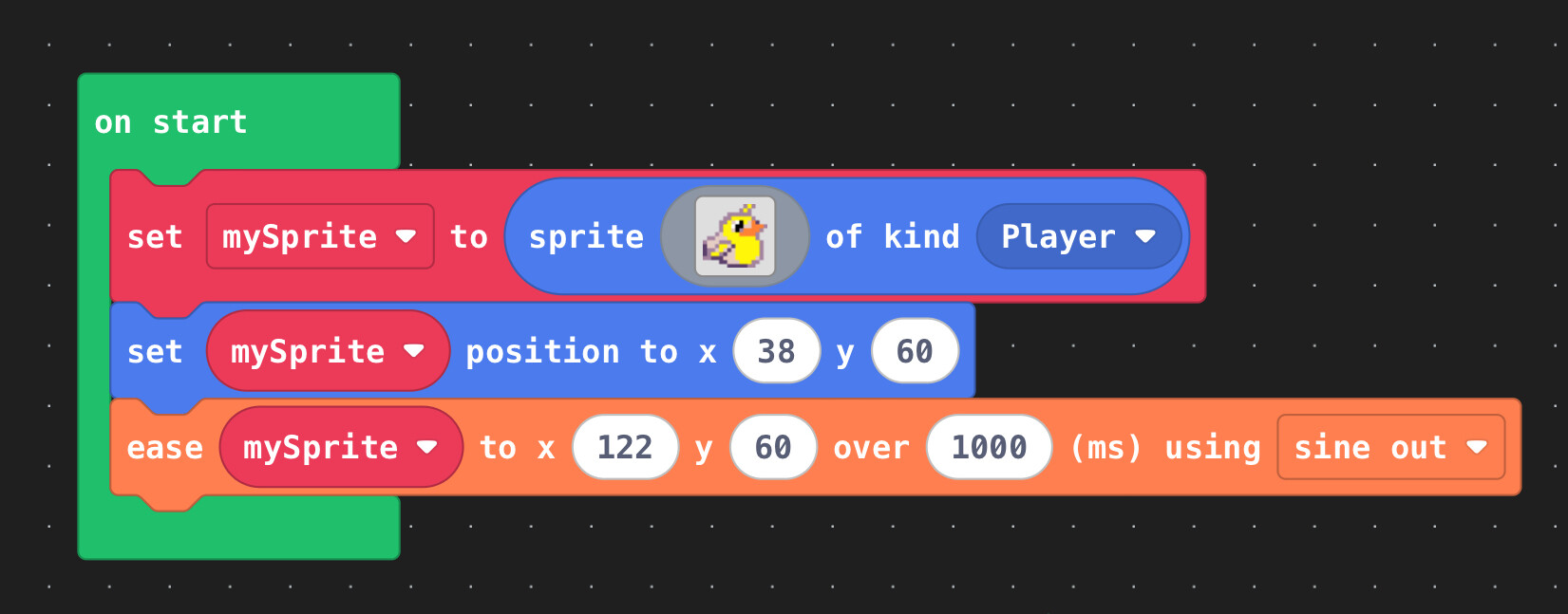
I strived to make the extension as accessible as possible, so that it’s simply a case of a “sprite moves from A to B” type block. So, in that sense, it helps with simple sprite movement, similar to that one block in @jwunderl’s sprite utils extension. Of course their also the twist of the actual easing to the location of your choice:

I have various easings, from sine, quad, quint, bounce, elastic, circular (my favourite), exponential, quart, and back.
Here are a few fun ones:
# Circular

# Elastic

# Bounce

And if you want to move your sprite relative to the sprites location, like, say, you want a sprite to dash, you can use the ease by dx and dy block!

Now, trust me, my example isn’t great, but you can do A LOT with this if you pair it with an animation, or like some killer move where the enemy flies in and… nevermind lol, getting ahead of myself.

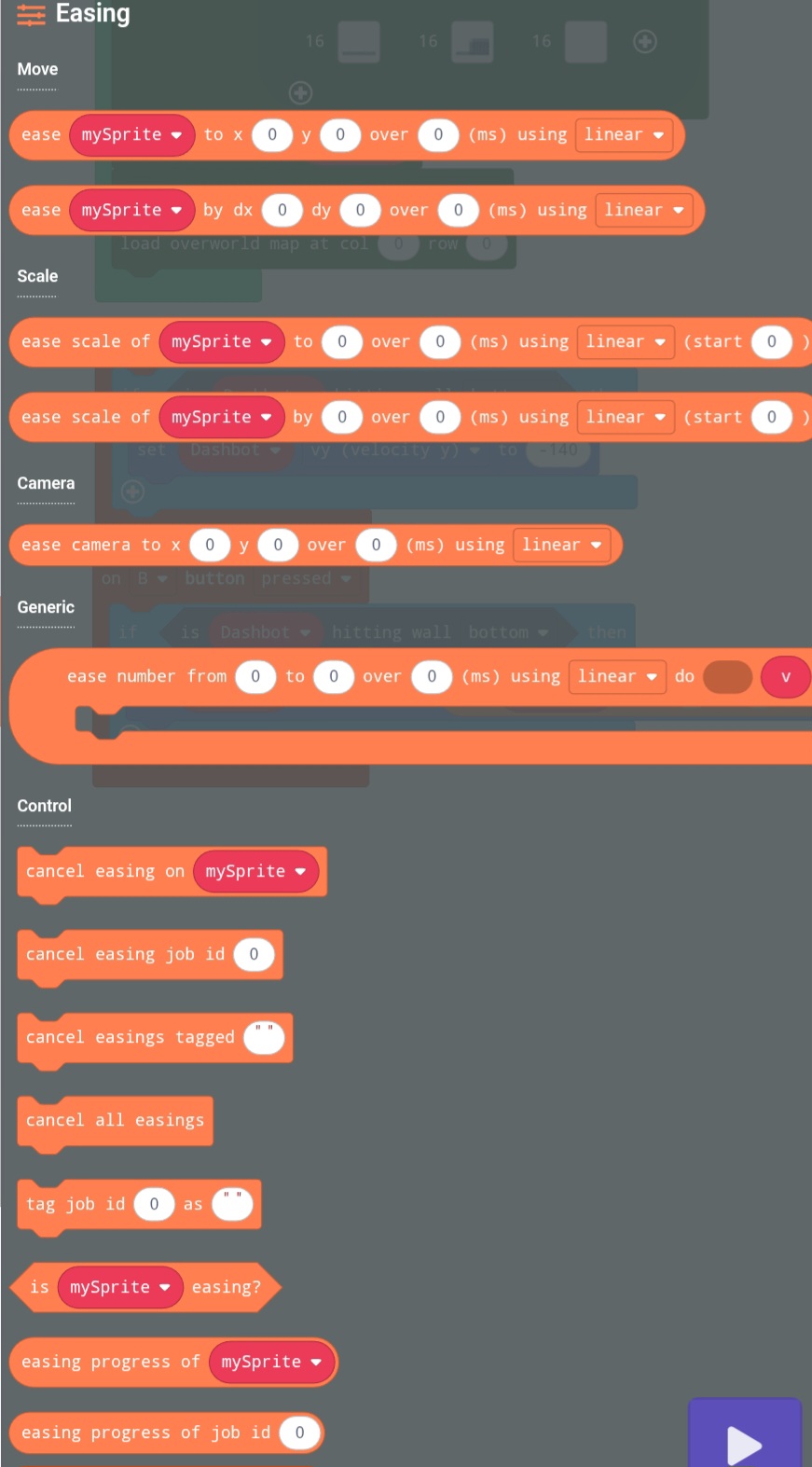
Those are the main two blocks, and the rest are intuitive enough, but the cancel easing blocks are very useful too, especially if you want a diving attack to be parried of deflected, you could cancel the easing and… bruh why am I giving you ideas again? Just use it for yourself, I think you’ll like it.
Another gif with me just goin crazy with easings:

---
### Author:  [@JtSpeedRun](https://forum.makecode.com/u/JtSpeedRun)
#### Post date: [September 5, 2025, 4:23pm UTC](https://forum.makecode.com/t/extension-arcade-easing-move-your-sprite-from-a-to-b-in-style/39077/2 "2025-09-05T16:23:59Z")
This is great! I see it being really useful in cutscenes and stuff like that in the future. I already have alot of projects that i’d like to implement this with! 🔥
Awsome work 👏
---
### Author:  [@PixelDoodle](https://forum.makecode.com/u/PixelDoodle)
#### Post date: [September 5, 2025, 6:18pm UTC](https://forum.makecode.com/t/extension-arcade-easing-move-your-sprite-from-a-to-b-in-style/39077/3 "2025-09-05T18:18:40Z")
really cool extension!
oohhh god the geometry dash brainrot is kicking in…
---
### Author:  [@Astronomicality22](https://forum.makecode.com/u/Astronomicality22)
#### Post date: [September 5, 2025, 10:46pm UTC](https://forum.makecode.com/t/extension-arcade-easing-move-your-sprite-from-a-to-b-in-style/39077/4 "2025-09-05T22:46:02Z")
FIRE IN THE HOLE:speaking\_head:🗣🗣🔥🔥🔥💯💯💯💯
---
### Author:  [@TheEarth](https://forum.makecode.com/u/TheEarth)
#### Post date: [September 5, 2025, 10:46pm UTC](https://forum.makecode.com/t/extension-arcade-easing-move-your-sprite-from-a-to-b-in-style/39077/5 "2025-09-05T22:46:10Z")
what do you mea
---
### Author:  [@PixelDoodle](https://forum.makecode.com/u/PixelDoodle)
#### Post date: [September 6, 2025, 2:04am UTC](https://forum.makecode.com/t/extension-arcade-easing-move-your-sprite-from-a-to-b-in-style/39077/6 "2025-09-06T02:04:34Z")
gd movement triggers
i know geometry dash didnt invent easings but its where i recognize them from
---
### Author:  [@ChimbroDaPro](https://forum.makecode.com/u/ChimbroDaPro)
#### Post date: [September 6, 2025, 11:23pm UTC](https://forum.makecode.com/t/extension-arcade-easing-move-your-sprite-from-a-to-b-in-style/39077/7 "2025-09-06T23:23:07Z")
SAME LOL! I got the easing idea straight from gd
---
### Author:  [@teaeat100](https://forum.makecode.com/u/teaeat100)
#### Post date: [September 7, 2025, 2:55am UTC](https://forum.makecode.com/t/extension-arcade-easing-move-your-sprite-from-a-to-b-in-style/39077/8 "2025-09-07T02:55:28Z")
I got a thing using this extension : [https://makecode.com/\_e8F3f8EU1Uc8](https://makecode.com/_e8F3f8EU1Uc8)
---
### Author:  [@Bilangus](https://forum.makecode.com/u/Bilangus)
#### Post date: [September 9, 2025, 4:51pm UTC](https://forum.makecode.com/t/extension-arcade-easing-move-your-sprite-from-a-to-b-in-style/39077/9 "2025-09-09T16:51:24Z")
Something happened. Guess we doin circles now!
---
### Author:  [@ChimbroDaPro](https://forum.makecode.com/u/ChimbroDaPro)
#### Post date: [September 10, 2025, 5:21pm UTC](https://forum.makecode.com/t/extension-arcade-easing-move-your-sprite-from-a-to-b-in-style/39077/10 "2025-09-10T17:21:45Z")
I’m updating it… it’s almost finished…
---
### Author:  [@Trr](https://forum.makecode.com/u/Trr)
#### Post date: [September 11, 2025, 4:48pm UTC](https://forum.makecode.com/t/extension-arcade-easing-move-your-sprite-from-a-to-b-in-style/39077/11 "2025-09-11T16:48:27Z")
Oh my god thank you so much
---
### Author:  [@teaeat100](https://forum.makecode.com/u/teaeat100)
#### Post date: [September 11, 2025, 4:50pm UTC](https://forum.makecode.com/t/extension-arcade-easing-move-your-sprite-from-a-to-b-in-style/39077/12 "2025-09-11T16:50:53Z")
How did this happen 😭
---
### Author:  [@not\_a\_lemon](https://forum.makecode.com/u/not_a_lemon)
#### Post date: [September 11, 2025, 4:57pm UTC](https://forum.makecode.com/t/extension-arcade-easing-move-your-sprite-from-a-to-b-in-style/39077/13 "2025-09-11T16:57:48Z")
Wow, that is so terrifying 😱 /s
---
### Author:  [@MeatballDev](https://forum.makecode.com/u/MeatballDev)
#### Post date: [September 16, 2025, 10:33pm UTC](https://forum.makecode.com/t/extension-arcade-easing-move-your-sprite-from-a-to-b-in-style/39077/14 "2025-09-16T22:33:01Z")
It wont work, in circles
---
### Author:  [@ChimbroDaPro](https://forum.makecode.com/u/ChimbroDaPro)
#### Post date: [September 17, 2025, 3:43pm UTC](https://forum.makecode.com/t/extension-arcade-easing-move-your-sprite-from-a-to-b-in-style/39077/15 "2025-09-17T15:43:11Z")
Just a sec… almosttttt…
---
### Author:  [@ChimbroDaPro](https://forum.makecode.com/u/ChimbroDaPro)
#### Post date: [September 24, 2025, 5:27pm UTC](https://forum.makecode.com/t/extension-arcade-easing-move-your-sprite-from-a-to-b-in-style/39077/16 "2025-09-24T17:27:41Z")
IT’S FINISHED, IT’S FINALLY COMPLETELY FINISHED, AFTER 1 MONTH! You can now ease anything. Absolutely anything. Tutorial incoming.
---
### Author:  [@TheEarth](https://forum.makecode.com/u/TheEarth)
#### Post date: [September 25, 2025, 12:20am UTC](https://forum.makecode.com/t/extension-arcade-easing-move-your-sprite-from-a-to-b-in-style/39077/17 "2025-09-25T00:20:17Z")
no it’s actually 19 days
---
### Author:  [@Astro](https://forum.makecode.com/u/Astro)
#### Post date: [September 26, 2025, 12:09am UTC](https://forum.makecode.com/t/extension-arcade-easing-move-your-sprite-from-a-to-b-in-style/39077/19 "2025-09-26T00:09:30Z")
can I ease tilemaps?
---
### Author:  [@TheEarth](https://forum.makecode.com/u/TheEarth)
#### Post date: [September 26, 2025, 12:09am UTC](https://forum.makecode.com/t/extension-arcade-easing-move-your-sprite-from-a-to-b-in-style/39077/20 "2025-09-26T00:09:31Z")
none taken
---
### Author:  [@ChimbroDaPro](https://forum.makecode.com/u/ChimbroDaPro)
#### Post date: [September 28, 2025, 2:55am UTC](https://forum.makecode.com/t/extension-arcade-easing-move-your-sprite-from-a-to-b-in-style/39077/21 "2025-09-28T02:55:15Z")
# Tutorial for Easing Extension v2.0.0!
Ok, so, as you can tell, A LOT has changed. We even had a super cursed “circle” block at some point (explanation of what the block was later on), but now, after so long, it’s ready! Let’s start with the blocks!

The update implements easing ID’s - you can cancel them, get their progress, tag them, _replay them_… and that’s how it works. Every time you create an easing, it has an ID. The number type blocks for position, scaling and camera do the easing, but also return the ID.
> **Sprite Movement**
>
> 
>
> Yeah this is the one we’ve already seen above. No differences, but I suppose it does it’s usual. Move a sprite from A to B with easing options. There’s another block to move the sprites relatively, based on its position, but it’s basically the the same.
>
> 
>
> As I said above, there’s an ID version which returns the ID of the easings so you can do a ton of stuff with it in the future.
> **Sprite Scaling**
>
> 
>
> Alright so this is a new block. You can now ease scaling as well! You can make all sorts of stuff with this, for example…
>
> 
>
> # A JUMPSCARE!
>
> So, uh, anyway… just like the movement block, all of this can be done relatively with a separate block. There’s also the ID version of the block, which you can use to uhhh… yeah, what I said above.
>
> 
>
> And here’s what it looks like just for the lols. You can set up what the scale starts as, which I think I forgot to say earlier.
> **Camera Easing**
>
> 
>
> This is also a new block! It’s a little bit buggy, might patch a few things later, but with this, you can ease the camera to a coordinate! You can also do really sick stuff with this, you could even do parallax easing if you mix it with _another easing block_…
>
> 
>
> I personally feel it’s very good if you want camera effects for cutscenes, and maybe it could work well mixed with sprite movement if you’re feeling innovative. Quick note: if the camera is following a sprite elsewhere in your project, that will fight manual centering, so turn off any follow behavior or be mindful that the follow will dominate. There’s obviously also the ID version, but it works exactly as mentioned above.
> **Generic Easing Function Creation**
>
> 
>
> This. This is the block that caused this update to take so long. If you want to predefine behaviors, use this block to register a named handler ahead of time; later you can call to run it. Put the value parameter in for the number in the block you wish to ease. If people use this extension, big projects would have like millions of these. It’s neat for reusable effects, so you can define how “rotate” or “transform” should behave once, then launch it with different ranges and durations. This block works best with other extensions. Oh yeah, and this was the super cursed circle block.
>
> Here are a few examples:
>
> 
>
> Here’s a fun one to implement rotation easing! I used [this extension](https://github.com/robo-technical-group/pxt-arcade-image-transform). Here’s the result:
>
> 
>
> Let’s try adding some [camera zoom](https://github.com/kiwiphoenix364/pxt-zoom) into the mix:
>
> 
>
> And here’s what we get as a result:
>
> 
>
> I could go on and on, but in any case, this is a really huge block. You can do anything with it. You can even put easings in the easing function and do really stupid stuff. This is by far the best block in the extension, so uh, have fun!
> **Easing ID and Tag Usage**
>
> Easing number blocks return easing IDs when you create them. Keep that ID if you want to cancel the effect or check its progress.
>
> 
>
> This block cancels a single easing by ID. Basic stuff.
>
> 
>
> This cancels all easings attached to a sprite (and yes, you can have more than one), and this:
>
> 
>
> This cancels all easings with a tag. This would be a good time to show the block to tag easings!
>
> 
>
> Just be aware that tagging an easing plays the easing. Finally there’s this block:
>
> 
>
> And this just nukes everything. Good if you want to crash out.
>
> Tagging is one of those small conveniences that becomes very useful in larger projects: when you create an easing you can optionally tag it (for example “intro” or “enemy-hit”) and then cancel or replay groups by tag instead of juggling lists of numbers (look at replay in the next dropdown).
>
> Aight I’m tired of taking pictures, I might just blitz through the last few of these.
>
> Querying is simple and helpful for logic: `is easing?` answers whether there’s any active easing on a sprite. `easing progress of ` or `easing progress of job id ` returns a 0 to 1 progress float (or -1 if nothing’s running), so you can drive other things off the easing state.
> **Easing Replayability**
>
> Replaying is the fun part, and it’s just lovely to use. This clones whatever easing you point it at and restarts it, giving you a new easing id (though unobtainable since you have the original). You can also replay em by tag. That will replay every easing with that tag; great for re-running an “intro” sequence when the player retries a level, like you could just name them all “intro” and boom! I made them create fresh easings so your old easing records stay for later use.
>
> Here’s a super fun example I made showcasing the replay blocks:
>
> 
>
> And now, here’s the result! Introducing the rolling duck! He’ll never stop rolling.
>
> 
Here’s a final example with me using most of the ver.2.0.0 features (except for camera stuff). It’s far from perfect, but here’s a random ultimate attack I made with Vortex throwing a… well, vortex… at scamma!

[Next page](https://forum.makecode.com/t/extension-arcade-easing-move-your-sprite-from-a-to-b-in-style/39077.md?page=2)