# \[Extension\] arcade-screen-transitions
**URL:** https://forum.makecode.com/t/extension-arcade-screen-transitions/23834
**Category:** Arcade
**Tags:** extension
**Created:** [November 1, 2023, 11:37pm UTC](https://forum.makecode.com/t/extension-arcade-screen-transitions/23834 "2023-11-01T23:37:21Z")
**Posts on this page:** 20
**Page:** 1
### Author:  [@richard](https://forum.makecode.com/u/richard)
#### Post date: [November 1, 2023, 11:37pm UTC](https://forum.makecode.com/t/extension-arcade-screen-transitions/23834/1 "2023-11-01T23:37:21Z")
# arcade-screen-transitions
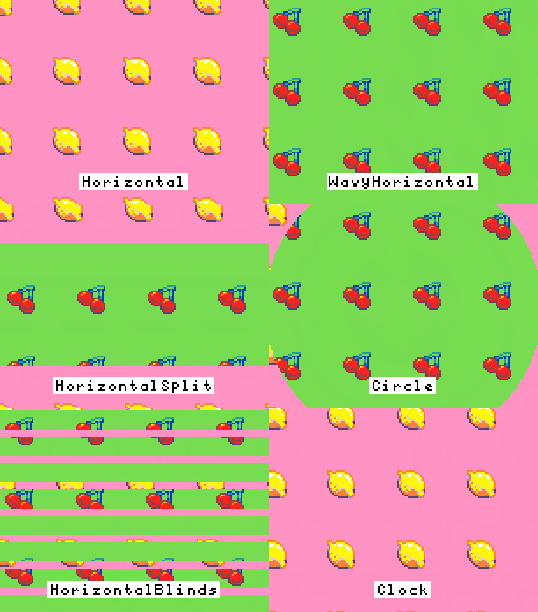
Hey folks!
I just finished up a brand new extension for Arcade: arcade-screen-transitions! You can find it here:
```auto
https://github.com/riknoll/arcade-screen-transitions
```
This extension allows you to apply transitions between screens. By transitions, I mean all of those fancy effects that you see in PowerPoint or old movies to ease between two different scenes. Here’s a demo project:
> **[screen-transition-demo1](https://arcade.makecode.com/S04393-06456-09228-87946)**
>
> Made with ❤️ in Microsoft MakeCode Arcade.
“But Richard, how can I transition between two screens if arcade only has one screen?” you may be asking. Well, yes, there is only one screen. This extension gets around that limitation by splitting the screen up by z-index. You can specify a cutoff z-index and screen 1 will include all of the sprites below that cutoff and screen 2 will have all of the sprites above it. When you start the screen effect, it will transition from the upper screen (screen 2) to the lower screen (screen 1).
Still confused? Well let’s take a look at an example program:

In this program ([share link](https://arcade.makecode.com/S24776-22475-42839-41729)), I create two sprites. The one named upperSprite has a z-index of 100, and the lowerSprite has the default z-index of 0. I then set the cutoff z-index to 50.
When the screen transition starts, you’ll see the sprite with the lower z-index disappear while the higher z-index sprite stays the same. That’s because the lower sprites is on the lower screen (it’s z-index is below 50) and the sprite with the higher z-index is on the upper screen. As the transition plays, the upper screen disappears and the lower screen takes over. It will stay this way until you press B, at which point both sprites will be visible again.
And here is another demo, this one does a _spooky_ transition when moving between rooms in a tilemap:
> **[screen-transition-demo3](https://arcade.makecode.com/S24496-97237-56961-49632)**
>
> Made with ❤️ in Microsoft MakeCode Arcade.
---
### Author:  [@richard](https://forum.makecode.com/u/richard)
#### Post date: [November 1, 2023, 11:40pm UTC](https://forum.makecode.com/t/extension-arcade-screen-transitions/23834/2 "2023-11-01T23:40:38Z")
In that cutoff z block, you might also notice the second z-index. Anything above that z-index will be ignored by the screen transition (e.g. HUD elements)
---
### Author:  [@goldtopaz](https://forum.makecode.com/u/goldtopaz)
#### Post date: [November 1, 2023, 11:43pm UTC](https://forum.makecode.com/t/extension-arcade-screen-transitions/23834/3 "2023-11-01T23:43:50Z")
I cant wait to use this for my hyper the dragon game for level transitions since i finally got that lag thing fixed!
---
### Author:  [@DangerNoodle](https://forum.makecode.com/u/DangerNoodle)
#### Post date: [November 1, 2023, 11:43pm UTC](https://forum.makecode.com/t/extension-arcade-screen-transitions/23834/4 "2023-11-01T23:43:51Z")
This is… Awesome.
---
### Author:  [@Mega0star01](https://forum.makecode.com/u/Mega0star01)
#### Post date: [November 1, 2023, 11:43pm UTC](https://forum.makecode.com/t/extension-arcade-screen-transitions/23834/5 "2023-11-01T23:43:52Z")
cool extension
---
### Author:  [@BlastBoxGames](https://forum.makecode.com/u/BlastBoxGames)
#### Post date: [November 2, 2023, 4:01pm UTC](https://forum.makecode.com/t/extension-arcade-screen-transitions/23834/6 "2023-11-02T16:01:36Z")
Wow this is Amazing This may be the second best extension second to mini menu
I was wondering if this works with the background scroll extension?
---
### Author:  [@DangerNoodle](https://forum.makecode.com/u/DangerNoodle)
#### Post date: [November 2, 2023, 4:13pm UTC](https://forum.makecode.com/t/extension-arcade-screen-transitions/23834/7 "2023-11-02T16:13:31Z")
When will he stop hyping his game 💀
---
### Author:  [@goldtopaz](https://forum.makecode.com/u/goldtopaz)
#### Post date: [November 2, 2023, 4:25pm UTC](https://forum.makecode.com/t/extension-arcade-screen-transitions/23834/8 "2023-11-02T16:25:24Z")
hey conguy did it a lot for his game so why can’t I? 😥
---
### Author:  [@Blobbey](https://forum.makecode.com/u/Blobbey)
#### Post date: [November 2, 2023, 5:40pm UTC](https://forum.makecode.com/t/extension-arcade-screen-transitions/23834/9 "2023-11-02T17:40:14Z")
This is so cool!!! I guess this makes my Loading extension a bit less useful though. 😕
---
### Author:  [@Luke](https://forum.makecode.com/u/Luke)
#### Post date: [November 2, 2023, 5:40pm UTC](https://forum.makecode.com/t/extension-arcade-screen-transitions/23834/10 "2023-11-02T17:40:24Z")
This would be great for a pokemon style game!
---
### Author:  [@Sarge](https://forum.makecode.com/u/Sarge)
#### Post date: [November 2, 2023, 10:15pm UTC](https://forum.makecode.com/t/extension-arcade-screen-transitions/23834/11 "2023-11-02T22:15:39Z")
Goldtopaz try not to mention Hyper the dragon on an unrelated post challenge
(level: impossible)
---
### Author:  [@BlastBoxGames](https://forum.makecode.com/u/BlastBoxGames)
#### Post date: [November 6, 2023, 6:58pm UTC](https://forum.makecode.com/t/extension-arcade-screen-transitions/23834/12 "2023-11-06T18:58:48Z")
Not as much as you
---
### Author:  [@goldtopaz](https://forum.makecode.com/u/goldtopaz)
#### Post date: [November 6, 2023, 7:44pm UTC](https://forum.makecode.com/t/extension-arcade-screen-transitions/23834/13 "2023-11-06T19:44:42Z")
really dog
---
### Author:  [@TheGreenArtist](https://forum.makecode.com/u/TheGreenArtist)
#### Post date: [November 6, 2023, 7:51pm UTC](https://forum.makecode.com/t/extension-arcade-screen-transitions/23834/14 "2023-11-06T19:51:00Z")
@BlastBoxGames is not wrong…
---
### Author:  [@ChimbroDaPro](https://forum.makecode.com/u/ChimbroDaPro)
#### Post date: [November 6, 2023, 7:59pm UTC](https://forum.makecode.com/t/extension-arcade-screen-transitions/23834/15 "2023-11-06T19:59:01Z")
That’s true.
---
### Author:  [@Brainstorm\_Studios](https://forum.makecode.com/u/Brainstorm_Studios)
#### Post date: [November 27, 2023, 6:18pm UTC](https://forum.makecode.com/t/extension-arcade-screen-transitions/23834/16 "2023-11-27T18:18:14Z")
hey rick, i need some help with this. how on earth does it work?
---
### Author:  [@richard](https://forum.makecode.com/u/richard)
#### Post date: [November 27, 2023, 6:33pm UTC](https://forum.makecode.com/t/extension-arcade-screen-transitions/23834/17 "2023-11-27T18:33:19Z")
do you mean how does it work as in “how do I use it?” or “how does the extension work?”
(also, it’s _richard_ not rick 🙂 )
---
### Author:  [@Brainstorm\_Studios](https://forum.makecode.com/u/Brainstorm_Studios)
#### Post date: [November 27, 2023, 6:39pm UTC](https://forum.makecode.com/t/extension-arcade-screen-transitions/23834/18 "2023-11-27T18:39:00Z")
i have nicknames for people i trust, so sue me. anyway, i mean how do i use it?
---
### Author:  [@richard](https://forum.makecode.com/u/richard)
#### Post date: [November 27, 2023, 7:03pm UTC](https://forum.makecode.com/t/extension-arcade-screen-transitions/23834/19 "2023-11-27T19:03:15Z")
well, I hope you’re ready for some ms paint diagrams!
you probably know that everything in arcade has a z-index that controls when it gets drawn to the screen. You can imagine that all sprites are stacked on on top of each other in a giant tower, with the high z sprites at the top and the low z sprites at the bottom.
The way this extension works is by taking that sprite tower and slicing it in half horizontally; all of the sprites below the slice are drawn on one screen and all of the sprites above the slice are drawn on another:

Now that we have all of our sprites in two screens, we can transition between them! The transition always goes from the upper screen to the lower screen. Like this:

(red is the upper screen, blue is the lower screen)
---
### Author:  [@richard](https://forum.makecode.com/u/richard)
#### Post date: [November 27, 2023, 7:09pm UTC](https://forum.makecode.com/t/extension-arcade-screen-transitions/23834/20 "2023-11-27T19:09:14Z")
Now, with that in mind, let’s look at a practical example! Let’s say I have a platformer game and at the end of the level I want to transition from the level to a high-score screen. For this, I would:
1. Create sprites for the high score screen at a low z-index. If I’m using a tilemap, I’d want them to be at a z-index less than 0 because the tilemap is at 0, so let’s say they are all at a z-index of -2
2. Play the screen transition with the cutoff at -1. This will transition the screen from the platformer level to the high score screen below
3. After the transition finishes, destroy all of the sprites for the platformer level
[Next page](https://forum.makecode.com/t/extension-arcade-screen-transitions/23834.md?page=2)