# \[Feedback\] Help the MakeCode team out!
**URL:** https://forum.makecode.com/t/feedback-help-the-makecode-team-out/4173
**Category:** Arcade
**Created:** [October 29, 2020, 11:37pm UTC](https://forum.makecode.com/t/feedback-help-the-makecode-team-out/4173 "2020-10-29T23:37:56Z")
**Posts on this page:** 12
**Page:** 1
### Author:  [@shakao](https://forum.makecode.com/u/shakao)
#### Post date: [October 29, 2020, 11:37pm UTC](https://forum.makecode.com/t/feedback-help-the-makecode-team-out/4173/1 "2020-10-29T23:37:56Z")
Hi folks,
You all are some of the most advanced MakeCode users; we want to hear what you need from us! Are there features you really want? Problems with the site that have made your life difficult? Help us out by taking [this anonymous survey](https://forms.office.com/Pages/ResponsePage.aspx?id=v4j5cvGGr0GRqy180BHbRwCR4NjxcfdOtFyUg9uownpUOTZQVU4zU1FZODA5RVU3VVhUUU5NNERMVi4u).
Your responses will help us make decisions that improve MakeCode. Let your voice be heard! 🙂
## [\> Fill out the survey here! \<](https://forms.office.com/Pages/ResponsePage.aspx?id=v4j5cvGGr0GRqy180BHbRwCR4NjxcfdOtFyUg9uownpUOTZQVU4zU1FZODA5RVU3VVhUUU5NNERMVi4u)
---
### Author:  [@shakao](https://forum.makecode.com/u/shakao)
#### Post date: [October 29, 2020, 11:38pm UTC](https://forum.makecode.com/t/feedback-help-the-makecode-team-out/4173/2 "2020-10-29T23:38:40Z")
---
### Author:  [@jacob\_c](https://forum.makecode.com/u/jacob_c)
#### Post date: [November 24, 2020, 11:06pm UTC](https://forum.makecode.com/t/feedback-help-the-makecode-team-out/4173/3 "2020-11-24T23:06:47Z")
@shakao how’d the survey go? Did you guys learn anything?
I’d be interested in hearing any kind of summary / takeaways that popped out.
---
### Author:  [@shakao](https://forum.makecode.com/u/shakao)
#### Post date: [November 25, 2020, 2:53am UTC](https://forum.makecode.com/t/feedback-help-the-makecode-team-out/4173/4 "2020-11-25T02:53:57Z")
Haha yeah, a lot of super useful suggestions (everyone wants flip/rotate for the sprite editor!) and good feedback in general. Let me double-check with about sharing results–I think it should be fine!–and I’ll try to do a summary of the most interesting bits sometime next week.
---
### Author:  [@Colethewolf](https://forum.makecode.com/u/Colethewolf)
#### Post date: [November 25, 2020, 3:29am UTC](https://forum.makecode.com/t/feedback-help-the-makecode-team-out/4173/5 "2020-11-25T03:29:45Z")
im done with mine
---
### Author:  [@cosmoscowboy](https://forum.makecode.com/u/cosmoscowboy)
#### Post date: [November 26, 2020, 2:03am UTC](https://forum.makecode.com/t/feedback-help-the-makecode-team-out/4173/6 "2020-11-26T02:03:04Z")
> [@shakao](#):
>
> everyone wants flip/rotate for the sprite editor!
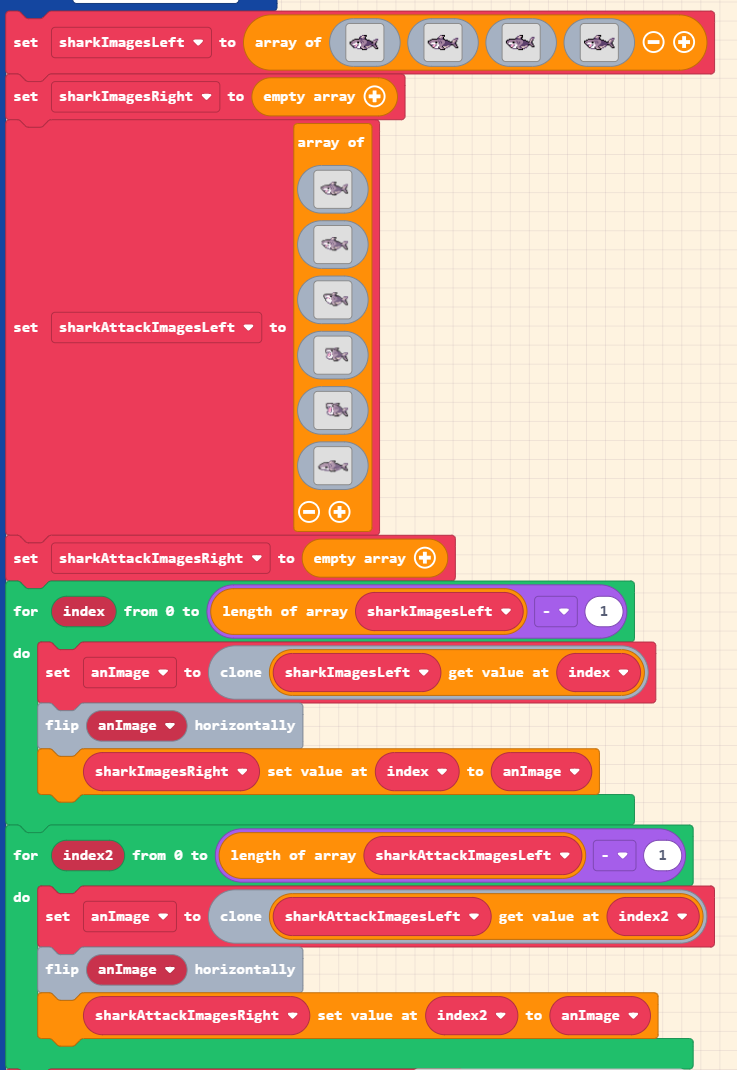
Rotating would be nice. For flipping the images of a sprite animation (where the image is only facing one way), I flip the images manually and add them to another array. 👍
---
### Author:  [@GameGod](https://forum.makecode.com/u/GameGod)
#### Post date: [November 26, 2020, 5:29pm UTC](https://forum.makecode.com/t/feedback-help-the-makecode-team-out/4173/7 "2020-11-26T17:29:34Z")
I made a simple program for rotation, here is the post it is in.
> [@nOw HiRiNg](https://forum.makecode.com/t/now-hiring/4010/11):
>
> Press A! Make sure to view the code.
Here is the code.
> **[Rotation](https://arcade.makecode.com/13246-44196-60161-70181)**
>
> Made with ❤️ in Microsoft MakeCode Arcade.
---
### Author:  [@cosmoscowboy](https://forum.makecode.com/u/cosmoscowboy)
#### Post date: [November 27, 2020, 7:18pm UTC](https://forum.makecode.com/t/feedback-help-the-makecode-team-out/4173/8 "2020-11-27T19:18:50Z")
That would make a nice extension, and an image block. One thing I noticed with the code, you are assuming that the image is 16x16 pixels. I also don’t see that there is an Image block for getting the width and height of an image.
---
### Author:  [@GameGod](https://forum.makecode.com/u/GameGod)
#### Post date: [November 27, 2020, 7:59pm UTC](https://forum.makecode.com/t/feedback-help-the-makecode-team-out/4173/9 "2020-11-27T19:59:46Z")
There is a good extension I use for this -
### [robo-technical-group/pxt-arcade-image-transform](https://github.com/robo-technical-group/pxt-arcade-image-transform)
> [@Having a Blast with MakeCode Arcade!](https://forum.makecode.com/t/having-a-blast-with-makecode-arcade/59/6):
>
> I’ve taken inspiration from @ChaseMor and created an extension for some image transformations (scaling and rotation). You can use the extension both in the blocks interface and in the JavaScript interface. The extension adds blocks under the Advanced section. I’ve been looking forward to creating extensions for a while now, just to see how that process works. It’s stunningly simple, given the excellent Monaco code editor and GitHub integration that are built into PXT. You really don’t even need…
---
### Author:  [@cosmoscowboy](https://forum.makecode.com/u/cosmoscowboy)
#### Post date: [November 27, 2020, 8:18pm UTC](https://forum.makecode.com/t/feedback-help-the-makecode-team-out/4173/10 "2020-11-27T20:18:48Z")
I did use that extension for some time; it is quite good (Alex has designed it well). The only drawback with using something like this, is that it uses up memory each time just to rotate the image. In the end I use a drawing tool like [Paint.NET](http://Paint.NET), save the color palette of Arcade there, draw the image once, rotate it in the tool and use Richard’s extension for getting the images. ([https://riknoll.github.io/pxt-arcade-asset-tool/](https://riknoll.github.io/pxt-arcade-asset-tool/))
---
### Author:  [@AlexK](https://forum.makecode.com/u/AlexK)
#### Post date: [November 27, 2020, 10:03pm UTC](https://forum.makecode.com/t/feedback-help-the-makecode-team-out/4173/11 "2020-11-27T22:03:51Z")
Yeah; my extension is good for games where you need 360 degrees of rotation. For simpler needs where you only need, say, the four cardinal directions, it’s much better to create static assets, especially when running the games on hardware.
---
### Author:  [@ChimbroDaPro](https://forum.makecode.com/u/ChimbroDaPro)
#### Post date: [February 5, 2024, 5:07pm UTC](https://forum.makecode.com/t/feedback-help-the-makecode-team-out/4173/12 "2024-02-05T17:07:51Z")
I submitted something, cuz it’s still open 😄