# Hardware Multiplayer (game)
**URL:** https://forum.makecode.com/t/hardware-multiplayer-game/132
**Category:** Arcade
**Tags:** game
**Created:** [April 29, 2019, 5:42pm UTC](https://forum.makecode.com/t/hardware-multiplayer-game/132 "2019-04-29T17:42:25Z")
**Posts on this page:** 20
**Page:** 1
### Author:  [@richard](https://forum.makecode.com/u/richard)
#### Post date: [April 29, 2019, 5:42pm UTC](https://forum.makecode.com/t/hardware-multiplayer-game/132/1 "2019-04-29T17:42:25Z")
Hey folks,
For those lucky enough to get their hands on some Arcade hardware (by GHI or Kittenbot) here’s a sample that shows how to do multiplayer between devices! To play the game, load the UF2 on two devices and connect them via the headphone jack.
> **[jacdac-multiplayer-demo-final](https://arcade.makecode.com/54386-28508-45239-82108)**
>
> Made with ❤️ in MakeCode Arcade.
Please note that the APIs I use here are subject to change. Also, this game cannot be played in the simulator right now (hardware only).
Want to learn more about how it works? Check out JACDAC at [https://jacdac.org/](https://jacdac.org/) and our recent blog post [https://makecode.com/blog/ozette/ozette](https://makecode.com/blog/ozette/ozette)
---
### Author:  [@bborncr](https://forum.makecode.com/u/bborncr)
#### Post date: [April 30, 2019, 3:48pm UTC](https://forum.makecode.com/t/hardware-multiplayer-game/132/2 "2019-04-30T15:48:56Z")
Great! Looking forward to an Arduino library.
---
### Author:  [@frank\_schmidt](https://forum.makecode.com/u/frank_schmidt)
#### Post date: [April 30, 2019, 7:42pm UTC](https://forum.makecode.com/t/hardware-multiplayer-game/132/3 "2019-04-30T19:42:03Z")
I’ve got the two hardware devices. MeowBit and BrainPad, I clicked on your link to the MakeCode explanation about using jacdac. I searched for a cable on Google: buy headphone jack to connect two jacdac devices…I clicked your “share” link and get a message “waiting for connection”. I’m trying to put this together so as to explain to parents or teachers how to do mulitplayer. I don’t have hardware that looks anything like what is in the picture.

---
### Author:  [@richard](https://forum.makecode.com/u/richard)
#### Post date: [April 30, 2019, 8:12pm UTC](https://forum.makecode.com/t/hardware-multiplayer-game/132/4 "2019-04-30T20:12:54Z")
All you need is a cable with headphone jacks on each end (3.5 mm stereo jacks) and the two boards (meowbit and brainpad should work fine). It’s the same kind of cable you would normally use when connecting to speakers.
The game won’t start until you connect the two devices with that cable
---
### Author:  [@Gus](https://forum.makecode.com/u/Gus)
#### Post date: [May 1, 2019, 9:02am UTC](https://forum.makecode.com/t/hardware-multiplayer-game/132/5 "2019-05-01T09:02:31Z")
An example [https://www.amazon.com/dp/B00NO73Q84/ref=cm\_sw\_r\_cp\_awdb\_t1\_L.vYCb1S5WS8M](https://www.amazon.com/dp/B00NO73Q84/ref=cm_sw_r_cp_awdb_t1_L.vYCb1S5WS8M)
---
### Author:  [@frank\_schmidt](https://forum.makecode.com/u/frank_schmidt)
#### Post date: [May 1, 2019, 12:10pm UTC](https://forum.makecode.com/t/hardware-multiplayer-game/132/6 "2019-05-01T12:10:17Z")
I see these cables on WalMart web site for about $4. Has anyone actually used multiplayer ? I have searched for Google answers to “jacdac multiplayer” , web, video or images. Nothing. I have searched for these terms on YouTube, nothing. You would think that if multiplayer was possible, someone would have made a video of it. Any links to see what it would look like or if it has been done with Arcade? Thax
. ps, I have sent a request to Kittenbot if they have a battery available for the MeowBit. Since I have not seen 2 people playing multiplayer, I would have to assume that the consoles are NOT connected to computers while playing (but maybe they are) so that implies that battery power is necessary. I can plug 5v into Meowbit with a micro USB cable but don’t know if that would interfere with the system. I do have 3 AAA batts. on my BrainPad Arcade now.
This might work, I don’t have any proof that it doesn’t. Both consoles have the same game, Pong 2 player on them. Pressing the “A” button on both boards starts the game. I don’t know that one player plays against the other or how that works, Moving an up arrow on one board and hitting the ball does not alter the ball on the other board-as it would in a real ping pong game. I mean , here, there are two separate balls and 2 sets of paddles. So I would say that I don’t know enough about gaming to know what to expect. An interesting side note is that one console seems to be sending some type of signal to the other or to the other’s power connection because the 5 v. battery pack for the Meowbit does not go dormant after 15-30 seconds as it does if there is no cable connection to another board. The pink battery pack stays “on” while the 3.5mm cable is connected from BrainPad to Meowbit…for what that’s worth. I’ll have to find two teens to test this
 out to tell me more about it.
---
### Author:  [@Gus](https://forum.makecode.com/u/Gus)
#### Post date: [May 1, 2019, 12:26pm UTC](https://forum.makecode.com/t/hardware-multiplayer-game/132/7 "2019-05-01T12:26:27Z")
This do not need a PC after the game is loaded. This is a new feature that is just coming out. You will be making the first multiplayer video 🙂
---
### Author:  [@frank\_schmidt](https://forum.makecode.com/u/frank_schmidt)
#### Post date: [May 1, 2019, 12:30pm UTC](https://forum.makecode.com/t/hardware-multiplayer-game/132/8 "2019-05-01T12:30:29Z")
I have a request into Jumping Yang (Colorbit, 51bit/colorbit extension on github) which is a 3 person conversation asking if this has been done in China with 2 MewoBits. They may have shown how to do it. I see a jacdac extension in makecode arcade. Wondering if that is necessary or ‘built-in’ to the program ? I think I saw a double player ‘pong’ game.
---
### Author:  [@frank\_schmidt](https://forum.makecode.com/u/frank_schmidt)
#### Post date: [May 1, 2019, 2:36pm UTC](https://forum.makecode.com/t/hardware-multiplayer-game/132/9 "2019-05-01T14:36:44Z")
 Well, here goes.
---
### Author:  [@frank\_schmidt](https://forum.makecode.com/u/frank_schmidt)
#### Post date: [May 1, 2019, 3:01pm UTC](https://forum.makecode.com/t/hardware-multiplayer-game/132/10 "2019-05-01T15:01:00Z")
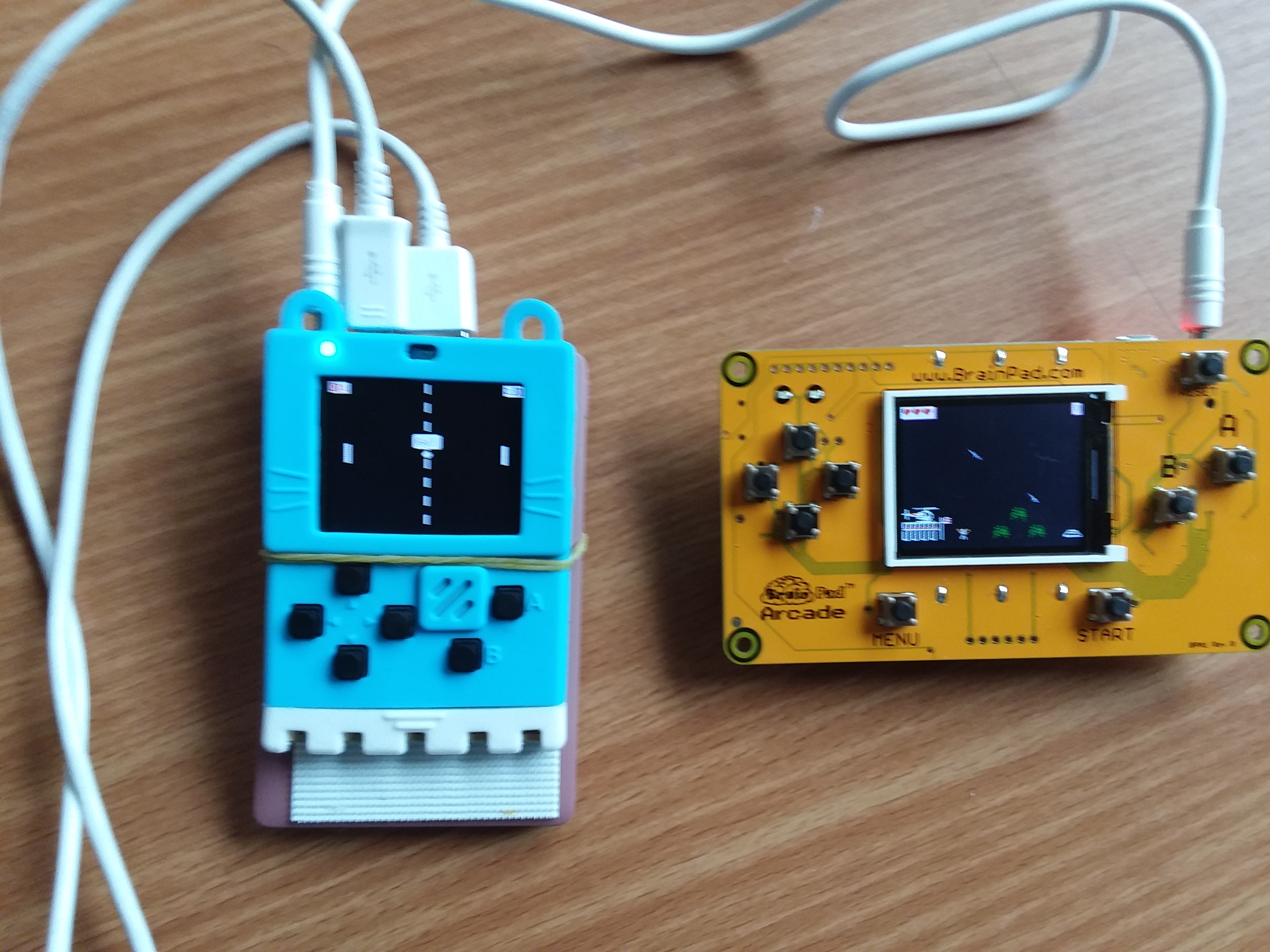 I think you have to load the multiplayer game on both boards individually. ie, the game does not transfer from one console to the other. …so far.
I switched from Pong pvp to Space destroyer linked above and controlling one console does control sprites on the other. So at this point multiplayer does appear to work, at least to that extent. Don’t know why Pong 2 player did not but will look in to that. The game does have to be uploaded to each console separately.
---
### Author:  [@AlexK](https://forum.makecode.com/u/AlexK)
#### Post date: [May 1, 2019, 9:21pm UTC](https://forum.makecode.com/t/hardware-multiplayer-game/132/11 "2019-05-01T21:21:44Z")
I did not include the jacdac drivers in the Pong PvP game, as they weren’t yet ready when I wrote the game. So, Pong PvP via jacdac probably won’t work until they are added.
---
### Author:  [@richard](https://forum.makecode.com/u/richard)
#### Post date: [July 17, 2019, 11:29pm UTC](https://forum.makecode.com/t/hardware-multiplayer-game/132/12 "2019-07-17T23:29:33Z")
Here is the fixed version with the new APIs: [https://makecode.com/\_P5uAaDJjzcM0](https://makecode.com/_P5uAaDJjzcM0)
---
### Author:  [@frank\_schmidt](https://forum.makecode.com/u/frank_schmidt)
#### Post date: [July 26, 2019, 10:47pm UTC](https://forum.makecode.com/t/hardware-multiplayer-game/132/13 "2019-07-26T22:47:27Z")
This “fixed” version does not work for me. in Edit, 2 errors in main.ts.
---
### Author:  [@richard](https://forum.makecode.com/u/richard)
#### Post date: [July 26, 2019, 11:36pm UTC](https://forum.makecode.com/t/hardware-multiplayer-game/132/14 "2019-07-26T23:36:30Z")
@frank_schmidt you need to use [arcade.makecode.com/beta](http://arcade.makecode.com/beta)
---
### Author:  [@frank\_schmidt](https://forum.makecode.com/u/frank_schmidt)
#### Post date: [July 27, 2019, 2:24am UTC](https://forum.makecode.com/t/hardware-multiplayer-game/132/15 "2019-07-27T02:24:41Z")
ok,thx.
---
### Author:  [@ladyada](https://forum.makecode.com/u/ladyada)
#### Post date: [July 28, 2019, 7:08pm UTC](https://forum.makecode.com/t/hardware-multiplayer-game/132/16 "2019-07-28T19:08:15Z")
hiya rik, im testing jacdac with the pygamer/pybadge using a USB microb-microb cable, and the old version UF2 ya sent me from June 12 works, but not the latest above. i can see pulses leaving/tx’ing from each board when i disconnect the cable but they dont see each other. im running the bootloader 3.7 for both, dya have any debugging recommendations? 🙂
---
### Author:  [@mmoskal](https://forum.makecode.com/u/mmoskal)
#### Post date: [July 28, 2019, 7:36pm UTC](https://forum.makecode.com/t/hardware-multiplayer-game/132/17 "2019-07-28T19:36:36Z")
When devices are connected what’s the analog voltage of the line when idle?
---
### Author:  [@ladyada](https://forum.makecode.com/u/ladyada)
#### Post date: [July 28, 2019, 7:46pm UTC](https://forum.makecode.com/t/hardware-multiplayer-game/132/18 "2019-07-28T19:46:06Z")
they’re not analog for sure, its digital, i see pulses. one bigger pulse then a delay, then a stream
(i tried with both removing the D13 LED and with the LED attached. on the older UF2 it works both ways. on the newer UF2, does not work either way)
---
### Author:  [@ladyada](https://forum.makecode.com/u/ladyada)
#### Post date: [July 28, 2019, 7:53pm UTC](https://forum.makecode.com/t/hardware-multiplayer-game/132/19 "2019-07-28T19:53:27Z")
lemme see if i can get a scope trace for ya
---
### Author:  [@mmoskal](https://forum.makecode.com/u/mmoskal)
#### Post date: [July 28, 2019, 7:59pm UTC](https://forum.makecode.com/t/hardware-multiplayer-game/132/20 "2019-07-28T19:59:36Z")
Oh. The only thing taken from bootloader should be the JACK TX pin. You can compare what you get in [https://microsoft.github.io/uf2/patcher/](https://microsoft.github.io/uf2/patcher/) for both bootloaders (just drop current.uf2 in there)
[Next page](https://forum.makecode.com/t/hardware-multiplayer-game/132.md?page=2)