# Help Makecode Arcade
**URL:** https://forum.makecode.com/t/help-makecode-arcade/44743
**Category:** Help
**Created:** [July 1, 2026, 11:43pm UTC](https://forum.makecode.com/t/help-makecode-arcade/44743 "2026-07-01T23:43:18Z")
**Posts on this page:** 20
**Page:** 1
### Author:  [@Lissa91](https://forum.makecode.com/u/Lissa91)
#### Post date: [July 1, 2026, 11:43pm UTC](https://forum.makecode.com/t/help-makecode-arcade/44743/1 "2026-07-01T23:43:18Z")
We have just purchased kitronik arcade and was hoping to use them as a fun activity - but because our school has blocked USB ports we are unable to send code to the microbit -
I can use the standard makecode to transfer programs but for some reason the arcade version comes up saying we are read only. We cannot even use the bluetooth setting - anyone able to give advice we would be very grateful
---
### Author:  [@MeatballDev](https://forum.makecode.com/u/MeatballDev)
#### Post date: [July 1, 2026, 11:51pm UTC](https://forum.makecode.com/t/help-makecode-arcade/44743/2 "2026-07-01T23:51:27Z")
First of all why did your school ban USB Ports
Second of all how is that even possible
If they did then it’s impossible to transfer the files
---
### Author:  [@RobbyZero](https://forum.makecode.com/u/RobbyZero)
#### Post date: [July 2, 2026, 5:55pm UTC](https://forum.makecode.com/t/help-makecode-arcade/44743/3 "2026-07-02T17:55:42Z")
Many schools ban USB ports to prevent students from bypassing administrative restrictions.
You could try however using a personal computer and downloading all of their projects onto that to put into the kitronik.
---
### Author:  [@WoofWoof](https://forum.makecode.com/u/WoofWoof)
#### Post date: [July 3, 2026, 4:00pm UTC](https://forum.makecode.com/t/help-makecode-arcade/44743/4 "2026-07-03T16:00:25Z")
If you are a teacher then you should be able to contact admin to get this ability unblocked. Since the micro:bit version works fine, this suggests that arcade specifically has been blocked (or vice versa, micro:bit unblocked) and therefore likely can be unblocked by admin. You just need to contact whoever manages the school devices.
---
### Author:  [@Lissa91](https://forum.makecode.com/u/Lissa91)
#### Post date: [July 4, 2026, 6:37pm UTC](https://forum.makecode.com/t/help-makecode-arcade/44743/5 "2026-07-04T18:37:50Z")
Thanks our Network Manager was the one suggesting putting comment here to see if anyone knows why it is happening - I guess we’ll keep looking as there must be a fix for it - we cannot be the only school experiencing this!
---
### Author:  [@AlexK](https://forum.makecode.com/u/AlexK)
#### Post date: [July 4, 2026, 6:40pm UTC](https://forum.makecode.com/t/help-makecode-arcade/44743/6 "2026-07-04T18:40:29Z")
This might be helpful.
[Reachable MakeCode domains](https://arcade.makecode.com/domains)
---
### Author:  [@Lissa91](https://forum.makecode.com/u/Lissa91)
#### Post date: [July 5, 2026, 11:10pm UTC](https://forum.makecode.com/t/help-makecode-arcade/44743/7 "2026-07-05T23:10:46Z")
We can access Makecode Arcade - but as the files save to downloads and then you drag onto micro:bit - this bit seems locked - we receive an error saying the microbit is write protected.
The normal makecode microbit site save straight to microbit and this works as long as we ignore the encryption error that appears when we plug in microbit.
Do you know if we can bypass the saving to download or turn off the write protection?
---
### Author:  [@AlexK](https://forum.makecode.com/u/AlexK)
#### Post date: [July 5, 2026, 11:17pm UTC](https://forum.makecode.com/t/help-makecode-arcade/44743/8 "2026-07-05T23:17:17Z")
Is Arcade creating a .hex file or a .png file when you select the **Download** button?
---
### Author:  [@Lissa91](https://forum.makecode.com/u/Lissa91)
#### Post date: [July 6, 2026, 5:20pm UTC](https://forum.makecode.com/t/help-makecode-arcade/44743/9 "2026-07-06T17:20:35Z")
Hex files
---
### Author:  [@AlexK](https://forum.makecode.com/u/AlexK)
#### Post date: [July 6, 2026, 5:38pm UTC](https://forum.makecode.com/t/help-makecode-arcade/44743/10 "2026-07-06T17:38:14Z")
IIRC, that is the expected behavior for Arcade. Interesting, though, that the micro:bit is mounted read only on your systems. That wouldn’t have anything to do with Arcade; that’s something for your systems admins to sort out. It sounds like it has to do with the permissions that you all have to USB drives.
@richard Can you take a look at this and, if it’s not you, mind pinging the micro:bit expert on the team to see if there is a workaround? 😃
---
### Author:  [@richard](https://forum.makecode.com/u/richard)
#### Post date: [July 6, 2026, 6:02pm UTC](https://forum.makecode.com/t/help-makecode-arcade/44743/11 "2026-07-06T18:02:57Z")
we don’t use the same webusb stack in arcade as we do in microbit. as such, we’ve never supported flashing the microbit from the arcade editor over webusb. it’s always drag and drop.
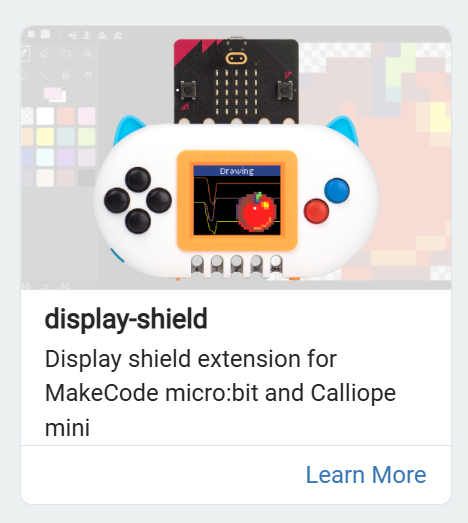
this isn’t an ideal fix since it doesn’t have all the capabilities of the full arcade editor, but @Lissa91 in the microbit editor you can use the display-shield extension to draw to the screen:
i’ve opened an issue for this in pxt-arcade:
>
>
> we don't support webusb for microbits in arcade. we should include dapjs and dyn…amically switch to it when a microbit is connected.
>
> some schools have usb ports disabled as reported here:
>
> https://forum.makecode.com/t/help-makecode-arcade/44743/7
in the meantime, i’ll see how hard it is for me to make you a little webapp that lets you flash arcade hex files to the board
---
### Author:  [@richard](https://forum.makecode.com/u/richard)
#### Post date: [July 7, 2026, 8:45pm UTC](https://forum.makecode.com/t/help-makecode-arcade/44743/12 "2026-07-07T20:45:17Z")
ah, turns out the microbit foundation was way ahead of me!
@Lissa91 you can flash your arcade hex to the microbit over webusb using this page:
> **[micro:bit hex download tool](https://microbit.org/tools/webusb-hex-download-tool/)**
just drag and drop the hex file you downloaded from [arcade.makecode.com](http://arcade.makecode.com) onto that page and click download!
---
### Author:  [@Lissa91](https://forum.makecode.com/u/Lissa91)
#### Post date: [July 8, 2026, 5:35pm UTC](https://forum.makecode.com/t/help-makecode-arcade/44743/13 "2026-07-08T17:35:57Z")
Thanks for all your help Richard,
We had contacted Micobit for support but are yet to hear back from them - I will try this link out and let you know how we get on -
My network manager and I are very grateful for your help with this and the kids that will get to use the arcade kit will be grateful to you too.
---
### Author:  [@Lissa91](https://forum.makecode.com/u/Lissa91)
#### Post date: [July 8, 2026, 6:35pm UTC](https://forum.makecode.com/t/help-makecode-arcade/44743/14 "2026-07-08T18:35:04Z")
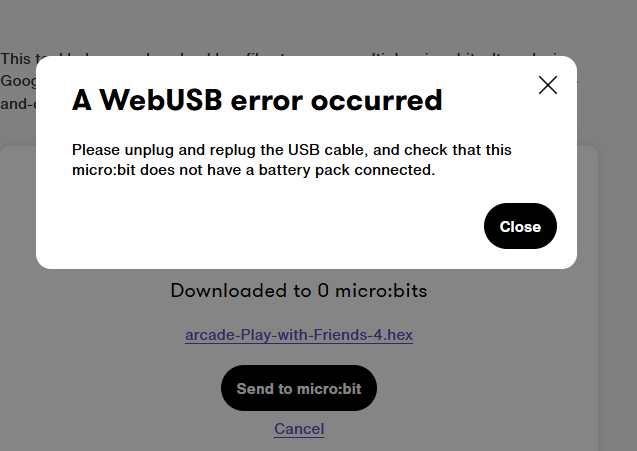
@richard unfortunately we cannot this to work either - we are now getting the message below - just for clarification our Micro:bits do not have the battery pack plugged in but are connected through the USB cable supplied. We also tried this on Edge and Chrome as well as trying on different Micro:bits.
---
### Author:  [@richard](https://forum.makecode.com/u/richard)
#### Post date: [July 8, 2026, 6:40pm UTC](https://forum.makecode.com/t/help-makecode-arcade/44743/15 "2026-07-08T18:40:50Z")
hmmm… you’re right. i only tested the suggested programs but for some reason it looks like it doesn’t like hex files from makecode.
at this point we might have to wait for the foundation. @martinwork do you know who best to contact about this particular tool?
---
### Author:  [@martinwork](https://forum.makecode.com/u/martinwork)
#### Post date: [July 8, 2026, 7:48pm UTC](https://forum.makecode.com/t/help-makecode-arcade/44743/16 "2026-07-08T19:48:22Z")
@Lissa91 and @richard I’ll find out!
---
### Author:  [@Lissa91](https://forum.makecode.com/u/Lissa91)
#### Post date: [July 8, 2026, 7:48pm UTC](https://forum.makecode.com/t/help-makecode-arcade/44743/17 "2026-07-08T19:48:27Z")
Thanks again - I have set up a thread with Micro:Bit foundation - I am in contact with someone called Martin - hopefully it’s the same Martin you have tagged and we can resolve this asap.
Thanks again
---
### Author:  [@martinwork](https://forum.makecode.com/u/martinwork)
#### Post date: [July 8, 2026, 9:09pm UTC](https://forum.makecode.com/t/help-makecode-arcade/44743/18 "2026-07-08T21:09:41Z")
@Lissa91 Yes, the same Martin.
@richard It’s OK with MakeCode for micro:bit files. There must be something different about Arcade files.
---
### Author:  [@richard](https://forum.makecode.com/u/richard)
#### Post date: [July 8, 2026, 9:12pm UTC](https://forum.makecode.com/t/help-makecode-arcade/44743/19 "2026-07-08T21:12:01Z")
hmm, i couldn’t get a hex file that i downloaded today from micro:bit to flash either. are you perhaps using old hex files? maybe something changed there?
i kept getting webusb error
---
### Author:  [@martinwork](https://forum.makecode.com/u/martinwork)
#### Post date: [July 8, 2026, 10:35pm UTC](https://forum.makecode.com/t/help-makecode-arcade/44743/20 "2026-07-08T22:35:02Z")
Just worked with a file saved from [live](https://makecode.microbit.org/)using this project: [https://makecode.microbit.org/\_dcvVq4XvC9Fw](https://makecode.microbit.org/_dcvVq4XvC9Fw)
And from [beta](https://makecode.microbit.org/beta)with this project
> **[test-v-8-1-30](https://makecode.microbit.org/06388-06951-38110-62228)**
>
> Made with ❤️ in Microsoft MakeCode for micro:bit.
[Next page](https://forum.makecode.com/t/help-makecode-arcade/44743.md?page=2)