# Help with Animation and Flip
**URL:** https://forum.makecode.com/t/help-with-animation-and-flip/4824
**Category:** Arcade
**Created:** [December 7, 2020, 4:36pm UTC](https://forum.makecode.com/t/help-with-animation-and-flip/4824 "2020-12-07T16:36:41Z")
**Posts on this page:** 5
**Page:** 1
### Author:  [@MrHM](https://forum.makecode.com/u/MrHM)
#### Post date: [December 7, 2020, 4:36pm UTC](https://forum.makecode.com/t/help-with-animation-and-flip/4824/1 "2020-12-07T16:36:41Z")
Hello All,
Trying to use set anim (animation extension) to create a left and right walking animation. Trying to get fancy where I have one set of source images that I can flip as necessary to avoid unnecessary graphics work. This approach seems to fail where I try to copy my right image into a left image variable. And then flip…but it acts like it is flipping the source images. If I just set the ‘left’ images equal to random images from the gallary, all works fine. Once I set left = right and then flip…all breaks…any ideas?
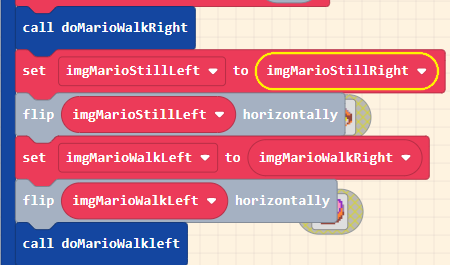
> **[PlatformPOC](https://arcade.makecode.com/60962-10009-34420-17397)**
>
> Made with ❤️ in Microsoft MakeCode Arcade.
BTW: if I simply remove the commands after the call to doMarioWalkRight, the right animation is fine.
---
### Author:  [@Dreadmask197](https://forum.makecode.com/u/Dreadmask197)
#### Post date: [December 7, 2020, 4:39pm UTC](https://forum.makecode.com/t/help-with-animation-and-flip/4824/2 "2020-12-07T16:39:21Z")
I don´t think you can flip animations. That´s my guess. I´ve tried doing it before but I can´t crack it.
---
### Author:  [@MrHM](https://forum.makecode.com/u/MrHM)
#### Post date: [December 7, 2020, 4:40pm UTC](https://forum.makecode.com/t/help-with-animation-and-flip/4824/3 "2020-12-07T16:40:47Z")
Not trying to flip the animation itself…trying to flip some source images to help built the animation…
---
### Author:  [@shakao](https://forum.makecode.com/u/shakao)
#### Post date: [December 7, 2020, 5:15pm UTC](https://forum.makecode.com/t/help-with-animation-and-flip/4824/4 "2020-12-07T17:15:29Z")
Ah yes, so all these variables reference the same base image; we never automatically clone an image in order to keep games performant on hardware devices. You can use the “clone” block:

to make a copy of `imgMarioStillRight` before you set `imgMarioStillLeft`, and that should give you the flip behavior you’re expecting!
---
### Author:  [@MrHM](https://forum.makecode.com/u/MrHM)
#### Post date: [December 7, 2020, 5:47pm UTC](https://forum.makecode.com/t/help-with-animation-and-flip/4824/5 "2020-12-07T17:47:14Z")
That is the ticket! Works. Thank you for the insights into arcade…
> **[PlatformPOC](https://arcade.makecode.com/20712-06756-57300-84174)**
>
> Made with ❤️ in Microsoft MakeCode Arcade.