# Hex generation error when using https on a local server
**URL:** https://forum.makecode.com/t/hex-generation-error-when-using-https-on-a-local-server/40514
**Category:** micro:bit
**Created:** [November 17, 2025, 6:18pm UTC](https://forum.makecode.com/t/hex-generation-error-when-using-https-on-a-local-server/40514 "2025-11-17T18:18:55Z")
**Posts on this page:** 17
**Page:** 1
### Author:  [@andrey1](https://forum.makecode.com/u/andrey1)
#### Post date: [November 17, 2025, 6:18pm UTC](https://forum.makecode.com/t/hex-generation-error-when-using-https-on-a-local-server/40514/1 "2025-11-17T18:18:55Z")
Hello! I installed the latest version of Microbit on a local Ubuntu server, and everything is up and running. I installed nginx and enabled HTTPS certificates. I started the local server with the command “pxt serve --port 3232 --wsport 4233 --hostname pxt.edu --local --https.” The interface loads and all functions work, except for generating the hex file. It says “no internet access,” and “connect to the internet and try again.” When using an IP address to log in to Microbit, the hex file is generated without problems, but the webbusb function is missing. I can’t figure out where the problem is; I’ve already tweaked both the nginx and Microbit rules configurations. I’m asking the community for help on how to resolve this issue.
---
### Author:  [@king\_bob](https://forum.makecode.com/u/king_bob)
#### Post date: [November 17, 2025, 6:55pm UTC](https://forum.makecode.com/t/hex-generation-error-when-using-https-on-a-local-server/40514/2 "2025-11-17T18:55:57Z")
welcome @andrey1
---
### Author:  [@Iro](https://forum.makecode.com/u/Iro)
#### Post date: [November 17, 2025, 7:53pm UTC](https://forum.makecode.com/t/hex-generation-error-when-using-https-on-a-local-server/40514/3 "2025-11-17T19:53:39Z")
um what……is……that….mean?
---
### Author:  [@andrey1](https://forum.makecode.com/u/andrey1)
#### Post date: [November 18, 2025, 5:51pm UTC](https://forum.makecode.com/t/hex-generation-error-when-using-https-on-a-local-server/40514/4 "2025-11-18T17:51:24Z")
Hello!
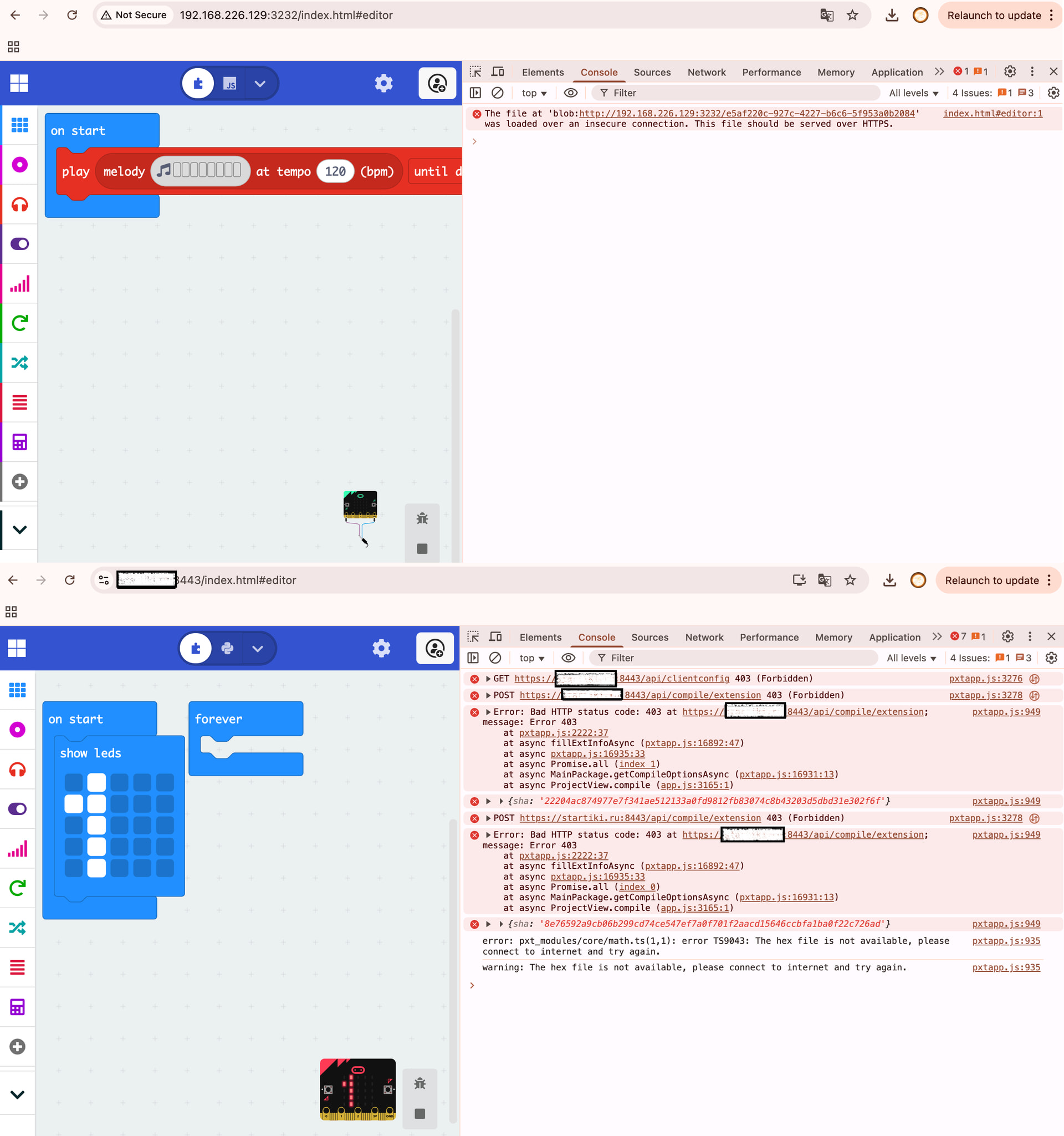
When I run the micro:bit by IP address and click “Save,” a dialog appears to save the .hex file to my computer. But when I access the micro:bit via its domain name, the .hex file is not created (I attach the administrator console output). I’ve been trying to integrate this into the teaching process for three months and don’t understand where I went wrong or which direction to take next.
Thank you for your help!!
---
### Author:  [@richard](https://forum.makecode.com/u/richard)
#### Post date: [November 18, 2025, 5:57pm UTC](https://forum.makecode.com/t/hex-generation-error-when-using-https-on-a-local-server/40514/5 "2025-11-18T17:57:50Z")
the local server is not meant to be used a publicly facing server; it’s meant for local development only.
can i ask why you’re trying to host your own website instead of just using [makecode.microbit.org](http://makecode.microbit.org)?
---
### Author:  [@andrey1](https://forum.makecode.com/u/andrey1)
#### Post date: [November 19, 2025, 6:18pm UTC](https://forum.makecode.com/t/hex-generation-error-when-using-https-on-a-local-server/40514/6 "2025-11-19T18:18:53Z")
I want to set up mobile stations consisting of one laptop (local server), a router, a set of tablets, and micro:bit boards so we can work anywhere without relying on power or the Internet.
Currently the minimal functionality is available via the local IP, but WEBUSB does not work — you can’t upload a program to the micro:bit “on the fly.” I configured nginx (previously tried Apache), installed HTTPS certificates, and set up WebUSB (connection to the micro:bit board), but .hex files stopped being generated. I’ve already reviewed a lot of documentation and made many edits to JSON files, but I haven’t been able to solve the problem yet.
---
### Author:  [@richard](https://forum.makecode.com/u/richard)
#### Post date: [November 19, 2025, 6:28pm UTC](https://forum.makecode.com/t/hex-generation-error-when-using-https-on-a-local-server/40514/7 "2025-11-19T18:28:56Z")
@andrey1 we publish an offline app for just this scenario:
> **[Using MakeCode offline](https://makecode.microbit.org/offline)**
>
> MakeCode is typically accessed at https://makecode.microbit.org/ where create, modify, and run your projects while you’re online. You can can use MakeCode when you’re offline too. Here are some ways you can work with MakeCode offline:
that being said, there is always some functionality that is not available when offline. while programs are compiled locally in the browser, C++ files from extensions are compiled using our cloud compiler. we cache these compiled extensions locally once they’ve been fetched from the cloud compiler, but you have to hit the internet once to fetch them.
one of the benefits of the offline app is that it comes packaged with all of the built-in extensions pre compiled so that it is much less likely to ever require an internet connection. still, if you’re using a third party extension that has a lot of C++, you’ll still need an internet connection at least once to get the compiled hex file.
---
### Author:  [@andrey1](https://forum.makecode.com/u/andrey1)
#### Post date: [November 20, 2025, 4:13pm UTC](https://forum.makecode.com/t/hex-generation-error-when-using-https-on-a-local-server/40514/8 "2025-11-20T16:13:34Z")
Thank you for your reply, Richard! You have a great offline app, but as I mentioned earlier, I want to use it on tablets running Android; your offline app is only for laptops. Is there an offline app available for Android OS?
May I return to the original question: am I correct that the service cannot be run over HTTPS? I need minimal functionality — it works by IP, so in theory somewhere in the configuration files you need to specify a DNS name instead of using an IP address?
---
### Author:  [@richard](https://forum.makecode.com/u/richard)
#### Post date: [November 21, 2025, 7:23pm UTC](https://forum.makecode.com/t/hex-generation-error-when-using-https-on-a-local-server/40514/9 "2025-11-21T19:23:57Z")
i see, in that case, i still don’t recommend using `pxt serve` here. instead, use `pxt staticpkg` to generate a static version of the site and serve that using the server of your choice. more docs here:
> **[pxt-staticpkg Manual Page](https://makecode.com/cli/staticpkg)**
>
> Compiles PXT editor into static HTML files
let me know if you run into issues!
---
### Author:  [@andrey1](https://forum.makecode.com/u/andrey1)
#### Post date: [November 26, 2025, 10:39pm UTC](https://forum.makecode.com/t/hex-generation-error-when-using-https-on-a-local-server/40514/10 "2025-11-26T22:39:32Z")
Richard, you’re a wizard — WebUSB and HEX file creation work correctly. A problem has arisen: I built a local version of micro:bit and added JSON translation files so they are loaded from the local machine instead of MakeCode servers. In the deployed version (after pxt staticpkg) there’s a language selection in the settings, but any language other than English doesn’t work — the admin console shows requests to the MakeCode translations site. Is there a way to make the HTML version of micro:bit use another language without internet access?
---
### Author:  [@richard](https://forum.makecode.com/u/richard)
#### Post date: [December 1, 2025, 3:28pm UTC](https://forum.makecode.com/t/hex-generation-error-when-using-https-on-a-local-server/40514/11 "2025-12-01T15:28:23Z")
try using the `--locs` flag with `pxt statickpkg`, it should download the localization files and put them in the right place
---
### Author:  [@nevergone](https://forum.makecode.com/u/nevergone)
#### Post date: [December 15, 2025, 5:37pm UTC](https://forum.makecode.com/t/hex-generation-error-when-using-https-on-a-local-server/40514/12 "2025-12-15T17:37:02Z")
Did pxt staticpkg solve the problem of working completely offline for you? What is your exact build process and operating configuration?
---
### Author:  [@andrey1](https://forum.makecode.com/u/andrey1)
#### Post date: [December 16, 2025, 9:38pm UTC](https://forum.makecode.com/t/hex-generation-error-when-using-https-on-a-local-server/40514/13 "2025-12-16T21:38:47Z")
Yes, the command completely solved my tasks. However, it took me some time to figure it out. In the end, I did the following: first, I rebuilt the project using the `pxt buildtarget` command, and then I used the following command: `PXT_LANGS=bg pxt staticpkg --output ./static-build`. After that, I copied the contents of the `pxt-microbit/static-build` folder to the web server, and everything worked.
---
### Author:  [@andrey1](https://forum.makecode.com/u/andrey1)
#### Post date: [December 16, 2025, 9:38pm UTC](https://forum.makecode.com/t/hex-generation-error-when-using-https-on-a-local-server/40514/14 "2025-12-16T21:38:52Z")
Richard, thank you! Your valuable advice helped me get a working, localized service for the micro:bit. I only have one problem left: when I write a program, select **Extensions** in the menu, add **audiorecording** , and use it, then the file generation and its upload to the micro:bit stop working afterwards. At the same time, for example, the **servo** extension (which I translated) does not cause such errors.
Am I correct in understanding that I need to run `pxt serve`, load all available extensions there, and then package everything again into `pxt staticpkg`?
---
### Author:  [@richard](https://forum.makecode.com/u/richard)
#### Post date: [December 17, 2025, 12:11am UTC](https://forum.makecode.com/t/hex-generation-error-when-using-https-on-a-local-server/40514/15 "2025-12-17T00:11:49Z")
@jwunderl do you happen to know if there is a way to tell staticpkg to bundle additional extensions in the hex files it generates?
---
### Author:  [@jwunderl](https://forum.makecode.com/u/jwunderl)
#### Post date: [December 17, 2025, 12:29am UTC](https://forum.makecode.com/t/hex-generation-error-when-using-https-on-a-local-server/40514/16 "2025-12-17T00:29:36Z")
I believe this field was what i added to handle that a long while ago [https://github.com/microsoft/pxt-arcade/blob/8a69fe745993a1715f1c4d879d40e657e7898236/pxtarget.json#L136](https://github.com/microsoft/pxt-arcade/blob/8a69fe745993a1715f1c4d879d40e657e7898236/pxtarget.json#L136)
---
### Author:  [@richard](https://forum.makecode.com/u/richard)
#### Post date: [December 17, 2025, 8:47pm UTC](https://forum.makecode.com/t/hex-generation-error-when-using-https-on-a-local-server/40514/17 "2025-12-17T20:47:43Z")
@andrey1 try adding that extension to that array in pxt-microbit’s pxtarget.json and see if it does anything