# How do functions work?
**URL:** https://forum.makecode.com/t/how-do-functions-work/28703
**Category:** Help
**Created:** [May 10, 2024, 8:51pm UTC](https://forum.makecode.com/t/how-do-functions-work/28703 "2024-05-10T20:51:06Z")
**Posts on this page:** 9
**Page:** 1
### Author:  [@Brainstorm\_Studios](https://forum.makecode.com/u/Brainstorm_Studios)
#### Post date: [May 10, 2024, 8:51pm UTC](https://forum.makecode.com/t/how-do-functions-work/28703/1 "2024-05-10T20:51:06Z")
i only really know the bare minimum about functions, calling lines of code without any other special things. i know there are more things i can add like sprites, variables, and booleans, but how?
---
### Author:  [@Taser](https://forum.makecode.com/u/Taser)
#### Post date: [May 11, 2024, 2:10am UTC](https://forum.makecode.com/t/how-do-functions-work/28703/2 "2024-05-11T02:10:20Z")
As far as I’m concerned, you can simply create/initialize variables (any type of them, whether they’re boolean, integer, or decimal) inside a function; they are called local variables. And, as the name implies, they’re **local** , they can only be accessed through the function.

Sure, the program won’t break down if you decide to use the local variable outside of the function, however, in reality, you just made 2 variables of the same name.

Button Local Variables

If you want a function to spawn a sprite, I’d use a local variable (variables that can only be accessed in a specific function), and assign a sprite for the variable, for example: if I wanted to spawn a button at a random location every time I pressed spacebar, I would’ve wrote this function down here.
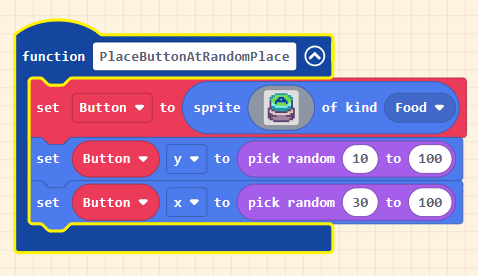
Here’s the code:
> **[Donut Spawn Stuff](https://arcade.makecode.com/34343-32528-18132-96863)**
>
> Made with ❤️ in Microsoft MakeCode Arcade.
---
### Author:  [@robotosaurus](https://forum.makecode.com/u/robotosaurus)
#### Post date: [May 11, 2024, 2:10am UTC](https://forum.makecode.com/t/how-do-functions-work/28703/3 "2024-05-11T02:10:22Z")
Hmm without much context I can’t help you.
---
### Author:  [@Luke](https://forum.makecode.com/u/Luke)
#### Post date: [May 11, 2024, 2:10am UTC](https://forum.makecode.com/t/how-do-functions-work/28703/4 "2024-05-11T02:10:34Z")
You can essentially make a custom block
Example: I’m trying to add custom emotion animations
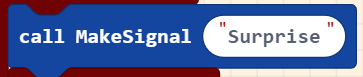
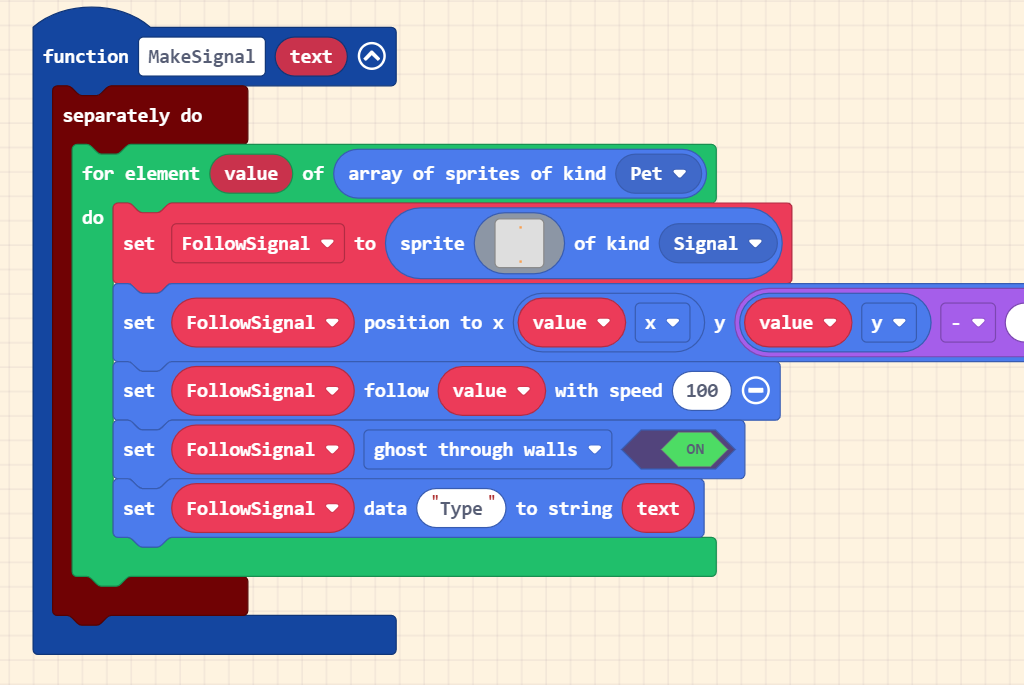
Now the text inputted in the function is sent to the bottom line
this just stores it on the sprite

Finally, the data is read in this if statement and the sprite animates

This is useful for repeating the same action - displaying an emoji on a sprite
but also making it able to be used for multiple different emoji types
Example 2: moving a sprite


Can edit the number of times the sprite moves, the amount it moves by, and the pause between each move repeat (can add even more if you want to customise further)
This is useful for making custom movement with only 1 function (less blocks)
also makes it easier to edit the code as changes affect all 4
---
### Author:  [@ARandomGuyOnMakeCode](https://forum.makecode.com/u/ARandomGuyOnMakeCode)
#### Post date: [May 11, 2024, 2:10am UTC](https://forum.makecode.com/t/how-do-functions-work/28703/5 "2024-05-11T02:10:41Z")
> [@Brainstorm\_Studios](#):
>
> i know there are more things i can add like sprites, variables, and booleans, but how?
By add more things, do you mean adding parameters?
---
### Author:  [@Josef](https://forum.makecode.com/u/Josef)
#### Post date: [May 11, 2024, 2:12am UTC](https://forum.makecode.com/t/how-do-functions-work/28703/6 "2024-05-11T02:12:02Z")
Look at the code from The Makecode Forums. It’s pretty self explanatory
---
### Author:  [@WoofWoof](https://forum.makecode.com/u/WoofWoof)
#### Post date: [May 11, 2024, 2:15am UTC](https://forum.makecode.com/t/how-do-functions-work/28703/7 "2024-05-11T02:15:59Z")
Just…look at this:
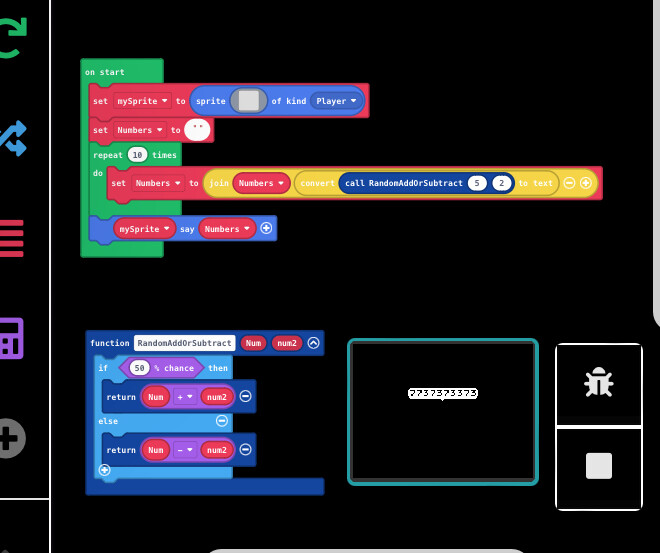
This is very simple, but so, so much more can be done.
[Here is the project](https://arcade.makecode.com/S64413-05134-46566-47292) if you want to change it to a different language or mess around with it 🙂
---
### Author:  [@UnsignedArduino](https://forum.makecode.com/u/UnsignedArduino)
#### Post date: [May 12, 2024, 1:00am UTC](https://forum.makecode.com/t/how-do-functions-work/28703/8 "2024-05-12T01:00:45Z")
MakeCode doesn’t support local variables in blocks, everything is global. 😭😭😭
So if you used a recursive function for example, it would definitely break.
---
### Author:  [@Brainstorm\_Studios](https://forum.makecode.com/u/Brainstorm_Studios)
#### Post date: [May 13, 2024, 2:05am UTC](https://forum.makecode.com/t/how-do-functions-work/28703/9 "2024-05-13T02:05:06Z")
Yeah.