# How to hide the minimap?
**URL:** https://forum.makecode.com/t/how-to-hide-the-minimap/37426
**Category:** Help
**Created:** [June 19, 2025, 9:17pm UTC](https://forum.makecode.com/t/how-to-hide-the-minimap/37426 "2025-06-19T21:17:28Z")
**Posts on this page:** 9
**Page:** 1
### Author:  [@Gl125371](https://forum.makecode.com/u/Gl125371)
#### Post date: [June 19, 2025, 9:17pm UTC](https://forum.makecode.com/t/how-to-hide-the-minimap/37426/1 "2025-06-19T21:17:28Z")
So basically, I want it where if I press A, it opens the minimap full screen and still keeps the game going in the background, but if I press A again, it closes the minimap and shows it smaller in the bottom left of the screen. Can anyone help me?
---
### Author:  [@maxitolplayer](https://forum.makecode.com/u/maxitolplayer)
#### Post date: [June 19, 2025, 10:16pm UTC](https://forum.makecode.com/t/how-to-hide-the-minimap/37426/2 "2025-06-19T22:16:02Z")
That’s supposed to happen
---
### Author:  [@WoofWoof](https://forum.makecode.com/u/WoofWoof)
#### Post date: [June 20, 2025, 6:18pm UTC](https://forum.makecode.com/t/how-to-hide-the-minimap/37426/3 "2025-06-20T18:18:55Z")
Are you using the minimap extension? I completely forget how that works (I tried to use it once but it’s such a laggy extension) so I’ll have to look at it when I get home. From what I remember, this seems like something that would be very easy to do, just using a variable to keep track of which state your minimap is in. Especially since you _want_ the game to continue in the background.
---
### Author:  [@Bifrosty](https://forum.makecode.com/u/Bifrosty)
#### Post date: [June 20, 2025, 9:12pm UTC](https://forum.makecode.com/t/how-to-hide-the-minimap/37426/4 "2025-06-20T21:12:27Z")
If you send a link to your game it would be easy to identify the issue
---
### Author:  [@Gl125371](https://forum.makecode.com/u/Gl125371)
#### Post date: [June 20, 2025, 9:16pm UTC](https://forum.makecode.com/t/how-to-hide-the-minimap/37426/5 "2025-06-20T21:16:09Z")
I doesn’t happen; I want it to.
---
### Author:  [@Gl125371](https://forum.makecode.com/u/Gl125371)
#### Post date: [June 20, 2025, 9:16pm UTC](https://forum.makecode.com/t/how-to-hide-the-minimap/37426/6 "2025-06-20T21:16:16Z")
Yeah, I’m using the minimap extension, I tried hiding the sprite for the map, but that just hides the sprites I’m showing on the map, It doesn’t hide the map itself. I also have another question: How to limit how much the map shows? Like make it show maybe 15 tiles away from the player, and only show the whole map if A button is pressed.
---
### Author:  [@Gl125371](https://forum.makecode.com/u/Gl125371)
#### Post date: [June 22, 2025, 2:48am UTC](https://forum.makecode.com/t/how-to-hide-the-minimap/37426/7 "2025-06-22T02:48:55Z")
Here you go: [https://arcade.makecode.com/S25969-11219-70485-65527](https://arcade.makecode.com/S25969-11219-70485-65527)
By the way, since I can’t import in the extension, I just changed the minimap demo.
---
### Author:  [@Bifrosty](https://forum.makecode.com/u/Bifrosty)
#### Post date: [June 23, 2025, 5:52pm UTC](https://forum.makecode.com/t/how-to-hide-the-minimap/37426/8 "2025-06-23T17:52:45Z")
Ok Here is a fixed version:
First I added a “minimapOpen” boolean (true/false) value. I set it to false when the game starts
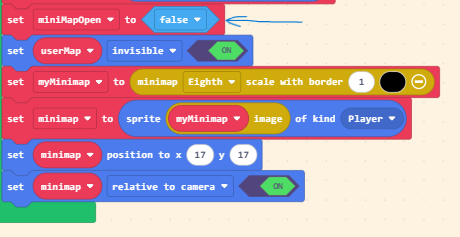
Then I give the player control over the variable with the A button. This setup changes whatever the variable previously was to its opposite, eg. (true-\>false) (false-\>true)
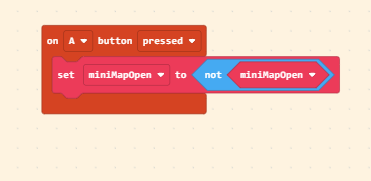
Lastly, I tell the game to adjust the minimap’s size and position based on the variable. Youve already enabled the sprite flag “relative to camera” to the minimap so this is easy.

This will allow the player to toggle an enlarged minimap with the A button. Here is a link to the new code: [https://makecode.com/\_f9caHtWayVUs](https://makecode.com/_f9caHtWayVUs)
---
### Author:  [@Gl125371](https://forum.makecode.com/u/Gl125371)
#### Post date: [June 23, 2025, 8:18pm UTC](https://forum.makecode.com/t/how-to-hide-the-minimap/37426/9 "2025-06-23T20:18:09Z")
Thank You! This helped a lot!