# How to make proper UI sprite
**URL:** https://forum.makecode.com/t/how-to-make-proper-ui-sprite/43638
**Category:** Help
**Tags:** game
**Created:** [April 26, 2026, 1:28am UTC](https://forum.makecode.com/t/how-to-make-proper-ui-sprite/43638 "2026-04-26T01:28:16Z")
**Posts on this page:** 12
**Page:** 1
### Author:  [@Mikey\_s.3000](https://forum.makecode.com/u/Mikey_s.3000)
#### Post date: [April 26, 2026, 1:28am UTC](https://forum.makecode.com/t/how-to-make-proper-ui-sprite/43638/1 "2026-04-26T01:28:17Z")
Can someone help me try to make a proper sprite for the UI screen of my project and the UI icons being able to stay on the screen whenever moving, like this pink block and next to it and A button icon showing to press A to shoot a projectile
> **[hi](https://arcade.makecode.com/41848-59547-68476-18517)**
>
> Made with ❤️ in Microsoft MakeCode Arcade.

---
### Author:  [@YamJam](https://forum.makecode.com/u/YamJam)
#### Post date: [April 26, 2026, 6:02pm UTC](https://forum.makecode.com/t/how-to-make-proper-ui-sprite/43638/2 "2026-04-26T18:02:21Z")
You can use the set sprite flag block. Usiong that you can set your UI sprite to relative to camera and done! IT stays on the screen no matter where the camera moves
---
### Author:  [@BitBot](https://forum.makecode.com/u/BitBot)
#### Post date: [April 26, 2026, 6:04pm UTC](https://forum.makecode.com/t/how-to-make-proper-ui-sprite/43638/3 "2026-04-26T18:04:36Z")
Take this block out of the toolbox:

Then change the “auto destroy” to relative to camera like so:

Then toggle OFF to ON, then you’re set!

---
### Author:  [@OrigamiArtist](https://forum.makecode.com/u/OrigamiArtist)
#### Post date: [April 26, 2026, 6:26pm UTC](https://forum.makecode.com/t/how-to-make-proper-ui-sprite/43638/4 "2026-04-26T18:26:02Z")
A ‘sprite stay in screen’ block might work. I prefer to use ‘`Set mySprite Relative to camera to on`’ block. These can be found in the Sprites category.
---
### Author:  [@RizeUpDev](https://forum.makecode.com/u/RizeUpDev)
#### Post date: [April 26, 2026, 6:34pm UTC](https://forum.makecode.com/t/how-to-make-proper-ui-sprite/43638/5 "2026-04-26T18:34:24Z")
There are 2 ways to do it.
1. You could use the  block. Press on the drop-down menu and click on ‘relative to camera’ block. This is useful for small, repetitive projects.
2. You could install the arcade sprite utils extension searching this:
I hope this was helpful. If you have any questions don’t hesitate to ask!
---
### Author:  [@NeverStopTheCoder](https://forum.makecode.com/u/NeverStopTheCoder)
#### Post date: [April 26, 2026, 6:35pm UTC](https://forum.makecode.com/t/how-to-make-proper-ui-sprite/43638/6 "2026-04-26T18:35:56Z")
you can use

which makes it so the sptite will always stay on screen where there are and move with the camera
downside is it auto make ghost set to on so you can overlap with anything
---
### Author:  [@Mikey\_s.3000](https://forum.makecode.com/u/Mikey_s.3000)
#### Post date: [April 27, 2026, 4:41pm UTC](https://forum.makecode.com/t/how-to-make-proper-ui-sprite/43638/7 "2026-04-27T16:41:44Z")
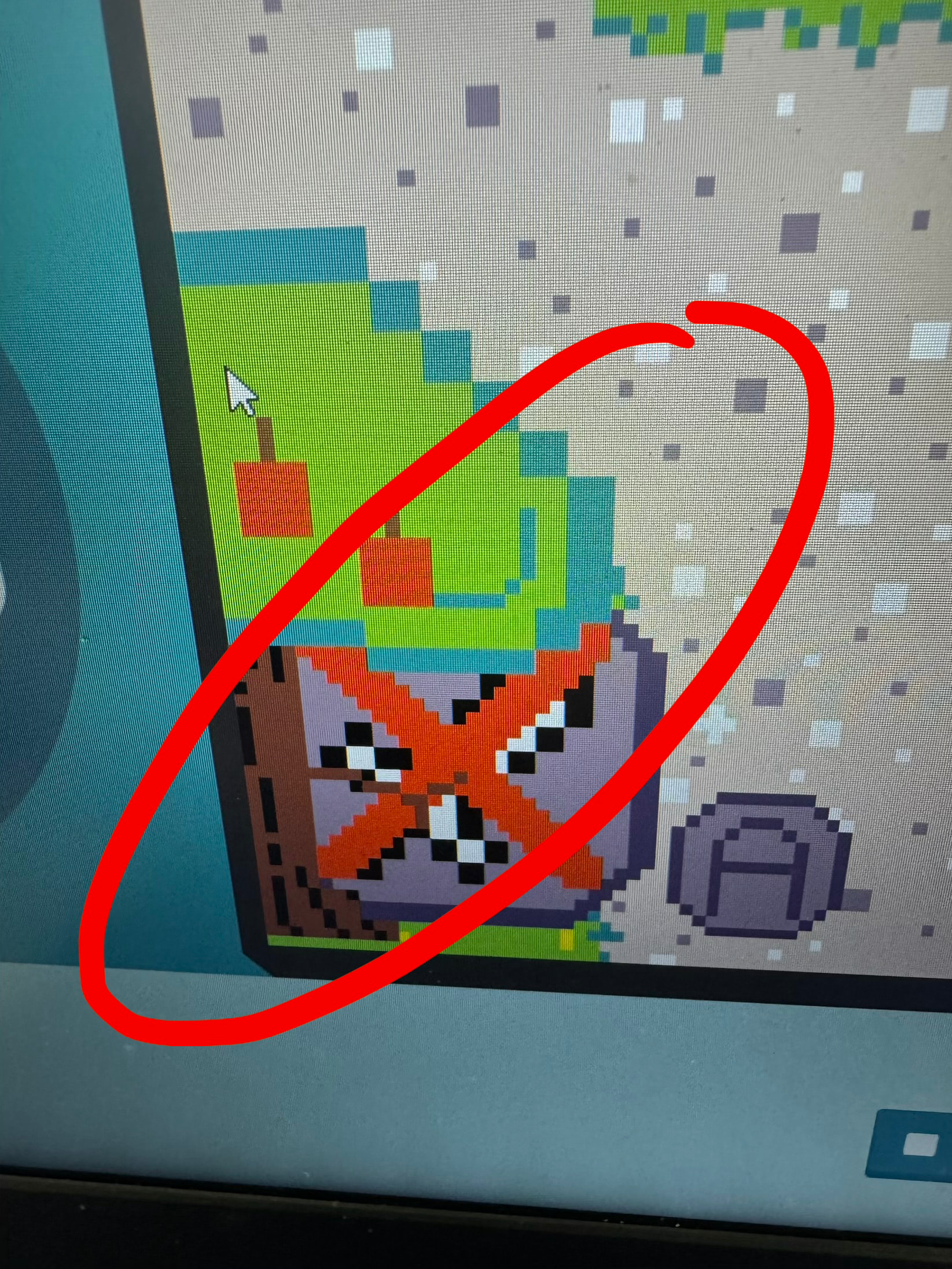
How can I also make the UI sprite stay on top of the other sprites cuz it looks like this now
---
### Author:  [@RizeUpDev](https://forum.makecode.com/u/RizeUpDev)
#### Post date: [April 27, 2026, 5:22pm UTC](https://forum.makecode.com/t/how-to-make-proper-ui-sprite/43638/8 "2026-04-27T17:22:26Z")
You should make sure to add this sprite AFTER the tree sprite is added!
---
### Author:  [@YamJam](https://forum.makecode.com/u/YamJam)
#### Post date: [April 27, 2026, 10:16pm UTC](https://forum.makecode.com/t/how-to-make-proper-ui-sprite/43638/9 "2026-04-27T22:16:16Z")
You can drag a set (sprite) x to (0) block and then change the x into z, which is at the very bottom. This allows you to order which sprites are on top another, with higher numbers being closer to the screen and lower being further. Or I guess you could just use riseupdevs way…
---
### Author:  [@richard](https://forum.makecode.com/u/richard)
#### Post date: [April 27, 2026, 10:17pm UTC](https://forum.makecode.com/t/how-to-make-proper-ui-sprite/43638/10 "2026-04-27T22:17:11Z")
set the z index of the ui sprite to be higher than the objects underneath it. higher-z sprites will always be drawn above lower-z sprites
---
### Author:  [@Mikey\_s.3000](https://forum.makecode.com/u/Mikey_s.3000)
#### Post date: [April 28, 2026, 6:30pm UTC](https://forum.makecode.com/t/how-to-make-proper-ui-sprite/43638/11 "2026-04-28T18:30:01Z")
What block is it?
---
### Author:  [@richard](https://forum.makecode.com/u/richard)
#### Post date: [April 28, 2026, 8:31pm UTC](https://forum.makecode.com/t/how-to-make-proper-ui-sprite/43638/12 "2026-04-28T20:31:22Z")
it’s in the property dropdown. same one as x, y, vx, vy, etc