# How to Run a Game on a Raspberry pi 5 SD Card Directly!
**URL:** https://forum.makecode.com/t/how-to-run-a-game-on-a-raspberry-pi-5-sd-card-directly/42555
**Category:** Collaboration
**Tags:** game
**Created:** [March 7, 2026, 6:56pm UTC](https://forum.makecode.com/t/how-to-run-a-game-on-a-raspberry-pi-5-sd-card-directly/42555 "2026-03-07T18:56:08Z")
**Posts on this page:** 20
**Page:** 1
### Author:  [@NeverStopTheCoder](https://forum.makecode.com/u/NeverStopTheCoder)
#### Post date: [March 7, 2026, 6:56pm UTC](https://forum.makecode.com/t/how-to-run-a-game-on-a-raspberry-pi-5-sd-card-directly/42555/1 "2026-03-07T18:56:08Z")
ok so if you can already do this I’m sorry but I was kinda convinced you could not but got it to work (with a little help from Google Gemini) now I’m not the best at creating a help GitHub repo but I’ll try to make one to give the right files but here are the steps
1.download the elf I used [https://vegz78.github.io/McAirpos/index2](https://vegz78.github.io/McAirpos/index2)
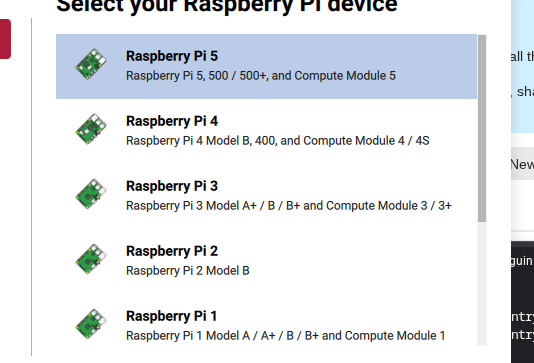
2.download the 32-bit os I now I used a Chromebook installing the imager using Linux and running it by typing “sudo rpi-imager” in the terminal
[](https://us1.discourse-cdn.com/flex020/uploads/makecode/original/3X/2/a/2adba16760fa9cb9cf3b094bd7692d3b2737f3ac.png "Screenshot 2026-03-05 8.23.42 AM")
[Screenshot 2026-03-05 8.23.42 AM534×363 47.8 KB](https://us1.discourse-cdn.com/flex020/uploads/makecode/original/3X/2/a/2adba16760fa9cb9cf3b094bd7692d3b2737f3ac.png "Screenshot 2026-03-05 8.23.42 AM")
[](https://us1.discourse-cdn.com/flex020/uploads/makecode/original/3X/4/c/4cf2f372f6275b8dfff24e3f922455d9cd3e3235.png "Screenshot 2026-03-05 8.23.50 AM")
[Screenshot 2026-03-05 8.23.50 AM534×363 51.2 KB](https://us1.discourse-cdn.com/flex020/uploads/makecode/original/3X/4/c/4cf2f372f6275b8dfff24e3f922455d9cd3e3235.png "Screenshot 2026-03-05 8.23.50 AM")
3.create folder by typing on the tv terminal or the Chromebook or whatever your using terminal and type “sudo mkdir /sd” and then type “sudo nano /sd/arcade.cfg” now you I think should already have this so you probably can skip this but to see if you have it type ls “-l /sd/arcade.cfg” If it says "No _such file or directory_ you missed the `sudo mkdir /sd` and `sudo nano /sd/arcade.cfg`
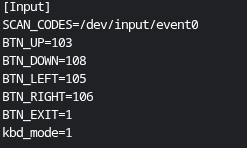
4.now in order to run the game and unlock the keyboard I used a USB keyboard you have to type nano /sd/arcade.cfg you will be be in a editor put this in it

[](https://us1.discourse-cdn.com/flex020/uploads/makecode/original/3X/d/a/dac20e5fd5ead991690c8c19fc0fc94ffb78bad9.png "Screenshot 2026-03-04 12.06.33 PM")
5.craete a named say “myGame.sh” by typing “nano myGame.sh” and put this in it
[](https://us1.discourse-cdn.com/flex020/uploads/makecode/original/3X/2/2/22dbf48a52e0053e02ff4eeaf91088ac851ae761.png "Screenshot 2026-03-04 12.07.56 PM")
and make the arcade-pokemon.elf be the name of your game I used this [https://arcade.makecode.com/S86054-26885-01958-76304](https://arcade.makecode.com/S86054-26885-01958-76304)
6.you need to get the data from your game so put a file called “converter.py” and put this in it
```python
import osimport glob
def setup_cartridge():
#1. Find the game file (any .elf)
elf_files = glob.glob(“*.elf”)if not elf_files:print(“Error: No game (.elf) found on this cartridge!”)return
game_name = elf_files[0]
print(f"Preparing cartridge for: {game_name}")
# 2. Force permissions
os.system(f"chmod +x {game_name}")
# 3. Create the boot script (The Bridge)
with open("boot.sh", "w") as f:
f.write(f"#!/bin/bash\n")
f.write(f"sleep 2\n") # Wait for Pi 5 graphics to wake up
f.write(f"sudo ./{game_name} --hw rpi\n")
os.system("chmod +x boot.sh")
print("Cartridge is ready for Auto-Boot!")
setup_cartridge()
```
and then run “python3 converter.py” you should see “Cartridge is ready for Auto-Boot!” and to see if you have the file type “ls” you should see something like arcade-myGame.data if you do good
7.run “chmod +x myGame.sh” and “chmod +x arcade-myGame.elf”
8.next if you did everything correct type “./myGame.sh” and your game should run with the keyboard
“Note: If you don’t see the `.data` file (like `arcade-myGame.data`) right away, don’t panic! You have to run the game successfully **one time** first. Once the game starts, it ‘unpacks’ itself and creates that data file on your SD card automatically.”
also note this is a help kinda post so pls ask stuff if you need help because I don’t really think I told this very well but that’s just me
Mods I think this is fixed
---
### Author:  [@aaa](https://forum.makecode.com/u/aaa)
#### Post date: [March 9, 2026, 7:03pm UTC](https://forum.makecode.com/t/how-to-run-a-game-on-a-raspberry-pi-5-sd-card-directly/42555/2 "2026-03-09T19:03:08Z")
You’ve overcomplicated this. The Raspberry Pi is a computer; connect it to the internet and go to Makecode Arcade. It’s really quite simple. There isn’t much reason to run it as a native program. Yes, it utilizes more CPU, but Makecode itself is so low-intensity that it could run on devices like the Micro:bit.
---
### Author:  [@NeverStopTheCoder](https://forum.makecode.com/u/NeverStopTheCoder)
#### Post date: [March 9, 2026, 11:37pm UTC](https://forum.makecode.com/t/how-to-run-a-game-on-a-raspberry-pi-5-sd-card-directly/42555/3 "2026-03-09T23:37:41Z")
and second of off you did not need to be kinda mean about it
---
### Author:  [@NeverStopTheCoder](https://forum.makecode.com/u/NeverStopTheCoder)
#### Post date: [March 9, 2026, 11:45pm UTC](https://forum.makecode.com/t/how-to-run-a-game-on-a-raspberry-pi-5-sd-card-directly/42555/4 "2026-03-09T23:45:10Z")
well if you are meaning make the pi grab your game from its link I did not want to do that I wanted to make it like a NES with each sd its own game
---
### Author:  [@NeverStopTheCoder](https://forum.makecode.com/u/NeverStopTheCoder)
#### Post date: [April 2, 2026, 2:39pm UTC](https://forum.makecode.com/t/how-to-run-a-game-on-a-raspberry-pi-5-sd-card-directly/42555/5 "2026-04-02T14:39:56Z")
BTN\_A=44
BTN\_B=45
BTN\_MENU=41
BTN\_RESET=14
kbd\_mode=1
put this after the up,down,left, and right for a b menu(backtick) and reset(backspace)
---
### Author:  [@NeverStopTheCoder](https://forum.makecode.com/u/NeverStopTheCoder)
#### Post date: [April 2, 2026, 5:05pm UTC](https://forum.makecode.com/t/how-to-run-a-game-on-a-raspberry-pi-5-sd-card-directly/42555/6 "2026-04-02T17:05:50Z")
heres is in the sh file for the board I’m using for custom buttons (replace the other sudo SDL\_… with this)
```auto
sudo SDL_VIDEODRIVER=kmsdrm SDL_EVDEV_DEVICES=/dev/input/by-id/usb-DragonRise_Inc._Generic_USB_Joystick-event-joystick ./arcade-pokemonNEW.elf --hw rpi
```
and the cfg
```auto
SCAN_CODES=/dev/input/by-id/usb-DragonRise_Inc._Generic_USB_Joystick-event-joystick
BTN_UP=290
BTN_DOWN=291
BTN_LEFT=292
BTN_RIGHT=293
BTN_A=288
BTN_B=289
BTN_RESET=294
BTN_MENU=295
kbd_mode=0
```
and this should let you use the tactile buttons instead of a keyboard
I’m going to figure out what board I’m using and get back to you guys(anyone)
---
### Author:  [@NeverStopTheCoder](https://forum.makecode.com/u/NeverStopTheCoder)
#### Post date: [April 14, 2026, 10:31pm UTC](https://forum.makecode.com/t/how-to-run-a-game-on-a-raspberry-pi-5-sd-card-directly/42555/7 "2026-04-14T22:31:39Z")
well it lets you type the buttons on a keyboard that are the same on the Simulater ie backtick = menu reset = backspace
---
### Author:  [@NeverStopTheCoder](https://forum.makecode.com/u/NeverStopTheCoder)
#### Post date: [May 23, 2026, 9:29pm UTC](https://forum.makecode.com/t/how-to-run-a-game-on-a-raspberry-pi-5-sd-card-directly/42555/8 "2026-05-23T21:29:42Z")
hey mods can you maybe change the title of this topic from
```auto
Make code game on a raspberry pi 5!
```
to
```auto
How to Run a Game on a Raspberry pi 5 SD Card Directly!
```
because I thought the title just throws you off well because its a computer and just use the link
---
### Author:  [@AlexK](https://forum.makecode.com/u/AlexK)
#### Post date: [May 23, 2026, 9:30pm UTC](https://forum.makecode.com/t/how-to-run-a-game-on-a-raspberry-pi-5-sd-card-directly/42555/9 "2026-05-23T21:30:15Z")
Roger that.
---
### Author:  [@NeverStopTheCoder](https://forum.makecode.com/u/NeverStopTheCoder)
#### Post date: [May 24, 2026, 6:26pm UTC](https://forum.makecode.com/t/how-to-run-a-game-on-a-raspberry-pi-5-sd-card-directly/42555/10 "2026-05-24T18:26:17Z")
ty(thank you)
---
### Author:  [@NeverStopTheCoder](https://forum.makecode.com/u/NeverStopTheCoder)
#### Post date: [May 24, 2026, 6:42pm UTC](https://forum.makecode.com/t/how-to-run-a-game-on-a-raspberry-pi-5-sd-card-directly/42555/11 "2026-05-24T18:42:19Z")
heres the code to copy for the pictures and a little more info
the buttons for using a **KEYBOARD**
```auto
[Target]
Hardware=pc
[Input]
SCAN_CODES=/dev/input/event0
BTN_LEFT=105
BTN_RIGHT=106
BTN_UP=103
BTN_DOWN=108
BTN_A=57
BTN_B=29
BTN_MENU=41
BTN_RESET=14
kbd_mode=1
```
the `BTN_EXIT=1` did not seem to do anything so got rid of it it was supposed to do the esc key to exit the game but did not work but this is the **INPUT**
the myGmae.sh is the code to get the game to run on the Pi here
```auto
#!/bin/bash
sudo unmount -l /proc/cpuonfo
sudo rm -f /TMP/cpuinfo
cp /proc/cpuinfo /tmp/cpuinfo
sudo sh -c 'echo "Harware : BCM2835" >> /tmp/cpuinfo'
sudo mount --bind /tmp/cpuinfo /proc/cpuinfo
sudo SDL_VIDEODRIVER=kmsdrm SDL_EVDEV_DEVICES=/dev/input/event0 ./arcade-pokemon.elf hw rpi
```
this is the **DISPLAY** and the `arcade-pokemon.elf` is the name of your game you have loaded on the pi like my game.elf,thisGame.elf,Mario.elf,Zelda.elf etc you get it
---
### Author:  [@NeverStopTheCoder](https://forum.makecode.com/u/NeverStopTheCoder)
#### Post date: [May 26, 2026, 10:47pm UTC](https://forum.makecode.com/t/how-to-run-a-game-on-a-raspberry-pi-5-sd-card-directly/42555/12 "2026-05-26T22:47:14Z")
> [@NeverStopTheCoder](#):
>
> download the 32-bit os
well i did not try it but the 64-bit os it should work fine if not maybe… better but proably not i just had the 32-bit os on it when i got it to work and its also what google or chatgpt or wherever I got that info said would work better with make code that or I think it said thats what Makecode should work on
---
### Author:  [@NeverStopTheCoder](https://forum.makecode.com/u/NeverStopTheCoder)
#### Post date: [May 27, 2026, 2:32am UTC](https://forum.makecode.com/t/how-to-run-a-game-on-a-raspberry-pi-5-sd-card-directly/42555/13 "2026-05-27T02:32:54Z")
also I’m working on getting it into a python package that you can just import and run two commands its going well its called RP5RS (Raspberry pi 5 Run Script)
---
### Author:  [@NeverStopTheCoder](https://forum.makecode.com/u/NeverStopTheCoder)
#### Post date: [May 28, 2026, 6:10pm UTC](https://forum.makecode.com/t/how-to-run-a-game-on-a-raspberry-pi-5-sd-card-directly/42555/14 "2026-05-28T18:10:16Z")
ok I’m not sure if this works yet but [https://pypi.org/project/RP5RS/](https://pypi.org/project/RP5RS/) it should be a python module now you just need to get the elf file on the pi first to run the set current game because it grabs any elf file there and I’m more happy because it was half me with the shell scripts and half gemini for the python I’d be happy if any one wants to test this but it should work like this I think
```auto
pip install RP5RS
import RP5RS
SetCurrentGameTo(your game elf here) # If you don't put a elf it should grab the first elf in the folder
RunGame() # Runs the set game
```
---
### Author:  [@NeverStopTheCoder](https://forum.makecode.com/u/NeverStopTheCoder)
#### Post date: [May 28, 2026, 9:06pm UTC](https://forum.makecode.com/t/how-to-run-a-game-on-a-raspberry-pi-5-sd-card-directly/42555/15 "2026-05-28T21:06:53Z")
I forgot to metion right now this only works on event0 which just means make sure you plug in the keyboard in first just because Gemini gave me code I kinda wanted to maybe figure out myself and I did not test
---
### Author:  [@NeverStopTheCoder](https://forum.makecode.com/u/NeverStopTheCoder)
#### Post date: [May 29, 2026, 4:58pm UTC](https://forum.makecode.com/t/how-to-run-a-game-on-a-raspberry-pi-5-sd-card-directly/42555/16 "2026-05-29T16:58:31Z")
ok I tested it fixed things with Gemini and now it should work at version 1.0.5 but space is a and left Ctrl is b the rest are the same
---
### Author:  [@AlexK](https://forum.makecode.com/u/AlexK)
#### Post date: [May 29, 2026, 10:01pm UTC](https://forum.makecode.com/t/how-to-run-a-game-on-a-raspberry-pi-5-sd-card-directly/42555/17 "2026-05-29T22:01:22Z")
I’ve been thinking about this one for a while. Nice work on this, NeverStop!
If you’re looking for a simpler way to do this, you could try kiosk mode in a web browser. The Xbox app leverages kiosk mode.
> [@Help with kiosks?](https://forum.makecode.com/t/help-with-kiosks/19561):
>
> I only found out really about the kiosks and it would be awesome to play games on a bigger screen and buttons like that , do you buy the kiosk or what ? I’m confused how to get and use one and how I can put games on it
Use your favorite search engine to learn how to boot an RPi directly into a web browser (bypassing the window manager) and configure the web browser to automatically launch the kiosk-mode URL.
---
### Author:  [@NeverStopTheCoder](https://forum.makecode.com/u/NeverStopTheCoder)
#### Post date: [May 29, 2026, 10:35pm UTC](https://forum.makecode.com/t/how-to-run-a-game-on-a-raspberry-pi-5-sd-card-directly/42555/18 "2026-05-29T22:35:17Z")
I know about kiosks but I wanted this for the console I am making and I think it looks better
---
### Author:  [@TheEarth](https://forum.makecode.com/u/TheEarth)
#### Post date: [May 30, 2026, 8:48pm UTC](https://forum.makecode.com/t/how-to-run-a-game-on-a-raspberry-pi-5-sd-card-directly/42555/19 "2026-05-30T20:48:46Z")
nice work! Never Stop LEarning(the last part was never said)
---
### Author:  [@NeverStopTheCoder](https://forum.makecode.com/u/NeverStopTheCoder)
#### Post date: [May 30, 2026, 8:53pm UTC](https://forum.makecode.com/t/how-to-run-a-game-on-a-raspberry-pi-5-sd-card-directly/42555/20 "2026-05-30T20:53:39Z")
there now is a
SendGameOver(PI\_id,Username,Password,game\_name,ReplaceOldFiles,SetAsCurrent,LaunchGame) a send over function that I did 70-75% and Gemini 30-25% that should send your game from your device Linux folder to the pi
PI\_id: enter the id of the pi ReplaceOldFiles: if true replaces all elf files with your only elf
Username: enter the pi username SetAsCurrent: if true will set your elf at the current game
Password: enter your pi password LaunchGame: if true it will launch the game as sent over
game\_name: enter your elf
and a RP5RS.ReplaceAllFilesWith() function just to replace them any thing you guys want
[Next page](https://forum.makecode.com/t/how-to-run-a-game-on-a-raspberry-pi-5-sd-card-directly/42555.md?page=2)