# How to Save Tilemaps in Makecode Arcade (javascript)
**URL:** https://forum.makecode.com/t/how-to-save-tilemaps-in-makecode-arcade-javascript/39668
**Category:** Help
**Tags:** tutorial, make, art, graphics-and-math, game
**Created:** [October 7, 2025, 3:06am UTC](https://forum.makecode.com/t/how-to-save-tilemaps-in-makecode-arcade-javascript/39668 "2025-10-07T03:06:35Z")
**Posts on this page:** 7
**Page:** 1
### Author:  [@RoboVacDev](https://forum.makecode.com/u/RoboVacDev)
#### Post date: [October 7, 2025, 3:06am UTC](https://forum.makecode.com/t/how-to-save-tilemaps-in-makecode-arcade-javascript/39668/1 "2025-10-07T03:06:35Z")
(Mods if this doesn’t belong in the Help section, I’m allowing you to change it to any other tags.)
* * *
# Saving and Loading Tilemaps in MakeCode Arcade
In MakeCode Arcade, **tilemaps** are the foundation of your game world. They define the layout of each level by arranging tiles—such as grass, walls, or water—into a grid. Sometimes you’ll want to save the current state of a tilemap so it can be restored later. This is especially useful for features like checkpoints, saving progress, or resetting a level after changes.
* * *
## Step 1: Saving a Tilemap
To save a tilemap, you need to capture the arrangement of tiles and store it in a two‑dimensional array. This array acts like a blueprint of the map.
```javascript
game.onUpdateInterval(5000, function () {
let tilemap = tilemap`level1`
let tilemapData: number[][] = []
for (let y = 0; y < tilemap.height; y++) {
tilemapData.push([])
for (let x = 0; x < tilemap.width; x++) {
tilemapData[y].push(tilemap.getTile(x, y))
}
}
console.log(tilemapData) // prints the saved data
})
```
Here, the game checks the tilemap every five seconds. It creates a new array called `tilemapData` and loops through each row (`y`) and column (`x`) to record the tile’s ID. The result is a complete snapshot of the map stored in memory.
* * *
## Step 2: Loading a Tilemap
Once you’ve saved the data, you can rebuild the map later by restoring each tile to its original position.
```javascript
function tilemapFromData(data: number[][]) {
let tilemap = tilemap`level1`
for (let y = 0; y < tilemap.height; y++) {
for (let x = 0; x < tilemap.width; x++) {
tilemap.setTile(x, y, data[y][x])
}
}
return tilemap
}
```
This function takes the saved `data` and loops through the map, setting each tile back to what it was. The result is a restored tilemap that matches the original layout.
* * *
## Step 3: Why This Matters
- **Save progress** : Players can return to the same map after quitting.
- **Dynamic maps** : If tiles change during gameplay (like breaking blocks), you can restore them.
- **Debugging** : Printing the tilemap data helps you understand how the map is structured.
You can also connect this system to a **scene** (`game.currentScene().tileMap.data.layers[0]`) if you want to manage multiple levels at once.
* * *
## Conclusion
Saving and loading tilemaps in MakeCode Arcade gives you more control over your game’s state. By storing the layout in an array and restoring it when needed, you can create richer gameplay experiences with checkpoints, level resets, or even permanent save systems. It’s a simple but powerful technique that makes your games feel more polished and professional.
---
### Author:  [@ChimbroDaPro](https://forum.makecode.com/u/ChimbroDaPro)
#### Post date: [October 7, 2025, 4:15pm UTC](https://forum.makecode.com/t/how-to-save-tilemaps-in-makecode-arcade-javascript/39668/2 "2025-10-07T16:15:37Z")
It’s like… this is really creepy, it’s like you knew what i needed, right in this exact moment. You don’t know just how useful this is for my heist jam game.
---
### Author:  [@RoboVacDev](https://forum.makecode.com/u/RoboVacDev)
#### Post date: [October 7, 2025, 4:37pm UTC](https://forum.makecode.com/t/how-to-save-tilemaps-in-makecode-arcade-javascript/39668/3 "2025-10-07T16:37:23Z")
Glad to hear it helps, @ChimbroDaPro! Let me know if you need more info on tilemaps and more.
---
### Author:  [@WoofWoof](https://forum.makecode.com/u/WoofWoof)
#### Post date: [October 8, 2025, 4:08am UTC](https://forum.makecode.com/t/how-to-save-tilemaps-in-makecode-arcade-javascript/39668/4 "2025-10-08T04:08:17Z")
There is definitely a better way to get and save that data! You can actually access it directly! Here is a demo:
> **[Saving a tilemap the easy way](https://arcade.makecode.com/S64905-27295-86352-01660)**
>
> Made with ❤️ in Microsoft MakeCode Arcade.
Press A to randomize the tilemap, and press reset to see that the tilemap has been saved!
I have written some comments to explain some stuff.
That “`[``]`” thing lets you access non-public members of an object without the compiler complaining and giving you an error.
---
### Author:  [@RoboVacDev](https://forum.makecode.com/u/RoboVacDev)
#### Post date: [October 13, 2025, 2:21am UTC](https://forum.makecode.com/t/how-to-save-tilemaps-in-makecode-arcade-javascript/39668/5 "2025-10-13T02:21:08Z")
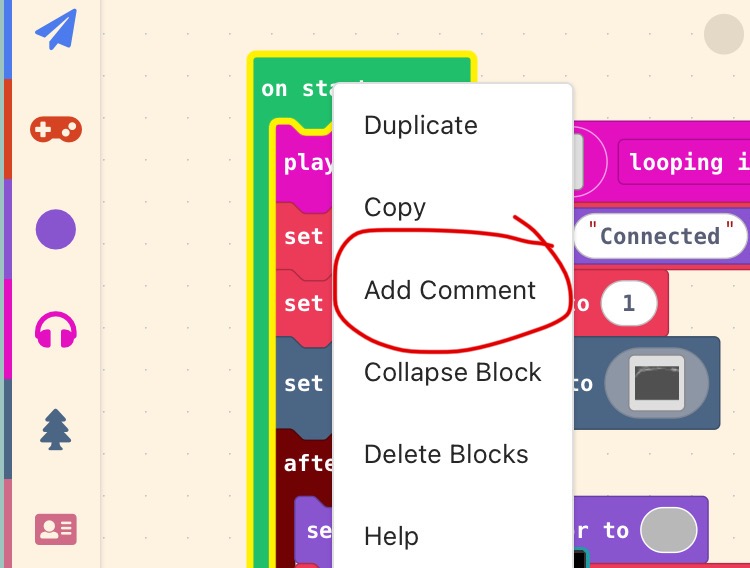
How do you add notes to your project (in the blocks)?
---
### Author:  [@WoofWoof](https://forum.makecode.com/u/WoofWoof)
#### Post date: [October 13, 2025, 3:14am UTC](https://forum.makecode.com/t/how-to-save-tilemaps-in-makecode-arcade-javascript/39668/6 "2025-10-13T03:14:55Z")
You can add them by right clicking on a block (tab and hold on touch screen) and clicking the Add Comment button.
---
### Author:  [@TheEarth](https://forum.makecode.com/u/TheEarth)
#### Post date: [October 13, 2025, 3:15am UTC](https://forum.makecode.com/t/how-to-save-tilemaps-in-makecode-arcade-javascript/39668/7 "2025-10-13T03:15:17Z")
right click