# Locations and Objects
**URL:** https://forum.makecode.com/t/locations-and-objects/4229
**Category:** Arcade
**Created:** [November 1, 2020, 8:29pm UTC](https://forum.makecode.com/t/locations-and-objects/4229 "2020-11-01T20:29:27Z")
**Posts on this page:** 10
**Page:** 1
### Author:  [@Raph](https://forum.makecode.com/u/Raph)
#### Post date: [November 1, 2020, 8:29pm UTC](https://forum.makecode.com/t/locations-and-objects/4229/1 "2020-11-01T20:29:27Z")
Hey guys! Total Newbie here with Arcade. Looking for some help checking locations of certain tiles.
First question:
Is there a way to use the location object to check if it matches a specific tile?
Something like this:
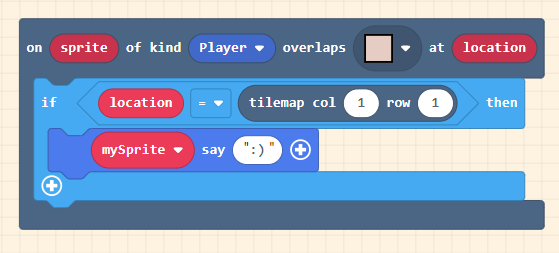
I’ve been cheating and playing another sprite at the location and checking for a collision. However this way I can’t use the tile gallery.
The other solution that I was using was round(x/16-1) but this would be a little more challenging for my students.
The other question is how would I go and console log the location object? Everytime I just get “{}”.
"
Greatly appreciate any assistance.
---
### Author:  [@omnisImperium](https://forum.makecode.com/u/omnisImperium)
#### Post date: [November 1, 2020, 8:33pm UTC](https://forum.makecode.com/t/locations-and-objects/4229/2 "2020-11-01T20:33:22Z")
I think you can drag the block that says the location col/row into the red location ellipse. Next, you can remove the if statement. I’m not sure, thins is just a guess.
---
### Author:  [@Raph](https://forum.makecode.com/u/Raph)
#### Post date: [November 1, 2020, 8:43pm UTC](https://forum.makecode.com/t/locations-and-objects/4229/3 "2020-11-01T20:43:53Z")
Doesn’t seem to allow me to drag a tilemap location into the location eclipse of the function.
---
### Author:  [@cosmoscowboy](https://forum.makecode.com/u/cosmoscowboy)
#### Post date: [November 1, 2020, 10:41pm UTC](https://forum.makecode.com/t/locations-and-objects/4229/4 "2020-11-01T22:41:49Z")
Do you mean this ‘if’ statement (tile at (tilemap col row is )

Also take a look at the ‘Tilemaps’ extension. It might have the functions you are looking for.

Once you have a location, you could then log a property value of the location.
---
### Author:  [@Raph](https://forum.makecode.com/u/Raph)
#### Post date: [November 2, 2020, 12:39am UTC](https://forum.makecode.com/t/locations-and-objects/4229/6 "2020-11-02T00:39:27Z")
You can use the location object from the function to check if it matches a tile using that collision block under scene. Feeling like there should be a tile at… block so that you can pull the coordinates from the location object.
Using the extension:

The moment I want to compare two locations, it doesn`t seem to work. I assume that it’s because it is missing the “tile at” when trying to pull from the tilemap.
> **[Testing 3](https://arcade.makecode.com/94131-39519-63450-66135)**
>
> Made with ❤️ in Microsoft MakeCode Arcade.
---
### Author:  [@Raph](https://forum.makecode.com/u/Raph)
#### Post date: [November 2, 2020, 12:45am UTC](https://forum.makecode.com/t/locations-and-objects/4229/7 "2020-11-02T00:45:19Z")
Without the tilemap block its able to compare both.

Unless there’s a better way, I guess this become a feature request for the following block:

---
### Author:  [@purna079](https://forum.makecode.com/u/purna079)
#### Post date: [November 2, 2020, 2:44am UTC](https://forum.makecode.com/t/locations-and-objects/4229/8 "2020-11-02T02:44:56Z")

Could you find a way to work with these blocks?
---
### Author:  [@cosmoscowboy](https://forum.makecode.com/u/cosmoscowboy)
#### Post date: [November 2, 2020, 3:13pm UTC](https://forum.makecode.com/t/locations-and-objects/4229/9 "2020-11-02T15:13:33Z")
I am not completely sure how Javacript compares objects, so I am assuming the comparison you are trying to make might point to the same tile in the game, but are two separate objects. Being two separates objects that may not be equal, even though conceptually they point to the same tile in the game.
---
### Author:  [@cosmoscowboy](https://forum.makecode.com/u/cosmoscowboy)
#### Post date: [November 2, 2020, 3:20pm UTC](https://forum.makecode.com/t/locations-and-objects/4229/10 "2020-11-02T15:20:48Z")
This is going to be a better comparison, as it compares to numbers.
So explain my previous point (this is true with C#, so I’m assuming it’s the same in Javascript) two class instances are never equal, unless the class implements comparison methods (via interface or Equals methods, etc). So:
Tile a = new Tile(0,0)
Tile b = new Tile(0,0)
a != b (true)
a==b (false)
This is C# syntax, but I guess the same is true in Javascript.
---
### Author:  [@cosmoscowboy](https://forum.makecode.com/u/cosmoscowboy)
#### Post date: [November 2, 2020, 3:25pm UTC](https://forum.makecode.com/t/locations-and-objects/4229/11 "2020-11-02T15:25:54Z")
This may explain it better:
> **[Object Equality in JavaScript - A Drip of JavaScript](http://adripofjavascript.com/blog/drips/object-equality-in-javascript.html)**