# Looking for a zoom out extension
**URL:** https://forum.makecode.com/t/looking-for-a-zoom-out-extension/39570
**Category:** Help
**Created:** [September 30, 2025, 4:12pm UTC](https://forum.makecode.com/t/looking-for-a-zoom-out-extension/39570 "2025-09-30T16:12:21Z")
**Posts on this page:** 16
**Page:** 1
### Author:  [@ItzWolfeel](https://forum.makecode.com/u/ItzWolfeel)
#### Post date: [September 30, 2025, 4:12pm UTC](https://forum.makecode.com/t/looking-for-a-zoom-out-extension/39570/1 "2025-09-30T16:12:21Z")
Heya!
I’m relatively new to make code, and I’ve been looking for a zoom out extension for my game, A Fisherman’s Life for me, so I can see the whole tilemap at once, I’ve seen some stuff about making a new, smaller tilemap so we can see it all. But I don’t think that’s what I’m looking for. Any way I may be able to do this? Thanks!
---
### Author:  [@Dvplayzty](https://forum.makecode.com/u/Dvplayzty)
#### Post date: [October 1, 2025, 1:04am UTC](https://forum.makecode.com/t/looking-for-a-zoom-out-extension/39570/2 "2025-10-01T01:04:04Z")
kiwiphoenix364/pxt-zoom or kiwiphoenix364/pxt-beta-screen-effects – Zoom in and out
I forgot who made it. srry.
---
### Author:  [@WoofWoof](https://forum.makecode.com/u/WoofWoof)
#### Post date: [October 1, 2025, 1:49am UTC](https://forum.makecode.com/t/looking-for-a-zoom-out-extension/39570/3 "2025-10-01T01:49:34Z")
You could try the mini-map extension to see the whole map, or increasing screen resolution, though I don’t usually like doing that because you can only change it once, at the start of the game, and a lot of extensions become buggy or don’t work with other screen resolutions.
---
### Author:  [@Luke](https://forum.makecode.com/u/Luke)
#### Post date: [October 1, 2025, 1:50am UTC](https://forum.makecode.com/t/looking-for-a-zoom-out-extension/39570/4 "2025-10-01T01:50:07Z")
you can’t zoom out, but you could increase the screensize and then zoom in with the zoom extension. However, i think you’re better off just using the minimap extension! you can find it in the default extension list
for non default extensions defo use [awesome arcade](https://awesome-arcade.vercel.app/extensions) it is indeed awesome
---
### Author:  [@SouperMediocre1](https://forum.makecode.com/u/SouperMediocre1)
#### Post date: [October 1, 2025, 1:51am UTC](https://forum.makecode.com/t/looking-for-a-zoom-out-extension/39570/5 "2025-10-01T01:51:15Z")
there is a zoom extension, but It wont do what I think you want, I’m assuming you just want to increase the size of the screen yes?
if that is what you want, you can switch to JavaScript and copy paste this at the top: namespace userconfig {
export const ARCADE\_SCREEN\_WIDTH = 160
export const ARCADE\_SCREEN\_HEIGHT = 120
}
you can change the numbers to change the resolution of your game - you can switch back to blocks mode afterward.
also, if you don’t want to change the resolution, you can install the tilemap utils extension and use 8x8 tiles instead of 16x16.
---
### Author:  [@Stickman4269](https://forum.makecode.com/u/Stickman4269)
#### Post date: [October 1, 2025, 1:58am UTC](https://forum.makecode.com/t/looking-for-a-zoom-out-extension/39570/6 "2025-10-01T01:58:24Z")
this will let you zoom in and out (I believe that negative or \<1 zoom zooms out) [https://github.com/kiwiphoenix364/pxt-zoom](https://github.com/kiwiphoenix364/pxt-zoom)
but you’ll probably need to increase the screen resolution instead and zoom in everywhere else
---
### Author:  [@ItzWolfeel](https://forum.makecode.com/u/ItzWolfeel)
#### Post date: [October 1, 2025, 11:08pm UTC](https://forum.makecode.com/t/looking-for-a-zoom-out-extension/39570/7 "2025-10-01T23:08:40Z")
I’ve tried this, but it simply makes the edges black. I’d like to see all of it, and for a short period of time. Specifically so I can see an animation that is usually out of view. And then go back to normal. Is this possible?
---
### Author:  [@ItzWolfeel](https://forum.makecode.com/u/ItzWolfeel)
#### Post date: [October 1, 2025, 11:08pm UTC](https://forum.makecode.com/t/looking-for-a-zoom-out-extension/39570/8 "2025-10-01T23:08:41Z")
How might I increase the screen size? Preferably in blocks.
---
### Author:  [@Luke](https://forum.makecode.com/u/Luke)
#### Post date: [October 1, 2025, 11:18pm UTC](https://forum.makecode.com/t/looking-for-a-zoom-out-extension/39570/9 "2025-10-01T23:18:07Z")
change to javascript, paste this and then convert back you’ll get a grey block. you can’t use it in coding tho it only works when run at the start of yr code
namespace userconfig {
export const ARCADE\_SCREEN\_WIDTH = 160
export const ARCADE\_SCREEN\_HEIGHT = 120
}
---
### Author:  [@NeverStopTheCoder](https://forum.makecode.com/u/NeverStopTheCoder)
#### Post date: [March 9, 2026, 11:46pm UTC](https://forum.makecode.com/t/looking-for-a-zoom-out-extension/39570/10 "2026-03-09T23:46:49Z")
I like that its just is it at all possible to do with out this and I’d prefer if I could change mid game now is it possible to trick the game to change the const to a let so we can += or -=
---
### Author:  [@Luke](https://forum.makecode.com/u/Luke)
#### Post date: [March 10, 2026, 8:31pm UTC](https://forum.makecode.com/t/looking-for-a-zoom-out-extension/39570/11 "2026-03-10T20:31:00Z")
its not possible
---
### Author:  [@NeverStopTheCoder](https://forum.makecode.com/u/NeverStopTheCoder)
#### Post date: [March 10, 2026, 9:01pm UTC](https://forum.makecode.com/t/looking-for-a-zoom-out-extension/39570/12 "2026-03-10T21:01:26Z")
well is it possilbe to zoom in and of a tilmap so i can get the whole thing but still have the same detail
edit: like this

---
### Author:  [@Luke](https://forum.makecode.com/u/Luke)
#### Post date: [March 11, 2026, 2:13am UTC](https://forum.makecode.com/t/looking-for-a-zoom-out-extension/39570/13 "2026-03-11T02:13:07Z")
OH theres a trick that Lucas did in [Blast and Slash (My gamejam game!)](https://forum.makecode.com/t/blast-and-slash-my-gamejam-game/28030) where the screen size was doubled with a 2x zoom. (so it looks like normal screen size) This allows you to zoom out and retain pixel cleaness.
---
### Author:  [@NeverStopTheCoder](https://forum.makecode.com/u/NeverStopTheCoder)
#### Post date: [March 11, 2026, 5:47pm UTC](https://forum.makecode.com/t/looking-for-a-zoom-out-extension/39570/14 "2026-03-11T17:47:25Z")
with this
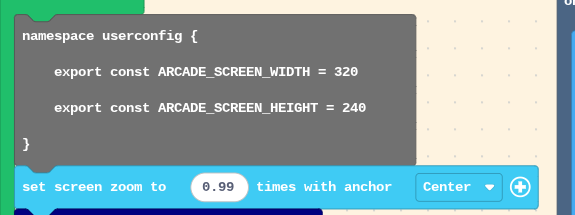
I got
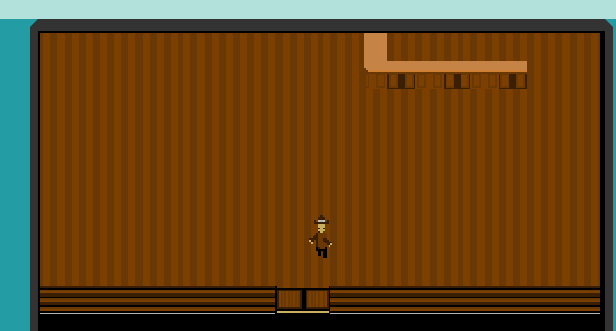with still room at the bottom of the screen but nice enough but I don’t know if I’ll use this because this i as big as I can get with zoom to get it all but the pixels are a little messed up
---
### Author:  [@Luke](https://forum.makecode.com/u/Luke)
#### Post date: [March 12, 2026, 2:14am UTC](https://forum.makecode.com/t/looking-for-a-zoom-out-extension/39570/15 "2026-03-12T02:14:37Z")
Why are you zooming 0.99? Surely just do 2
---
### Author:  [@NeverStopTheCoder](https://forum.makecode.com/u/NeverStopTheCoder)
#### Post date: [March 12, 2026, 5:57pm UTC](https://forum.makecode.com/t/looking-for-a-zoom-out-extension/39570/16 "2026-03-12T17:57:16Z")
because 2 was too far i could not see it all and even with 0.99 I could not move up for some reason