# Make code keyboard
**URL:** https://forum.makecode.com/t/make-code-keyboard/3664
**Category:** Arcade
**Created:** [September 28, 2020, 2:53pm UTC](https://forum.makecode.com/t/make-code-keyboard/3664 "2020-09-28T14:53:30Z")
**Posts on this page:** 15
**Page:** 1
### Author:  [@isaacreisbr23](https://forum.makecode.com/u/isaacreisbr23)
#### Post date: [September 28, 2020, 2:53pm UTC](https://forum.makecode.com/t/make-code-keyboard/3664/1 "2020-09-28T14:53:30Z")
hi guys i’m making a new game and in this game i would like to use the keyboard extension but i don’t know how to use it so can someone shed some light on this ?? thanks
---
### Author:  [@Dreadmask197](https://forum.makecode.com/u/Dreadmask197)
#### Post date: [September 28, 2020, 5:15pm UTC](https://forum.makecode.com/t/make-code-keyboard/3664/2 "2020-09-28T17:15:25Z")
It’s not an extension. It’s in the `game` aisle. its going to be an oval block
---
### Author:  [@UnsignedArduino](https://forum.makecode.com/u/UnsignedArduino)
#### Post date: [September 29, 2020, 1:27am UTC](https://forum.makecode.com/t/make-code-keyboard/3664/3 "2020-09-29T01:27:08Z")
The keyboard extension allows hardware to simulate a keyboard, so when you plug in the hardware, the computer thinks it’s a keyboard. You can use code to like do, `When button A is pressed, press the enter key`
---
### Author:  [@Fish](https://forum.makecode.com/u/Fish)
#### Post date: [September 29, 2020, 1:47am UTC](https://forum.makecode.com/t/make-code-keyboard/3664/4 "2020-09-29T01:47:22Z")
I have a question regarding keyboard Ext. It only seems to work with a button pressed block and I would like to keyboard type in a logic function. Any help would be appreciated
---
### Author:  [@Dreadmask197](https://forum.makecode.com/u/Dreadmask197)
#### Post date: [September 29, 2020, 12:53pm UTC](https://forum.makecode.com/t/make-code-keyboard/3664/5 "2020-09-29T12:53:02Z")
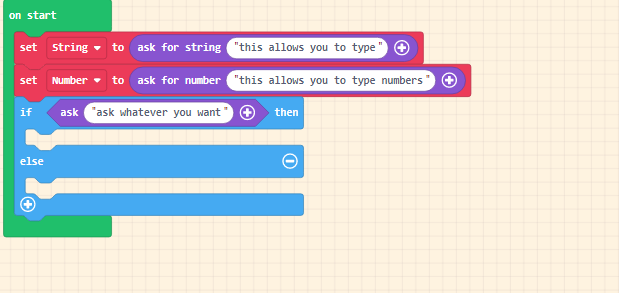
These are the blocks you can find. the red blocks are made up variables i made.
@Fish and @isaacreisbr23
---
### Author:  [@richard](https://forum.makecode.com/u/richard)
#### Post date: [September 29, 2020, 4:49pm UTC](https://forum.makecode.com/t/make-code-keyboard/3664/6 "2020-09-29T16:49:38Z")
so the keyboard extension will only work on hardware (meowbit, pybadge, pygamer, etc.) and it should just work if you have the device plugged in to the computer.
Basically, the device will pretend to be a keyboard and send key events over a protocol called [HID](https://en.wikipedia.org/wiki/USB_human_interface_device_class)
---
### Author:  [@Fish](https://forum.makecode.com/u/Fish)
#### Post date: [September 29, 2020, 5:57pm UTC](https://forum.makecode.com/t/make-code-keyboard/3664/7 "2020-09-29T17:57:49Z")
What is going on with the beta keypad extension? I have brought it into several boards by can’t seem to find the blocks
---
### Author:  [@richard](https://forum.makecode.com/u/richard)
#### Post date: [September 29, 2020, 6:06pm UTC](https://forum.makecode.com/t/make-code-keyboard/3664/8 "2020-09-29T18:06:49Z")
The should show up in the toolbox once you add the extension. like this:

---
### Author:  [@Dreadmask197](https://forum.makecode.com/u/Dreadmask197)
#### Post date: [September 29, 2020, 6:53pm UTC](https://forum.makecode.com/t/make-code-keyboard/3664/9 "2020-09-29T18:53:30Z")
Oh that extension. What’s the extension link?
---
### Author:  [@Fish](https://forum.makecode.com/u/Fish)
#### Post date: [September 29, 2020, 7:37pm UTC](https://forum.makecode.com/t/make-code-keyboard/3664/10 "2020-09-29T19:37:59Z")
Thx, I have that but the keyboard blocks do not work in a if function

They work in this block

---
### Author:  [@Fish](https://forum.makecode.com/u/Fish)
#### Post date: [September 29, 2020, 7:40pm UTC](https://forum.makecode.com/t/make-code-keyboard/3664/11 "2020-09-29T19:40:38Z")
This extension does not appear to show up in the blocks editor

---
### Author:  [@richard](https://forum.makecode.com/u/richard)
#### Post date: [September 29, 2020, 7:45pm UTC](https://forum.makecode.com/t/make-code-keyboard/3664/12 "2020-09-29T19:45:19Z")
I’m not familiar with that extension. @peli or @mmoskal might know
---
### Author:  [@isaacreisbr23](https://forum.makecode.com/u/isaacreisbr23)
#### Post date: [September 29, 2020, 9:53pm UTC](https://forum.makecode.com/t/make-code-keyboard/3664/13 "2020-09-29T21:53:29Z")
send me the link to this extension, please
---
### Author:  [@Fish](https://forum.makecode.com/u/Fish)
#### Post date: [September 29, 2020, 11:47pm UTC](https://forum.makecode.com/t/make-code-keyboard/3664/14 "2020-09-29T23:47:41Z")
The extensions I am referring to is from the makecode extension page and listed as a beta
---
### Author:  [@peli](https://forum.makecode.com/u/peli)
#### Post date: [October 4, 2020, 9:55pm UTC](https://forum.makecode.com/t/make-code-keyboard/3664/15 "2020-10-04T21:55:01Z")
This is an extension written for the Adafruit Neotrellis. [https://learn.adafruit.com/adafruit-neotrellis](https://learn.adafruit.com/adafruit-neotrellis)