# Mazes extension
**URL:** https://forum.makecode.com/t/mazes-extension/290
**Category:** Arcade
**Tags:** extension
**Created:** [June 24, 2019, 6:42pm UTC](https://forum.makecode.com/t/mazes-extension/290 "2019-06-24T18:42:52Z")
**Posts on this page:** 16
**Page:** 1
### Author:  [@AlexK](https://forum.makecode.com/u/AlexK)
#### Post date: [June 24, 2019, 6:42pm UTC](https://forum.makecode.com/t/mazes-extension/290/1 "2019-06-24T18:42:52Z")
Now that production and beta have been bumped to newer versions, as promised in a previous thread, I am releasing my mazes extension. You can use this extension to generate random mazes with a variety of algorithms. The algorithms come from Jamis Buck’s book.[1]
Extension URL (for importing into your own projects): [https://github.com/robo-technical-group/pxt-arcade-mazes.git](https://github.com/robo-technical-group/pxt-arcade-mazes.git)
API documentation is available here: [https://github.com/robo-technical-group/pxt-arcade-mazes/blob/master/docs/api.md](https://github.com/robo-technical-group/pxt-arcade-mazes/blob/master/docs/api.md)
See it in action below. Press A to generate a new maze. In the JavaScript version, you also can press B to switch between the tile map and an image of the whole maze with its solution.
- Blocks playground: [https://makecode.com/\_c2W0szf0m6kF](https://makecode.com/_c2W0szf0m6kF)
- JavaScript playground: [https://makecode.com/\_53mUxx39eRoj](https://makecode.com/_53mUxx39eRoj)
I made a simple game in Blocks that uses the playgrounds as a premise. At the start of the game, the duck is trapped in a cell. Press A to build a maze and to start the clock. You have 60 seconds to get the duck to its home in the swamp. Snacks appear when you have 30 seconds left to help you. If you’re running low on time and want to cheat, just press A to generate a new map. 🙂
> **[Maze Game 2.0 Blocks](https://arcade.makecode.com/94958-21669-01982-44551)**
>
> Made with ❤️ in Microsoft MakeCode Arcade.
The sample game runs fine on hardware as-is. If you move to a larger tile map, you may need to switch the game to “hardware mode,” which disables the breadcrumb sprites. (The breadcrumbs still appear; you just don’t get any points for them.) Hardware can handle tile maps up to a grid size of 15x15 when the pathway is two tiles wide. If you switch to one-tile pathways, the path gets really tight to navigate, but you should be able to use a larger grid. JavaScript version is also available.[2]
Happy Monday! Have fun!
* * *
[1] [Buck, J. (2015). _Mazes for programmers: Code your own twisty little passages_. Dallas, Texas: Pragmatic Programmers](https://pragprog.com/book/jbmaze/mazes-for-programmers)
[2] [JavaScript version of Maze Game](https://makecode.com/_4T54H0WhFhvW)
[See all of my MakeCode Arcade games and extensions here!](https://sites.google.com/site/akulcsarsite/makecode/makecode-arcade)
---
### Author:  [@AlexK](https://forum.makecode.com/u/AlexK)
#### Post date: [June 24, 2019, 6:49pm UTC](https://forum.makecode.com/t/mazes-extension/290/2 "2019-06-24T18:49:56Z")
I highly recommend Jamis Buck’s book. Advanced students will be able to explore these algorithms to create their own projects. The book is light on the math and analysis of the algorithms (by intention), but the book also shares plenty of additional resources for students who want to dive more deeply into the algorithms. Definitely check it out!
Also, see the original thread (linked at the bottom of the main post above) to see some work that @jwunderl shared from his days as a lead TA at UW. Thanks again for sharing, Joey!
Sorry about the flurry of activity: Three games and four extensions over the weekend. I’ve had an inspired week. 😄
---
### Author:  [@WeCodeMakeCode](https://forum.makecode.com/u/WeCodeMakeCode)
#### Post date: [August 14, 2020, 12:43am UTC](https://forum.makecode.com/t/mazes-extension/290/3 "2020-08-14T00:43:29Z")
Amazing! Really.
When I used this I noticed that your nice help files do not open when using the MakeCode Arcade editor: touching the block then selecting help. Have you been able to fix this?
In some of the extensions I have developed, I can’t get my help files to work. Tearing my hair…
---
### Author:  [@WeCodeMakeCode](https://forum.makecode.com/u/WeCodeMakeCode)
#### Post date: [August 14, 2020, 12:47am UTC](https://forum.makecode.com/t/mazes-extension/290/4 "2020-08-14T00:47:07Z")
See my extension example in [Looking for MakeCode Arcade Extension with Help files that is not on Arcade's dashboard](https://forum.makecode.com/t/looking-for-makecode-arcade-extension-with-help-files-that-is-not-on-arcades-dashboard/3046)
---
### Author:  [@AlexK](https://forum.makecode.com/u/AlexK)
#### Post date: [August 16, 2020, 2:47am UTC](https://forum.makecode.com/t/mazes-extension/290/5 "2020-08-16T02:47:05Z")
Hi, @WeCodeMakeCode ! Thanks for the compliment; I really appreciate it! Love what you’re doing over at your site. For those of you who haven’t seen it yet, definitely check it out![1]
I haven’t yet tried to include help files for my extensions within the MakeCode interface. I’m not entirely certain that’s possible right now. The last time I looked at that documentation, those `// %help =` annotations could only point to a help file in the existing MakeCode documentation. That may have changed, though, since I last looked. @jwunderl, @peli, et al., do you have any thoughts or advice?
P.S. @peli - Thanks for raising the issue on GitHub. Like five months ago. 😃 So sorry I missed it! I’ve updated the extension and bumped the version number to 2.0+.
P.P.S. For those of you following this extension, I plan on looking at the new tile map engine and seeing if it makes sense to rewrite the extension to take advantage of it. For now, this extension uses the older, color-based tile map engine.
* * *
[1] [WeCodeMakeCode site](https://wecodemakecode.com/)
---
### Author:  [@peli](https://forum.makecode.com/u/peli)
#### Post date: [August 24, 2020, 3:32am UTC](https://forum.makecode.com/t/mazes-extension/290/6 "2020-08-24T03:32:04Z")
Wow you have quite a bit of docs! If you turn on github pages on your repo, github will automatically use Jekyll to render the simulator and the pages. We should be able to configure it as well to render all the docs under /docs.
I think you can edit `_config.yml` and add docs under the `include` key
```auto
include:
index.html
README.md
static
docs
```
([https://jekyllrb.com/docs/configuration/options/](https://jekyllrb.com/docs/configuration/options/))
---
### Author:  [@DA\_PRO\_PLAYZ](https://forum.makecode.com/u/DA_PRO_PLAYZ)
#### Post date: [October 30, 2024, 4:47pm UTC](https://forum.makecode.com/t/mazes-extension/290/7 "2024-10-30T16:47:14Z")
it won’t work, what am I doing wrong?
> **[a spoopy game](https://arcade.makecode.com/S32278-15693-01991-70751)**
>
> Made with ❤️ in Microsoft MakeCode Arcade.
---
### Author:  [@AlexK](https://forum.makecode.com/u/AlexK)
#### Post date: [October 30, 2024, 7:08pm UTC](https://forum.makecode.com/t/mazes-extension/290/8 "2024-10-30T19:08:06Z")
I haven’t updated this extension to work with the current implementation of tilemaps. It’s on my list of updates at the start of next year.
---
### Author:  [@AlexK](https://forum.makecode.com/u/AlexK)
#### Post date: [November 11, 2025, 7:09am UTC](https://forum.makecode.com/t/mazes-extension/290/9 "2025-11-11T07:09:43Z")
I finally crossed off one of my goals for this year: I’ve updated this extension to use the modern implementation of tilemaps!
Creating a random maze as a tilemap is really as simple as this: (Yes, you could combine those two blocks into one.)
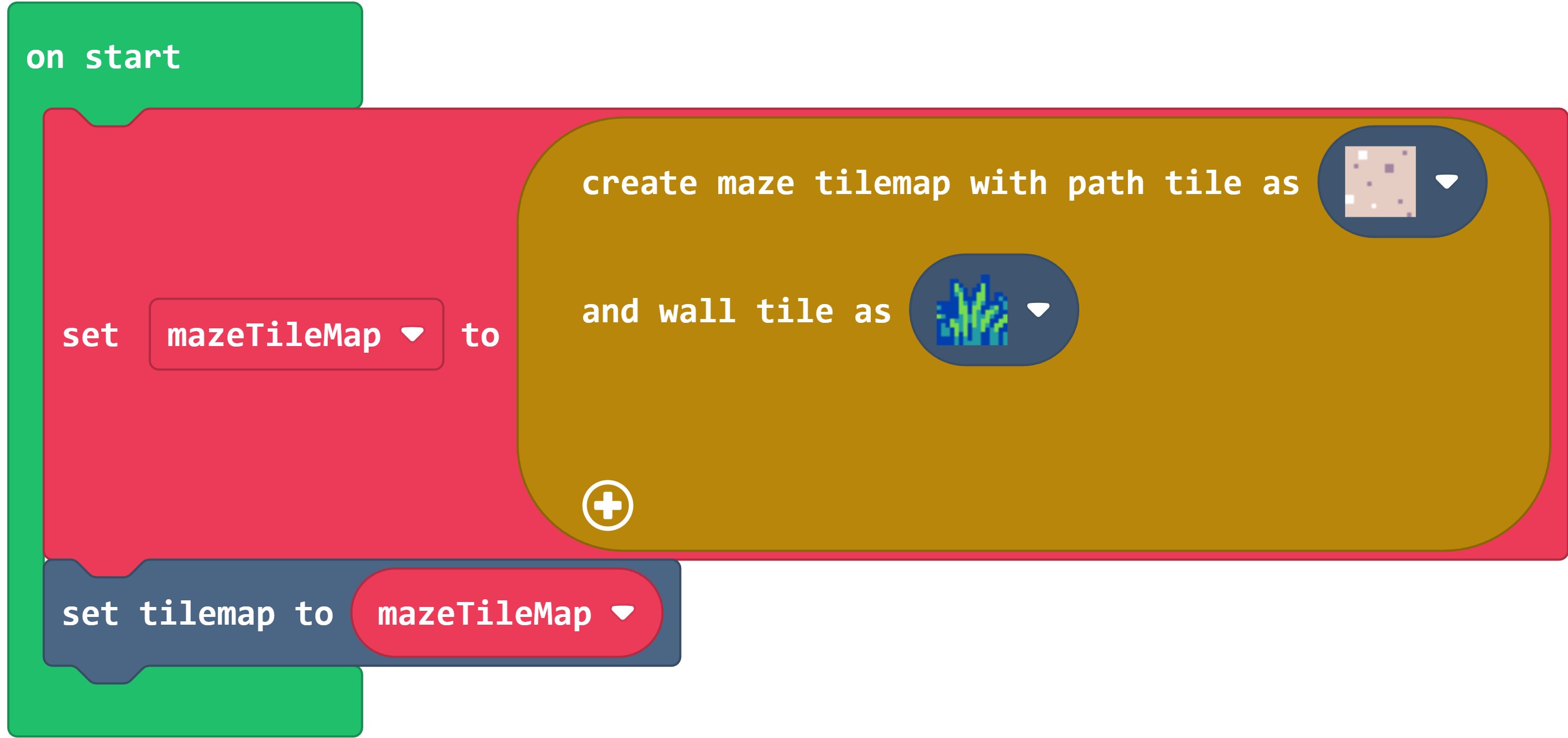
It’s a real tilemap, so you can manipulate it as you would any other tilemap.
I’ll post more documentation here later, but if you want to play around in the meantime, then have fun!
> **[Simple Blocks Maze Tilemap](https://arcade.makecode.com/57377-38089-33459-52577)**
>
> Made with ❤️ in Microsoft MakeCode Arcade.
---
### Author:  [@Awesomefreez](https://forum.makecode.com/u/Awesomefreez)
#### Post date: [November 16, 2025, 11:53pm UTC](https://forum.makecode.com/t/mazes-extension/290/10 "2025-11-16T23:53:19Z")
can this be used with raycasting now?
---
### Author:  [@AlexK](https://forum.makecode.com/u/AlexK)
#### Post date: [November 16, 2025, 11:54pm UTC](https://forum.makecode.com/t/mazes-extension/290/11 "2025-11-16T23:54:15Z")
It creates tilemaps, so I suppose so…? Haven’t tried it yet. Feel free to give a try and report back.
---
### Author:  [@Awesomefreez](https://forum.makecode.com/u/Awesomefreez)
#### Post date: [November 17, 2025, 2:38am UTC](https://forum.makecode.com/t/mazes-extension/290/12 "2025-11-17T02:38:07Z")
I tried it and it works!
---
### Author:  [@AlexK](https://forum.makecode.com/u/AlexK)
#### Post date: [November 23, 2025, 1:11am UTC](https://forum.makecode.com/t/mazes-extension/290/13 "2025-11-23T01:11:41Z")
Here is a more complete Blocks game that uses this extension. It also uses the **Settings** and **Mini Map** extensions.
> **[Mazes Blocks Example](https://arcade.makecode.com/34088-77162-14757-81172)**
>
> Made with ❤️ in Microsoft MakeCode Arcade.
~~Writing the Blocks version of a tutorial now. Have fun!~~
Blocks version of the tutorial is available here:
[https://arcade.makecode.com/#tutorial:https://github.com/robo-technical-group/pxt-tutorials/mazes-tutorial-blocks](https://arcade.makecode.com/#tutorial:https://github.com/robo-technical-group/pxt-tutorials/mazes-tutorial-blocks)
Have fun!
---
### Author:  [@AlexK](https://forum.makecode.com/u/AlexK)
#### Post date: [November 23, 2025, 4:59am UTC](https://forum.makecode.com/t/mazes-extension/290/14 "2025-11-23T04:59:14Z")
Here’s a temporary URL for the Blocks tutorial while the MakeCode servers refresh their caches. The tutorial’s permanent URL should work soon.
[https://arcade.makecode.com/#tutorial:87568-92377-22221-69294](https://arcade.makecode.com/#tutorial:87568-92377-22221-69294)
---
### Author:  [@rymc88](https://forum.makecode.com/u/rymc88)
#### Post date: [November 23, 2025, 10:34pm UTC](https://forum.makecode.com/t/mazes-extension/290/15 "2025-11-23T22:34:24Z")
You are legend! Thank you for making great extensions, providing documentation and support, and being such a helpful member of this MakeCode community.
---
### Author:  [@AlexK](https://forum.makecode.com/u/AlexK)
#### Post date: [January 25, 2026, 4:35am UTC](https://forum.makecode.com/t/mazes-extension/290/16 "2026-01-25T04:35:50Z")
I’ve added tutorials for the typing languages.
- Javascript: [https://arcade.makecode.com/#tutorial:https://github.com/robo-technical-group/pxt-tutorials/mazes-tutorial-js](https://arcade.makecode.com/#tutorial:https://github.com/robo-technical-group/pxt-tutorials/mazes-tutorial-js)
- Python: [https://arcade.makecode.com/#tutorial:https://github.com/robo-technical-group/pxt-tutorials/mazes-tutorial-py](https://arcade.makecode.com/#tutorial:https://github.com/robo-technical-group/pxt-tutorials/mazes-tutorial-py)
I’m thinking about adding an advanced tutorial or two, but I’ll entertain any ideas on extending these tutorials.
Have fun!