# Mindstorms simulator display problem?
**URL:** https://forum.makecode.com/t/mindstorms-simulator-display-problem/212
**Category:** EV3
**Created:** [May 30, 2019, 1:55am UTC](https://forum.makecode.com/t/mindstorms-simulator-display-problem/212 "2019-05-30T01:55:38Z")
**Posts on this page:** 3
**Page:** 1
### Author:  [@dpwoos](https://forum.makecode.com/u/dpwoos)
#### Post date: [May 30, 2019, 1:55am UTC](https://forum.makecode.com/t/mindstorms-simulator-display-problem/212/1 "2019-05-30T01:55:38Z")
I don’t think the fullscreen view of the mindstorms simulator is being displayed correctly:
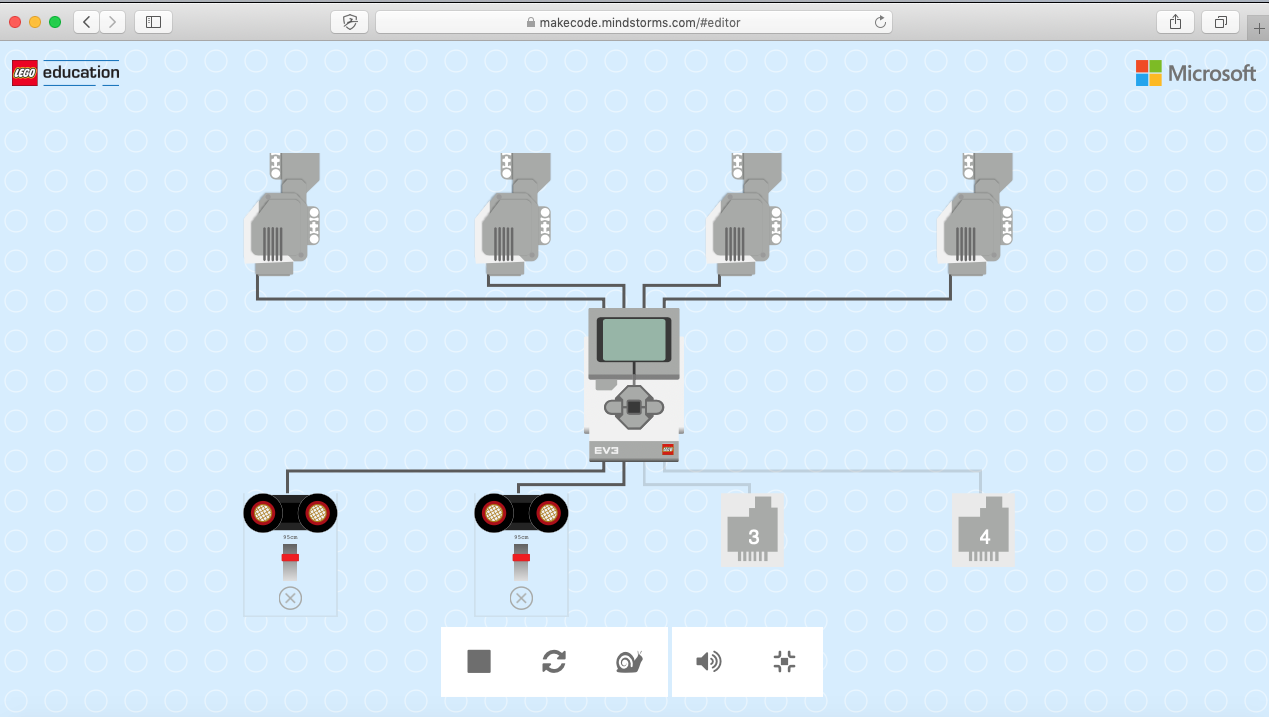
Notice that the top part of the motors are missing.
Same issue in both Chrome and Safari, MacOS Mojave 10.14.4.
Thanks.
---
### Author:  [@Walt.White](https://forum.makecode.com/u/Walt.White)
#### Post date: [November 4, 2019, 5:22pm UTC](https://forum.makecode.com/t/mindstorms-simulator-display-problem/212/2 "2019-11-04T17:22:55Z")
I get the same thing. The banner header with the LEGO Education and Microsoft name and logo is too big in the vertical dimension. Fix is to make the browser full screen. The MakeCode “fullscreen” fills to whatever size browser you have set.
Walt
---
### Author:  [@peli](https://forum.makecode.com/u/peli)
#### Post date: [November 4, 2019, 6:07pm UTC](https://forum.makecode.com/t/mindstorms-simulator-display-problem/212/3 "2019-11-04T18:07:07Z")
Thank you for reporting this. This look like a fix in our simulator layout algorithm.