# My New Game (SneakPeak/Help)
**URL:** https://forum.makecode.com/t/my-new-game-sneakpeak-help/34739
**Category:** Arcade
**Created:** [March 20, 2025, 12:29pm UTC](https://forum.makecode.com/t/my-new-game-sneakpeak-help/34739 "2025-03-20T12:29:22Z")
**Posts on this page:** 11
**Page:** 1
### Author:  [@Fixitude](https://forum.makecode.com/u/Fixitude)
#### Post date: [March 20, 2025, 12:29pm UTC](https://forum.makecode.com/t/my-new-game-sneakpeak-help/34739/1 "2025-03-20T12:29:22Z")
I am making my new game and I would like to give a sneak peak but I can’t do that till this is done, I have a problem with my game, the problem is I am making a variable called paused for the title screen and setting the game to paused but it is completely pausing and not doing anything until you click the button please find the image below

---
### Author:  [@loganisdabest](https://forum.makecode.com/u/loganisdabest)
#### Post date: [March 20, 2025, 1:48pm UTC](https://forum.makecode.com/t/my-new-game-sneakpeak-help/34739/2 "2025-03-20T13:48:47Z")
put change paused by 1 in the on player2 button pressed
---
### Author:  [@Fixitude](https://forum.makecode.com/u/Fixitude)
#### Post date: [March 20, 2025, 8:58pm UTC](https://forum.makecode.com/t/my-new-game-sneakpeak-help/34739/3 "2025-03-20T20:58:23Z")
Ahh.. Thank you that half worked and then I had to input a little 😄
---
### Author:  [@Fixitude](https://forum.makecode.com/u/Fixitude)
#### Post date: [March 20, 2025, 9:01pm UTC](https://forum.makecode.com/t/my-new-game-sneakpeak-help/34739/4 "2025-03-20T21:01:54Z")
Also I have a bunch of other unexplained problems that are just stupid and should work my brain just isn’t working, one of them is when I go into the game normally it shoots and animates both directions but when i go through the menu system it doesn’t work it only shoots one way here is a screenshot

Also this Is my menu system and when I go into it and try and change the volume it doesn’t change please help

---
### Author:  [@WoofWoof](https://forum.makecode.com/u/WoofWoof)
#### Post date: [March 20, 2025, 9:03pm UTC](https://forum.makecode.com/t/my-new-game-sneakpeak-help/34739/5 "2025-03-20T21:03:57Z")
If you put it into an “on game update” block the game will not update until the code inside the block is done running. If you put the code into a “forever” block you will not have this problem!
---
### Author:  [@Fixitude](https://forum.makecode.com/u/Fixitude)
#### Post date: [March 20, 2025, 9:17pm UTC](https://forum.makecode.com/t/my-new-game-sneakpeak-help/34739/6 "2025-03-20T21:17:08Z")
I just tried that ☹ Didn’t work.
---
### Author:  [@Fixitude](https://forum.makecode.com/u/Fixitude)
#### Post date: [March 20, 2025, 9:17pm UTC](https://forum.makecode.com/t/my-new-game-sneakpeak-help/34739/7 "2025-03-20T21:17:10Z")
I have managed to partially fix the volume problem so when you click it it sets the volume when you start the game.
---
### Author:  [@Fixitude](https://forum.makecode.com/u/Fixitude)
#### Post date: [March 20, 2025, 10:28pm UTC](https://forum.makecode.com/t/my-new-game-sneakpeak-help/34739/8 "2025-03-20T22:28:21Z")
I have so many big problems that I am just going to provide the link (Sigh) which I didn’t want to do and hope others can fix it. [https://arcade.makecode.com/S06446-46412-62174-27549](https://arcade.makecode.com/S06446-46412-62174-27549) The problem now is that I just can’t find a way of making this sim error go away.
---
### Author:  [@WoofWoof](https://forum.makecode.com/u/WoofWoof)
#### Post date: [March 21, 2025, 10:04pm UTC](https://forum.makecode.com/t/my-new-game-sneakpeak-help/34739/9 "2025-03-21T22:04:48Z")
Ok, so there’s this really neat feature called Debug Mode that you can use for stuff like this!
You enter it by pressing this button under the simulator:

Once you are in Debug Mode, you can find the little play icon, I think at the top right next to the simulator. Then, when the game gives you an error, it will highlight the cause of the issue! For example, when I press A on the start screen of your game, this code gets highlighted:

If you click the little warning icon, it will tell you what the error is:
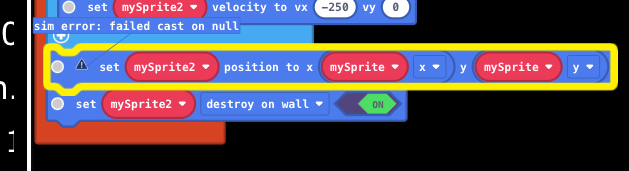
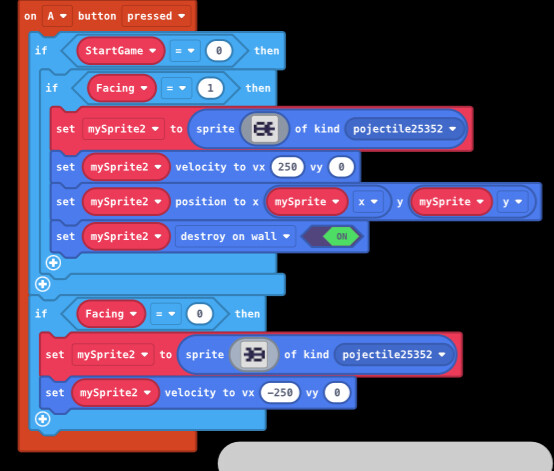
Looks like the error is “failed to cast on null”, which basically means the program tried to find some information and that information was “null”, aka it didn’t exist. In this case, I can guess that the thing that doesn’t exist is either mySprite or mySprite2, which makes sense because they aren’t visible on the start screen. I think you just forgot to put these two blocks into a that one If statement that checks to make sure the game has started. If I move those blocks, your error is fixed!
---
### Author:  [@Fixitude](https://forum.makecode.com/u/Fixitude)
#### Post date: [March 22, 2025, 12:40am UTC](https://forum.makecode.com/t/my-new-game-sneakpeak-help/34739/10 "2025-03-22T00:40:16Z")
I now need help because for some reason this code is not working (Deep breath) and I am getting rather annoyed it isn’t even starting the game now.
> **[Shadow Masters (Broken!)](https://arcade.makecode.com/S06446-46412-62174-27549)**
>
> Made with ❤️ in Microsoft MakeCode Arcade.
---
### Author:  [@hassan](https://forum.makecode.com/u/hassan)
#### Post date: [March 22, 2025, 1:54am UTC](https://forum.makecode.com/t/my-new-game-sneakpeak-help/34739/11 "2025-03-22T01:54:12Z")
The culprit is the empty tile maps in the `set overworld` pxt-world extension function in your `Resume` function:

I’m not too familiar with this extension, but the tiles maps are blank which is why you are seeing nothing. For some reason I cannot seem to edit the tiles maps directly either in blocks, or in the asset editor (perhaps @richard could provide more context as the extension author).
That being said, you can grab the built-in parameter and remove it like so:

Then you can drag in a new one from the overworld toolbox:

Once that is in place, you can either fill in the individual tile maps, or grab a single tile map that you can fill and copy-paste if you want the same map over and over again:

When the tile maps are loaded, you will see that you character loads in as expected.
Please note: This extension was made to add many smaller tile maps together so that characters could go from screen to screen, like they do in old-school RPGs. That being said, it seems you want to make a side scroller since there is gravity. Only the bottom three tile maps in the last row can be seen by your character since they don’t have a way to travel up. You can either add verticality to your game via platforms to use those higher up tiles, or consider making a long skinny tile map instead.
Here is the link to the edited code so you can see for yourself: [https://makecode.com/\_WXpPs6g535t5](https://makecode.com/_WXpPs6g535t5)
I like the main character’s sprite! Hope you keep working on the game 🙂