# Problem with precision of number
**URL:** https://forum.makecode.com/t/problem-with-precision-of-number/16184
**Category:** micro:bit
**Created:** [November 5, 2022, 8:56pm UTC](https://forum.makecode.com/t/problem-with-precision-of-number/16184 "2022-11-05T20:56:06Z")
**Posts on this page:** 6
**Page:** 1
### Author:  [@bibbib](https://forum.makecode.com/u/bibbib)
#### Post date: [November 5, 2022, 8:56pm UTC](https://forum.makecode.com/t/problem-with-precision-of-number/16184/1 "2022-11-05T20:56:06Z")
I hope there is a micro:bit expert out there who can help me with this…
I can’t get the “Show data” window (or the LED display) to show the correct number.
10^-4.5 = 0.00003162.
When I do a test and just write the calculation it works. But when -4.5 is stored in the variable “power” it doesn’t work. Then I just get the result 0.0001?!??? Going crazy here, anyone have an explanation and maybe even a solution?
There are pictures in the comment… (it is in Danish but I it is possible to understand)

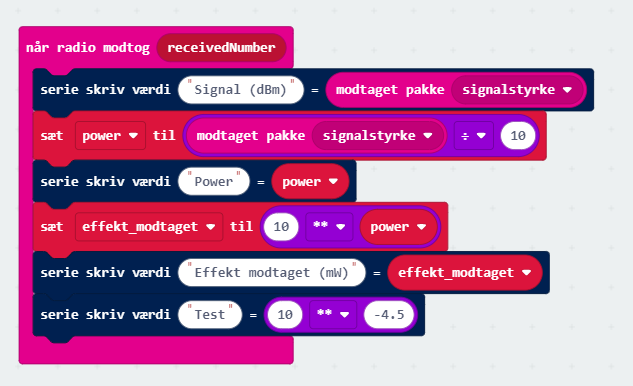
---
### Author:  [@bsiever](https://forum.makecode.com/u/bsiever)
#### Post date: [November 7, 2022, 12:30pm UTC](https://forum.makecode.com/t/problem-with-precision-of-number/16184/2 "2022-11-07T12:30:04Z")
Soon after my other reply I realized it may be easier to use if the `power()` were a function that can be used from blocks. Here’s a version that encapsulates the `power()` for floating point numbers as a function that’s callable from blocks: [https://makecode.microbit.org/\_URjXjd9YbKht](https://makecode.microbit.org/_URjXjd9YbKht)
The function part can be copy/pasted from one project to another by copying the test in the JavaScript view or you could simply edit the code given in the links.
Bill
---
### Author:  [@bsiever](https://forum.makecode.com/u/bsiever)
#### Post date: [November 7, 2022, 12:30pm UTC](https://forum.makecode.com/t/problem-with-precision-of-number/16184/3 "2022-11-07T12:30:29Z")
I think this is what’s going on:
- The. `10 ** -4.5` is all literals. The compiler is probably doing the computation simply replacing the expression with the final value at compile time. So this computation isn’t happening on the micro:bit.
- The `**` operator is probably really just `Math.pow()`. It looks like the simulator may use a full fledged `Math.pow()` (probably the JavaScript function), but the micro:bit version appears to only work with integers. So .5 part of 4.5 is lost. The result is 10 \*\* -4 = .0001.
TypeScript has access to `Math.log()` and `Math.exp()`, which work with floating point numbers. You can use a change of base to do the computation, like `Received_Power = Math.exp(Power * Math.log(10))`. (`log(10)` is constant, so it could also be expressed as `Received_Power = Math.exp(Power * 2.30258509299)`)
Here’s a shared project that uses this approach. You’ll want to switch the the JavaScript view to edit/copy/paste the formula from this to your work: [https://makecode.microbit.org/\_Re7Pfme2mVHx](https://makecode.microbit.org/_Re7Pfme2mVHx) . I’ve tested this on a micro:bit v2.00 and do get 0.000031622776601684.
I hope that helps,
Bill
---
### Author:  [@bibbib](https://forum.makecode.com/u/bibbib)
#### Post date: [November 10, 2022, 5:37pm UTC](https://forum.makecode.com/t/problem-with-precision-of-number/16184/4 "2022-11-10T17:37:41Z")
Thank you very much!!! This seems to solve it 🙂
---
### Author:  [@bibbib](https://forum.makecode.com/u/bibbib)
#### Post date: [November 10, 2022, 11:02pm UTC](https://forum.makecode.com/t/problem-with-precision-of-number/16184/5 "2022-11-10T23:02:40Z")
Out of curiosity, if I want a student to reproduce the function, can the “Math.exp(exponent \*Math.log(base))” expression be made in “Blocks” tab, or do they need to go to the JavaScript tab?

---
### Author:  [@bsiever](https://forum.makecode.com/u/bsiever)
#### Post date: [November 11, 2022, 7:04pm UTC](https://forum.makecode.com/t/problem-with-precision-of-number/16184/6 "2022-11-11T19:04:11Z")
Hi @bibbib,
I don’t think you can use `exp()` or `log()` with the default blocks and I don’t see an extension that would help either.
Here are two options that you might consider if you want to simplify this for students:
**Option 1** : Just have them open this project and customize it via the Edit button: [https://makecode.microbit.org/\_4R13oKaYM0AK](https://makecode.microbit.org/_4R13oKaYM0AK)
**Option 2** : (Using the JavaScript tab)
1. Go to the JavaScript tab.
2. Paste in:
```auto
function power (base: number, exponent: number) {
return Math.exp(exponent * Math.log(base))
}
```
3. Return to blocks.
4. Expand the “Advanced” section at the bottom of the blocks toolboxes.
5. Select the `Functions` toolbox.
6. Drag out the oval `call power` block.
I hope that helps,
Bill
P.S. I’d love to hear about your assignment or how you’re using this in class. (And what ages / subjects / grades). There are some educators on the micro:bit [Developer Slack forum](https://tech.microbit.org/community/) that may be interested in your work (and sharing their work).