# Programming LEDs to power on through voice activation
**URL:** https://forum.makecode.com/t/programming-leds-to-power-on-through-voice-activation/29307
**Category:** micro:bit
**Created:** [June 17, 2024, 6:30pm UTC](https://forum.makecode.com/t/programming-leds-to-power-on-through-voice-activation/29307 "2024-06-17T18:30:41Z")
**Posts on this page:** 20
**Page:** 1
### Author:  [@kathleenharris](https://forum.makecode.com/u/kathleenharris)
#### Post date: [June 17, 2024, 6:30pm UTC](https://forum.makecode.com/t/programming-leds-to-power-on-through-voice-activation/29307/1 "2024-06-17T18:30:41Z")
What are some options to program LEDs to power on through voice activation (using micro:bit). Are there any links to good tutorials?
---
### Author:  [@dsssssssss9](https://forum.makecode.com/u/dsssssssss9)
#### Post date: [June 17, 2024, 10:48pm UTC](https://forum.makecode.com/t/programming-leds-to-power-on-through-voice-activation/29307/2 "2024-06-17T22:48:03Z")
Hi
Welcome !
Are you using a V1 or V2 micro:Bit please?
LEDs on the Micro:Bit 5\*5 display or External?
---
### Author:  [@kathleenharris](https://forum.makecode.com/u/kathleenharris)
#### Post date: [June 17, 2024, 11:56pm UTC](https://forum.makecode.com/t/programming-leds-to-power-on-through-voice-activation/29307/3 "2024-06-17T23:56:12Z")
Using external LEDs, and open to using V1 or V2 micro:Bit
---
### Author:  [@dsssssssss9](https://forum.makecode.com/u/dsssssssss9)
#### Post date: [June 25, 2024, 6:25pm UTC](https://forum.makecode.com/t/programming-leds-to-power-on-through-voice-activation/29307/4 "2024-06-25T18:25:33Z")
So sorry for the delay in getting back to you!!
Using a V2 Micro:Bit is the easiest way to do this as it has a Microphone Built in & MakeCode has the blocks to support it.
Here i have connected Led ( & current limiting resistor ) to PIN1 & GND on the Micro:Bit…

The Pin:Bit connector is NOT necessary it just makes accessing the pins easier i find - you can just use Alligator clip wires or whatever you have just as well.
* * *
Here is the code I used - not the best way of doing it i admit but hopefully easy to understand?

The code 1st sets a variable i use to decide if LED is to be turned on or off ( false = off . True = on )
It then Sets PIN1 to 0 which has the effect of ensuring the LED connected to PIN1 is turned off as soon as the code is run.
When a “LOUD” sound is detected the code inverts the value of ONOff - if False it sets it to True , If True it sets it to False.
This results in LED being turned on / off alternately each time a “LOUD” sound is detected
The code the turns on the LED ( by setting PIN1 to 1) if OnOff is True otherwise it turns it off ( by setting PIN1 to 0 )
* * *
I hope this helps , please feel free to ask any further questions
Finally here is the link to my code…
[https://makecode.microbit.org/\_h5zgojapYadd](https://makecode.microbit.org/_h5zgojapYadd)
---
### Author:  [@kathleenharris](https://forum.makecode.com/u/kathleenharris)
#### Post date: [June 26, 2024, 12:11am UTC](https://forum.makecode.com/t/programming-leds-to-power-on-through-voice-activation/29307/5 "2024-06-26T00:11:38Z")
Thank you!
---
### Author:  [@dsssssssss9](https://forum.makecode.com/u/dsssssssss9)
#### Post date: [June 26, 2024, 4:28pm UTC](https://forum.makecode.com/t/programming-leds-to-power-on-through-voice-activation/29307/6 "2024-06-26T16:28:16Z")
You are most welcome .
I realise you may want “full” voice control -
Such as "turn on light " , " turn off light " etc ?
This code just reacts to any loud noises in the room …
If you want fuller voice control let me know , you will need extra hardware such as …
> **[Gravity: Offline Language Learning Voice Recognition Sensor for micro:bit /...](https://www.dfrobot.com/product-2665.html)**
>
> This offline language learning voice and speech recognition sensor is compatible with micro:bit, Arduino, and esp32. It supports both I2C and UART communication methods.
I’ve had good success with this device & would be only too glad to help in any way …
Just ask as many questions as you need , as often as you need to ask them .
Please let me know how you get on ?
Regards
---
### Author:  [@kathleenharris](https://forum.makecode.com/u/kathleenharris)
#### Post date: [July 11, 2024, 2:31am UTC](https://forum.makecode.com/t/programming-leds-to-power-on-through-voice-activation/29307/7 "2024-07-11T02:31:22Z")
Thank you for this! I think I will want to do the voice recognition.
---
### Author:  [@dsssssssss9](https://forum.makecode.com/u/dsssssssss9)
#### Post date: [July 12, 2024, 8:16pm UTC](https://forum.makecode.com/t/programming-leds-to-power-on-through-voice-activation/29307/8 "2024-07-12T20:16:58Z")
Hi again
Yes a voice recognition system will give you more control
The offline device I recommended before is very useful & easy to use .
No need for complicated programming or any internet connectivity
Here is a very short video I did show the basic usage of it
[ ](https://www.youtube.com/watch?v=LGwAD32lSl4)
If you’d like any more information or help please just ask
Regards
---
### Author:  [@kathleenharris](https://forum.makecode.com/u/kathleenharris)
#### Post date: [September 24, 2024, 4:46pm UTC](https://forum.makecode.com/t/programming-leds-to-power-on-through-voice-activation/29307/9 "2024-09-24T16:46:57Z")
Hi, it’s Mikki again. Is the expansion board necessary for just when coding, or does it need to be attached at all times?
I want to use gravity voice recognition system with a battery powered micro bit to have a led light attached to a hand-made lantern turn on and off. Will the expansion board need to remain attached to the microbit once coded for the light to turn on and off?
I’m very new to all of this! Thank you for your help.
---
### Author:  [@dsssssssss9](https://forum.makecode.com/u/dsssssssss9)
#### Post date: [September 24, 2024, 6:26pm UTC](https://forum.makecode.com/t/programming-leds-to-power-on-through-voice-activation/29307/10 "2024-09-24T18:26:37Z")
Hi
Great to hear from you again!
I used the expansion board shown before PURELY as a simple way to connect the Voice Recognition board to the Micro:Bit,
There are various other expansion boards available that give access to the pins on the Micro:Bit, many are smaller if space is a concern in your project, or indeed , with a bit of imagination & some wires you could connect BOTH the Voice Recognition Board & the Lantern DIRECTLY to the Micro:Bit
It needs to connect to 3V , GND,SDA & SCL pins on the Micro:Bit
\*\* \* Pin 19: The SCL (clock) pin
- Pin 20: The SDA (data) pin\*\*
With this connection method you also need to ensure the Voice Board Mode Selection Switch s set to I2C
Again the expansion board i used plays no part in the programming / operation but just acts as a relatively simple way to connect it all together
Hope this helps - if not please free free to ask
Let us know how your project is coming along
Regards
---
### Author:  [@kathleenharris](https://forum.makecode.com/u/kathleenharris)
#### Post date: [October 1, 2024, 12:00am UTC](https://forum.makecode.com/t/programming-leds-to-power-on-through-voice-activation/29307/11 "2024-10-01T00:00:27Z")
Good day!
Do you know of 1-3 other manufacturers other than DF Robot that make an offline language learning voice recognition sensor for micro:bit?
I appreciate your help.
---
### Author:  [@dsssssssss9](https://forum.makecode.com/u/dsssssssss9)
#### Post date: [October 2, 2024, 10:02pm UTC](https://forum.makecode.com/t/programming-leds-to-power-on-through-voice-activation/29307/12 "2024-10-02T22:02:02Z")
Hi
The only other similar device I know that has Makecode support is …
> **[Speech Recognition Sensor | LEARN](https://wiki.elecfreaks.com/en/microbit/sensor/octopus-sensors/sensor/octopus_ef04108/)**
>
> Introduction
There was another device by kittenbot called “Koi v1” but the newer V2 version has had voice recognition removed .
The other device I know of does not have Makecode support so may not be suitable…
> **[Grove Offline Voice Recognition sensor | Seeed Studio Wiki](https://wiki.seeedstudio.com/Grove-Offline-Voice-Recognition/)**
>
> Getting started for the Grove Offline Voice Recognition sensor.
Regards
---
### Author:  [@mikem](https://forum.makecode.com/u/mikem)
#### Post date: [October 10, 2024, 9:08pm UTC](https://forum.makecode.com/t/programming-leds-to-power-on-through-voice-activation/29307/13 "2024-10-10T21:08:34Z")
Hi dsssssssss9,
I’m Mike, and I’m collaborating with Mikki on this project. As I’m also new to coding, I would appreciate any guidance. Could you walk me through the initial setup of the DFRobot voice recognition module? Thank you!
---
### Author:  [@dsssssssss9](https://forum.makecode.com/u/dsssssssss9)
#### Post date: [October 10, 2024, 10:04pm UTC](https://forum.makecode.com/t/programming-leds-to-power-on-through-voice-activation/29307/14 "2024-10-10T22:04:09Z")
HI Mike
Great to meet you even if only virtually
Would be glad to help in any way i can
Do you have The DFRobot module yet or are you just looking at how to set it up so you can decide if it is the right module for your project???
If you could give me a day or 3 i’ll get a quick guide put together for you
Would you prefer written or video guide ( or both of course)?
Regards
---
### Author:  [@mikem](https://forum.makecode.com/u/mikem)
#### Post date: [October 11, 2024, 8:44pm UTC](https://forum.makecode.com/t/programming-leds-to-power-on-through-voice-activation/29307/15 "2024-10-11T20:44:18Z")
It’s great to meet you as well,
I have the DFRobot module, microchip, expansion board, and all the necessary wires and I connected them according to the instructions on the DFRobot website.
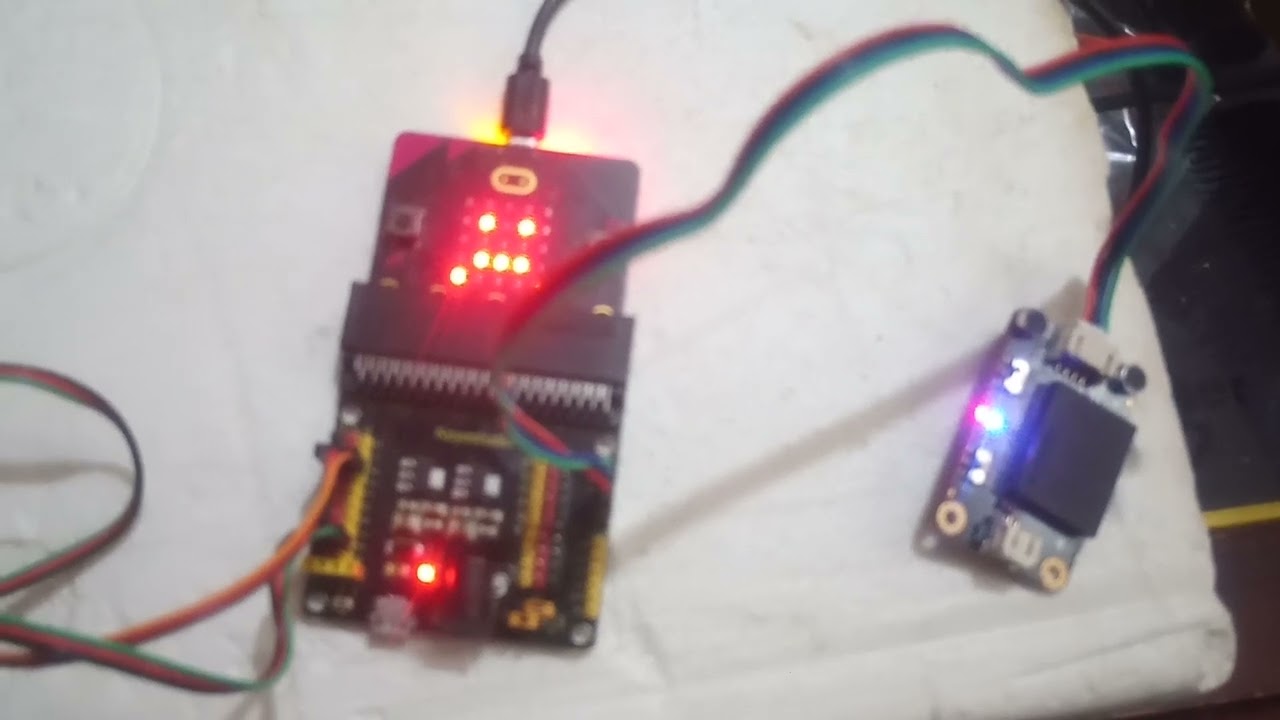
I copied the microchip code from the website and uploaded it (not sure if it’s correct). When I say, “hello robot,” the blue light on the voice activation module lights up, but it doesn’t respond to the command.
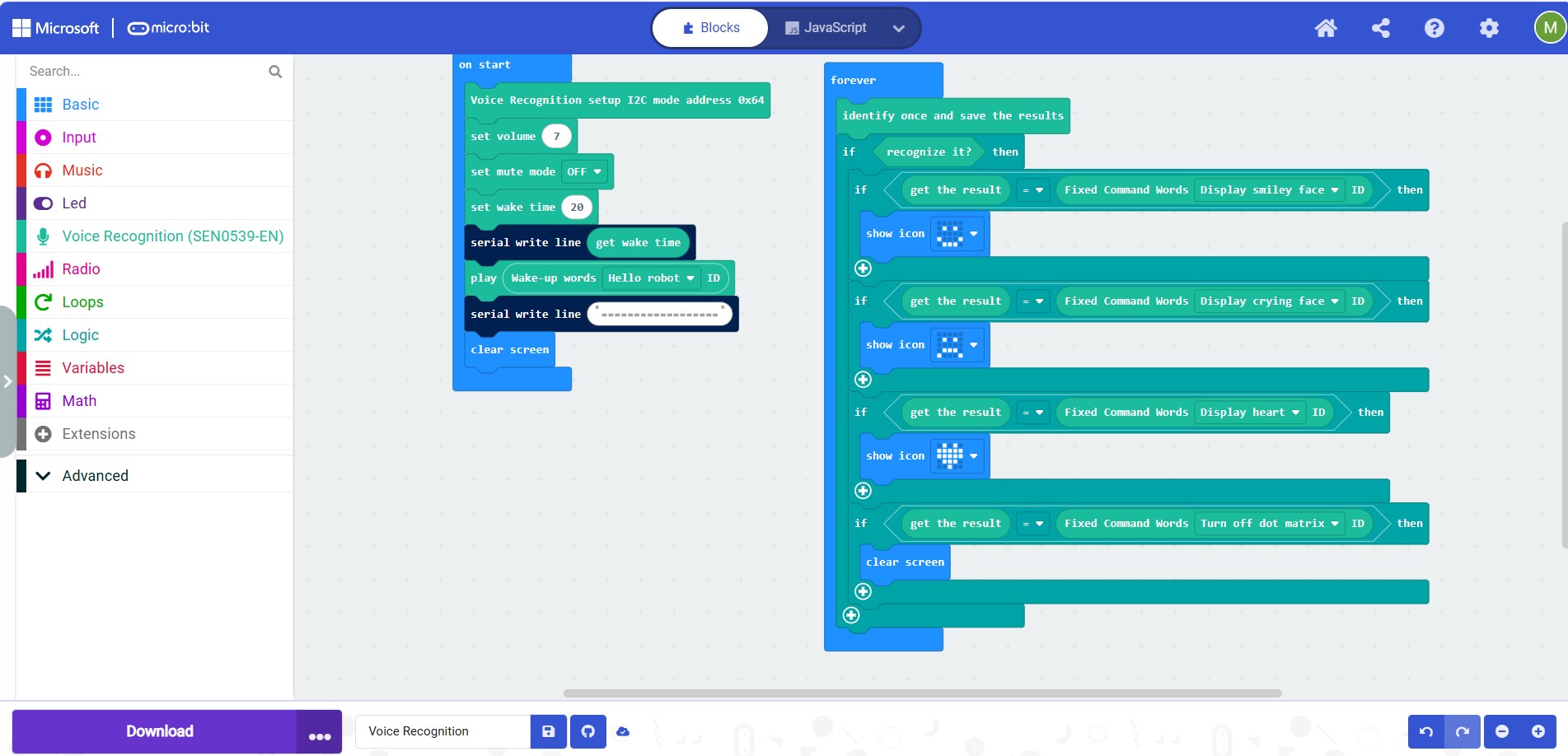
I’ve attached a photo of the module connected to the microchip, showing the blue light activation. Additionally, I’m including a screenshot of the code I copied. In the second serial write line in the “on start” block, I input 18 equal signs. I suspect this might be part of the issue.
I would prefer a written and video guide
Thank you in advance for your help!

---
### Author:  [@mikem](https://forum.makecode.com/u/mikem)
#### Post date: [October 11, 2024, 8:44pm UTC](https://forum.makecode.com/t/programming-leds-to-power-on-through-voice-activation/29307/16 "2024-10-11T20:44:35Z")
Here is the code.
---
### Author:  [@thinker999](https://forum.makecode.com/u/thinker999)
#### Post date: [March 20, 2026, 5:12pm UTC](https://forum.makecode.com/t/programming-leds-to-power-on-through-voice-activation/29307/17 "2026-03-20T17:12:20Z")
I also have that expansion board for the Microbit. I opened MakeCode but I can’t find the expansion. Is there a special URL or code that you have to type in?
---
### Author:  [@dsssssssss9](https://forum.makecode.com/u/dsssssssss9)
#### Post date: [March 22, 2026, 7:07am UTC](https://forum.makecode.com/t/programming-leds-to-power-on-through-voice-activation/29307/18 "2026-03-22T07:07:56Z")
Hi
Which expansion board ?
If you mean the dfrobot offline voice unit the make code extension can be added by typing the following into the extensions search on the Make code IDE
> **[GitHub - DFRobot/pxt-DFRobot\_voiceRecognition: This module uses a new offline speech recognition...](https://github.com/DFRobot/pxt-DFRobot_voiceRecognition)**
>
> This module uses a new offline speech recognition chip. Built-in 135 commonly used fixed command entries, newly added command word self-learning ability, self-study command words can not be a voice, can be a mouth, a back finger, a cat meow, etc., support 17 self-study command words.
If you mean something else just let me know
Regards
---
### Author:  [@thinker999](https://forum.makecode.com/u/thinker999)
#### Post date: [March 22, 2026, 7:20am UTC](https://forum.makecode.com/t/programming-leds-to-power-on-through-voice-activation/29307/19 "2026-03-22T07:20:02Z")
i got it already
---
### Author:  [@bsiever](https://forum.makecode.com/u/bsiever)
#### Post date: [March 22, 2026, 7:24am UTC](https://forum.makecode.com/t/programming-leds-to-power-on-through-voice-activation/29307/20 "2026-03-22T07:24:54Z")
Hi @thinker999 and welcome to the forum,
You can use the `Extensions` button to add a toolbox to support many expansion boards. See: [https://makecode.microbit.org/extensions](https://makecode.microbit.org/extensions) . You can search for the specific name of your board or if there isn’t an official extension, you may be able to check the manufacturer to see if they have a URL to support the board.
If you can’t find anything, it may help if you let us know the details about the board, like name, manufacturer, and/or a link to where you bought it. A picture may be helpful if you can’t provide any of those.