# Pxt-icon-editor: an extension for editing the system menu icons!
**URL:** https://forum.makecode.com/t/pxt-icon-editor-an-extension-for-editing-the-system-menu-icons/41690
**Category:** Arcade
**Tags:** extension
**Created:** [January 24, 2026, 2:59am UTC](https://forum.makecode.com/t/pxt-icon-editor-an-extension-for-editing-the-system-menu-icons/41690 "2026-01-24T02:59:26Z")
**Posts on this page:** 9
**Page:** 1
### Author:  [@WoofWoof](https://forum.makecode.com/u/WoofWoof)
#### Post date: [January 24, 2026, 2:59am UTC](https://forum.makecode.com/t/pxt-icon-editor-an-extension-for-editing-the-system-menu-icons/41690/1 "2026-01-24T02:59:26Z")
Yup! You read that title right! Now look at my beautiful example project!
> **[pxt-icon-editor](https://arcade.makecode.com/S41798-83964-65109-16262)**
>
> Made with ❤️ in Microsoft MakeCode Arcade.
### `WoofWoofCodes/pxt-icon-editor`
… is what you put in the extensions search bar to find it!
And here’s the github repo: [https://github.com/WoofWoofCodes/pxt-icon-editor](https://github.com/WoofWoofCodes/pxt-icon-editor)
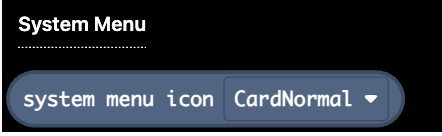
This extension adds a single block, at the bottom of the Scene blocks tab, which gives you access to the system menu icons as image variables:
You can hover over the block for a reminder about the sizes of the images:
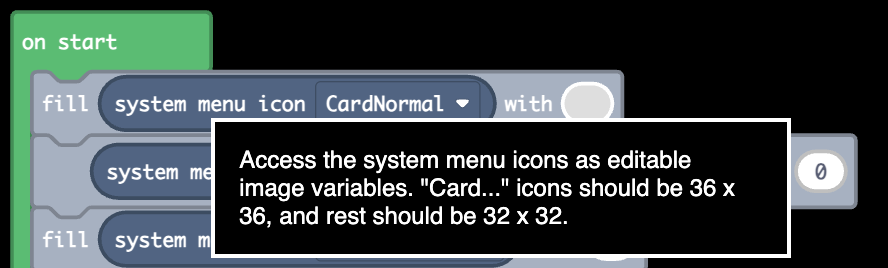
You can edit them using any of the blocks in the Images tab. Check out the example project code to see what is probably the simplest way to edit them.
I’ve wanted this ability for a while, and after looking into it it’s fairly simple to do, so I thought I would turn it into a very small extension. Now I better not see any more ruined menus after someone changes the color palette!
---
### Author:  [@redSprite](https://forum.makecode.com/u/redSprite)
#### Post date: [January 25, 2026, 2:15am UTC](https://forum.makecode.com/t/pxt-icon-editor-an-extension-for-editing-the-system-menu-icons/41690/2 "2026-01-25T02:15:51Z")
Wowowowowowowow
This is so cool
Eventually we will be able to customize the pause menu itself, not just by images.
---
### Author:  [@AlexK](https://forum.makecode.com/u/AlexK)
#### Post date: [January 25, 2026, 2:26am UTC](https://forum.makecode.com/t/pxt-icon-editor-an-extension-for-editing-the-system-menu-icons/41690/3 "2026-01-25T02:26:28Z")
Well, we can do that already … in JavaScript, anyway. This is, of course, begging to be combined with WoofWoof’s customizations and built into an extension!
> **[Custom Pause Menu](https://arcade.makecode.com/16513-73399-17591-21012)**
>
> Made with ❤️ in Microsoft MakeCode Arcade.
---
### Author:  [@WoofWoof](https://forum.makecode.com/u/WoofWoof)
#### Post date: [January 25, 2026, 2:48am UTC](https://forum.makecode.com/t/pxt-icon-editor-an-extension-for-editing-the-system-menu-icons/41690/4 "2026-01-25T02:48:39Z")
Totally possible, but I got lazy. I’ll mess with that some other day.
---
### Author:  [@WoofWoof](https://forum.makecode.com/u/WoofWoof)
#### Post date: [January 25, 2026, 2:49am UTC](https://forum.makecode.com/t/pxt-icon-editor-an-extension-for-editing-the-system-menu-icons/41690/5 "2026-01-25T02:49:40Z")
Is that not already in blocks? You can change what the menu button does already, though I suppose changing the screen brightness isn’t in blocks.
---
### Author:  [@AlexK](https://forum.makecode.com/u/AlexK)
#### Post date: [January 25, 2026, 2:51am UTC](https://forum.makecode.com/t/pxt-icon-editor-an-extension-for-editing-the-system-menu-icons/41690/6 "2026-01-25T02:51:29Z")
I’m sure we can do most of this in Blocks. I was thinking a simpler Blocks interface to add custom items to the standard pause menu.
---
### Author:  [@WoofWoof](https://forum.makecode.com/u/WoofWoof)
#### Post date: [January 25, 2026, 8:09pm UTC](https://forum.makecode.com/t/pxt-icon-editor-an-extension-for-editing-the-system-menu-icons/41690/7 "2026-01-25T20:09:29Z")
I mean I kinda have this working in the JavaScript extras extension. There’s a block to do it, but it’s kinda a hack job because you can’t make it exactly how the JavaScript function works with blocks. I’ll have to find some even hackier workaround that still looks sorta understandable.
---
### Author:  [@WoofWoof](https://forum.makecode.com/u/WoofWoof)
#### Post date: [January 28, 2026, 6:41pm UTC](https://forum.makecode.com/t/pxt-icon-editor-an-extension-for-editing-the-system-menu-icons/41690/8 "2026-01-28T18:41:55Z")
Ha! Looks like I used the wrong screenshot for the block hover description! The grammar has been fixed in the actual extension.
Feel free to directly copy my menu icons and everything into your game if you want to use them! Should be easy enough with the new ability to copy and paste blocks into other projects.
---
### Author:  [@RoboVacDev](https://forum.makecode.com/u/RoboVacDev)
#### Post date: [February 9, 2026, 3:54am UTC](https://forum.makecode.com/t/pxt-icon-editor-an-extension-for-editing-the-system-menu-icons/41690/9 "2026-02-09T03:54:39Z")
_YOU DID WHAT!?_
WOWIE!!! THIS IS AWESOME!!! Definetely gonna use this in all my games.