# Save data?
**URL:** https://forum.makecode.com/t/save-data/18327
**Category:** Help
**Created:** [March 7, 2023, 7:39pm UTC](https://forum.makecode.com/t/save-data/18327 "2023-03-07T19:39:44Z")
**Posts on this page:** 16
**Page:** 1
### Author:  [@Dodec](https://forum.makecode.com/u/Dodec)
#### Post date: [March 7, 2023, 7:39pm UTC](https://forum.makecode.com/t/save-data/18327/1 "2023-03-07T19:39:44Z")
Does anybody know how to code save data with blocks
---
### Author:  [@Blobbey](https://forum.makecode.com/u/Blobbey)
#### Post date: [March 7, 2023, 8:04pm UTC](https://forum.makecode.com/t/save-data/18327/2 "2023-03-07T20:04:01Z")
Yeah! There’s an extension for this! Just go to the + extensions bar in your project and it will bring up a whole list of extensions that you can download by clicking on them.
Here’s what the extension looks like:

I hope this helps!
---
### Author:  [@Dodec](https://forum.makecode.com/u/Dodec)
#### Post date: [March 7, 2023, 8:38pm UTC](https://forum.makecode.com/t/save-data/18327/3 "2023-03-07T20:38:38Z")
Thank you
---
### Author:  [@Dodec](https://forum.makecode.com/u/Dodec)
#### Post date: [March 7, 2023, 8:45pm UTC](https://forum.makecode.com/t/save-data/18327/4 "2023-03-07T20:45:44Z")
I dont know how to make it work
---
### Author:  [@richard](https://forum.makecode.com/u/richard)
#### Post date: [March 7, 2023, 9:00pm UTC](https://forum.makecode.com/t/save-data/18327/5 "2023-03-07T21:00:00Z")
What kind of data are you trying to save? Can you post a link to your game?
---
### Author:  [@Dodec](https://forum.makecode.com/u/Dodec)
#### Post date: [March 7, 2023, 11:07pm UTC](https://forum.makecode.com/t/save-data/18327/6 "2023-03-07T23:07:13Z")
Im triying to make it where if you click save, it saves your progress when you exit out.
> **[RPG](https://arcade.makecode.com/S52493-25582-47625-43088)**
>
> Made with ❤️ in Microsoft MakeCode Arcade.
---
### Author:  [@richard](https://forum.makecode.com/u/richard)
#### Post date: [March 8, 2023, 12:07am UTC](https://forum.makecode.com/t/save-data/18327/7 "2023-03-08T00:07:47Z")
So, the first step is to decide what state you want to save. Based on your game, it looks like your current state is:
- The player’s position (x and y)
- The health left in the status bar
- Whether or not the player has watched the opening cutscene
Now, let’s create two functions: saveState and restoreState:
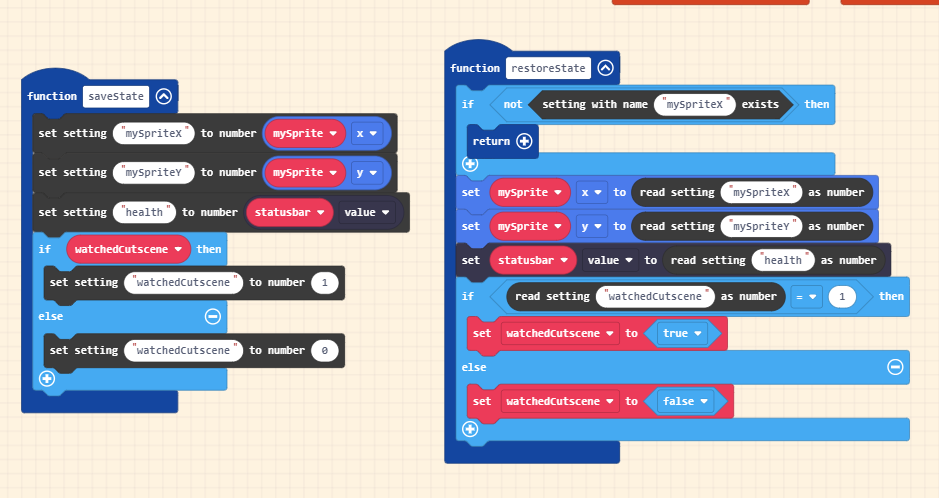
In save state we write all of our state to settings. For the “watchedCutscene” true/false value we need to convert it to a number, so we’ll do 1 for true and 0 for false.
Now in our restore state function, we first check to see if our settings exist. If they don’t, there is no state for us to restore so we can just bail out using return. If the setting does exist, then we just do the exact opposite of what’s in our save state function.
Now that we have those functions defined, let’s call them in the game! restoreState will get called in the bottom of our on-start code:

Note that I added a little code to make sure the cutscene doesn’t play if the watchedCutscene variable is set to true!
…and save state gets called in the menu button handler:

> **[RPG (richard's edits)](https://arcade.makecode.com/S30846-34524-56215-01107)**
>
> Made with ❤️ in Microsoft MakeCode Arcade.
---
### Author:  [@Dodec](https://forum.makecode.com/u/Dodec)
#### Post date: [March 8, 2023, 12:08am UTC](https://forum.makecode.com/t/save-data/18327/8 "2023-03-08T00:08:28Z")
Thank you
---
### Author:  [@richard](https://forum.makecode.com/u/richard)
#### Post date: [March 8, 2023, 12:09am UTC](https://forum.makecode.com/t/save-data/18327/9 "2023-03-08T00:09:29Z")
No problem!
One other quick tip: you might find the arcade-character-animations extension useful for animating your character! It will let you get rid of all of those button handlers you have
---
### Author:  [@Dodec](https://forum.makecode.com/u/Dodec)
#### Post date: [March 8, 2023, 12:16am UTC](https://forum.makecode.com/t/save-data/18327/10 "2023-03-08T00:16:03Z")
Ok. There may be bugs in the rpg.
---
### Author:  [@PixelDoodle](https://forum.makecode.com/u/PixelDoodle)
#### Post date: [March 8, 2023, 5:20pm UTC](https://forum.makecode.com/t/save-data/18327/11 "2023-03-08T17:20:08Z")
That’s the Exact Save technique I did for my Voxel Edge Project! I’m surprised I did that right!
---
### Author:  [@Punkin\_Vampira](https://forum.makecode.com/u/Punkin_Vampira)
#### Post date: [April 17, 2025, 9:52pm UTC](https://forum.makecode.com/t/save-data/18327/12 "2025-04-17T21:52:02Z")
Hi, I added the achievements extension to my Space Invaders game made in Makecode Arcade. How do I make it so that when you get a badge it saves and when you re-enter it no longer appears because it’s already saved?
---
### Author:  [@WoofWoof](https://forum.makecode.com/u/WoofWoof)
#### Post date: [April 17, 2025, 10:22pm UTC](https://forum.makecode.com/t/save-data/18327/13 "2025-04-17T22:22:34Z")
I believe that is a feature of the extension, no? Maybe you have a “reset all achievements” block somewhere? Or a “reset achievement (…)” block? That would reset the setting that saved what achievements you have achieved.
---
### Author:  [@richard](https://forum.makecode.com/u/richard)
#### Post date: [April 17, 2025, 10:22pm UTC](https://forum.makecode.com/t/save-data/18327/14 "2025-04-17T22:22:55Z")
@Punkin_Vampira yeah that’s a question for the author of that extension
---
### Author:  [@Mekun](https://forum.makecode.com/u/Mekun)
#### Post date: [October 31, 2025, 6:11pm UTC](https://forum.makecode.com/t/save-data/18327/15 "2025-10-31T18:11:22Z")
What if we want to delete the data? What do we do then?
---
### Author:  [@WoofWoof](https://forum.makecode.com/u/WoofWoof)
#### Post date: [November 3, 2025, 3:38am UTC](https://forum.makecode.com/t/save-data/18327/16 "2025-11-03T03:38:21Z")
I believe there is a block for deleting all saved data, as well as one for deleting just specific settings, somewhere in the extension tab.