# Tilemap behaving unexpectedly
**URL:** https://forum.makecode.com/t/tilemap-behaving-unexpectedly/43683
**Category:** Help
**Created:** [April 27, 2026, 5:14pm UTC](https://forum.makecode.com/t/tilemap-behaving-unexpectedly/43683 "2026-04-27T17:14:59Z")
**Posts on this page:** 5
**Page:** 1
### Author:  [@codeFan413](https://forum.makecode.com/u/codeFan413)
#### Post date: [April 27, 2026, 5:14pm UTC](https://forum.makecode.com/t/tilemap-behaving-unexpectedly/43683/1 "2026-04-27T17:14:59Z")
[https://makecode.com/\_62T7dF62M0UE](https://makecode.com/_62T7dF62M0UE)
Hello, when you activate the red button, it will remove the red blocks, but if you run into a spike and restart the level afterwards, the red blocks are still removed even though the game reloads the tilemap. (8x8 assets are still there because i cannot remove them)
Also tried not using a transparent tile for replacing the red blocks, doesnt help.
---
### Author:  [@VoxelMaster64](https://forum.makecode.com/u/VoxelMaster64)
#### Post date: [April 27, 2026, 10:09pm UTC](https://forum.makecode.com/t/tilemap-behaving-unexpectedly/43683/2 "2026-04-27T22:09:15Z")
it’s likely changing the actual data of the tilemaps
---
### Author:  [@richard](https://forum.makecode.com/u/richard)
#### Post date: [April 27, 2026, 10:11pm UTC](https://forum.makecode.com/t/tilemap-behaving-unexpectedly/43683/3 "2026-04-27T22:11:59Z")
you’re storing your levels in an array instead of recreating them each time you load a level. that means that changes will persist if you set the tiles in the map, turn walls on/off, etc.
if you don’t want the one you’re storing in an array to be updated, you can always use the clone block from tile util to set the current tilemap to a clone instead of a reference to the stored one:

---
### Author:  [@redSprite](https://forum.makecode.com/u/redSprite)
#### Post date: [April 28, 2026, 9:13pm UTC](https://forum.makecode.com/t/tilemap-behaving-unexpectedly/43683/4 "2026-04-28T21:13:20Z")
I’ve seen the editing of an asset within an array before, can we also do this with other asset types?
---
### Author:  [@richard](https://forum.makecode.com/u/richard)
#### Post date: [April 28, 2026, 9:34pm UTC](https://forum.makecode.com/t/tilemap-behaving-unexpectedly/43683/5 "2026-04-28T21:34:32Z")
yup, there’s nothing special about arrays though. the real thing is just that you’re keeping a reference to the same object
for example, let’s take a look this program:
[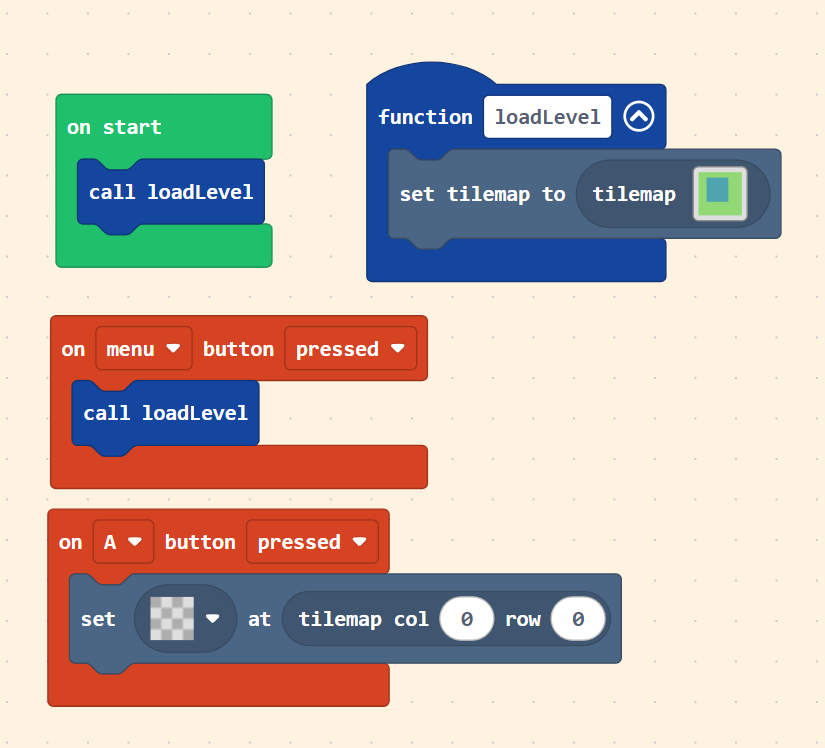](https://makecode.com/_7rdDzyhcaDia)
the `loadLevel` function is creating a new tilemap every time it is called. if you were to modify the tilemap by pressing the A button, that change _will not_ persist when `loadLevel` is called a second time. you can click on that image to try it out.
now if we take the same program and use a variable:
[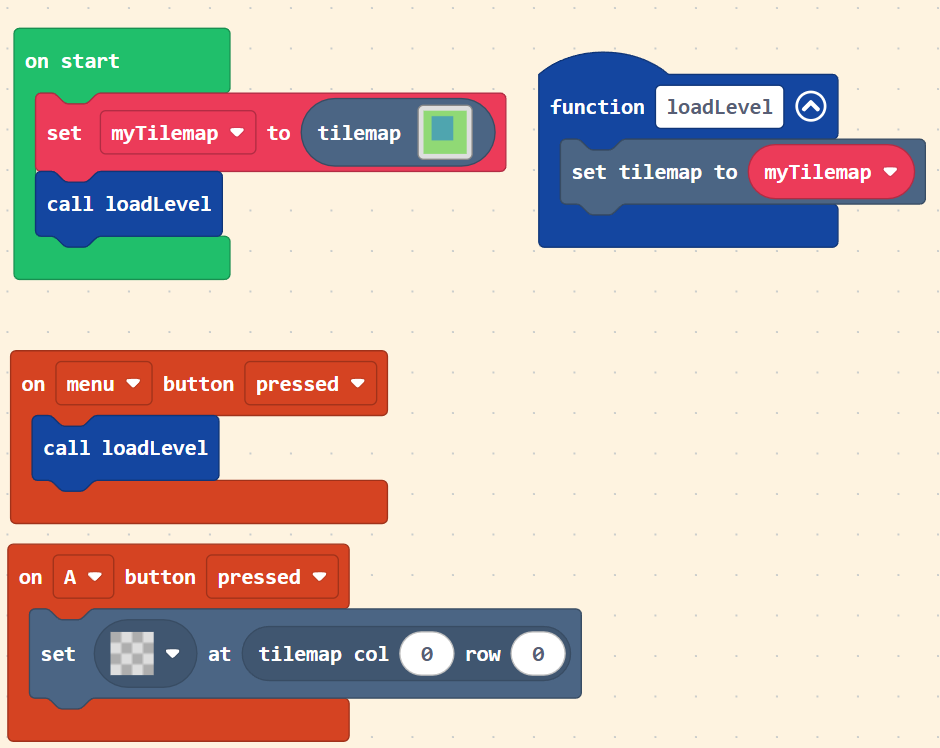](https://makecode.com/_dhrH6F2RC7qY)
this time we’re only creating the tilemap once and we’re keeping a reference to it in the `myTilemap` variable. if the tilemap is modified by pressing the A button, then the change _will_ persist when `loadLevel` is called again. again, click on that image to try it out