# Undertale
**URL:** https://forum.makecode.com/t/undertale/34795
**Category:** Help
**Tags:** game
**Created:** [March 22, 2025, 3:59am UTC](https://forum.makecode.com/t/undertale/34795 "2025-03-22T03:59:15Z")
**Posts on this page:** 9
**Page:** 1
### Author:  [@skibidiboiley](https://forum.makecode.com/u/skibidiboiley)
#### Post date: [March 22, 2025, 3:59am UTC](https://forum.makecode.com/t/undertale/34795/1 "2025-03-22T03:59:15Z")
does anyone know how to make a gaster blaster in make code arcade? like the animations and stuff, I kind of need help on it
---
### Author:  [@Bifrosty](https://forum.makecode.com/u/Bifrosty)
#### Post date: [March 22, 2025, 6:39pm UTC](https://forum.makecode.com/t/undertale/34795/2 "2025-03-22T18:39:27Z")
Here is a gaster blaster sprite I made a long time ago

You can use makecode’s built in acceleration feature to mimic the movement of a gaster blaster. The lifespan feature will ensure the gaster blaster destroys itself after (1700)ms. I set the depth to 1 to make sure that the gaster blaster is always above its lasers. (this does not have to be 1 but it does have to be higher than the laser’s depth)

Next use an on game update loop to summon lasers. The code creates lasers at the positions of any gaster blasters on screen. I make sure the lasers destroy themselves with lifespan similarly to the blaster. I make a quick rectangle for the laser’s image – This will be easy to manipulate later.
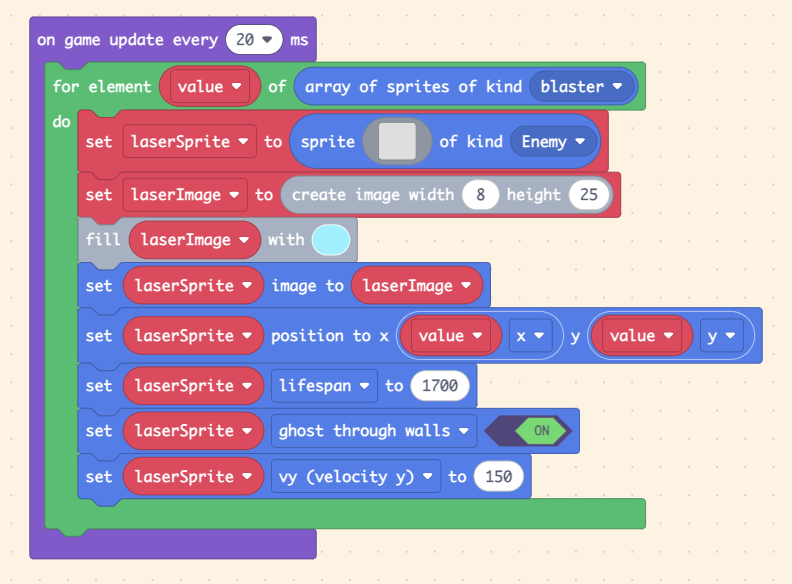
All this code makes a basic gaster blaster but its beam looks very lame:

To fix this we can use math! I won’t explain the equation because you don’t really need to know how it works but if you are a math dude you can figure it out:

This will give the width of the laser that iconic pulse effect. Now you are done! Heres a link to the project in which you can look at my example code → [https://makecode.com/\_VHYWDjdTeMvH](https://makecode.com/_VHYWDjdTeMvH) (press A to summon blasters)
Mess around with the inputs to change the beam’s look to your liking.
---
### Author:  [@Saturn](https://forum.makecode.com/u/Saturn)
#### Post date: [March 22, 2025, 6:50pm UTC](https://forum.makecode.com/t/undertale/34795/3 "2025-03-22T18:50:58Z")
**I HAVE BEEN SUMMONED!**
> **[Gaster Blaster](https://arcade.makecode.com/S06258-79533-99224-60864)**
>
> Made with ❤️ in Microsoft MakeCode Arcade.
---
### Author:  [@skibidiboiley](https://forum.makecode.com/u/skibidiboiley)
#### Post date: [March 23, 2025, 9:32pm UTC](https://forum.makecode.com/t/undertale/34795/4 "2025-03-23T21:32:26Z")
does the gaster blaster work with animation?
---
### Author:  [@Bifrosty](https://forum.makecode.com/u/Bifrosty)
#### Post date: [March 24, 2025, 2:35am UTC](https://forum.makecode.com/t/undertale/34795/5 "2025-03-24T02:35:29Z")
I assume by animation you mean the animate block →

In this case, yes! Just animate your blaster sprite with more frames. I’m not going to draw them but you can use the sprite I gave you.
---
### Author:  [@ADM\_F](https://forum.makecode.com/u/ADM_F)
#### Post date: [March 24, 2025, 12:26pm UTC](https://forum.makecode.com/t/undertale/34795/6 "2025-03-24T12:26:32Z")
> **[Lasers And Gaster blasters](https://arcade.makecode.com/S77018-65067-47856-03309)**
>
> Made with ❤️ in Microsoft MakeCode Arcade.
the main part of a gaster blaster is how the beam in instant so here’s a short piece of code to make that
i used Sprite-Scaling to achieve this its found in the extensions tab
---
### Author:  [@skibidiboiley](https://forum.makecode.com/u/skibidiboiley)
#### Post date: [March 31, 2025, 4:42pm UTC](https://forum.makecode.com/t/undertale/34795/7 "2025-03-31T16:42:59Z")
thank you, I have 1 more question though, i am wondering if there is code that flips the screen upside down by any chance? its ok if there is not
---
### Author:  [@Bifrosty](https://forum.makecode.com/u/Bifrosty)
#### Post date: [April 3, 2025, 4:50pm UTC](https://forum.makecode.com/t/undertale/34795/8 "2025-04-03T16:50:58Z")
Sure. Use the sprite utility extenstion to get an image of the screen, flip it and render it back.

Here is the extension → [https://github.com/jwunderl/arcade-sprite-util](https://github.com/jwunderl/arcade-sprite-util)
To download it, click on the extension button
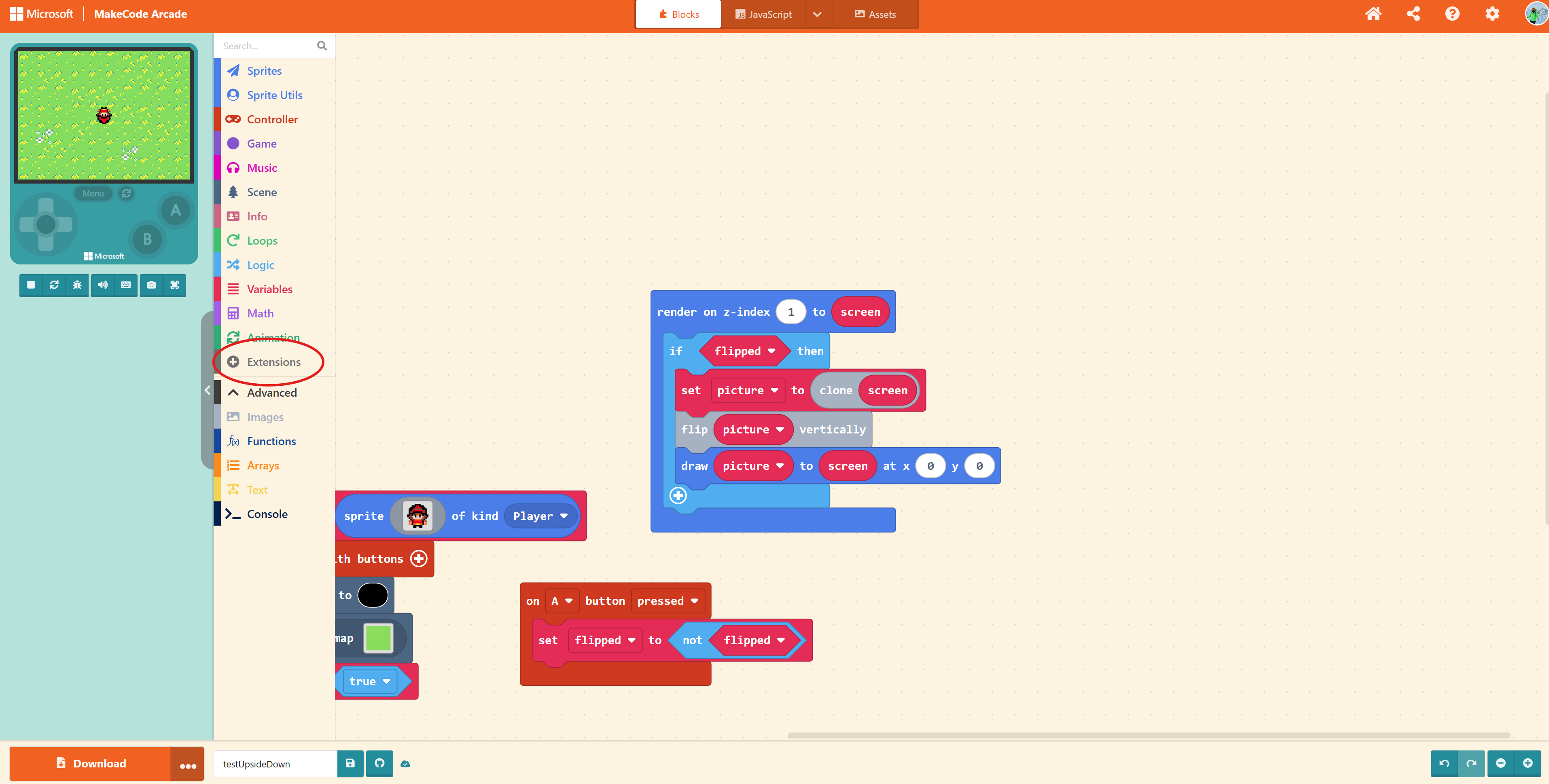
Paste the link and click on the box that appears

Now you should have a sprite utility drawer where you can find the “render on z index block”
Here is my example project → [https://makecode.com/\_EUxaooEAVWHM](https://makecode.com/_EUxaooEAVWHM) (Press A to go upsidedown)
---
### Author:  [@undertale\_fan](https://forum.makecode.com/u/undertale_fan)
#### Post date: [September 17, 2025, 5:32pm UTC](https://forum.makecode.com/t/undertale/34795/9 "2025-09-17T17:32:57Z")
heres my gaster blaster sprite