# Vector2 Extension
**URL:** https://forum.makecode.com/t/vector2-extension/28676
**Category:** Arcade
**Tags:** extension
**Created:** [May 9, 2024, 10:03pm UTC](https://forum.makecode.com/t/vector2-extension/28676 "2024-05-09T22:03:03Z")
**Posts on this page:** 2
**Page:** 1
### Author:  [@ARandomGuyOnMakeCode](https://forum.makecode.com/u/ARandomGuyOnMakeCode)
#### Post date: [May 9, 2024, 10:03pm UTC](https://forum.makecode.com/t/vector2-extension/28676/1 "2024-05-09T22:03:03Z")
Recently made an extension for creating and manipulating 2d vectors. I was originally going to just keep it to myself but decided to release it to the MakeCode community because why not. Also, this is my first extension (yay)!
* * *
**GitHub repo:**
> **[GitHub - ARandomJuyOnGitHub/pxt-Vector2: A MakeCode extension for a vector library](https://github.com/arandomjuyongithub/pxt-vector2/)**
>
> A MakeCode extension for a vector library
If you want to use the extension, simply copy the text below and paste it into the extensions search bar:
> **arandomjuyongithub/pxt-vector2**
For the people who care, here’s a rundown of all the blocks in the extension currently. I may add more in the future, and if I do, I’ll update this accordingly (if I remember to). Most of the blocks are pretty self-explanatory so there won’t be much.
## Blocks:
> **Create**
>
> ### Summery:
>
> Functions used to create new vectors.
>
> * * *
>
> _There’s only one block so no subcategories_
>
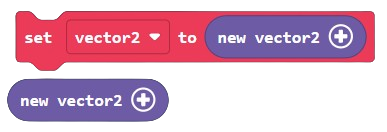
> Block example:
>
> 
>
> JavaScript example:
>
> ```auto
> vectors.create(:number,:number)
>
> ```
>
> Description:
> Creates a new vector2. That’s about it. By default, the numbers for the x and y parameters are both 0.
> **Properties**
>
> ### Summery:
>
> Functions used to access, calculate, or manipulate properties of your average vector. Primarily used to calculate many of the concepts in mathematics and physics (probably).
>
> * * *
>
> > **Magnitude**
> >
> > Block example:
> > 
> >
> > JavaScript example:
> >
> > ```auto
> > vectors.magnitude(:Vector2)
> >
> > ```
> >
> > Description:
> > Returns the magnitude (the length) of the inputted vector
>
> * * *
>
> > **Normal**
> >
> > Block example:
> > 
> >
> > JavaScript example:
> >
> > ```auto
> > vectors.normal(:Vector2)
> >
> > ```
> >
> > Description:
> > Returns the normal of the inputted vector. In other words, returns a vector whose magnitude (length) is a quantity of 1 while retaining the original vector’s direction.
>
> * * *
>
> > **Value**
> >
> > Block example:
> > 
> >
> > JavaScript example:
> >
> > ```auto
> > vectors.getValue(:Vector2)
> >
> > ```
> >
> > Description:
> > Returns the value of the inputted vector. Simply printing the vector will not show its value (for some reason) so use this instead.
>
> * * *
>
> > **Component Manipulation**
> >
> > Block example:
> >
> > 
> >
> > JavaScript example:
> >
> > ```auto
> > let vector2 = vectors.create();
> >
> > vector2.x = 5;
> > vector2.y = 5;
> > ------
> > vector2.x += 5;
> > vector2.x -= 5;
> > vector2.y += 5
> > vector2.y -= 5;
> > ------
> > vector2.x
> > vector2.y
> >
> > ```
> >
> > Description:
> > Used to manipulate the components of the selected vector. To do this in JavaScript (as you can clearly see), you can just change the x or y components of the vector directly.
> **Math**
>
> ### Summery:
>
> Functions used to preform basic, as well as complex arithmetic on vectors rather than numbers.
>
> * * *
>
> > **Addition**
> >
> > Block example:
> > 
> >
> > JavaScript example:
> >
> > ```auto
> > vectors.add(:Vector2,:Vector2)
> >
> > ```
> >
> > Description:
> > Returns the sum of the two vectors.
>
> * * *
>
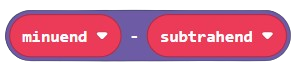
> > **Subtraction**
> >
> > Block example:
> > 
> >
> > JavaScript example:
> >
> > ```auto
> > vectors.subtract(:Vector2,:Vector2)
> >
> > ```
> >
> > Description:
> > Returns the difference of the two vectors.
>
> * * *
>
> > **Multiplication**
> >
> > Block example:
> > 
> >
> > JavaScript example:
> >
> > ```auto
> > vectors.multiply(:Vector2,:Vector2 || :number)
> >
> > ```
> >
> > Description:
> > Returns the product/multiple of the two values. I say values because the second parameter can be a vector or a number. Similarly to dividing, multiplying a vector by a number will increase/decrease its magnitude (length) while retaining the vector’s direction.
>
> * * *
>
> > **Division**
> >
> > Block example:
> > 
> >
> > JavaScript example:
> >
> > ```auto
> > vectors.divide(:Vector2,:Vector2 || :number)
> >
> > ```
> >
> > Description:
> > Returns the quotient of the two values. I say values because the second parameter can be a vector or a number. Similarly to multiplying, dividing a vector by a number will increase/decrease its magnitude (length) while retaining the vector’s direction.
> **Methods**
>
> ### Summery:
>
> The meat of the extension. Functions used to manipulate vectors, as well as compare and relate them to each other (I think).
>
> * * *
>
> > **Dot Product**
> >
> > Block example:
> > 
> >
> > JavaScript example:
> >
> > ```auto
> > vectors.dot(:Vector2,:Vector2)
> >
> > ```
> >
> > Description:
> > Returns the [dot product](https://en.wikipedia.org/wiki/Dot_product) of the inputted vectors. Also known as the scalar product of two vectors. Basically, takes two vectors and converts them into a scalar (a number). It can be used to compare the directions the 2 vectors are facing to each other (sorry for the weird wording).
>
> * * *
>
> > **Normalized Dot Product**
> >
> > Block example:
> > 
> >
> > JavaScript example:
> >
> > ```auto
> > vectors.normalizedDot(:Vector2,:Vector2)
> >
> > ```
> >
> > Description:
> > Returns the [normalized dot product](https://en.wikipedia.org/wiki/Cosine_similarity) of the inputted vectors. This is basically the same as getting the dot product of two vectors, except that the vectors are normalized beforehand. This returns a number between -1 and 1, which represents the cosine of the angle between the two vectors. Another name for this is the _ **cosine similarity** _ of the two vectors (sounds very cool). This can also be used to compare the directions the 2 vectors are facing to each other (again, sorry for the weird wording).
>
> * * *
>
> > **Rotation**
> >
> > Block example:
> > 
> >
> > JavaScript example:
> >
> > ```auto
> > vectors.rotate(:Vector2,:number)
> >
> > ```
> >
> > Description:
> > Rotates the inputted vector the chosen number of degrees. Rotates the vector clockwise (to the right) if the number is positive, otherwise, rotates the vector counterclockwise (to the left).
>
> * * *
>
> > **Angles**
> >
> > Block example:
> > 
> >
> > JavaScript example:
> >
> > ```auto
> > vectors.angle(:Vector2,:Vector2,:AngleTypes)
> >
> > ```
> >
> > Description:
> > Returns the angle between the two vectors. The Enum/dropdown is used to indicate whether the returned angle is acute or obtuse. In JavaScript use `AngleTypes.acute ` or `AngleTypes.obtuse` for the Enum, or you can just use numbers.
>
> * * *
>
> > **Projection**
> >
> > Block example:
> > 
> >
> > JavaScript example:
> >
> > ```auto
> > vectors.project(:Vector2,:Vector2)
> >
> > ```
> >
> > Description:
> > Returns the [projection](https://en.wikipedia.org/wiki/Vector_projection) of the vector in the first parameter onto the vector in the second parameter. Think of it like the first vector casting a shadow onto the second vector (I’m sure that helped absolutely no one).
>
> * * *
>
> > **Reflection**
> >
> > Block example:
> > 
> >
> > JavaScript example:
> >
> > ```auto
> > vectors.reflect(:Vector2,:Vector2)
> >
> > ```
> >
> > Description:
> > Reflects the vector in the first parameter across the vector in the second parameter. Think in the sense of a ray of light reflecting of a surface, rather than a point or a line undergoing a transformation by reflection. The unit vector represents the [normal](https://en.wikipedia.org/wiki/Normal_(geometry)) of the surface (the direction the surface is facing) the hypothetical ray of light is bouncing off of. The inputted vector is normalized within the function, so it doesn’t have to be normalized beforehand.
> **Sprite Related Methods**
>
> ### Summery:
>
> Basically, the same thing as normal methods but specifically related to sprites. In other words, functions used to manipulate and _ **extract** _ the properties of sprites, but as vectors.
>
> * * *
>
> > **Vector to Sprite**
> >
> > Block example:
> > 
> >
> > JavaScript example:
> >
> > ```auto
> > vectors.vectorToSpriteProperty(:Sprite,:SpriteProperties,:Vector2)
> >
> > ```
> >
> > Description:
> > Sets the chosen property of the inputted sprite to the inputted vector. The Enum/dropdown is used to indicate which property you want to change. In JavaScript use the `SpriteProperties` Enum, or you can just use numbers.
>
> * * *
>
> > **Sprite to Vector**
> >
> > Block example:
> > 
> >
> > JavaScript example:
> >
> > ```auto
> > vectors.spritePropertyToVector(:Sprite,:SpriteProperties)
> >
> > ```
> >
> > Description:
> > Returns the chosen property of the inputted sprite as a vector. The Enum/dropdown is used to indicate which property you want to return. In JavaScript use the `SpriteProperties` Enum, or you can just use numbers.
> **Miscellaneous**
>
> ### Summery:
>
> Random functions that don’t fit into any of the categories above
>
> * * *
>
> > **Set Equal To**
> >
> > Block example:
> > 
> >
> > JavaScript example:
> >
> > ```auto
> > vectors.equateTo(:Vector2,:Vector2)
> >
> > ```
> >
> > Description:
> > Sets the vector in the first parameter equal to the vector in the second parameter. Using the assignment operator (=) doesn’t work so use this instead.
>
> * * *
>
> > **Check If Equal To**
> >
> > Block example:
> > 
> >
> > JavaScript example:
> >
> > ```auto
> > vectors.isEqualTo(:Vector,:Vector)
> >
> > ```
> >
> > Description:
> > Checks if the two inputted vectors are equal to each other. If they are, the function will return true, otherwise, the function will return false. Using the equality operator (==) doesn’t work so use this instead.
>
> * * *
>
> > **Distance**
> >
> > Block example:
> > 
> >
> > JavaScript example:
> >
> > ```auto
> > vectors.distance(:Vector2,:Vector2)
> >
> > ```
> >
> > Description:
> > Returns the distance between the two inputted vectors (in pixels).
Feel free to let me know about any problems you experience with the extension and if you have any suggestions on things to add to the extension.
---
### Author:  [@SouperMediocre1](https://forum.makecode.com/u/SouperMediocre1)
#### Post date: [July 9, 2025, 12:00am UTC](https://forum.makecode.com/t/vector2-extension/28676/2 "2025-07-09T00:00:08Z")
i dont understand much about vectors, but i know they are very important and i am trying to make a soft body engine, ive looked the the blocks in this and i dont understand how the vector is stored as data, so i am unsure if it is possible to store it into a sprite with the sprite data extension. can you confirm if this is possible or not?