another question! @Bifrosty how did u make the ai bosses and monsters? and like how did they know where the player was? and how it knows when and what direction to use the projectiles?
1 Like
Oh wow. I needed this. Thanks @Bifrosty. Quick question: is it easy to add this as dialogue in my game without adding a ton of extra code? It really hurts when I use the text sprite extension and make lots of variables and create positions, flags and timers for it.
You can get the player’s position with the “mySpirte x” and “mySprite y” blocks.
Everything the enemies and bosses do in the game is entirely possible without an extension. But I used sprite utilities extension to do most of that. It has an “get angle from one sprite to another” block. It also allows you to make “on game update loops” for specific sprites.
It takes some practice to make decent enemy AI, this is not my first attempt. Here is a post I made with a simple example: How to make AI - #7 by Bifrosty
2 Likes
It definitely could be a hassle to integrate to a game depending how far along you are. Here is how I setup my dialogue system in Conquest of Duat:
Not that this method also uses the timer extension.
1.Create a function that contains inputs for the text displayed, position of the text, and the duration you want your dialogue to run for.

2.Create your textSprite and set a boolean (true/false varible) containing information as to whether or not there is dialogue on screen.
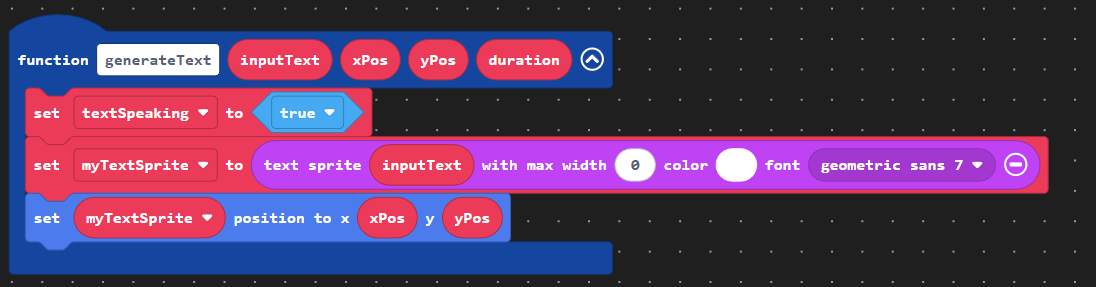
3.Animate your text. It should be revealed letter by letter for about 60% of the time it is on screen. The “lifespan” sprite attribute destroys a sprite after a given amount of milliseconds.
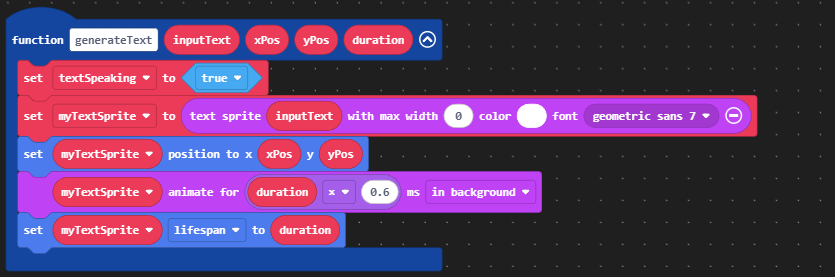
4.End the dialogue. I like to give the player 100-200 milliseconds after the text has disappeared before showing them new text, it just looks nicer.

5.Add your dialouge. Note the use of the timer extension “separately do.” It stops the pause until block from pausing the entire game.

Here is my example in the form of a simple cutscene:
6 Likes
@Bifrosty Thank you so much! I also learned functions that are slightly more advanced because of this to! I always just used them do repeating code.
4 Likes
Bro can you help me with the art for Voyage: Chapter II?
2 Likes
don’t mind me i might have to copy this. 
3 Likes
i understand everything there but what does the “set (textspekaing) to True” block do? and what is it for?
oh and how did you make it so there are different colors in the sentences in the game?
1 Like
yes! fancy text is such a cool way to make more customisable dialogue, I’ve also used similar methods with functions to make text for Red Line and Westward
4 Likes
Sorry, I’m working on my own game rn.
1 Like
The textSpeaking variable enables the pause until blocks to be relaxed and ready for the next line of text or the next part of the cutscene. As for changing color mid sentence, just look at the fancy text documentation I sent or look in the code.
1 Like
That’s okay.
1 Like
another question! srry its just im making a game with the text. ok so. my character is talking and talking but then after a few words the next sentences don’t work for some reason.
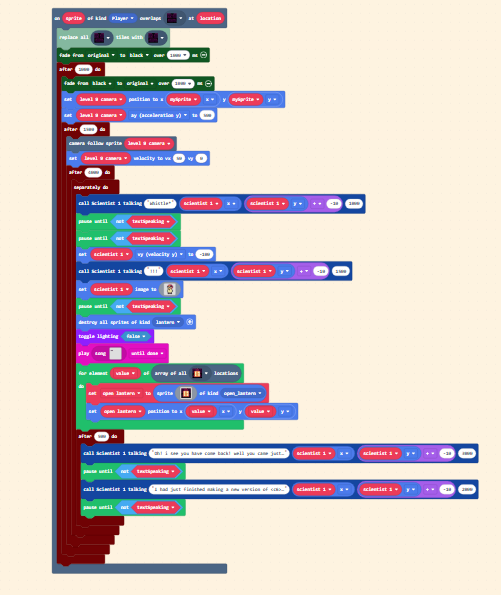
the last 2 sentences don’t work. i need help!
1 Like
No joke best MakeCode Arcade possible
3 Likes
I open the code and it almost fried my pc
2 Likes
If the first post on this topic gets to 45 likes  then I will make another boss fight in a new area.
4 Likes
Really? You promise?
3 Likes
I see a couple potential problems. Its hard to tell from your screenshot though. I see that your “play song” is set to “until done” set it to “in background” or "looping in background. If that doesn’t work show me your function.
2 Likes

IDK just make a new topic and post the game link. I’ll meet you over there.
2 Likes