[Extension] arcade-state-transitions

Hey folks!

Today I’m posting about an extension that I actually made years ago, but apparently never got around to posting despite the fact that I use it all the time on livestream. In fact, this might be my favorite extension that I’ve ever written. I present: riknoll/arcade-state-transitions

This is a minimal state machine extension for Microsoft MakeCode Arcade. All the blocks have documentation (right click on a block and select “Help” to read more info on how to use it).

This extension is divided into two parts: global state and sprite state.

Global state

A lot of times when you are making a game, you’ll have multiple “states” that your game is moving through.

For example, a turn-based RPG you might have:

  • A state where you are walking around in an overworld
  • A state when the player is in a battle
  • A state when the pause menu is open
  • A state when the player is buying something from the shop

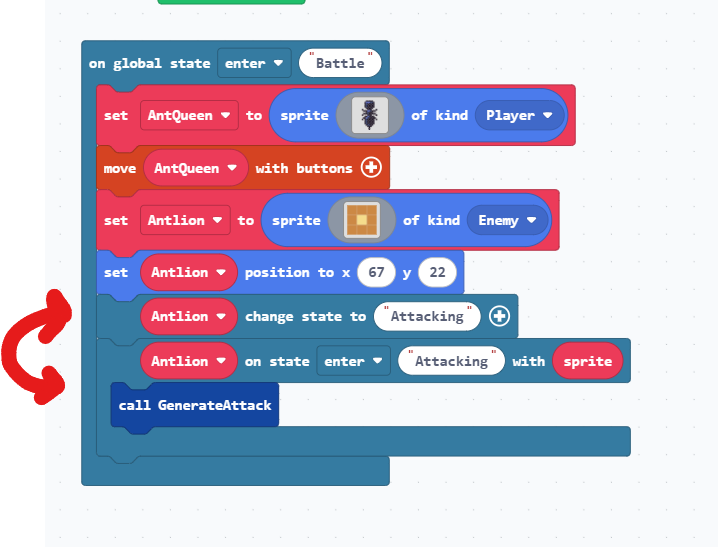
Odds are that in your game, you’re going to have very different code running for each of these states. For example, in the “Battle” state pressing A might cause the player to swing a sword whereas in the “Overworld” state pressing A might be used to talk to an NPC. This extension lets you register separate on game update, on button pressed, and forever event handlers in your game that only run when a specific state is active.

This makes it way easier to organize your code than if you were to use a bunch of variables to keep track of what state you’re currently in.

Sprite state

…but that’s not all! Sprites will often have their own state as well.

For example, let’s consider a guard in a stealth game that’s walking around with a flashlight. If we were to break down the states that this guard might have, it could look like this:

  • A “normal” state where the guard is walking around on their patrol route
  • An “alert” state where the guard has heard the player’s footsteps and is getting suspicious
  • A “chasing” state where the guard has seen the player and is chasing after them

Just like with the global state, you’ll probably want very different code to run when the guard is in each of these states.

This extension makes it super easy to do so! Not only that, but each of the events is nestable so you can put all of logic for a sprite in a single function.

See also

This extension pairs super well with riknoll/arcade-improved-sprite-data and riknoll/arcade-multi-events. Try using all three of them together, especially if you’re making a very big game.

13 Likes

huh. isn’t it super simple to make a state machine? you just make a long switch statement and run a function depending on the state variable, or if you can

state = state_normal

state()

and run the state variable like a function. well, unless this has state initialization and such too. i wouldn’t consider that too hard to implement either but if so, i guess i can see why this’ exist.

@babol this does indeed feature all of the state management you could ever want. You can run code when you enter a state, exit a state, each frame while a state is active, etc. You can even listen to state transitions and hijack them if necessary or register multiple event handlers with different weights that run in the background.

and while it may be easy to implement that for global state, you’re missing that this extension also allows you to register events that run only for a single sprite. in effect, each sprite can have its own on game update, on button pressed, etc. that will only run for the sprite on which they are registered. this makes it easy to, say, define the entire AI of a sprite in a single function instead of having to reference it all over your codebase. or even split your AI behaviors into separate functions and then mix-and-match them for each sprite kind.

4 Likes

Woah! This will 100% clean up my usage of variables and “If true” blocks for multiple button uses. Thanks for sharing this! :face_holding_back_tears:

2 Likes

@babol to expand on that mix-and-match example I gave, one cool way to use this extension is to create functions that let you reuse AI between multiple types of sprites

for example, say i have three types of sprites in my game:

  • An NPC that just wanders around randomly
  • An enemy that wanders around randomly and attacks the player
  • An enemy that follows the walls of the tilemap and attacks the player

if we break down the behavior of each sprite, it looks like this:

  • the NPC has the behavior “wander randomly”
  • the first enemy has two behaviors “wander randomly” and “attack player”
  • the second enemy has two behaviors “follow wall” and “attack player”

in our game, we can define three functions: addRandomWanderingBehavior, addWallFollowingBehavior, and addProjectileAttackBehavior. then when we spawn each sprite, we can just reuse these functions like this:

now we have a nice compact way to share code between each sprite without having to reference a bunch of sprite kinds and variables in some global on game update!

here’s the full code of that example:

3 Likes

THANK YOU!! Check just about any game on my profile and you’ll see a clunky ‘state’ variable and long list of ‘if’ statements doing this exact thing… This is now a must-have, I’d wholeheartedly support adding it to the featured extensions list within makecode (I’m not sure the real name)!

3 Likes

This might just replace some variables and true/false statements. Thanks bro!

4 Likes