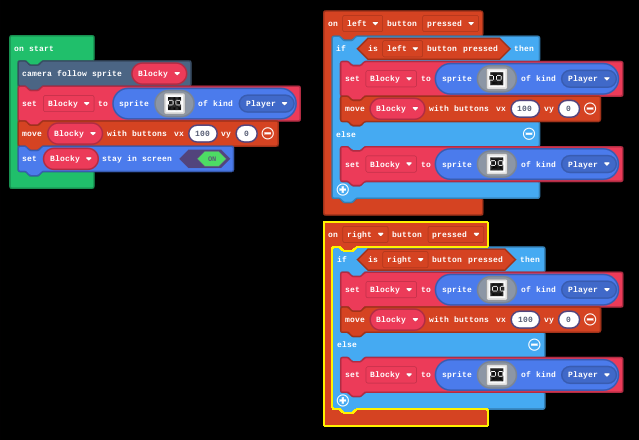
I want to make my sprite(Blocky) look in the direction that its moving and then when its not moving it returns back to the front facing sprite. Anyone know what I’m doing wrong?
1 Like

The reason why this doesn’t work is because the “else” scripts will never run as it’s impossible for them to run, since the script can only check if the corresponding arrow is pressed, which it will always be true.
Instead, use an “On game update” and replace the key press booleans with vx check booleans: Like this:
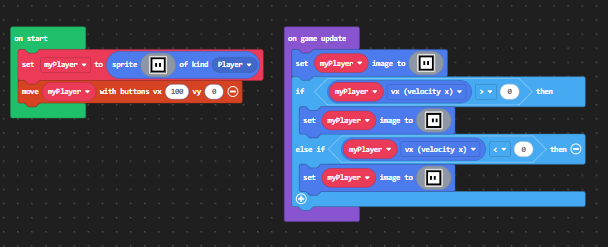
let myPlayer = sprites.create(assets.image`playerFront`, SpriteKind.Player)
controller.moveSprite(myPlayer, 100, 0)
game.onUpdate(function () {
    myPlayer.setImage(assets.image`playerFront`)
    if (myPlayer.vx > 0) {
        myPlayer.setImage(assets.image`playerRight`)
    } else if (myPlayer.vx < 0) {
        myPlayer.setImage(assets.image`playerLeft`)
    }
})
Here’s the JavaScript variant of the same code.
myPlayer = sprites.create(assets.image("""playerFront"""), SpriteKind.player)
controller.move_sprite(myPlayer, 100, 0)

def on_on_update():
    myPlayer.set_image(assets.image("""playerFront"""))
    if myPlayer.vx > 0:
        myPlayer.set_image(assets.image("""playerRight"""))
    elif myPlayer.vx < 0:
        myPlayer.set_image(assets.image("""playerLeft"""))
game.on_update(on_on_update)
Here’s the Python variant of the same code.
Hope you learn something from this!
3 Likes
This worked!
Thank you so much!