I need help with getting gravity for my characters because I’m trying to make a simple RPG but I can’t figure out how to make gravity for my player and enemies.
6 Likes
Is this what you want?
Ah, gravity. The one variable that is not named something obvious. You see, when makecode was created, gravity was named “ay” for “acceleration y”. This was because it does not make since for gravity to be -400 and make you rise, and also, “gravity X” would get even weirder. Therefore, they decided to name them “vx” and “vy”.
In the case of platformers, we would traditionally apply an AY property to everything we want to have gravity.
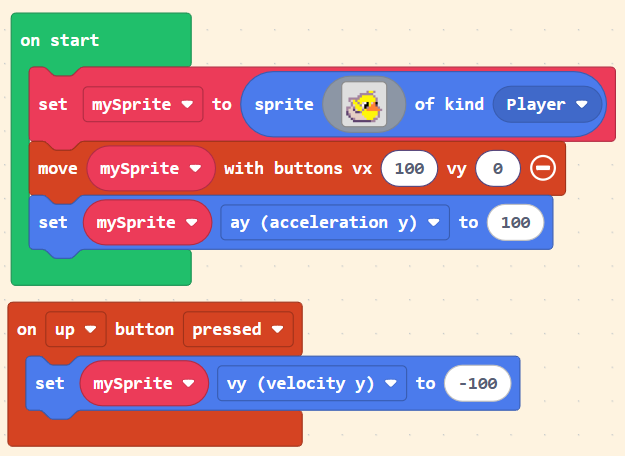
The simplest way is just to set the sprite’s ‘ay’ value to something like 50-200! (The higher the number, the stronger the gravity.)
This way, they ‘accelerate’ towards the bottom of the screen!
Keep in mind that if you were using the ‘move sprite with buttons with velocity 50’ block and want your player to be able to jump, you should use the expansion plus icon to only make the player move horizontally, not vertically. That way you can use the up arrow to set the player’s vy to something like -100, creating a more realistic jump!
Here’s what I mean:
1 Like
Use a “set sprite ay” block
Set sprite AY to
2 Likes
Thanks! This has been really helpful for my game.
3 Likes