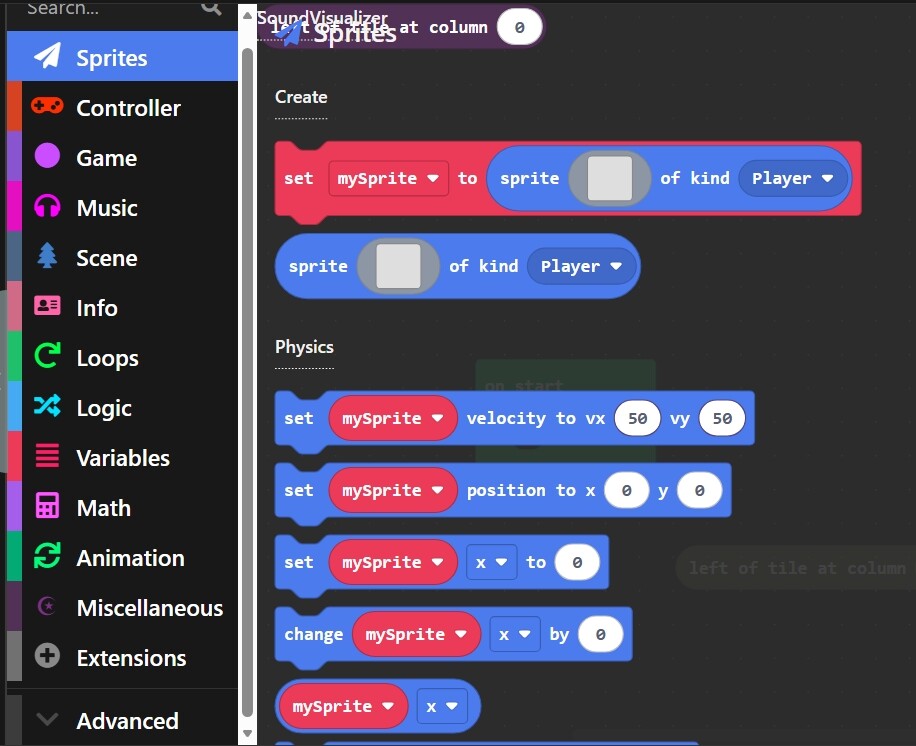
i try going to other projects and its still broken
6 Likes
have you tried
1.restart the device
2.restart the page
3.sign out and back in
4.close and reopen the tab
Can you elaborate? What exactly is broken?
1 Like
Did you restart your app/the tab you were using?
send the extension you are using it most likely is causing these bugs try removing the extension
when did this start?
Try closing the tab and reopening it. Works for me
Restart the web
Closing and reopening Makecode should fix the issue, but going back into that project might break it again, as it is probably an issue with that extension. I can take a look at the extension to see what might be wrong if you want.
1 Like
I think @richard should look at this bug  HEY @richard UI BUG AT AISLE 2.
This bug happens to me sometimes.
Try restarting your computer, or signing in and out of your account
this looks like you have an extension installed that has a bad block definition in it. your other projects should be fine if you refresh the page from the home screen and then open them up. they’ll only be broken if you open the broken category once before switching to them
2 Likes
Can’t spell “clarify” correctly? Shame.
Well, clarify what? We don’t have enough context.
We can’t read minds, you know.
2 Likes