omg PLEASE PLEASE PLEASE use functions and arrays
6000 blocks with 0 functions or arrays is simply insanity
keep in mind that card delver uses a similar 7000 blocks 


Step by step example of how you can optimise:
Functions are like custom blocks which can be used for repetative sections of code - like your infinite if statement
Arrays help with long lists of data, like with your npcs and character lists
Combining them can be extremely useful
for example instead of this to create the selection menu:

we can create an image array of all the characters, and a small function to read the array and create the sprite. We can use some parameters to control the type and location of these sprites.
However, we can do better and optimise further, as we want a specific layout of sprites to generate the same every time.

because the functions are all in ascending order, we can use this block - which is essentially a repeat for x block with an index variable. This index variable acts as a ticker, increasing by 1 for every repeat. Here i’ve set the maximum to the length of the array -1 so that it repeats exactly the number of images in the array - the number of sprites we want. I can also just pop the index into the type param of the function to set the right image.
however, how do we arrange them? currently they’re all going to stack in one place at the coordinates (10, 50).


we can set the starting positions with 2 variables which we define outside the loop
Remember that the entire line of code in the green index block repeats, so adjustments of a variable in the loop repeats. This means you can affect the next sprite which uses the variable to set it’s position and the next and so on, creating tempoary values specific to each sprite.
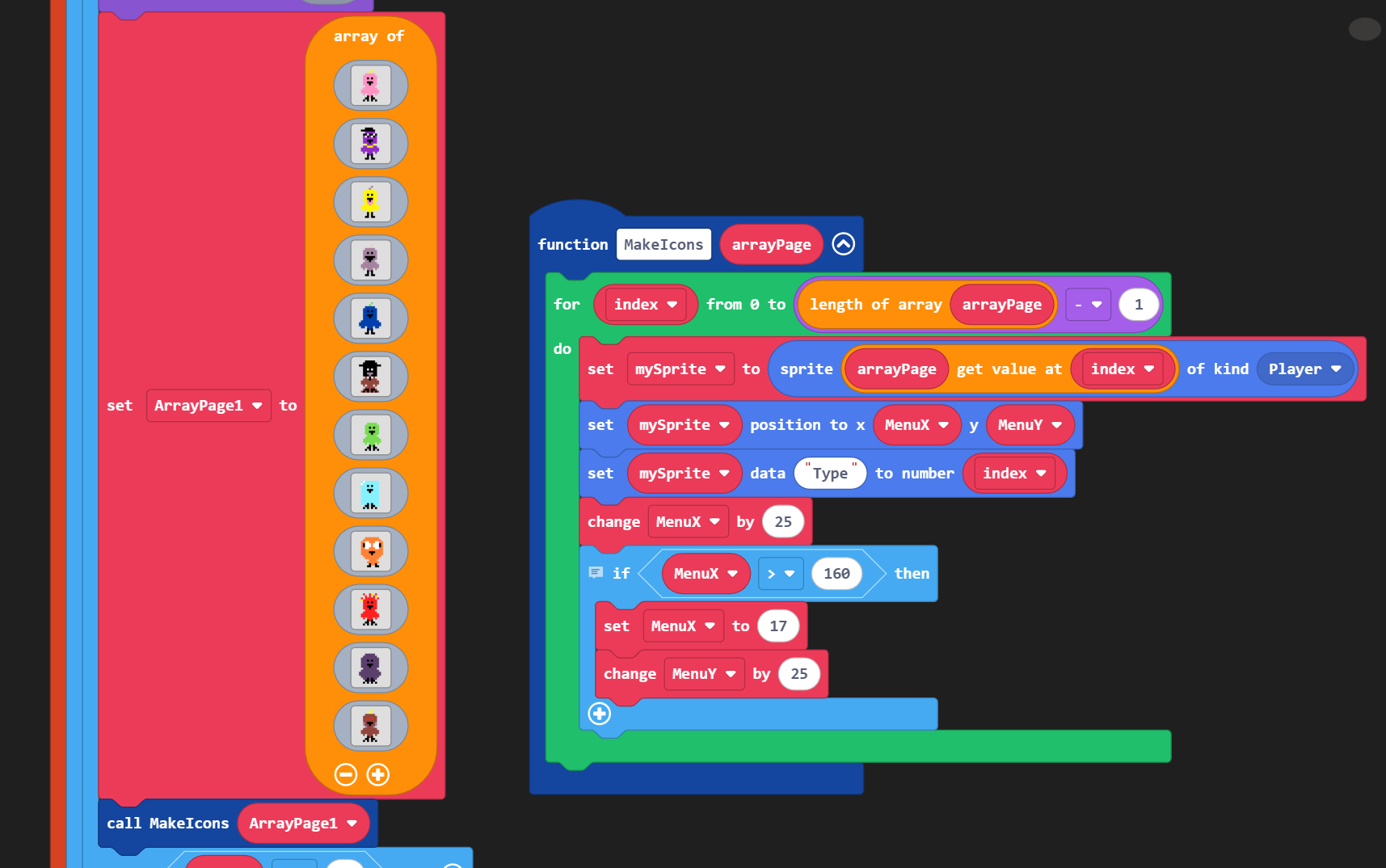
here, the code shifts the x pos of the menu item right by 25 pixels until it’s offscreen (greater than 160). Then, entie line of sprites shifts down, changing the y cords by 25 and resetting the x cords.
The great thing about this is that i can now create a function to handle all three pages by combining this with the other function!

The final function! The amazing thing about this is not only do you reduce the number of blocks, adapting this code is much simpler too. If you wanted different sprites, switch out the array. Sprites are too small? just adjust the x and y offsets.

now if you wanted to go even MORE optimised, you could draw this directly to one sprite with this block. This is how i made my inventory system in card delver

All one sprite!!!
