Oh My Gosh! Am I going Crazy? 
This is the correct new block:

4 Likes
Is there a way to use a moving camera with this I’ve been trying to make a game using this extension and have been struggling to find an easy way to set the lines onto the camera rather than the background
2 Likes
I’ve actually been working on camera movement! Experimenting on the “canvas” that the soft bodies draw on.
Here’s how you could enable both soft bodies and a camera in a game:
This block is very important:

It basically lets the rendering know if the image they’re dealing with is a sprite (which is subject to change position).
Please let me know if this helped! I’ll try and maybe make a new block that makes this kind of stuff easier.
Happy New Year!
5 Likes
Thanks
1 Like
hello, so I recently got a problem in this game and the insects glitch a lot… https://arcade.makecode.com/S00751-68251-52566-20458
could you help?
2 Likes
Ok. Thank you for coming to me with your problem!
This is actually a cool game so far with good art.
I see what you mean why the worms are acting so weird.
Here’s what I would do:
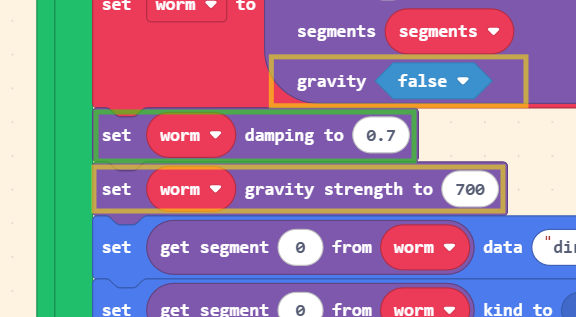
In the green box I added a block that sets the damping for a softbody. This block will put a limit to how much the softbody can stretch and move quickly.
In the bottom yellow box: This block will only work if the gravity is turned to “true” (in the upper yellow box).
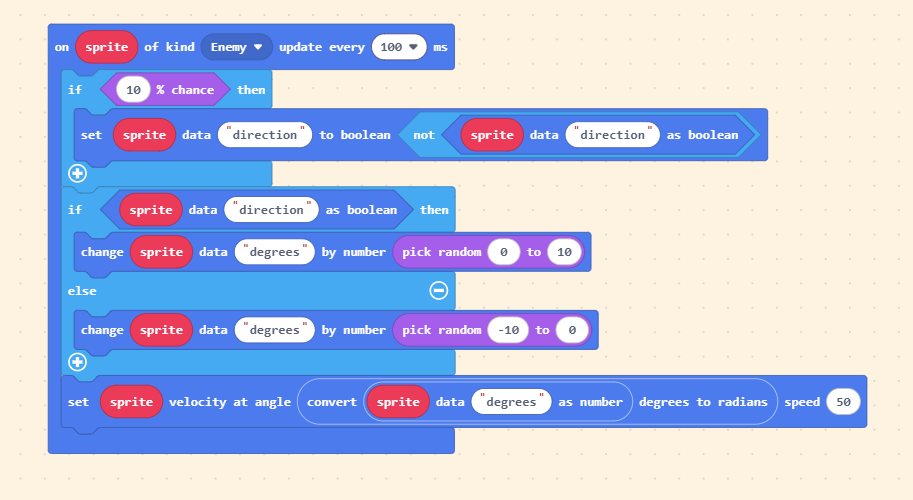
To make the movement smoother on the worms you could do something like this:

Add data to the first segment of the softbody, then you could do something like this in the “enemy” game loop:
OK. Last thing.
I’ve actually experienced this problem in other games of mine (even without softbodies).
It looks like the worms are “rubbing” against the tiles that have walls and it makes them jitter.
I think the sprites in the softbodies are feeling the left and right sides of the wall even when there’s a wall visibly blocking that from even happening. @richard or someone else could give some insight on to why that happens.
Thank you for sharing this game! Hopefully you found some of this useful! If you could, please tag me in your finished game! I hope to see this grow.
Happy New Year!
2 Likes
is there a way to make it so you can throw ropes and attach them to walls to use it like a grappling hook?
1 Like
There is. It might take some extra math but essentially you could have one of the end segments stay at the player while the other end moves in or towards your desired direction/location. Also, if you want the “hook” to stay connected to something you could use the opposite connections and make the end that was thrown to stay at the location and just connect the player to the other end of the chain.
Something like this is totally possible. Please let me know if this helped or if a demo would be more helpful!
2 Likes
could u please make a demo for me? thanks!
1 Like
thanks! Happy new year too!
1 Like
Cool art reminds me of rain world
2 Likes
It DOES look like rain world actually!
Ok. I’m going to work on a demo. I’ll put it in here when I finish it. It shouldn’t take me longer than a day to make it.
2 Likes
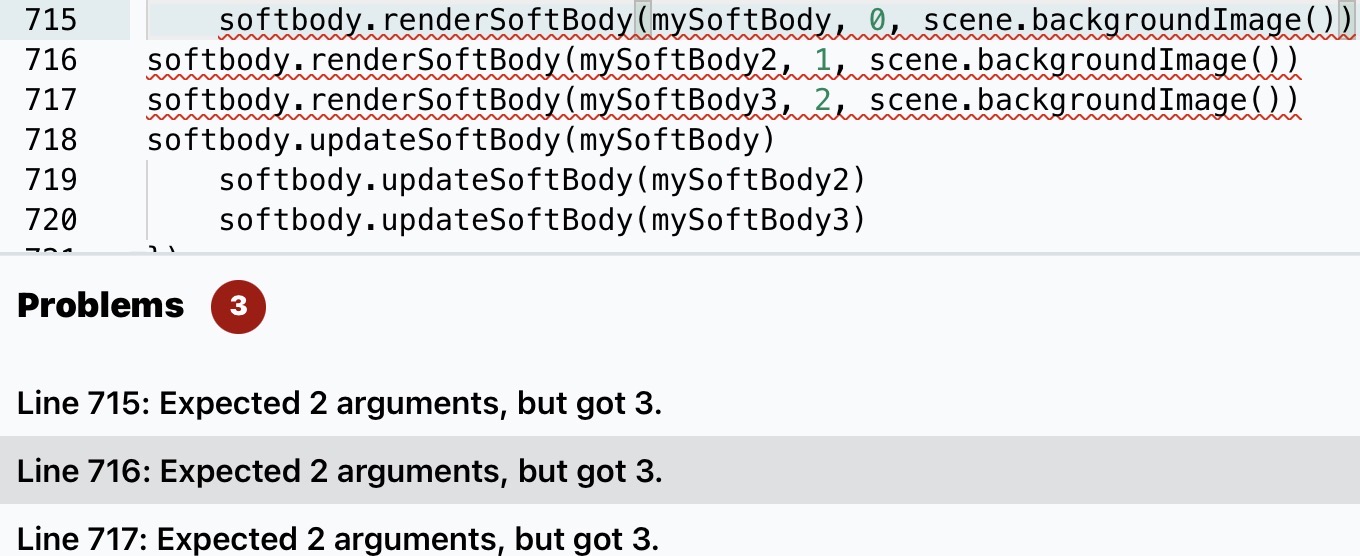
Keep getting this bug when trying to update the extension and when i just delete the line it deletes everything except for the enemies logic anyone know why
1 Like
Ok. This was actually a harder challenge than I thought it was going to be.
Here’s where I got so far:
Here are the problems I ran into:
-
Soft bodies don’t like being squashed together. Each segment has rules on how close and how far apart they can be from each other, so this was a problem because the player has to throw the soft body; all the segments are created at the same time, so we had to put them in the same spot once they were created. This leads to crazy pushes on all the segments away from each other simultaneously.
-
Because each segment can only be so far from each other (in this extension of mine), the updater starts to force movement on the segments. This leads to the hook not being able to stay behind a wall. This of course doesn’t matter it the hook stick in a different way (without walls).
-
For a similar reason from number 2, I was having trouble keeping the soft body attached and effected by the player and vis versa. So I ended up deleting the player and making the first segment of the soft body look like the player. Lots of programmers use this “magic trick”, especially with rendering complex geometry.
I think we can grow on this. What do you all think? Hopefully this demo brought some insight. I think it would be easier with my other extension using IK chains.
3 Likes
It’s because that block is for only updating the render. It’s showing you that error because the number is not needed. I changed it so you can set the color and type of rendering through a different block. Just remove the number and the following comma.
2 Likes
For some reason the file is in the wrong location making me unable to update it normally even when i try and reinstall the extension then delete the old file it deletes almost all my blocks

maybe make a new project with the extension you need, this time with the updated soft body extension, then just copy and paste the code from your old project.
It got it working i just deleted the old extension switched to block code switched back to java script deleted the numbers and commas then switched back again to block code and for some reason that worked thanks for helping me with this. Also i cant believe I didn’t think of that.
1 Like
this is really cool! i feel like once we figure out how to make it better we need to make a way to make it so the player goes toward the hook and when u un-hook, the player keeps its momentum. like Spider-Man!
1 Like