Any tips on how to do this would be highly appreciated.
One thing that helped me a lot is thinking of enemy AI as a state machine instead of one giant update loop.
For example, each enemy can be in one of these states:
- Idle – stand still or wander around.
- Search – look for the player within a radius or line of sight.
- Chase – move toward the player.
- Attack – if close enough, perform an attack.
- Stunned/Retreat – optional states for more interesting behavior.
Then, every update, the enemy only asks two questions:
- “What state am I in?”
- “Should I switch to a different state?”
This keeps your AI much easier to expand later instead of having one giant game.onUpdate() full of if statements.
If you’re using JavaScript/TypeScript, an enum is a nice way to organize your states instead of using numbers or strings:
enum EnemyState {
    Idle,
    Search,
    Chase,
    Attack,
    Stunned
}
Then each enemy can simply store its current state:
let enemyState = EnemyState.Idle
Or, if you’re making multiple enemy types, I’d even recommend giving each enemy its own class (or interface + class) with an enemyState property. That way every enemy shares the same basic AI structure but can override how each state behaves. For example, a sniper and a melee enemy could both have Idle, Search, Chase, and Attack states, but each would implement them differently.
Starting with a state machine makes it much easier to add things like patrol routes, line-of-sight, boss phases, fleeing, or different enemy personalities later without rewriting all your AI.
Also, some extensions can help you such as:
https://github.com/jwunderl/arcade-tilemap-a-star : A* algorithms for path following
https://github.com/felixtsu/pxt-sight : To see if an enemy can see you.
Also the Sprite Utils and Timer extensions.
4 Likes
You make me want to continue trying. I would look into how unity it done other 3d engine does it, or really any engine. But I’m going to continue trying now.
1 Like
heres a tip if you think that your ai is dumb its not because of your code its because theres something you forgot to give the ai like memory sight and more good luck!
What type of enemy? Is this a top-down game or a platformer? Are there any key things that you want the enemy to do?
A dungeon style game, and the enemy should start following the player if they get close enough.
Is this the wrong topic?
yes it works, but its less readable heres an extension i wipped up in an hour: https://github.com/c-minusminus/enum-blocks
1 Like
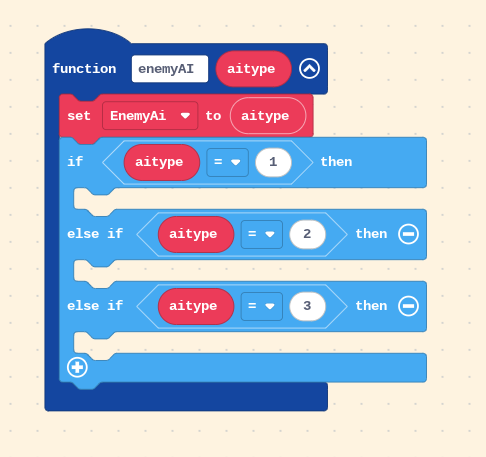
Yep! That’ll work just fine in Blocks. Passing in a number like enemyAI(1), enemyAI(2), etc. is basically accomplishing the same thing as an enum—it lets your AI know which behavior to run. Just make sure you set the enemy ai type to whether in the if statements.
Question: Are you planning on using the variable “EnemyAI” for multiple enemies or one? Because then you’ll need to change some things and use data (specifically helpful is the “sprite-data” extension).
The only thing I’d watch out for is something called magic numbers. Those are numbers like 1, 2, and 3 where you have to remember what each one means. They work, but later on it can be hard to remember if 2 was “Chase” or “Attack.”
In JavaScript/TypeScript, people often use an enum instead:
enum EnemyState {
    Idle,
    Search,
    Chase,
    Attack
}
Then instead of writing enemyAI(2), you’d write:
enemyAI(EnemyState.Chase)
It does the same thing, but it’s much easier to read and avoids accidentally passing the wrong number.
For Blocks, though, your approach is perfectly fine. If you ever move to JavaScript, enums are just a cleaner way to represent those numbers.
4 Likes
Instead of using numbers, you could also simply use strings instead -_-
no, I one tried to make a 2D enemy following thing but gave up. Specifically I tried one for platformer, which means A* won’t work.
does that mean top-down? If so, use A*. otherwise maybe look something up.
I’ve actually been wondering what the enum does for a while. Is it like an array or a function? Or something else?
so an enum is basically something so avoid magic numbers. got example, take this:
const damage =
    baseDmg * (diff === 0 ? 1.0 : diff === 1 ? 1.4 : 3.5) +
    (zone === 5 ? 50 : zone === 12 ? 120 : 0);
what does that mean? I don’t know. What about this:
enum Difficulty { EASY = 1.0, MEDIUM = 1.4, HARD = 3.5 }
enum HazardZone { SAFE = 0, SWAMP = 31, LAVA = 120 }

damage =
    baseDmg * (diff === 0 ? Difficulty.EASY : diff === 1 ? Difficulty.MEDIUM : Difficulty.HARD) +
    (zone === 0 ? HazardZone.SAFE : zone === 1 ? HazardZone.SWAMP : HazardZone.LAVA);
Oh, its to calculate the damage token in different areas and hardnesses!
Another benefit with this is that it is much easier to change the damage multipliers, now that there enums!
2 Likes
I kinda explained it already in my previous quote
But…here:
It’s something else. An enum (short for enumeration) is basically a way to give names to numbers.
For example, instead of remembering:
0 = Idle
1 = Search
2 = Chase
3 = Attack
you can write:
enum EnemyState {
    Idle,
    Search,
    Chase,
    Attack
}
Then instead of doing:
enemyAI(2)
you can do:
enemyAI(EnemyState.Chase)
Under the hood, EnemyState.Chase is still just the number 2. The enum just gives it a meaningful name, which makes your code much easier to read and avoids “magic numbers” (numbers like 2 or 3 where you have to remember what they mean).
3 Likes