This is a little different than the rest of the help posts, but is there any reason to use a forever block over on game update?
3 Likes
on game update is for when you have code that you want to be guaranteed to run every frame at the same time (for example, doing physics stuff, animations, etc). every single on game update is guaranteed to run and finish before the frame is drawn to the screen. as a result, you can’t use any blocks that pause inside of an on game update because it will freeze your whole game.
forever is much looser; it isn’t tied to the frame so you can pause all you want without freezing your game. the downside is that forever isn’t guaranteed to run every frame like on game update is.
let’s take a look at an example:
here’s the code:
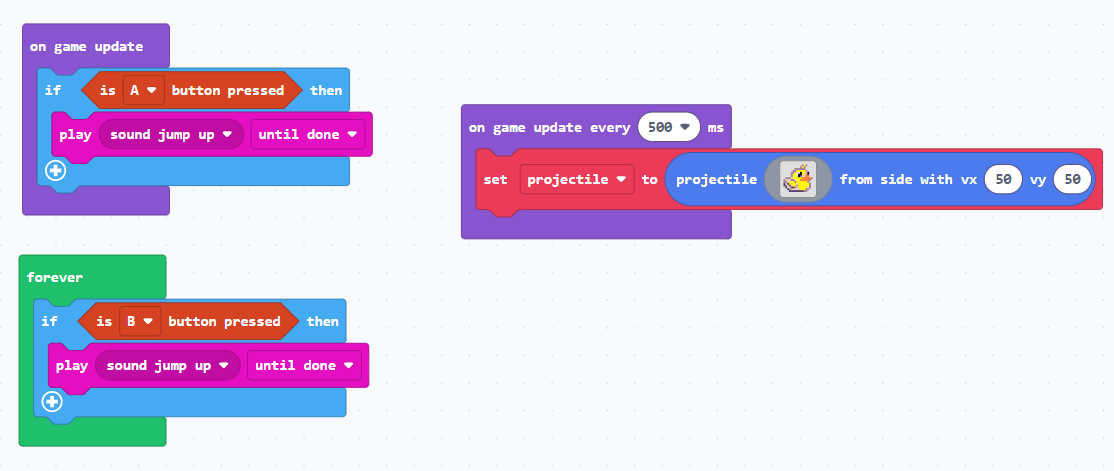
if you hold down the A button or the B button in this game, you’ll hear sounds playing. however, the A button will freeze the game since it’s in an on game update. the B button won’t freeze the game because it’s inside a forever
9 Likes
Oh I see; “On Game Update” runs within a single frame, “Forever” runs in the background.
6 Likes
yup! that’s a concise way of putting it
2 Likes
how many updates/frames per second is there? I’ve heard a bunch of people say it’s 30, but when I test it, it’s 50
3 Likes
IIRC, the game update code will run up to 30 times per second. If you display statistics, it shows the theoretical FPS. It’s not literal.
6 Likes
Like I said, when I test it, stuff updates around 50 times a second. This sprite should only say 30, but it says 48-50
4 Likes
@ScriptScraper you are correct! it’s 48. i have no idea why we decided on that number
9 Likes
I thought u said you changed it to 60 with the march 2025 update bro
1 Like
nope?
1 Like
It uses delta time and I recommend using delta time
it calculates the fps (technically every 200 ms, but can every frame)
1 Like