depending on how there rendered, it may be that it’s rendering polygons behind the actual camera. https://scratch.mit.edu/projects/1197402752/ has that glitch. I don’t intirely know how to solve it, though one way is to check if any points of the polygon are behind the player, and if so, don’t render it. that won’t always produce the best outcome but it might work
1 Like
new update! use old link
I added collision so this glitch never happens anymore
1 Like
Ok, new release!
Also, I have reached the stage in which I invite others to try to make something with it! If you want to make something with this 3D engine, feel free to- but please make sure to give me credit!
4 Likes
Please note that this engine is not done yet. Lag issues and some other glitches are thigs I am working to fix.
3 Likes
@richard can we turn parallel arrays into a single hex code? if so, how? We want to be able to create a makecode “game” that would serve as a 3d tilemap editor, and we need a way to store the face images and x/y/z positions; we can use arrays pretty easily but it’s annoying to make multiple custom blocks like “set tilemap face images to” and “set tilemap face positions to” etc. Can we somehow combine the data from 4 parallel arrays into a single hex value so people can simply copy paste one number instead of 4 arrays? if so, thanks, and if there’s another solution, please let me know.
1 Like
sure, you can make your hex buffer format as complicated as you want, it’s just a question of how you encode/decode the data.
for example, assuming that each position consists of 4 numbers (x, y, z, and tileIndex), i would encode them like this:
class Position {
    constructor(
        public x: number,
        public y: number,
        public z: number,
        public tileIndex: number
    ) {

    }
}

// We're going to use two bytes for each of the numbers in a position,
// so all together that adds up to 8 bytes per position
const POSITION_SIZE_BYTES = 8;

function serializePosition(
    buf: Buffer,
    offset: number,
    position: Position
) {
    // For x, y, and z, use an Int16LE. This takes up two bytes and has a
    // range of -32,768 to 32,767 so should be good enough. Note, I'm assuming
    // that x/y/z are all integers and do not have decimal points.

    // For each subsequent number, I add 2 to the offset because each number we're
    // writing is 2 bytes long
    buf.setNumber(NumberFormat.Int16LE, offset, position.x)
    buf.setNumber(NumberFormat.Int16LE, offset + 2, position.y)
    buf.setNumber(NumberFormat.Int16LE, offset + 4, position.z)

    // For the tile index, we use a UInt16LE (unsigned integer) because indices can
    // only be positive integers. Once again, this takes up two bytes
    buf.setNumber(NumberFormat.UInt16LE, offset + 6, position.tileIndex)
}

function deserializePosition(
    buf: Buffer,
    offset: number
) {
    // Make sure all of these number formats match what's in serializePosition
    const x = buf.getNumber(NumberFormat.Int16LE, offset);
    const y = buf.getNumber(NumberFormat.Int16LE, offset + 2);
    const z = buf.getNumber(NumberFormat.Int16LE, offset + 4);
    const tileIndex = buf.getNumber(NumberFormat.UInt16LE, offset + 6);

    return new Position(x, y, z, tileIndex)
}


function encodePositionArray(
    positions: Position[]
) {
    const buf = control.createBuffer(positions.length * POSITION_SIZE_BYTES);

    for (let i = 0; i < positions.length; i++) {
        serializePosition(
            buf,
            i * POSITION_SIZE_BYTES,
            positions[i]
        );
    }

    return buf;
}

function decodePositionArray(
    buf: Buffer
) {
    const numPoints = Math.idiv(buf.length, POSITION_SIZE_BYTES);

    const result: Position[] = [];

    for (let i = 0; i < numPoints; i++) {
        result.push(deserializePosition(
            buf,
            i * POSITION_SIZE_BYTES
        ))
    }

    return result;
}
2 Likes
do you think makecode could handle a fractal block world demake, by any chance
2 Likes
Alr so @Existent_Chicken and I are each trying a different method for 3d engines; here’s iteration 1 of mine!
This is my first ever 3d project and it took a lot of work to make, although I do have to give a lot of credit to Google AI for helping me understand how matrices work and how to multiply a matrix by a vector3 and stuff like that, and a bit of credit goes to @Existent_Chicken and their dad for helping me understand what exactly the AI meant by some stuff.
3 Likes
New version with camera directions!
2 Likes
YAAAAAAAAAAAAAAAAAAAAAAAAAY I GOT TEXTURES WORKING!!!

5 Likes
HOW DO PEOPLE DO THIS???!!! HOW? 
2 Likes
W O W !!! 
I’m blown away, the last time I’ve seen any render of this quality was Brohann’s dinosaur now up on the makecode website itself.
I’m mainly impressed by how well the textures look in 3D (I’m not sure Brohann had even done 3D textures before) and how there aren’t any bugs or clipping 
4 Likes
Why did I say this when I literally just made this? I am so interested in 3D mechanics that I made this. I know. It is cool. I didn’t even make it with javascript. Just 1 variable. Called angle.
2 Likes
LET’S GOOOO I GOT SHADERS WORKING!!!
I’m actually really surprised by how smooth it still is even with the dithering; I guess the bit shifting helped a lot.
BTW this spinning guy is Sparky, a Munchy who’ll be the main character in my big 3d game. If I can get it fully working.
5 Likes
AMAZING!! The shading is really smooth, so you have to preprogram where it shades or does it calculate where to shade?
4 Likes
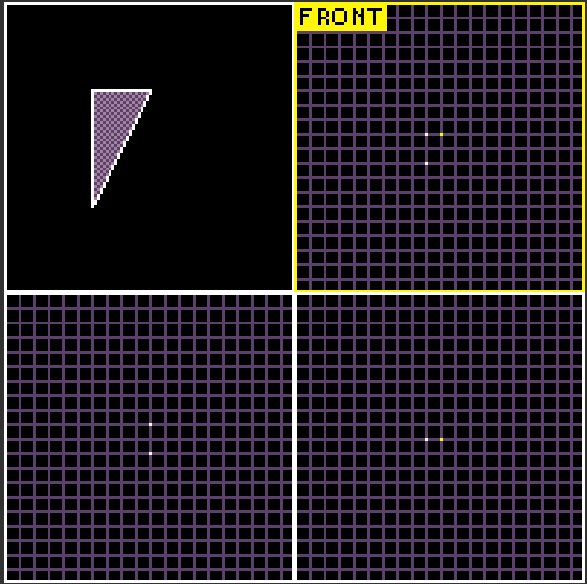
It calculates where to shade based on the angle in radians from the set sun position to the positions of the face vertices.
3 Likes
THATS SO COOL!!! Very high tech, and such fast progress too
2 Likes
hey @richard in most typescript editors you can convert a number to a hexadecimal by using .toString(16); however makecode doesn’t’ seem to have that optional number parameter. Is there a different way to convert a number to hexadecimal?
1 Like