With the settings (aka saving) extension, is it possible to save specific items and specific amounts, and is it able to save the area youre in (like ut/dr) asking for myself. if no, can you guys make a better saving extension? @richard i think youre the main guy to ask for this stuff so uh yea
5 Likes
I tried to make an old rpg game before and the way i handled the inventory was as a number array with numbers being what item was there (0 being none, 1 being a potion or smth, so on). It works well for the old rpg styles with limited inventories.
However, for a modern take, you could just make a big array of just the ammounts of items, like i visualized here:
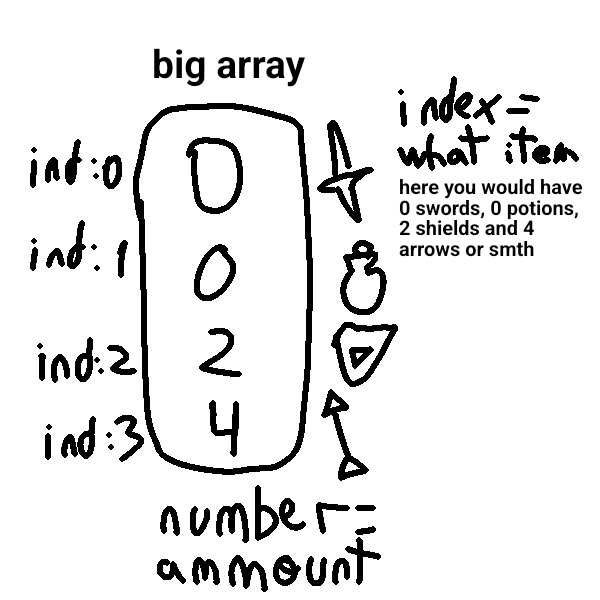
This is just an idea tho. Feel free to do as you find best.
1 Like
Sarge made a better saving extension! You can find it on awesome arcade, I think it’s called “better-settings”.
2 Likes
I may be misunderstanding, but I believe yes; you could save a number for the amount, an image for the item, and a string for the name.
For the most part no; You can’t save a scene, tilemap, or set of sprites, likely because it’s just a lot of data to recreate. You could save specific elements manually, though, like saving a number indicating which tilemap the program should load or an array with the positions of the sprites onscreen.
LMK if this is what you meant! ^v^
2 Likes
whats awesome arcade?
thanks randomuser!
thanks you bilangus
4 Likes
Does anyone know if theres a tutorial or example on how to use that extension? I’m curious because I’m making a Fnaf 6 style game?
ps. Man I love it how Richard just doesn’t reply to half his pings.
2 Likes
Richard is out sick today: No stream today (1/26/26) - Live - Microsoft MakeCode
2 Likes
Request one here … and don’t assume that anyone will reply to a ping.
2 Likes
Awesome Arcade is a website by @UnsignedArduino which holds a bunch of extensions and tools in one, easily searchable place!
Hers the link: https://awesome-arcade.vercel.app
It doesn’t have everything, but it has a lot of useful stuff. I don’t think it’s been updated in a while.
3 Likes