Do you want to know how to control your movement and jumping? Well, here’s a tutorial to do so!
First, we have the humble “move mySprite with buttons” block.

It makes you move a sprite with buttons. Press the + button and you get to control how fast your sprite goes.
If you are making a platformer, then you need to do this:

This way the sprite won’t be able to move upwards with buttons.
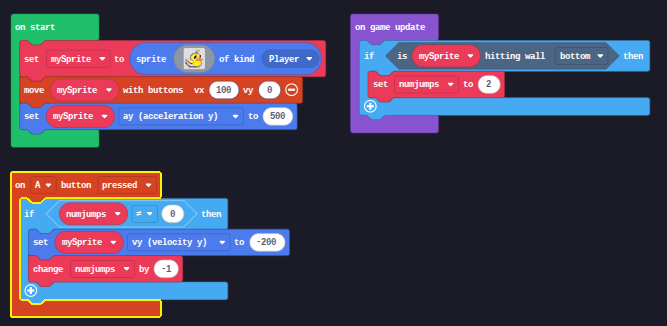
But wait! The sprite’s not falling. What do I do? Get out the handy “set mySprite x to 0” block and change “x” to “ay”. This is the downward acceleration that is sorta like gravity.

But now you might be wondering, “how do I make the sprite jump?” Drag an “on A button pressed” block out. Then, get another “set mySprite x to 0” block and change “x” to “vy”. You have to make the vy negative, however because that will make the sprite go up.

BUT WAIT!!! How do I make the sprite double jump? Well, this gets a little complicated. First, make a variable named “numjumps” and set it to how many jumps you want it to have. Then, do this:

But you may notice that the sprite will be unable to jump upon hitting the ground. Well, you can fix this by either doing this
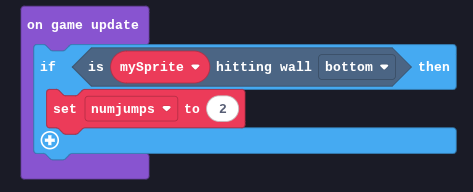
or this

And there you have it! You now have fully functional double jumps.
Going back to open world style RPGS, you may wonder how to make the sprite stop moving. Well, to do that make a variable called “moving”. Then grab a “true” reporter block (the hexagonal block) and put it in in place of the zero.

Then do this:

And then you can control when the sprite moves! Just remember to change it back when you’re done. You can do the same thing with jumping, by doing this:

And that’s all I have to say.