Tutorial for Easing Extension v2.0.0!
Ok, so, as you can tell, A LOT has changed. We even had a super cursed “circle” block at some point (explanation of what the block was later on), but now, after so long, it’s ready! Let’s start with the blocks!
The update implements easing ID’s - you can cancel them, get their progress, tag them, replay them… and that’s how it works. Every time you create an easing, it has an ID. The number type blocks for position, scaling and camera do the easing, but also return the ID.
Sprite Movement
Yeah this is the one we’ve already seen above. No differences, but I suppose it does it’s usual. Move a sprite from A to B with easing options. There’s another block to move the sprites relatively, based on its position, but it’s basically the the same.
As I said above, there’s an ID version which returns the ID of the easings so you can do a ton of stuff with it in the future.
Sprite Scaling
Alright so this is a new block. You can now ease scaling as well! You can make all sorts of stuff with this, for example…

A JUMPSCARE!
So, uh, anyway… just like the movement block, all of this can be done relatively with a separate block. There’s also the ID version of the block, which you can use to uhhh… yeah, what I said above.
And here’s what it looks like just for the lols. You can set up what the scale starts as, which I think I forgot to say earlier.
Camera Easing
This is also a new block! It’s a little bit buggy, might patch a few things later, but with this, you can ease the camera to a coordinate! You can also do really sick stuff with this, you could even do parallax easing if you mix it with another easing block…

I personally feel it’s very good if you want camera effects for cutscenes, and maybe it could work well mixed with sprite movement if you’re feeling innovative. Quick note: if the camera is following a sprite elsewhere in your project, that will fight manual centering, so turn off any follow behavior or be mindful that the follow will dominate. There’s obviously also the ID version, but it works exactly as mentioned above.
Generic Easing Function Creation
This. This is the block that caused this update to take so long. If you want to predefine behaviors, use this block to register a named handler ahead of time; later you can call to run it. Put the value parameter in for the number in the block you wish to ease. If people use this extension, big projects would have like millions of these. It’s neat for reusable effects, so you can define how “rotate” or “transform” should behave once, then launch it with different ranges and durations. This block works best with other extensions. Oh yeah, and this was the super cursed circle block.
Here are a few examples:
Here’s a fun one to implement rotation easing! I used this extension. Here’s the result:

Let’s try adding some camera zoom into the mix:
And here’s what we get as a result:

I could go on and on, but in any case, this is a really huge block. You can do anything with it. You can even put easings in the easing function and do really stupid stuff. This is by far the best block in the extension, so uh, have fun!
Easing ID and Tag Usage
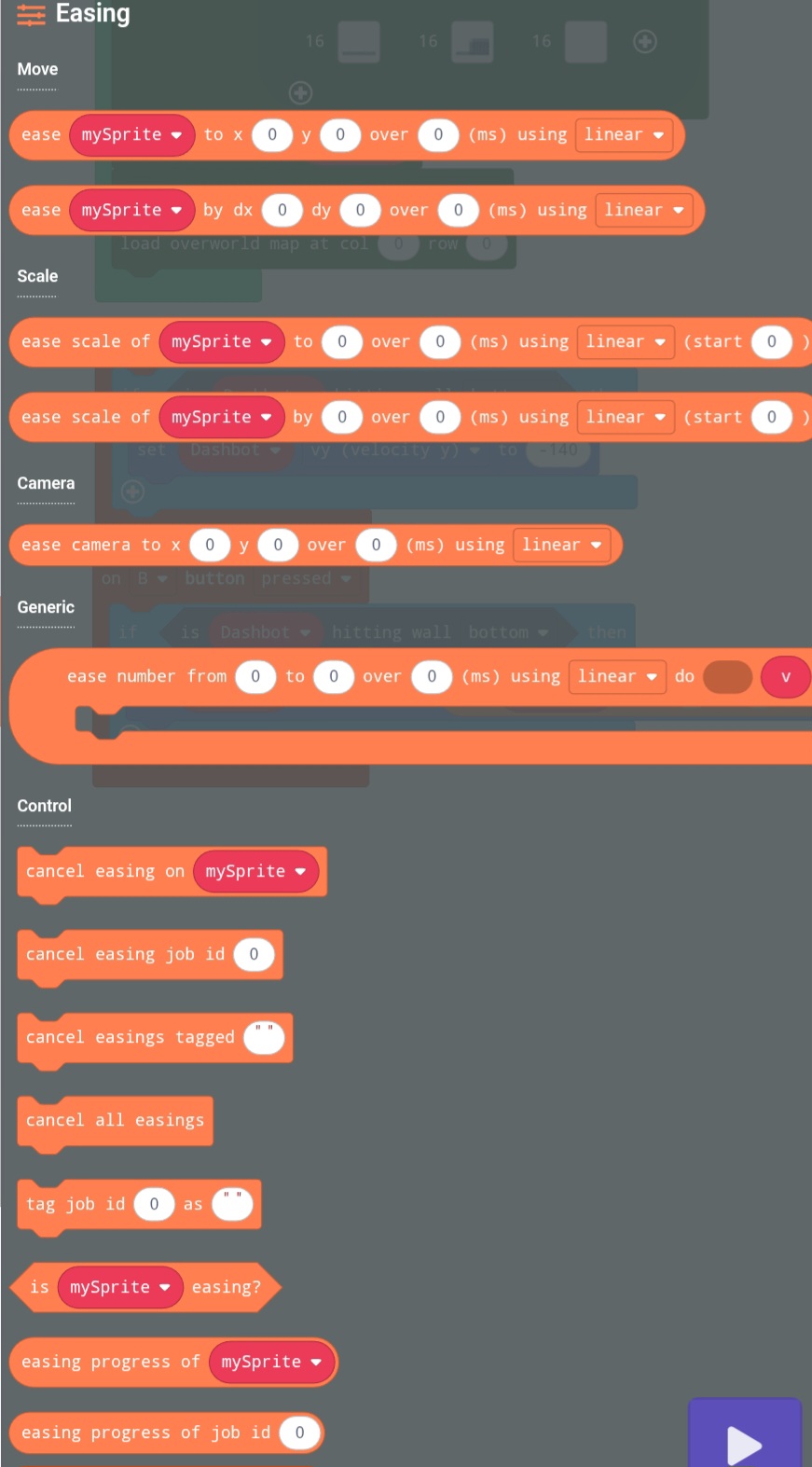
Easing number blocks return easing IDs when you create them. Keep that ID if you want to cancel the effect or check its progress.
This block cancels a single easing by ID. Basic stuff.
This cancels all easings attached to a sprite (and yes, you can have more than one), and this:
This cancels all easings with a tag. This would be a good time to show the block to tag easings!
Just be aware that tagging an easing plays the easing. Finally there’s this block:
And this just nukes everything. Good if you want to crash out.
Tagging is one of those small conveniences that becomes very useful in larger projects: when you create an easing you can optionally tag it (for example “intro” or “enemy-hit”) and then cancel or replay groups by tag instead of juggling lists of numbers (look at replay in the next dropdown).
Aight I’m tired of taking pictures, I might just blitz through the last few of these.
Querying is simple and helpful for logic: is <sprite> easing? answers whether there’s any active easing on a sprite. easing progress of <sprite> or easing progress of job id <n> returns a 0 to 1 progress float (or -1 if nothing’s running), so you can drive other things off the easing state.
Easing Replayability
Replaying is the fun part, and it’s just lovely to use. This clones whatever easing you point it at and restarts it, giving you a new easing id (though unobtainable since you have the original). You can also replay em by tag. That will replay every easing with that tag; great for re-running an “intro” sequence when the player retries a level, like you could just name them all “intro” and boom! I made them create fresh easings so your old easing records stay for later use.
Here’s a super fun example I made showcasing the replay blocks:
And now, here’s the result! Introducing the rolling duck! He’ll never stop rolling.

Here’s a final example with me using most of the ver.2.0.0 features (except for camera stuff). It’s far from perfect, but here’s a random ultimate attack I made with Vortex throwing a… well, vortex… at scamma!

 . I guess time will tell. But let me give you a breakdown of what this extension has to offer: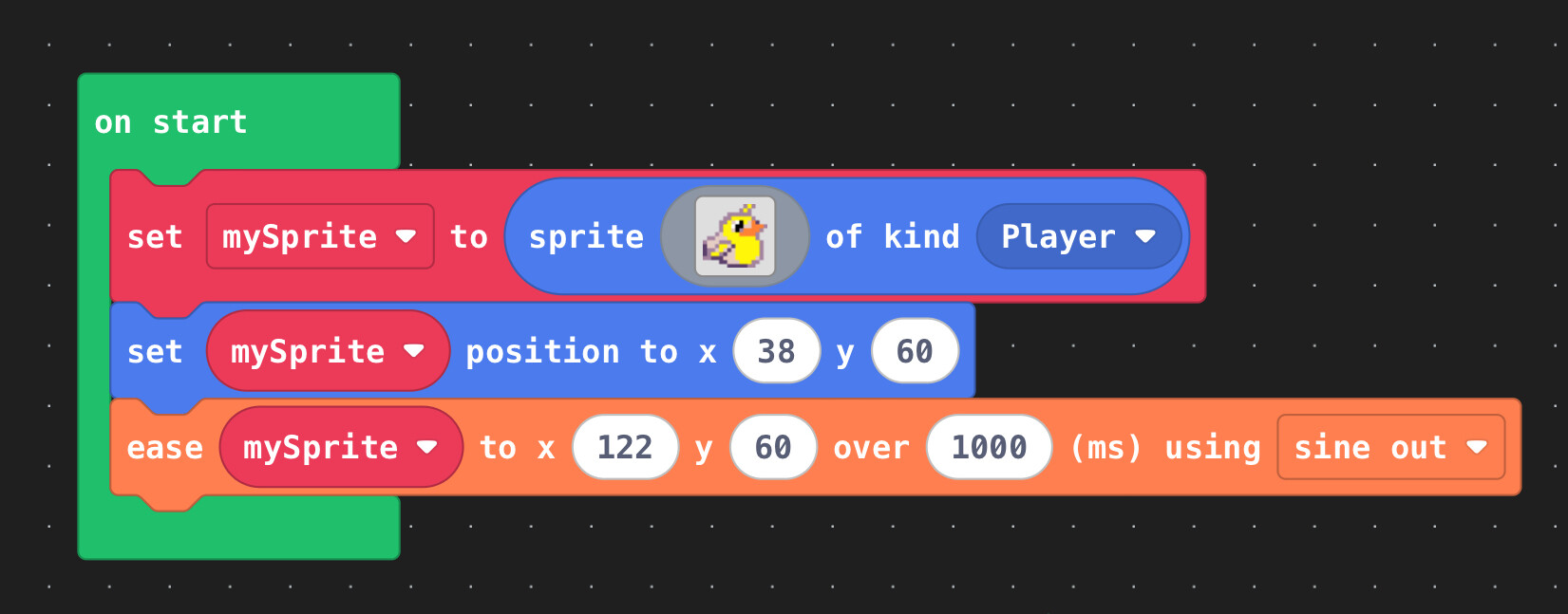




 /s
/s


