Sprite util:
Shader:
Sprite util:
Shader:
Yes, So I Am Creating Raed 3 trailer
I’m helping my son create a Minecraft mod in MakeCode using Microsoft’s Code Connector. We’re creating a procedurally generated city. He asked about using seeds so he can save/share the most interesting cities that are generated. I assumed this would be easy but, well, obviously not since I’ve landed here.
Unfortunately while this extension works great for MakeCode Arcade, it doesn’t seem to work for MakeCode for Minecraft. @UnsignedArduino , do you have any idea how to get this to work in the Minecraft version of MakeCode? Really appreciate any insights/leads you can provide. Thanks!
You can try making a new Minecraft MakeCode project in JavaScript as a new extension, make a new file, (call it something like fast_random_blocks.ts) and copy the code from my fast_random_blocks.ts. Then save that as a GitHub project and that will be your extension to try. I would do this myself, but i dont have access to a computer right now.
Good luck on the city! If it works, please share pics! 
As the resident smol brain, I have no idea how any of this works. Can someone give me a brief explanation of sorts?
After fighting to get @UnsignedArduino 's extension to work in MakeCode for Minecraft and failing, I’ve created a different extension which seems to work in any MakeCode environment, including MakeCode for Minecraft. It is based on the algorithm posted here: https://stackoverflow.com/a/29450606.
I highly doubt it is as good as the Fast Random extension above. However, for anyone having trouble with that extension, I recommend taking a look at what I’ve put together.
Note: To use in Minecraft, you’ll need to import using a makecode-dot-com link as that editor doesn’t yet support Github. To do this, import into MakeCode Arcade as an extension and then use Share to publish that project. Import the makecode-dot-com link into MakeCode for Minecraft.
Working On Raed 1 (Still)
I am working on Baldi’s Basics In MakeCode, So Get Ready
@UnsignedArduino How do i use this? Im trying to figure out how to make a infinite map for my runner but I can’t figure it out, please help.
bumping this
i need help as well,
my school blocks the block help pages, so i come here for help on how to use blocks.
specifically these three blocks
And if i may, i want to request a detailed explaination on how to use all of the blocks in this extention in this topic for others sake too
the pick random from array of block accepts an array (you can drag out the array of block and replace it with a variable that has any type of array inside) and picks a random value from it. So if you have the array [1, 4, 5, 6, 7, 8] then it might pick 7.
the 50/50 and n percent chance block return a boolean (true or false), which is true approximately 50% and n% of the time respectively. for example, if you did rng 5% chance, out of 100 runs of that function, normally it will return 5 trues. (obviously, it is chance based, so it could return 6 trues out of 100, or 4, etc. see the binomial distribution)
Also, if you can access GitHub (which I doubt it because you said your school blocks the help pages) then you can read the source code which has comments: https://github.com/UnsignedArduino/Fast-Random-Blocks/blob/master/fast_random_blocks.ts
This clears up a lot of questions, but i have some new ones
can i use the n% chance numbers as a set of chances?
like, put them into the “Pick random from array of:” block. Will this make it pick random using the provided chances/. or will it ignore the chances and just pick a random block with no chances at all.
I hope you can understand what im trying to explain- i have a hard time articulating
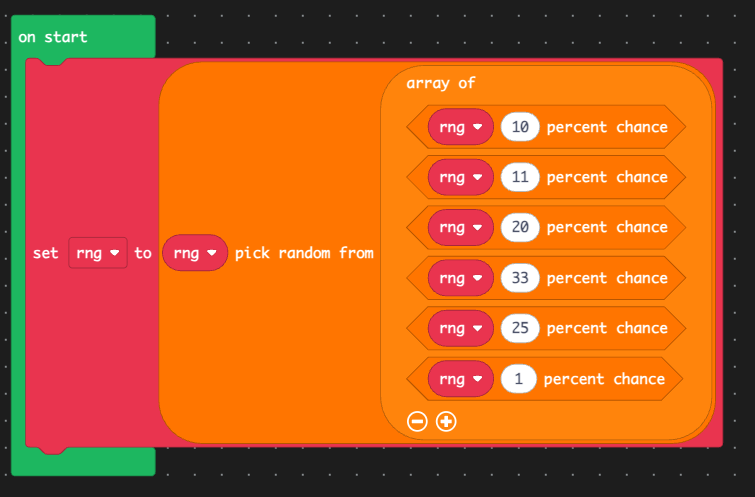
i made this to try and show what i mean
(ignoring the fact that the RNG object is not initialized, and is being set to the result) I’m sorry, I’m pretty confused by what you’re asking  . But this is what that code would do:
// TypeScript equivalent
const result = rng.randomElement([
  rng.percentChance(10),
  rng.percentChance(11),
  rng.percentChance(20),
  rng.percentChance(33),
  rng.percentChance(25),
  rng.percentChance(1)
]);
Firstly, those rng.percentChance() blocks all evaluate to a single boolean (True/False), so then the result could look like this:
const result = rng.randomElement([
  false,
  false,
  true,
  true,
  false,
  false
]);
Now the rng.randomElement block will pick one of those six booleans randomly, all with equal chance: So then, the result could look like this:
const result = false;
The percent chance blocks just return a single boolean at the time of execution. So if this statement was executed multiple times, you would get a different array of six booleans, and then randomElement would pick randomly from that array. The result is a boolean.
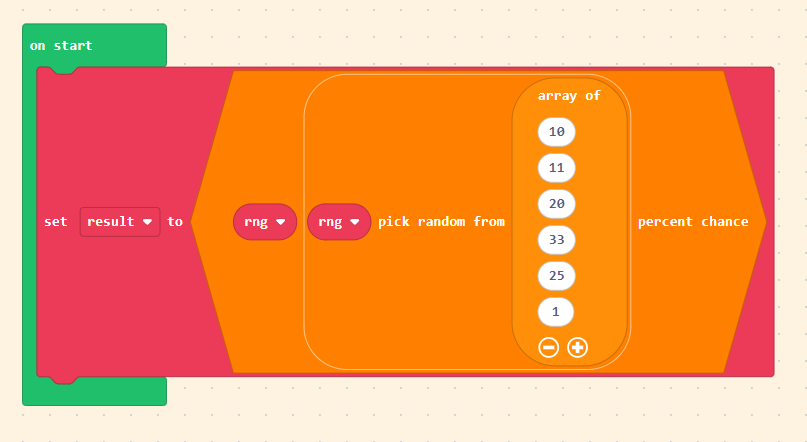
If you are asking about wanting to use a random percentage number, and THEN passing it to the n% chance block, you would want something like this:
This is what the above code would do:
//TypeScript equivalent
const result = rng.percentChance(
  rng.randomElement([10, 11, 20, 33, 25, 1])
);
Firstly, the rng.randomElement function picks a random number from that list, all having equal chance. So then it could look like this:
const result = rng.percentChance(
  11
);
Then the rng.percentChance will return a boolean, where the chance of getting True in this case would be 11% of the time. So then, the result could look like this:
const result = false;