Some people might know that im getting into creating extensions, and I want to know how I can add a color parameter. Like this:

    //% color.shadow="colorNumberPicker"
    export function showColor(color: number) {

    }
For more color options in Blocks:
1 Like
I would definitely check out the arcade blocks playground site! It has a bunch of examples on making custom blocks for extensions.
the color parameter is //% color.shadow=“colorindexpicker”
//% block="change screen $color"
//% color.shadow="colorindexpicker"
export function change(color: number) {
    scene.setBackgroundColor(color)
}
1 Like
@BLADEr and @AlexK, I tried these but none of them worked, it still has me input a number  Maybe it’s because I’m trying to use multiple parameters?
see this:
My first time trying to make an extension
Are you creating new releases every time you make a change? How are you testing your extension?
1 Like
I just change the part of the block into the code that you showed me, then I simply go into blocks and see if the block looks the way I want.
without releasing new extension updates, in fact, I haven’t made a new release since the first broken/useless version!
does this help
//% color.shadow=“colorindexpicker”
export function name of your block(color: number): void {
}
This is what it would look like
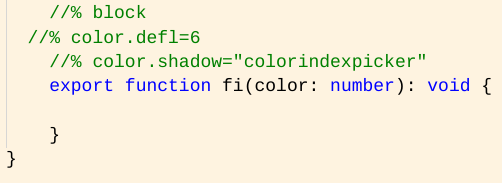
It would look like this in the blocks

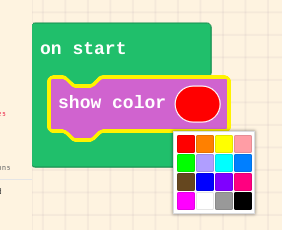
Or you can try
//% color.shadow=“colorNumberPicker”
For
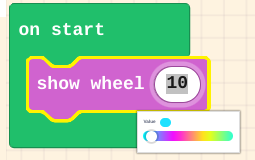
Or
//% color.shadow=“colorWheelPicker”
For
Or
//% color.shadow=“colorWheelHsvPicker”
For

It works but I need it to show up four times, each choosing the color of a different sprite the block creates.
like this
//% color.shadow=“colorindexpicker”
//% color2.shadow=“colorindexpicker”
//% color3.shadow=“colorindexpicker”
export function name of your block(color: number,color2: number,color3: number): void {
}
Ohhhhhhhh thanks, I’ll test it out. I thought you HAD to do color.shadow… and that the parameter HAD to be just plain “color”.
well not the parameter can be anything like
//% hotdog.shadow=“colorindexpicker”
//% paper.shadow=“colorindexpicker”
//% YamJam.shadow=“colorindexpicker”
export function name of your block(hotdog: number,paper: number,YamJam: number): void {
}
2 Likes
Well, I found that out from your post earlier!