Is that aesprite I just started using it and it looks like the ui
Yeah Aseprite, I’m not an expert or really even any good at it, but that’s the issue at least my son ran into when I had him build out some art.
We’d grab the colors from our palette, then create an index picture. But the tools that exist for importing that back into makecode didn’t seem to work well with the colors and we’d end up having to re-color everything.
2 Likes
Ok I looked through my repo and there’s a bunch of stuff that I have for my classes that I wouldn’t want others to have (also collaborators are all-or-nothing for personal accounts, I didn’t have time to create an organization yet).
BUT stay tuned, I have another project in the works that will be open source and I’ll likely move these things over there, and that point it’ll need a lot of care to get it glossed up and looking like it fits in.
Hoping by mid-week I’ll have something to show everyone.
2 Likes
so would you maybe say that if this all goes well I can down load a WORKING elf and maybe use RP5RS or this or something and it should run on a raspberry pi 5 WITHOUT CRASHING right just because I saw this and using the elf I can get by adding something to the URL or using McAirpos and elf files and it adding it to the URL and getting a elf from McAirpos that elf ran on a raspberry pi 5 some what using RP5RS it crashes every game or so
do you think I should add you as a collaborator on the RP5RS repo
@NeverStopTheCoder @VoxelMaster64 @UnsignedArduino I have the baseline of my idea built:
The repo is here: https://github.com/Kikketer/MakecodeGames
I’ll make a bigger announcement in a few days after I see that the database is settled up properly and the ingestion of games has been proven out. Basically it’s just a “games focused skin” over the forums. My next goals:
- Bring in these tools (png-to-*)
- Include my “2 minute arcade” (https://www.forthelearnofit.com/twominute) that hosts ONLY random games from the library. Thinking either the top “Hot” or maybe “Newest” to get more exposure to fresh games without having to sift and find and select (the netflix problem)
- @UnsignedArduino - your awesome extensions project, I was thinking of creating an extension search engine in here as well. Basically have hand-picked extensions and then provide awesome documentation for each + examples. With the search I’m thinking “I need to be able to find the distance between sprites” kind of natural language search which would then find and result in the right extension but also how to use the part (complete with block code example). Mock up image to come in another post later today. Maybe you have some input on how we could do that (my solve has been to use AI to parse through the github repos of the extensions and generate useful docs + block code examples)
I’ll have this open for PRs and such but only a select few (you and a few others that I know) will get any real eyes on it with potential to merge.
2 Likes
Long sentence but I think I get what you’re saying.
My goal with the native build is to have a native output that no longer needs mcairpos or other wrappers to fake and handle the complexities and specifics of the current elf export.
I just haven’t had time to test on a raspberry pi 5. It does work on 3 and a La Frite. I’m not 100% sure the architecture differences between them so I can’t guess right now if it’ll work.
I’ll try to remember to give the repo a look. Honestly I’ve made a lot of assumptions on it, I haven’t had a real chance to see the problem it solves and how it does that.
So, @Kikketer : I have a Raspberry Pi 3 handy: what do I need to do if I wanted it to boot directly on a makecode game? Is that what your creation station is for?
You’re going to beat me to implementing that all before I even continue working on Awesome Arcade 
But yeah for extension search, that seems like similarity search so vector databases and related to “RAG” or whatever new iteration in the LLM space they’re calling it now. Personally for Awesome Arcade, I was planning on adding tags to extensions and tools as well which is a simpler method.
1 Like
This is so cool. It’s shaping up to be a real hub of the community.
1 Like
My goal was more about the documentation side. It’s hard to understand what a plugin does or what it offers before you actually have it added to your game. I often ask my son “what’s the one where I can get distances between sprites” 
I’d like to be able ask this site the same question and not just get the extension but also how to use it (some are harder to understand than others).
My other goal is to do more and more with AI (17 years software engineer, I’ve hardly touched real code at work in the last 6 months… it’s all driven by agents now). So I was thinking of sending AI at the extension repo and have it generate the documentation based on that including examples.
Here’s an example screenshot of my POC branch.
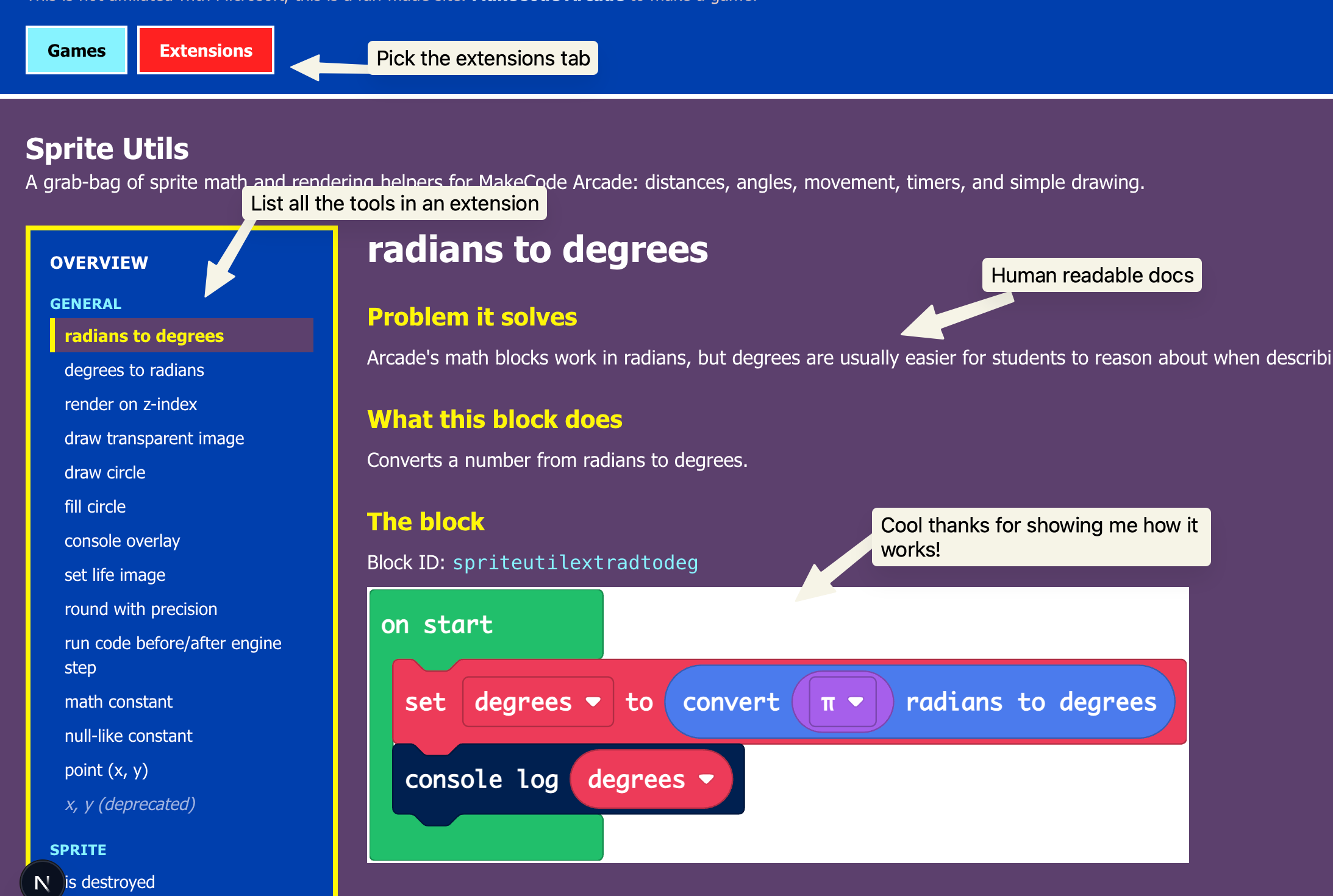
My final goal is “minimal maintenance”. The Games list is driving from the forums, so basically no maintenance there. But the extensions are harder to fetch/find and I want to make sure they are vetted enough to be good enough for people to want to use them. But the docs around it are generated and could be updated on a reasonable auto-schedule “check daily, version bump? regen-docs”.
I’ve somewhat dried up my tokens for the week, so I can go out and touch grass until this weekend. But if you (or anyone else) wants to dive in on this I’d give some PRs a look. This extensions branch is here if you want to give it an eye: https://github.com/Kikketer/MakecodeGames/pull/12
I’m game to give PRs a look if you want to contribute.
3 Likes
CreationStationArcade repo = the scripts needed to make an arcade machine turn on with a single “just plug it in” and handling the ability to reset or return to menu.
For a Raspberry Pi 3 this is the branch: https://github.com/Kikketer/CreationStationArcade/tree/single-native-arcade
This is then intended to be used with USB joysticks https://a.co/d/05qNmC1r
Then just install the “Lite” version of Debian 64 bit (important, compiled games are 64 bit)
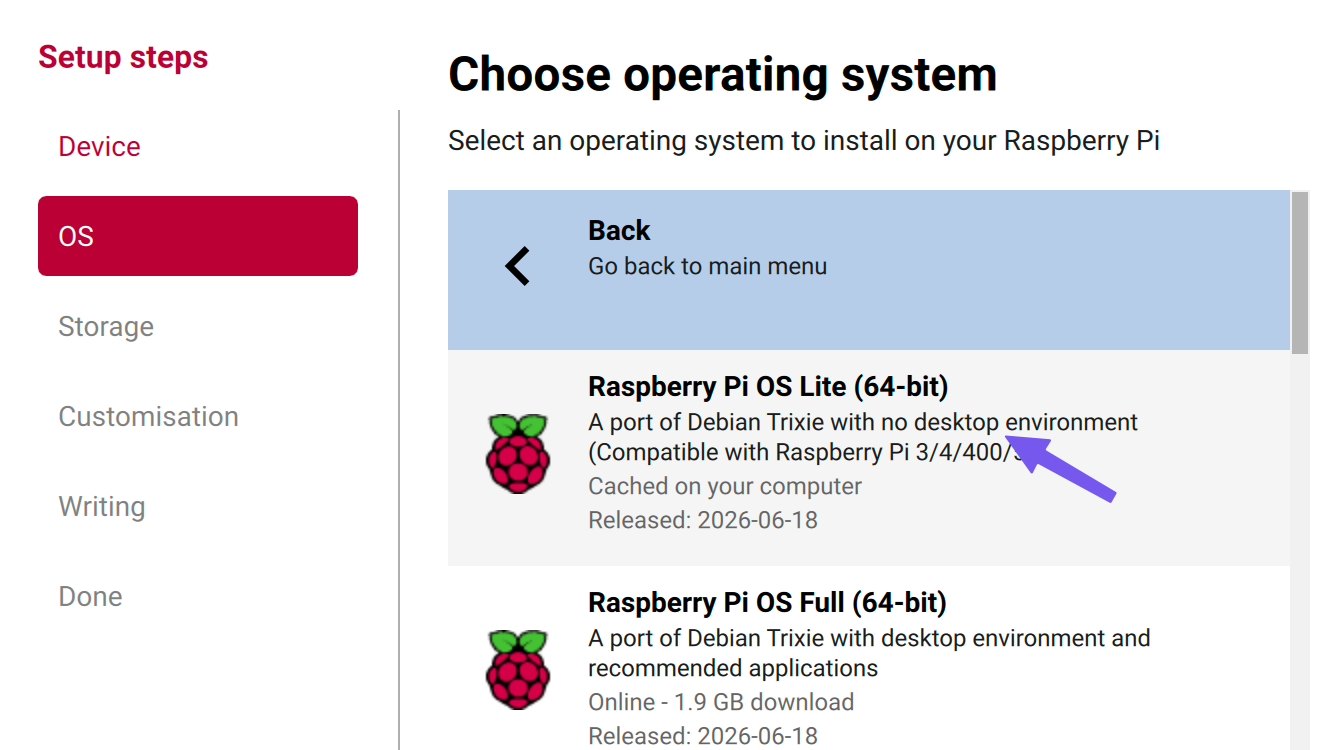
Then clone the CreationStationArcade repo into that device (log in with pi) and switch to the single-native-arcade branch.
Compile your game using the png-to- utility: https://www.forthelearnofit.com/desktop
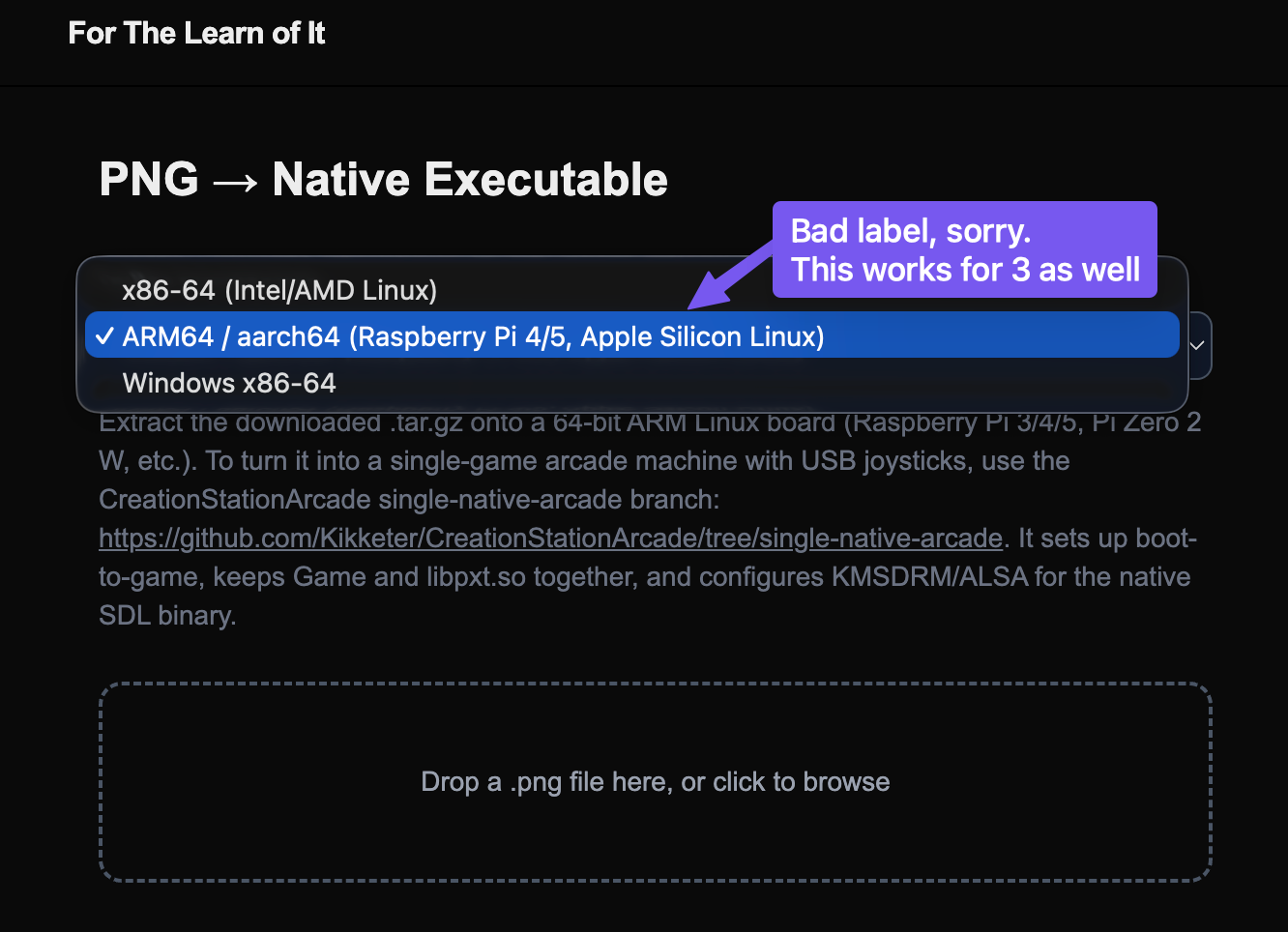
It’ll download a zip, extract it to the /games folder within the raspberry pi folder CreationStationArcade/games. It should be in it’s own folder
example: /home/pi/CreationStationArcade/games/MyAwesomeGame/ << in that folder should be Game and libpxt files.
Now you should be able to just run the install/single-native-arcade-setup.sh --game=MyAwesomeGame. That’s intended to be a “one stop shop” to setup all the things on that device to:
- Install the needed dependencies to run the game
- Auto login
- Auto start the game that you gave it
- Start up a background thread to sniff for GPIO 13 to be pressed, which then presses the “r” button on the keyboard to reset a game.
“Why this whole complicated step 4” you ask. I was imagining this as a real console device where the controller doesn’t have a reset button, you gotta get up off your backside and push the button! So if a game needs to be reset, this is how it’s done/compiled today.
Reboot and rock on!
(note that you can run that setup script over and over, it won’t hurt anything. It’s the easiest way to pick a different auto-boot game).
Phew that was like 2 pictures and 15 sentences longer than I expected. I’m actually going to steal this and put it in the readme too.
1 Like


YES that’s awesome!
Basically every couple hours the overlords bots sift through the public forum JSON files, finds anything new and adds it to the database. So if you are looking for your fresh game it’ll likely be there within a couple hours. That is as long as I don’t break it.
Other fun side-effects. Reactions and clicks within the forum will push your game up in the “Hot” or “Trending” rows. Also that’s added to clicks directly from Makecode.games as well (so clicking the game in there isn’t a “lost play”, it’s just not recorded in the forums).
I’ve found myself stuck in here just playing games randomly. That’s one of the dangers of creations (happens ALL the time making games) where you are getting it to a workable point and you forget to keep working and you just play all day 
Also for anyone wanting to get their game out there, if you make a new version and it’s a different url, it’ll show up as a new game. If you want to retain your clicks/reactions/etc just re-use the same url you have (update your existing game, not a new one).
1 Like
now I think I’m just dumb but Isent this just kiosk like why would this matter for games running as elfs
Ok, I gave it a go this week end, and I’m too much of a noob, I have questions!
- I’m not a power user of gitHub, I barely understands how it work… and it’s about the same with Raspberry Pi ecosystem…
- I’ve installed PI OS lite, no problem
- So far, I’m planning to use a regular game controller (I have a fancy 8bitDo for my Retropie systems, but for the makeCode Pi version, I plan using a wired basic retro controller). Do I need to install anything else?
- It took me a while to understand how to “clone” the Github from command line
- I installed Git successfully
- When I try to clone your repo from command line, I’m getting a “repo not found” error… I’ve re-read the address several times, it seems there’s no spelling errors: am I missing anything?
- you say to clone the Repo, then switch to single-native: does that mean I need to clone the parent repo, then clone again the child? Do I need to manually create the folders?
- I may want to benefit from the “multi games menu” so that I have more than one game installed? Does that change anything?
- Can that menu be visually “skinned” / edited?
1 Like
I’ll be able to give you a detailed walkthrough this weekend. Weekdays are too busy to even think.
And I found today that I’ve exhausted my Vercel workflow quota. I have a plan but again won’t be able to done til this weekend. For now the Makecode.games site isn’t updating its games list or extensions.
3 Likes
No worries! I’m in no rush! But I’ll appreciate extra guidance
1 Like