So you may have seen earlier posts of mine and comments around the whole “Creation Station Arcade” (sometimes called MadeArcade). Basically I’m attempting to get more modern machines under the hood of arcade machines.
The .elf file itself has had some issues and is somewhat limited:
- I’ve found it crashes quite a bit on somewhat simple games
- It’s designed to hog and take over an entire Raspberry Pi Zero and use GPIO
- The McAirpos is a great patch/wrapper to use when you want to put this on a retro game box with multiple games…
I felt like we could streamline this even more with “real”, and since the code is open source we can fearlessly dive into it and see if there’s a “more root way to get what we want”.
After a good couple weekends of “compound engineering” (this is what we call engineering where you basically talk to a bot all day, sometimes while watching tv) I’ve been able to produce REAL native executables from our PNG files!
Be aware: This is still working out some kinks and is still somewhat untested.
- Simply export your PNG file from MakeCode Arcade
- Pick which platform you want to use (x86 = intel/amd style machines, arm = raspberry pi style)
- Drop your PNG on the dropzone
- Wait for it…
- BOOM download the executable for your desktop!
Right now it only supports Linux because that’s my goal: an arcade machine that doesn’t need the sniffing and faking of keyboard inputs, gpio inputs, and sniffing to kill and respawn the PID (McAirpos style). It supports USB gamepads and the keyboard out of the box. Reset and menu just work! Oh also 4 player is just there and working as well.
I’ve tested on a weaksauce chrombook-turned-linux-machine and a Raspberry Pi 3. I have other tests I’m going to run yet including “what extensions are supported” and “what’s the weakest system this can run on”.
If you combine this output with my “single-native-arcade” branch of CreationStationArcade:
You can basically run that script in a Raspberry Pi 3, telling it which game you’d like to launch on boot and BAM you are rocking and rolling.
Future
- Testing on more machine types
- Testing extension support and what it’s limits are
- See if I can crash it

- Multi-game arcade setup in CreationStationArcade using this
- Cleaner documentation, right now it’s all just agent-built and may be tricky to read
Excited to see/hear if anyone else finds this useful. I’m really excited to see a native game spit out that I can simply just run on a linux machine!
References and other posts:
8 Likes
thank you @Kikketer but so theoretically if this went well it would fix my problem with How to Run a Game on a Raspberry pi 5 SD Card Directly! and do what I originally wanted to do
2 Likes
and also you kinda said help would be nice does RP5RS this help at all for any missing stuff
1 Like
That’s the plan, I as debating between Mac or Windows next (I use mac) but knowing that most gamers like Windows and your post… I now know what I’ll do next
I’ll plop this on my todo list.
3 Likes
Your thread around Raspberry Pi 5 was part of my inspiration as well. I didn’t read too far into that since my Raspberry PI 5 arcade actually was “chromium first” and forced my hand to use RPI5 to just get chromium to actually work.
I know McAirpos and your RPI wrapper have their uses, I think we can all do these things and keep attacking this same limitation in different ways. My goal was to stop wrapping stuff and dive into the source to solve it at the root. The biggest struggle I have to do is keep up with any changes to the compiler CPP files and such, it’ll be interesting to see how well this holds up.
I still actually have to test some of my known crashing games and some of the fancy extensions (like raytracing)… I’m not holding my breath for the extension support 
2 Likes
Thanks for offering to see if that helps, I’m going to just toss this at the RPI 5 I have and see what works. It would be interesting now to see limitations like extensions and such. Heck I’m honestly not even sure if music works (just realized that).
3 Likes
well extensions are made from code that you can make in the editor so I might work as long as its not too crazy
2 Likes
True but I know things like the attract plugin does not work on elf files, that and the resolution are things I want to try.
1 Like
well some of the deafult extensions worked for me when I tried with RP5RS
2 Likes
does this support browser events extention?
1 Like
I can’t say I’m familiar with that one, but feel free to go give it a spin. That’s kind of the crowd testing I’m hoping for, I only know of a few extensions and I don’t have a lot of time during the week to experiment.
I’m kind of forming a small list of extensions that I use and any suggested here to create some hodge-podge test game to see what breaks and what works.
1 Like
Yeah if it works for an .elf file it’ll likely work for this combo since I’m basically just hijacking the “shell” that’s wrapping around the game to make it runnable on a machine as a “native” application.
From what I understand (and this is very VERY new to me):
- game code (I think of it as the cartridge, NES style)
- sdlmain (this I think of as the code inside the console) << this is what I modified
- libpxt (imagine this as the processor in the console)
What this does is mess with the sdlmain to make it create a shell that the cartridge and the processor can run just with a different display/output and input.
Since I’m just doing some light patches to that, I have a feeling that the same limitations of the elf file are there in terms of extensions. The gain we get is USB support, “real” feeling game, no extra child-spawning, no extra wrappers and we can toss it on any powerhouse computer.
From what I’ve lightly gathered so far from looking at the code and reading what my agent swarm has discovered is this lives on top of a very cool and pretty solid foundation of SDL https://www.libsdl.org/. << all of this is new to me as of like 2 weeks (learn something new every day, thank you Microsoft and the whole dev team for making this thing as open source as it is)
1 Like
well if you need any help just let me know and I can try to share what I’ve learned
2 Likes
idk what your currently doing to handle extensions but rather than the exporter thing memorizing them, you could make the program find the code on github, and if there’s a shim then find that on github.
2 Likes
Confirmed the suspected raytracing plugin doesn’t work just like it doesn’t work in standard “elf” files. It throws a 911 exception (seems a little dramatic if you ask me ).
I do have wonders about why/how it does this but that’s going to be a back burner thing. For now some of the standard ones likely work.
My next tests will be for scaling and rotation, I’m not holding my breath.
1 Like
I also at first thought that https://www.forthelearnofit.com/png-to was something already made but I might be wrong if you made this website I kinda want to help out with this a little more so if you did make this and I have it right if you need help with HTML or JAVASCRIPT I can help with that to make it look better
Yes the whole “bring your PNG to makecode” and “pull your makecode out to a png” mostly exists all over.
However I ran into limitations with what I found out there:
- The makecode to png = exported EVERYTHING which was annoying to delete stuff before saying export otherwise you get a spam of downloads
- The png to makecode (one that Richard even built) didn’t seem to work well when I had custom palettes. Also the indexing of colors didn’t line up when I DID have an indexed file. I may have just been using it wrong.
- None of them worked well when I’m using Visual Studio Code which seems to require me to add/edit both the .g.jres and .g.ts files for new assets (it also doesn’t allow for renaming unless you edit those files so I was already familiar with that area and ready for the battle)
This version does all the things I needed. It depends more on the “inner workings” and doesn’t use the blocks at all. It inputs and outputs the img and jres stuff which can be a little confusing if you aren’t used to it.
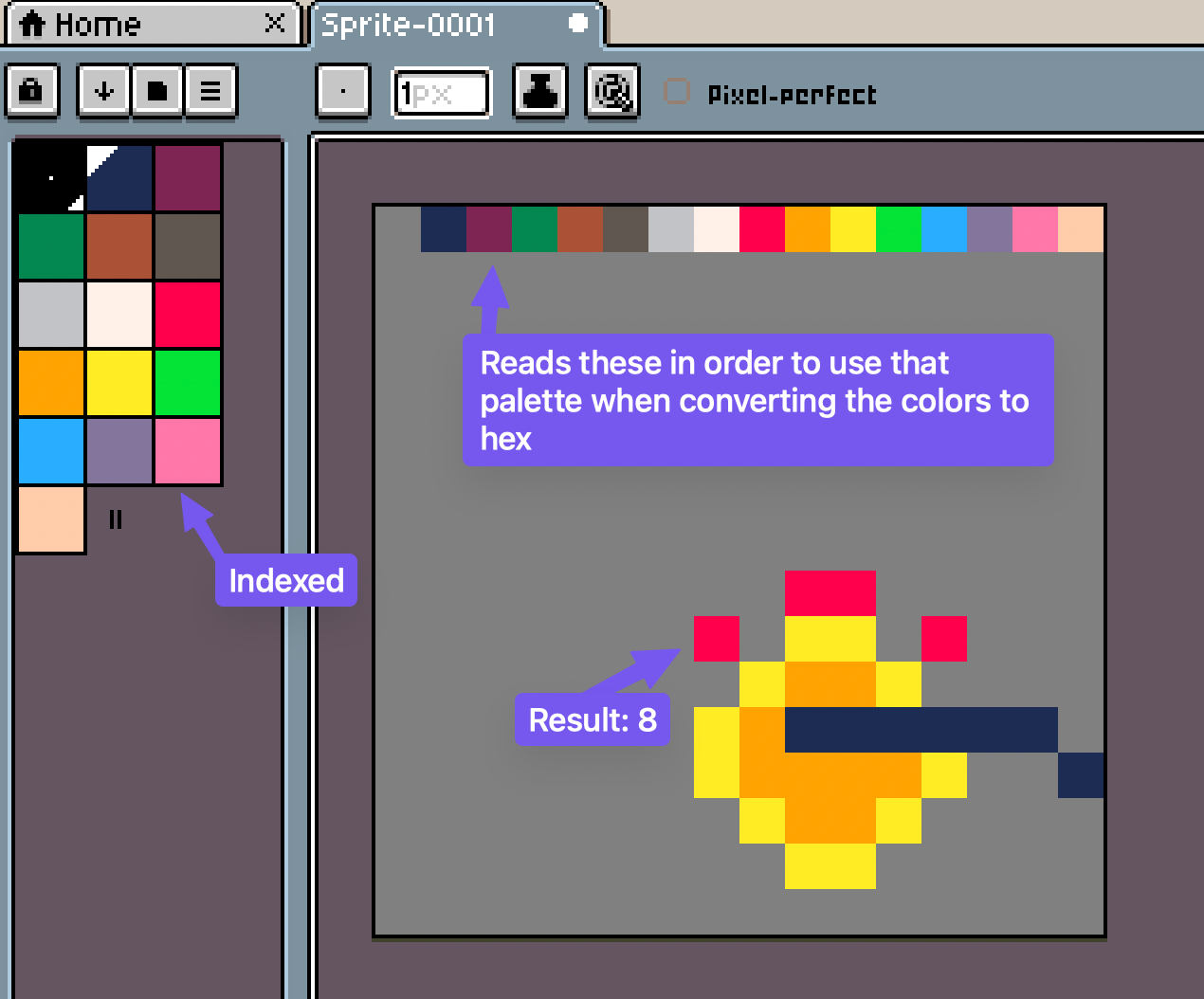
For the palette stuff I can now copy/paste the array of colors (it’s in the pxt.json file), i have stories about that whole thing too… and mostly the reason I use VSCode for things like that. It also allows you to just put the colors as the top left pixels as well if you want to add that to your image, pretty handy and easy ask for artists “just put the 16 colors you are using in which order you have them indexed”
Heavy inspiration came from Richards work especially around the spritesheet stuff.
Right now I’m moving a bit quick on all of these things, testing would be great. I’ve been bit by slop-prs and have spent way too much time trying to sift through that so unfortunately I’m not going to open the repo for PRs.
The future of software development is “have the bots build it custom for you” which is both sad but also exciting. Almost all of this is built from an IDE that I built using bots (bots building tools for bots to build stuff… scary stuff).
2 Likes
And on that note I’d actually invite you to be a collaborator on the repo if you want. Be aware there may be demons 
I also have a ton of stuff for my classes as well, it’s locked behind a key right now that I embed onto the machines I have setup in the class. (Mostly to prevent a bot from showing up and slamming endpoints and Gemini tokens).
Toss me your github username and I’ll get you in as a collaborator on the app.
should be the same NeverStopTheCoder what should you like me to start with